- Electric and Telecom Plans Free
- Fire and Emergency Plans Free
- Floor Plans Free
- Plant Layout Plans Free
- School and Training Plans Free
- Seating Plans Free
- Security and Access Plans Free
- Site Plans Free
- Sport Field Plans Free
- Business Process Diagrams Free
- Business Process Mapping Free
- Classic Business Process Modeling Free
- Cross-Functional Flowcharts Free
- Event-driven Process Chain Diagrams Free
- IDEF Business Process Diagrams Free
- Logistics Flow Charts Free
- Workflow Diagrams Free
- ConceptDraw Dashboard for Facebook Free
- Mind Map Exchange Free
- MindTweet Free
- Note Exchange Free
- Project Exchange Free
- Social Media Response Free
- Active Directory Diagrams Free
- AWS Architecture Diagrams Free
- Azure Architecture Free
- Cisco Network Diagrams Free
- Cisco Networking Free
- Cloud Computing Diagrams Free
- Computer Network Diagrams Free
- Google Cloud Platform Free
- Interactive Voice Response Diagrams Free
- Network Layout Floor Plans Free
- Network Security Diagrams Free
- Rack Diagrams Free
- Telecommunication Network Diagrams Free
- Vehicular Networking Free
- Wireless Networks Free
- Comparison Dashboard Free
- Composition Dashboard Free
- Correlation Dashboard Free
- Frequency Distribution Dashboard Free
- Meter Dashboard Free
- Spatial Dashboard Free
- Status Dashboard Free
- Time Series Dashboard Free
- Basic Circle-Spoke Diagrams Free
- Basic Circular Arrows Diagrams Free
- Basic Venn Diagrams Free
- Block Diagrams Free
- Concept Maps Free
- Family Tree Free
- Flowcharts Free
- Basic Area Charts Free
- Basic Bar Graphs Free
- Basic Divided Bar Diagrams Free
- Basic Histograms Free
- Basic Line Graphs Free
- Basic Picture Graphs Free
- Basic Pie Charts Free
- Basic Scatter Diagrams Free
- Aerospace and Transport Free
- Artwork Free
- Audio, Video, Media Free
- Business and Finance Free
- Computers and Communications Free
- Holiday Free
- Manufacturing and Maintenance Free
- Nature Free
- People Free
- Presentation Clipart Free
- Safety and Security Free
- Analog Electronics Free
- Audio and Video Connectors Free
- Basic Circuit Diagrams Free
- Chemical and Process Engineering Free
- Digital Electronics Free
- Electrical Engineering Free
- Electron Tube Circuits Free
- Electronic Block Diagrams Free
- Fault Tree Analysis Diagrams Free
- GHS Hazard Pictograms Free
- Home Automation and Wiring Free
- Mechanical Engineering Free
- One-line Diagrams Free
- Power Сircuits Free
- Specification and Description Language (SDL) Free
- Telecom and AV Circuits Free
- Transport Hazard Pictograms Free
- Data-driven Infographics Free
- Pictorial Infographics Free
- Spatial Infographics Free
- Typography Infographics Free
- Calendars Free
- Decision Making Free
- Enterprise Architecture Diagrams Free
- Fishbone Diagrams Free
- Organizational Charts Free
- Plan-Do-Check-Act (PDCA) Free
- Seven Management and Planning Tools Free
- SWOT and TOWS Matrix Diagrams Free
- Timeline Diagrams Free
- Australia Map Free
- Continent Maps Free
- Directional Maps Free
- Germany Map Free
- Metro Map Free
- UK Map Free
- USA Maps Free
- Customer Journey Mapping Free
- Marketing Diagrams Free
- Matrices Free
- Pyramid Diagrams Free
- Sales Dashboard Free
- Sales Flowcharts Free
- Target and Circular Diagrams Free
- Cash Flow Reports Free
- Current Activities Reports Free
- Custom Excel Report Free
- Knowledge Reports Free
- MINDMAP Reports Free
- Overview Reports Free
- PM Agile Free
- PM Dashboards Free
- PM Docs Free
- PM Easy Free
- PM Meetings Free
- PM Planning Free
- PM Presentations Free
- PM Response Free
- Resource Usage Reports Free
- Visual Reports Free
- House of Quality Free
- Quality Mind Map Free
- Total Quality Management TQM Diagrams Free
- Value Stream Mapping Free
- Astronomy Free
- Biology Free
- Chemistry Free
- Language Learning Free
- Mathematics Free
- Physics Free
- Piano Sheet Music Free
- Android User Interface Free
- Class Hierarchy Tree Free
- Data Flow Diagrams (DFD) Free
- DOM Tree Free
- Entity-Relationship Diagram (ERD) Free
- EXPRESS-G data Modeling Diagram Free
- IDEF0 Diagrams Free
- iPhone User Interface Free
- Jackson Structured Programming (JSP) Diagrams Free
- macOS User Interface Free
- Object-Role Modeling (ORM) Diagrams Free
- Rapid UML Free
- SYSML Free
- Website Wireframe Free
- Windows 10 User Interface Free

Remote Presentation for Skype
This solution extends ConceptDraw MINDMAP software with the ability to collaborate via Skype*.
It lets you present remotely to participants of your Skype conference call.
It works great with other ConceptDraw Solution Park solutions such as Word Exchange, Presentation Exchange, and Mind Map Exchange.
* Remote Presentation for Skype is not supported in newer versions of Skype. The API used to communicate between users of ConceptDraw MINDMAP has been discontinued by Skype. For current list of products and versions of those products required for the proper operation of this solution please view “Compatibility”.
-
Install this solution Free -
What I need to get started -
Solution Requirements - This solution requires the following products to be installed:
ConceptDraw MINDMAP v16 - This solution requires the following products to be installed:
-
Compatibility - Sonoma (14), Sonoma (15)
MS Windows 10, 11 - Sonoma (14), Sonoma (15)
-
Support for this Solution -
Helpdesk
Feedback
"I had a chance to try it out today with Olin Reams, Sales & Marketing Director at CS Odessa and it worked like a charm. Once Olin started the session I was able to view the ConceptDraw MINDMAP and listen to him over Skype. The process was very straight forward and the solution adds considerable value to teams that need to present information and ideas. Once the session was over, I had the shared map on my local computer complete with all the embedded files."
Brian S. Friedlander, Ph.D
Assistive Technology
Examples
All the Remote Presentation for Skype samples shown here are ConceptDraw MINDMAP documents, which will help when getting started with the Remote Presentation for Skype solution. They are accessible by using the Input tab in ConceptDraw MINDMAP
Example 1: Getting Started with Remote Presentation for Skype
This mind map was created in ConceptDraw MINDMAP An experienced user can build a map similar to the sample provided in 30 minutes or less.
Here are the steps you need to follow to show or view a presentation, when using the Remote Presentation for Skype solution for ConceptDraw MINDMAP

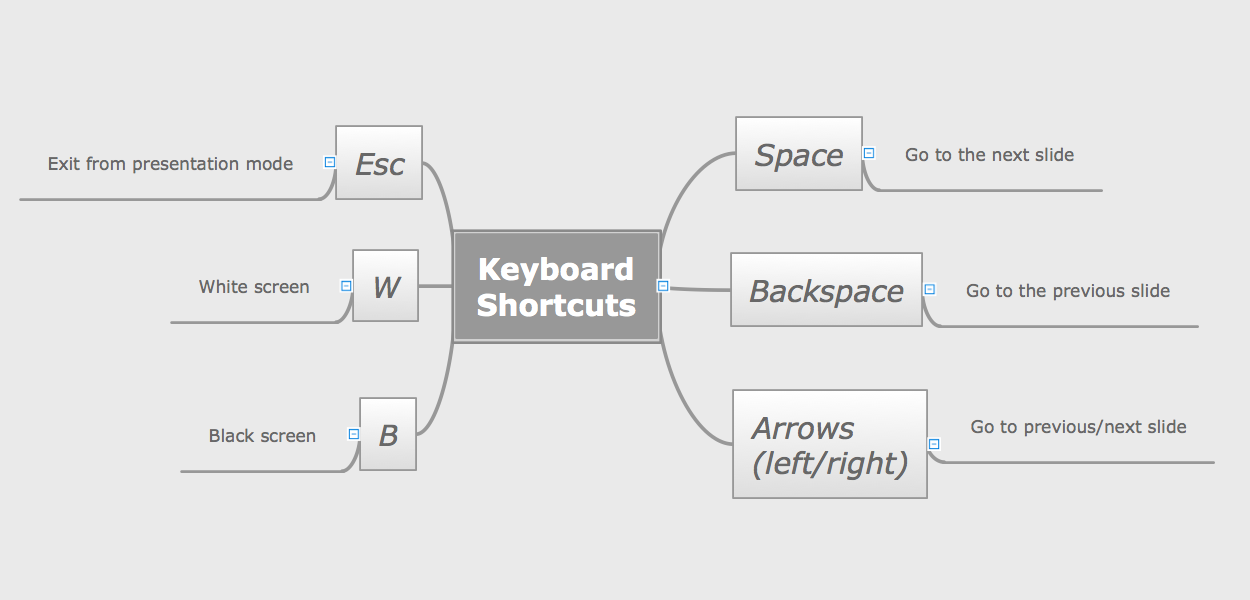
Example 2: Keyboard Shortcuts for Presentations in ConceptDraw MINDMAP
This mind map was created in ConceptDraw MINDMAP An experienced user spent less than 5 minutes creating this sample.
This mind map illustrates keyboard shortcuts that help you easily manage your presentation in ConceptDraw MINDMAP
What I Need to Get Started
ConceptDraw MINDMAP (or later), the “Remote Presentation for Skype” solution (found in the Collaboration Area of ConceptDraw Solution Park) and a Skype account are all you need to get started. Make sure they are installed on the computer you are going to use for you presentation/briefing.
How to install
Download and install ConceptDraw STORE and ConceptDraw MINDMAP (or later). Next, install the “Remote Presentation for Skype” solution using ConceptDraw STORE.
If you don't have Skype installed on your computer visit skype.com. There you can find download and install instructions for Skype.
Start Using
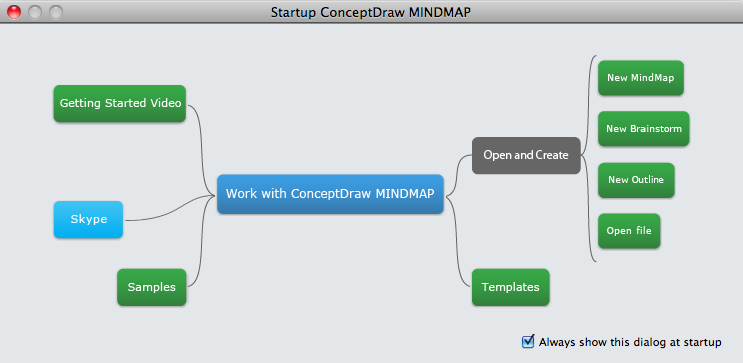
To start using Remote Presentation for Skype just run ConceptDraw MINDMAP and press the Skype button on Startup Dialog or on the Home tab.
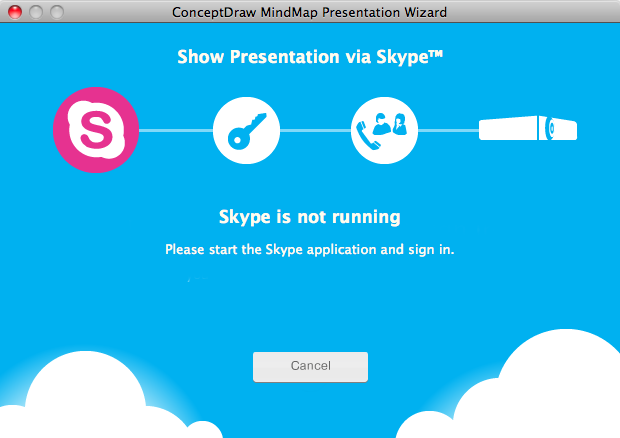
Then follow the Wizard's instructions. ConceptDraw MINDMAP Presentation Wizard informs you on status and gives detailed instructions any steps that are required.
Using Skype to better facilitate meetings, presentations and briefings
We here at CS Odessa, as well as many of our ConceptDraw users, rely on Skype heavily in our business. Skype recently reported they had 40 million users online at the same time – that’s almost 5 times the population of London! Skype is the video web conferencing service of choice for many businesses. An estimated one out of three Skype account holders uses it for business related matters. That works out to 14 million people using Skype to conduct business during peak usage times.
Skype makes it is easy to voice call, video chat, send SMS and instant messages, receive voicemails, and share files with anyone, anywhere, instantly and at low to no cost. Skype makes it easy to work with colleagues around the globe simultaneously. This is certainly good for business, but it also poses a challenge: how do you keep all those different people, all those different thinking styles, on the same page?
The answer is simple: ConceptDraw MINDMAP and the new “Remote Presentation for Skype” Solution. Mind mapping is a proven method for capturing and presenting ideas that directly increases productivity, and there’s no better software for it than ConceptDraw MINDMAP Now, thanks to the “Remote Presentation for Skype” Solution, ConceptDraw MINDMAP users can present and view live via Skype, allowing coworkers in other cities, countries, even continents to view their documents while hearing each other’s’ voices. Leveraging ConceptDraw MINDMAP ’s intuitive presentation capabilities over Skype’s instantaneous communication network opens up a whole new dimension of global collaboration. The possibilities are limited only by your imagination.
The Remote Presentation for Skype solution allows for presentations created in ConceptDraw MINDMAP to be shown over Skype. This presents the perfect combination of your visual mind map and your voice explaining it. You can vary the order of the presentation and be flexible in explaining topics, offering advice, and answering questions. Presentations are interactive, with notes and task information available via dynamic icons during the presentation. Each participant ends up with a copy of the presentation and supporting material, making information dissemination an easy task. This is indispensable for consultants, trainers, and other knowledge workers who need to provide remote presentations worldwide. You can present to up to 25 audio users simultaneously with Skype’s free version (January 13, 2011).
Best of all, the ConceptDraw Remote Presentation for Skype solution doesn’t bog down your connection speed. Once your presentation is transmitted, you don’t use any more bandwidth than a normal Skype call. If the connection is lost, your audience can continue watching the presentation even if they can’t hear your voice.