Software Diagrams
Development of Software with ConceptDraw DIAGRAM
ConceptDraw is a tool for technical and business graphics. It provides specialists who create graphic documentation with a possibility to focus not on the process of drawing itself but on the essence of the task. For this ConceptDraw features a huge number of ready-to-use objects (4590 for the moment of writing the article), smart connectors, layers, hyperlinks and many other possibilities.
Design and document development of projects using a wide range of pre-drawn shapes and smart connectors. Develop visualization solutions with the help of the built-in scripting language.
ConceptDraw DIAGRAM is a perfect tool for:
- Designing and planning tasks such as:
- Jacobson Use Cases Diagram
- SSADMN Diagram
- Yourdon and Coad Diagram
- Command OLE Diagram
- Block Diagrams
- Data Modeling Diagram
- SysML Diagram
- Chen RED Diagram
- Martin RED Diagram
- IDEF0 Diagram
- Booch OOD Diagram
- Gane Sarson Diagram
- Memory Object Diagram
- Data Flow Diagram
- FlowCharts
- Graphic User Interface (GUI)
- UML Diagram
- Program Structure Diagrams
- ORM Diagram
Modern development of program software leads to a large amount of graphic documentation: diagrams describing the work of applications in various cuts and notations, GUI design, documentation on project management. Each of these fields is represented by topical libraries and templates.
To ConceptDraw DIAGRAM new possibilities have been added, thanks to which the program became a sequence higher useful for developers. The most considerable innovations are:
- a set of wizards for automation of widespread tasks built-in scripting language, which helps to automate tasks specific for your
- particular situation.
Let us consider typical applications.
Object-oriented design
Over the recent years object-oriented methodology has become more and more widespread. Thanks to this methodology developers manage to deal with growing complexity of applications. More and more programs are written in such programming languages as C++, Java, Visual Basic and Object Pascal. However, the complexity of the designed systems imposes extended requirements as to design of graphic documentation. ConceptDraw possesses powerful tools for designing of technical documentation for object-oriented projects. The libraries included in the package allow to easily draw class hierarchies, object hierarchies and diagrams of data flows with the use of the most popular notations, including UML and Booch notations. And the library for projecting COM-interfaces will spare developers of ActiveX-servers a headache.
Flowcharts of algorithms and business-processes
Flowcharting is a conventional way of recording algorithms in a graphic form. ConceptDraw is an ideal means for their creation. Easiness of flowcharting in ConceptDraw is really impressive. This functionality is useful for students and teachers of informatics.
At development of real application flowcharts are widely used for clearing processes on which business-logics of the application will be based.
Prototyping Graphical User Interface (GUI)
ConceptDraw allows to more tightly draw art designers, managers and users to the process of GUI design. Now libraries of controls for Windows XP, MacOS and MacOS X are available to all of them and they can share their vision of Windows, menu and web-forms on various platforms with developers.
Project management
For a large-scale project to be completed successfully it should be thoroughly projected. One of the generally recognized and visual tools for projecting and tracking timeliness of the work on a project is a Gantt chart. ConceptDraw offers the wizard for automatic creation of Gantt chart.
The other side of the question of project management is the dynamism of changes. Changes in a project and its documentation are made daily. All updates should be done in time and be available to each developer. ConceptDraw offers many methods of solving this question:
- Cross platform compatibility. ConceptDraw is released in two versions: for PC and for Mac. Its files can be easily read by the both versions. It means you can exchange documents with your colleagues and partners working on different platforms.
- Export to HTML provides the possibility of getting a set of ready web-pages based on a ConceptDraw file, which can be displayed in intranet or Internet for all who care.
- Export to PDF and graphic formats are designed, first of all, for sending information via e-mail.
Automation of management and development process
ConceptDraw DIAGRAM supports XML. XML for ConceptDraw has been created and, at the same time, support for import XML for Visio. All this allows to develop solutions for automation of various aspects of software development.
For instance:
- generation of UML diagrams etc. on the ready initial code
- generation of the initial code
- generation of resources for Windows and MacOS, web-forms
- and a lot more
Visualization of data
ConceptDraw is a good means for visualization of information of any kind. The program features powerful graphic possibilities. Thus, on the ready graphic kernel ConceptDraw the rest products of the line have been developed: ConceptDraw PROJECT, ConceptDraw MINDMAP This powerful graphic kernel (2D-graphics) is supported by a number of open formats (including XML). To this add the flexibility of data processing, connected with the scripting language ConceptDraw Basic (included in version V), and also the flexibility in parameterization of objects, which is provided by the whole table of the object parameters (which is available for editing even from the program's interface). So in the end it becomes clear that visualizing of information in ConceptDraw is a good idea.
So, the typical task for ConceptDraw Basic is to automate the visualization of some data. This data can be obtained as the result of work of an arbitrary application (including ConceptDraw-script) and saved in a text file, ODBC-compatible database or in one of the open formats supported by ConceptDraw. In the first two cases, data will further be read and visualized with the help of ConceptDraw Basic. In case of using a ConceptDraw open format (XML for ConceptDraw or XML for Visio) the obtained document can be simply opened in ConceptDraw, you can then add some details of design and get a presentable diagram. Possibilities of ConceptDraw Basic considerably increase at using in script the functions exported by the shared libraries.
The conclusion is: ConceptDraw is a platform worth considering for writing solutions, connected with data visualization.
Work with databases
Special attention has been given to work with databases. There are libraries for designing databases in various notations: ORM, Chen ERD and Martin ERD, Express-G and relational diagrams. Starting from version V, ConceptDraw supports ODBC-compatible databases. Interaction with them is possible with the help of the scripting language ConceptDraw Basic. Besides, in ConceptDraw Professional package there is Database Model Diagram wizard (it can be found among the templates of the section ERD & Database). It builds a model of an arbitrary presented by the user in the form of DSN database.
Having applied all said above about possibilities of ConceptDraw in fields of projection, automation and visualization of data, we can conclude, that the program is well designed for solving the following tasks:
- design of databases
- ORM-diagrams
- ER-diagrams
- relational diagrams
- reengineering of databases
- visual displaying of data in the form of charts and diagrams

Example 1. Data Flow Diagram
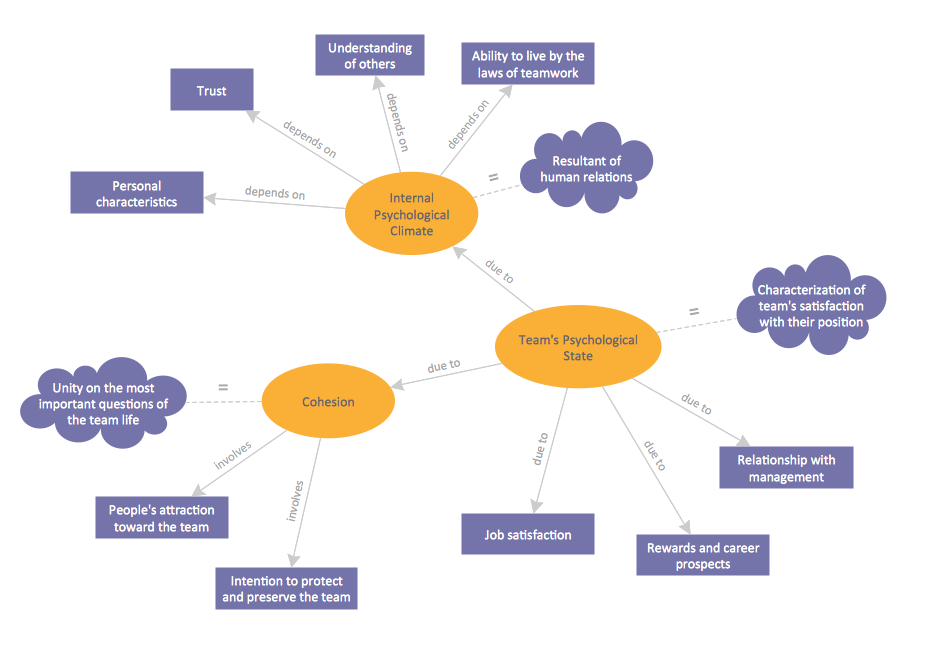
TEN RELATED HOW TO's:Interior design is an art of planning and coordinating the space in a building or on a floor to produce a charming and convenient environment for the client. You can ask professionals for help, or you can create floor plans easily with ConceptDraw DIAGRAM , using diverse libraries or altering numerous templates. You don’t need no formal training anymore to be a designer, isn’t it great? Using a ConceptDraw DIAGRAM floor plan software makes depicting of home or office layout ideas a simple task. It does not require special skills to make detailed and scaled floor plans. Adding furniture to design interior is also a breeze. You can draw and furnish your floor plans with a floor plan software. Moreover, using software for floor planning you gain an opportunity to share your plans and high-resolution images of your designs with clients or stakeholders. Picture:Create Floor Plans Easilywith ConceptDraw DIAGRAM Floor Design SoftwareRelated Solution:A concept map is a way of representing relationships between ideas, images, or words. How to draw a Concept Map quick, easy and effective? ConceptDraw DIAGRAM offers the unique Concept Maps Solution from the Diagrams Area that will help you!
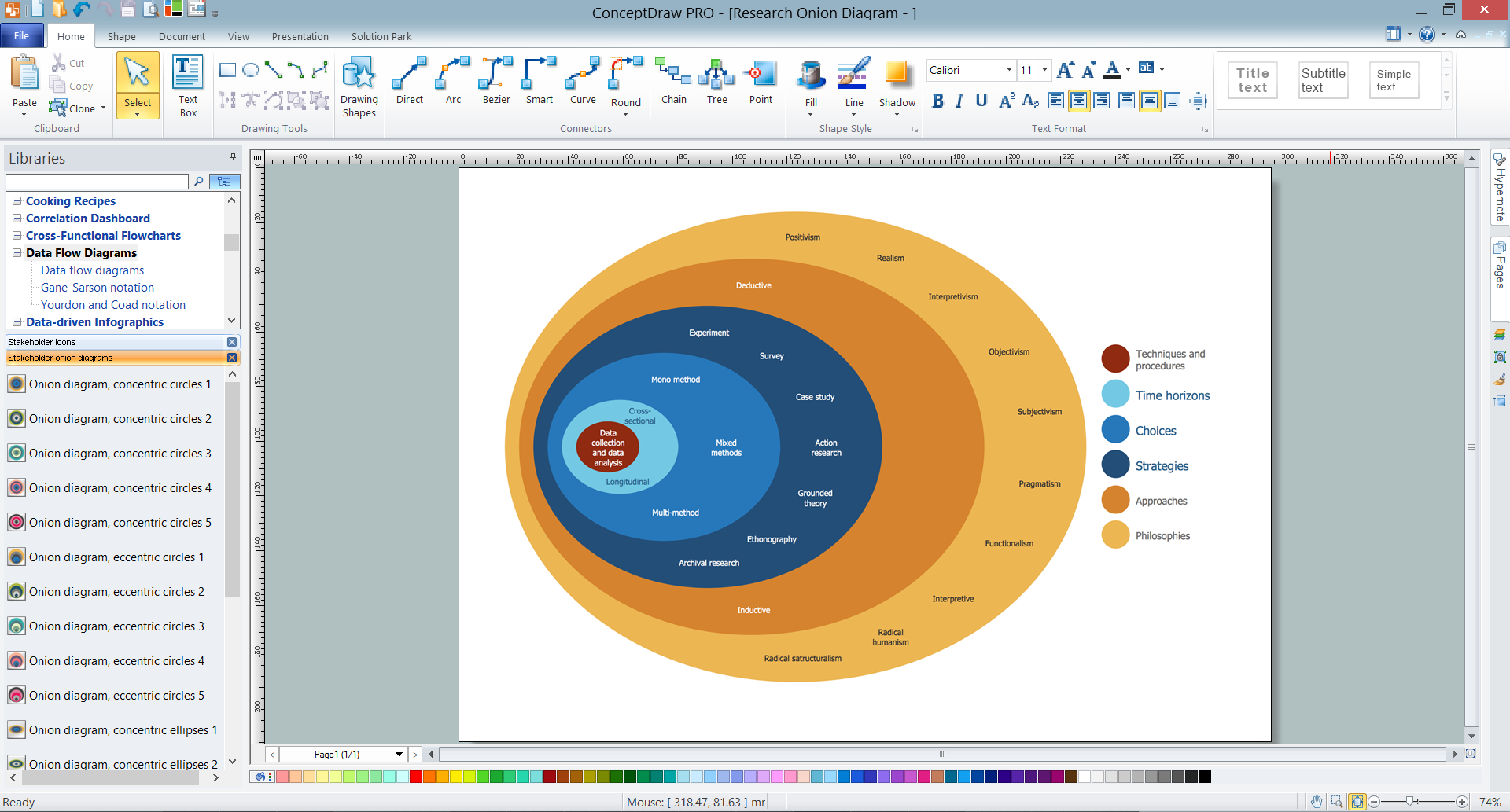
 Picture: Concept MapRelated Solution:The onion diagram is a type of diagram which shows the dependencies among parts of an organization or process. The items are displayed at the concentric circles, where the items at the bigger rings depend on the items at the smaller rings. ConceptDraw DIAGRAM diagramming and vector drawing software extended with Stakeholder Onion Diagrams Solution from the Management Area of ConceptDraw Solution Park is a professional Onion Diagram Maker.
 Picture: Onion Diagram MakerRelated Solution:Data modeling is actively applied in analysis and uses wide set of methods for description the data requirements in a system. One of the most popular and well-known is the ERD method of database modeling. The best ERD tool for the Mac and Windows is ConceptDraw DIAGRAM software extended with the Entity-Relationship Diagram (ERD) solution from the Software Development Area for ConceptDraw Solution Park, which is sharpened for professional ERD drawing and data modeling with Entity Relationship Diagram.
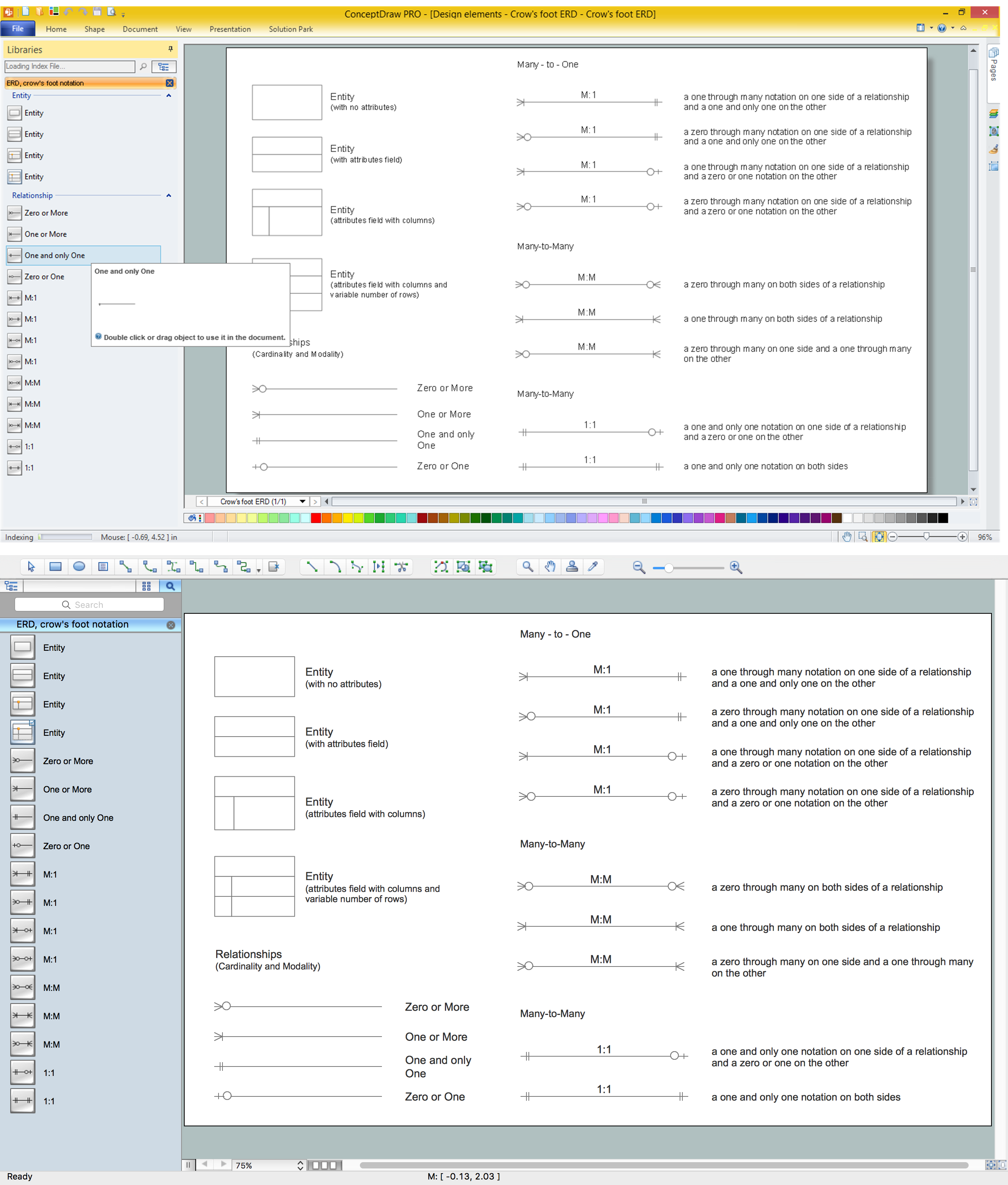
 Picture: Data Modeling with Entity Relationship DiagramRelated Solution:The first thing that usually comes to mind when talking about database models is ER-diagrams, and the ways to create them. The second most recognizable notation is the Crow’s Foot, which visually differs from Chen’s notation. Actually, it doesn’t matter which notation you’ll use for your entity relationship diagram (ERD), but the content is what matters. When designing an Entity-Relationship Diagram one need to use a certain notated symbols that were developed and standardized especially for databases description. First of them - the Chen’s notation had a linguistic origin. It includes rectangle boxes to show entities that may be described as nouns, and the relationships between them described as verbs depicted in a form of diamond. Finally the Chen’s notation was simplified up to the Crow’s Foot notation. It represents a relationship as labeled line. It is precisely this notation is shown in the given figure. ConceptDraw DIAGRAM together with its Entity-Relationship Diagram (ERD) solution is designed to support professionals who deals with creating ER diagrams using the element of both - Chen’s and Crow's Foot notations.
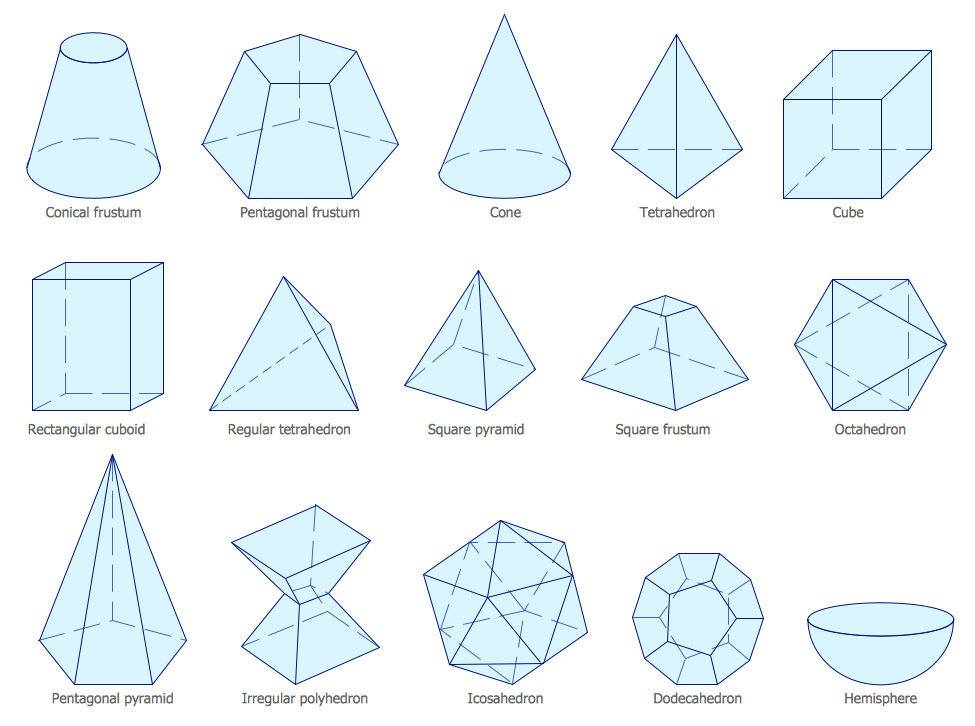
 Picture: Design Element: Crows Foot for Entity Relationship Diagram - ERDRelated Solution:ConceptDraw DIAGRAM extended with Mathematics solution from the Science and Education area is a powerful diagramming and vector drawing software that offers all needed tools for mathematical diagrams designing. Mathematics solution provides 3 libraries with predesigned vector mathematics symbols and figures: Solid Geometry Library, Plane Geometry Library and Trigonometric Functions Library.
 Picture: Mathematics SymbolsRelated Solution:ConceptDraw DIAGRAM is a powerful diagramming and vector drawing GUI software. Extended with Mac OS User Interface solution from the Software Development area, ConceptDraw DIAGRAM is the best software for designing professional looking user interfaces for new OS X 10.10 Yosemite operating system developed for Macintosh computers. Mac OS User Interface solution offers you large quantity of Mac OS templates, samples and user interface design examples.
 Picture: Mac OS User Interface Design ExamplesRelated Solution:How to draw pictorial chart quick, easy and effective? ConceptDraw DIAGRAM offers the unique Pictorial Infographics Solution that will help you! Pictorial Infographics solution contains large number of libraries with variety of predesigned vector pictograms that allows you design infographics in minutes. There are available 10 libraries with 197 vector pictograms.
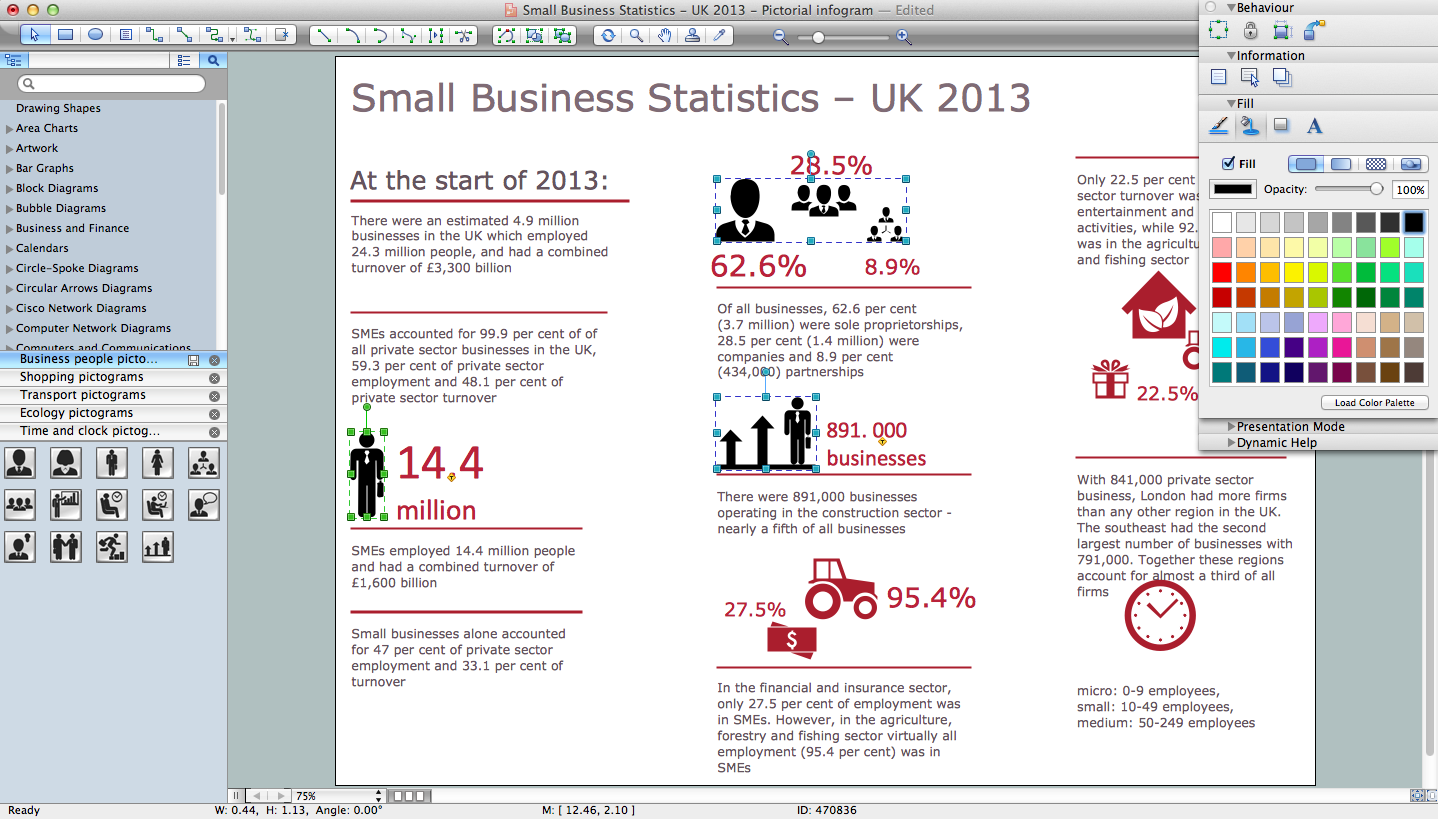 Picture: How to Draw Pictorial Chart. How to Use InfogramsRelated Solution:UML Interaction Overview Diagram schematically shows a control flow with nodes and a sequence of activities that can contain interaction or sequence diagrams.
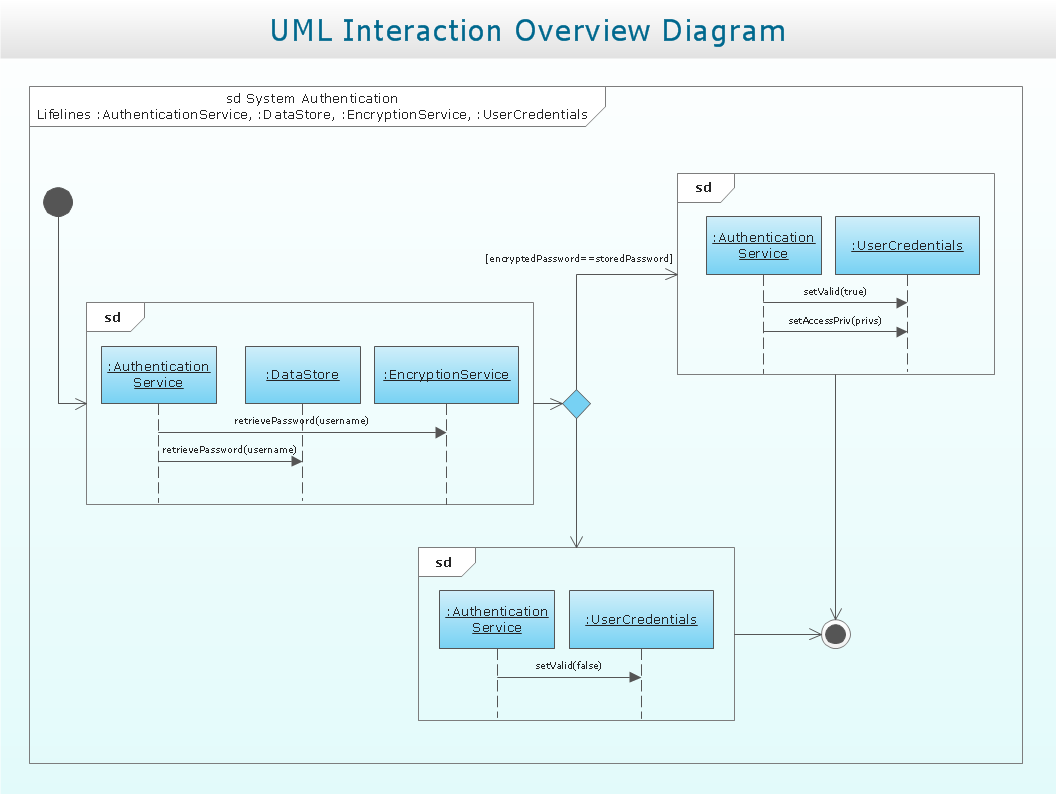 Picture: Interaction Overview DiagramDatabase design is an important part of any project, as databases become more and more complex nowadays. To make the model more representative, entity relationship diagrams are widely used in software engineering area. These diagrams show sets of entities as rectangles connected via lines labeled with their cardinalities. This an example of the ER-diagram developed to store information regarding some online role-playing game. It includes three main elements of ER diagram: entities, relationships and attributes. The entities, attributes and relationships on this ER-diagram is depicted according to the Chen's notation. Chen's notation for Entity Relationship diagrams admits using of rectangles to depict entities, ovals for attributes and ,at least, diamonds to show relationships. ConceptDraw Entity-Relationship Diagrams solution was applied as ERD software to create this diagram.
 Picture: ConceptDraw DIAGRAM ER Diagram ToolRelated Solution:ConceptDrawDIAGRAM 18