This site uses cookies. By continuing to browse the ConceptDraw site you are agreeing to our Use of Site Cookies.

Basic of Flowchart: Meaning and Symbols


Flowcharts are the best for visually representation the business processes and the flow of a custom-order process through various departments within an organization. ConceptDraw DIAGRAM diagramming and vector drawing software extended with Flowcharts solution offers the full set of predesigned basic flowchart symbols which are gathered at two libraries: Flowchart and Flowcharts Rapid Draw. Among them are: process, terminator, decision, data, document, display, manual loop, and many other specific symbols. The meaning for each symbol offered by ConceptDraw gives the presentation about their proposed use in professional Flowcharts for business and technical processes, software algorithms, well-developed structures of web sites, Workflow diagrams, Process flow diagram and correlation in developing on-line instructional projects or business process system. Use of ready flow chart symbols in diagrams is incredibly useful — you need simply drag desired from the libraries to your document and arrange them in required order. There are a few serious alternatives to Visio for Mac, one of them is ConceptDraw DIAGRAM. It is one of the main contender with the most similar features and capabilities.
How to Build a Flowchart
HelpDesk

How to Create Flowchart Using Standard Flowchart Symbols
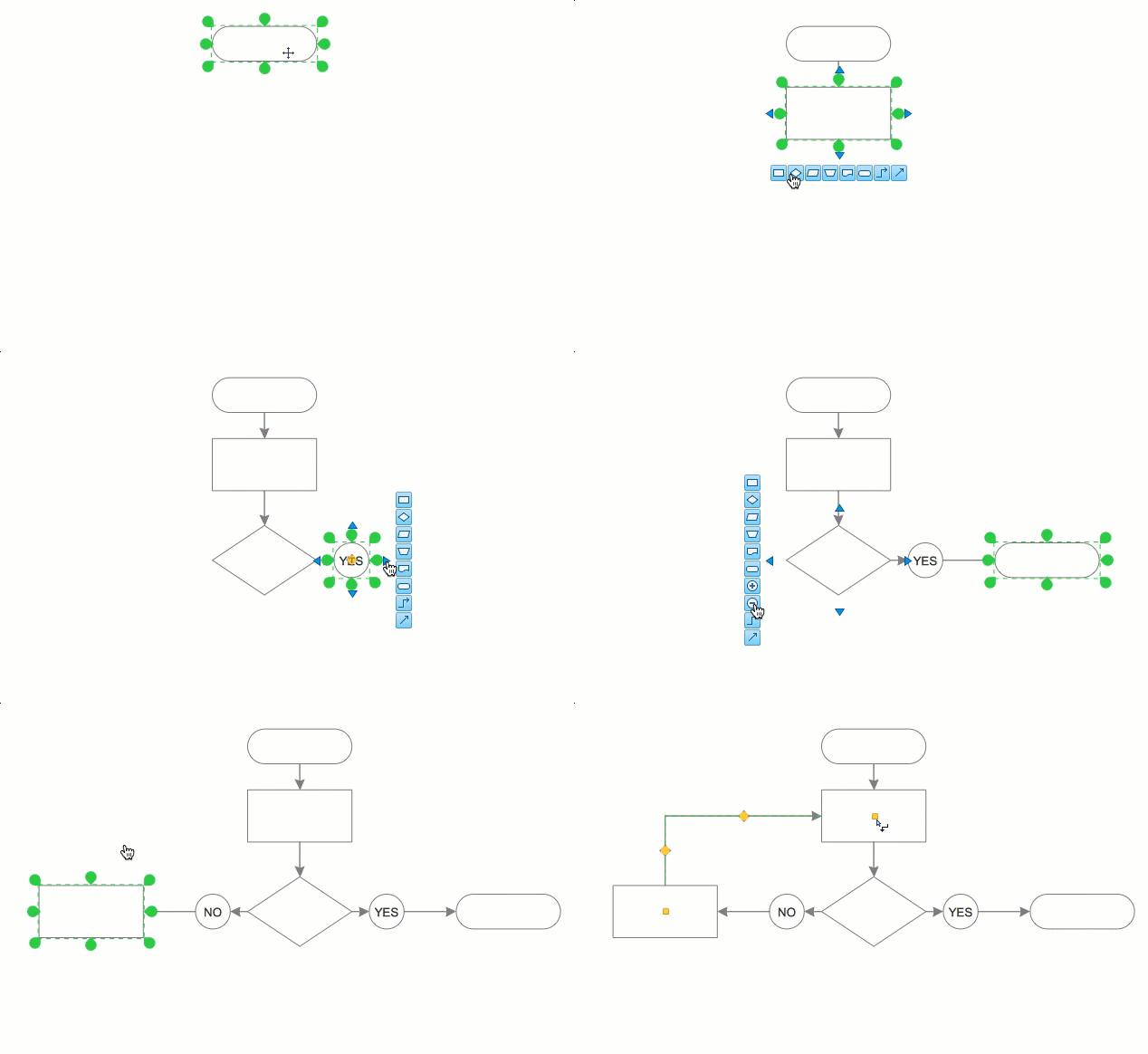
Flowcharts are used to display an algorithm for consistent execution of certain steps. Flowchart is probably the easiest way to make a graphical representation of any process. Flowcharts use the set of standard geometric symbols and arrows to define relationships. ConceptDraw DIAGRAM allows you to create professional flowchart quickly and easily. The ability to create flowcharts is contained in the Flowcharts solution. The solution provides a set of special tools for creating flowcharts.

Accounting Flowchart Symbols

Accounting is a well known and popular tool used for gaining full quantitative information about the finances. The accounting process includes extensive set of activities that begins with transactions and ends with closing of books. It contains all financial information for a given organization, the data about incomes, expenditures, purchases, sales, return, payroll, and many other numerical information. The excellent possibility to create great-looking Accounting Flowcharts is offered by professional ConceptDraw DIAGRAM diagramming and vector drawing software. It includes the Accounting Flowcharts solution containing wide variety of predesigned accounting flowchart symbols. All symbols are easy recognizable, commonly used, vector and professionally designed, so are capable effectively save your time and efforts when representing all stages of accounting work process, the flow of data in an organization, accounting procedures and processes, documents, tasks, responsible people, users, components and authorizations.

Flow Chart Symbols

The Flowcharts are incredibly useful and popular tool used in science, business, software development, analytics, engineering, marketing, manufacturing, administration, architecture, government, politics, and many other fields thanks to a variety of existing types of flowcharts. A Flowchart is a visual graphical representation of the process, algorithm, or the set of steps taken for problem's solution. Widely used for designing, visualizing and documenting simple and complex processes and programs, they effectively help to understand the process and to find easier the flaws if they are. Each flowchart type supposes the use of its own set of notations for drawing corresponding diagram, which includes the symbols of process, decision, data, document, data base, termination, initiation processes, processing loops, conditions, etc. It is easily design a Flowchart using the special professional flowchart maker - ConceptDraw DIAGRAM diagram software with numerous predesigned flow chart symbols grouped in libraries of Flowcharts solution from ConceptDraw Solution Park.

Types of Flowchart — Overview

When designing a process or an instruction in clear and understandable way, you should consider creating a flowchart. You can avoid spending a lot of time understanding complex concepts as they get clear with different diagrams. The flowcharts are very popular diagram type, they are useful at different fields from the description business processes to the presentation of cooking recipes. Basic Flowchart, Business Process Modeling Diagram, Process Flowchart, Cross Functional Flowchart, Procedure Flowchart, Data Flow Diagram, IDEF Flowchart, SDL Diagram, Workflow Diagram, Document Flowchart, Program Flowchart, Value Stream Map, System Flowchart, Highlight Flowchart, Sales Flowchart are the main types flowchart. The ConceptDraw DIAGRAM is one of the professional applications which has great advantages and using which you can create different types of Flowcharts easy and fast. Try to draw an illustrative and comprehensible diagram in ConceptDraw DIAGRAM describing the processes instead of writing complex long text and make sure how it is convenient. Visio is expensive, and if you use it in a team environment, these costs are compounded. ConceptDraw DIAGRAM is an affordable alternative to Visio and luckily, it comes with a team plan. ConceptDraw DIAGRAM can import and export Visio files, so Mac users can collaborate with PC users stuck on Microsoft's software.
How to Simplify Flow Charting

Organizational Chart

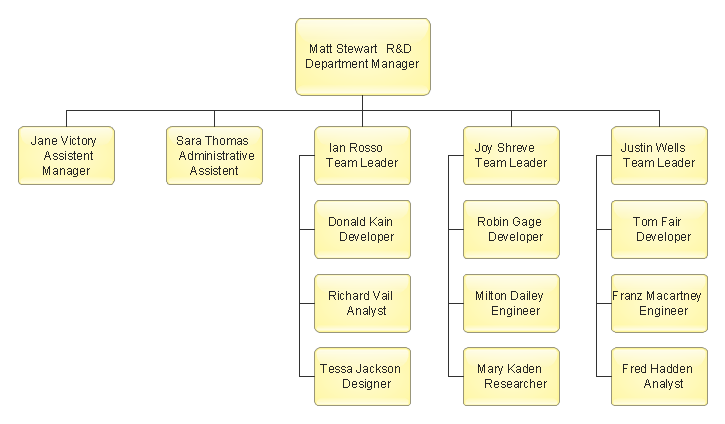
Organizational Chart is useful and perspective tool, which helps to illustrate the structure of an organization and relationships between personnel or departments. It is simple, but at the same time capacious graphical representation. ConceptDraw MINDMAP software is powerful in questions of brainstorming, designing Mind Maps and Organizational Charts, making professional presentations, building effective strategies, preparing documents and conducting meetings. ConceptDraw Office applications allow create Organizational Chart from your map in one click. Use numerous advantages of hierarchical tree structure of Mind Map when developing the organizational structure of your organization. Pay also attention on helpful Business Productivity solutions supported by ConceptDraw Solution Park, which assist managers and knowledge workers in making their jobs easier and save their time. The flexibility of ConceptDraw Office and the use of content that has already been developed and offered by ConceptDraw Solution Park as well as ability to repurpose it according to your requirements, help you effectively respond to any eventuality.

Accounting Information Systems Flowchart Symbols
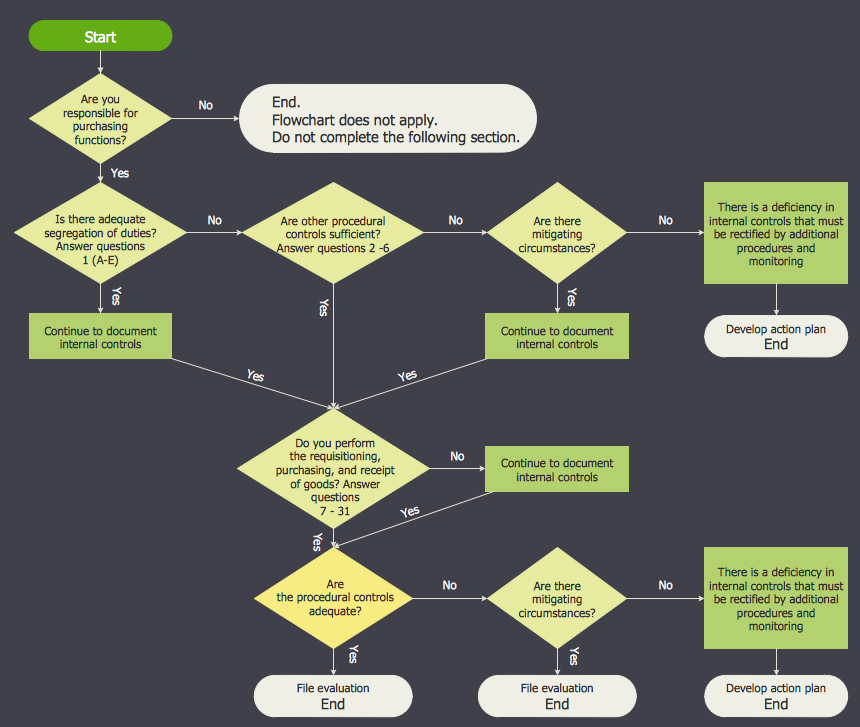
The excellent possibility to create professional-looking Accounting Flowcharts is offered by powerful ConceptDraw DIAGRAM software and its Accounting Flowcharts solution. This solution contains wide variety of predesigned accounting flowchart symbols commonly used when representing the flow of data, documents, tasks and people responsible for performance each stage of accounting work process.

Process Flowchart Symbols

The Process Flowchart or Process Flowchart Diagram (PFD) is a visual representation relations between major parts of the system, the steps in a process, and even connections between various systems. The possibility to easy create professional-looking and attractive Process Flowcharts, Business Process Diagrams and Maps which visualize the steps of complex processes is provided by Business Process Diagram Solution from the Business Processes Area of ConceptDraw Solution Park and 16 libraries with 230 process flowchart symbols from BPMN 1.2 and BPMN 2.0.

Social Media Flowchart Symbols

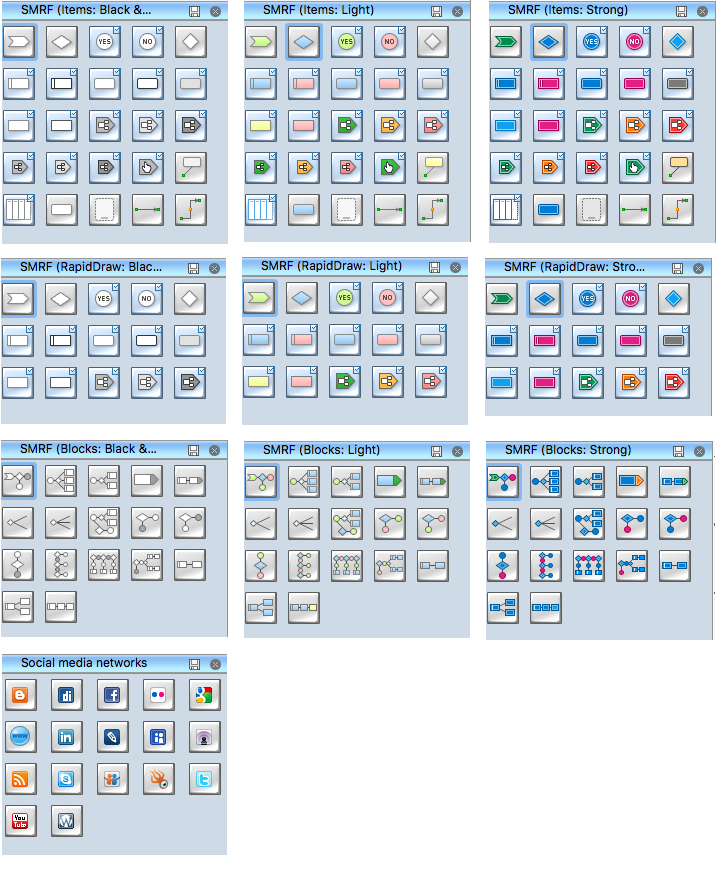
Social media is a popular view of mass communication which allows people, companies and organizations create, share, discover, modify, access, comment, discuss and exchange information through the Internet. Social Media Response solution for ConceptDraw DIAGRAM provides collection of 10 libraries with diversity of predesigned vector social media flowchart symbols for fast and easy creating interactive Social Media Flowcharts, Response Charts and Action Mind Maps.

SDL Flowchart Symbols

Drawing the diagrams we try to find in help the powerful software and now we have the ConceptDraw DIAGRAM. The ability easily create the SDL diagrams is made possible thanks to unique Specification and Description Language (SDL) Solution from the Industrial Engineering Area of ConceptDraw Solution Park. This solution extends ConceptDraw DIAGRAM libraries - SDL Connectors and SDL Diagrams that contain 70 predesigned SDL flowchart symbols.

Org Chart Diagram

ConceptDraw Office products and PM solutions included to ConceptDraw Solution Park support many project methodologies, among them Agile and Simple Projects, which help in implementing the best practices in project management. ConceptDraw Office applications give effective support in solving the issues related with planning, tracking, events, milestones, resource usage, and many other project management functions. ConceptDraw MINDMAP software provides the great advantages of a Mind Map hierarchical tree structure during the process of development the organizational structure of an organization. When you need to make the Organizational Chart, you can use any ConceptDraw DIAGRAM or ConceptDraw MINDMAP software. If you already have a designed Mind Map, it is incredibly easy to generate an Organizational Chart directly from ConceptDraw MINDMAP. You need simply double-click the corresponding icon, all the rest will be made automatically. The Organizational Chart will be created from the active page of your map, outputted to ConceptDraw DIAGRAM and opened in Slideshow mode.
HelpDesk

How To Make a PowerPoint Presentation of Flowcharts
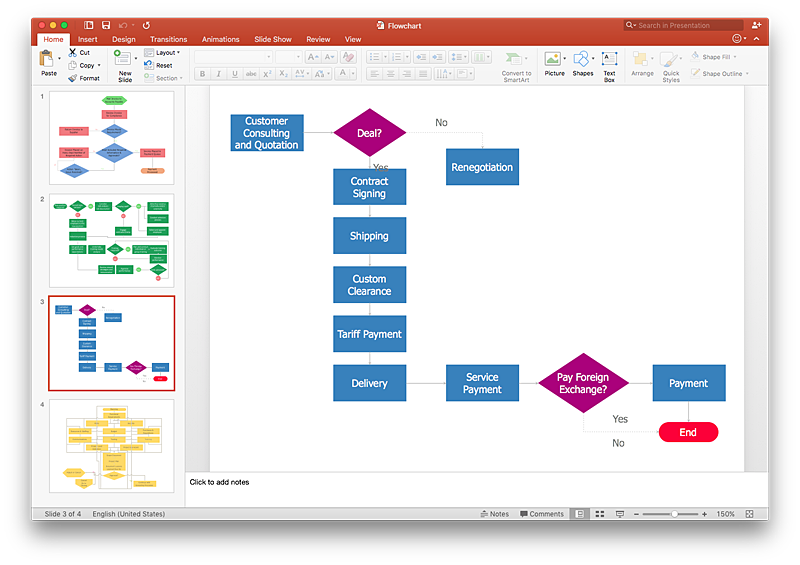
ConceptDraw DIAGRAM allows you to create professional flowchart quickly and easily. The ability to create flowcharts is contained in the Flowcharts solution. To submit flowcharts for the audience, you can use export to MS PowerPoint.

Flowchart Design
Flowchart Symbols, Shapes, Stencils and Icons

A flowchart is a type of diagram which represents an algorithm, process or workflow, displays the steps as boxes of various kinds and depicts their order by connecting them with arrows. Any business graphic document will be more colorful and understandable if will use professional-looking and visual diagrams and flowcharts. Flowchart design gives versatile presenting and explaining of the process. ConceptDraw DIAGRAM flowchart software enhanced with Flowcharts solution helps effectively make Flowchart Design. Use of predesigned flowchart symbols and bright color palette offers a fresh view and favorably distinguishes the flowcharts designed in ConceptDraw DIAGRAM from the black and white flowcharts on a paper. Preferably to use no more than three or four colors and apply identical for the same shape types. The best flowchart design can be achieved by starting with Flowchart template, or any of suitable ready examples or samples offered in ConceptDraw STORE, open one of them and enter the proper text into each Flowchart shape. Each symbol of the flowchart has a definition that can't be changed. This means that all flowcharts shapes can be grouped in according to their meaning. Users with ConceptDraw DIAGRAM flowchart software can style groups of symbols with close definitions by color sets chosen from complementary palette. Almost all workflows can be depicted as a flowchart. Colored diagrams are more light for perception of the certain information, this is part of flowchart design. Bright colors need to be used in the key points of Decision symbols, to focus attention on their importance for whole process flow.
Business Process Modeling with ConceptDraw

How to Draw a Flowchart

A good Flowchart is incredibly helpful for representing and understanding the system and systematic flow of information in the system. That's why its creation requires attention, accuracy, caution and expertise. There are many standardized symbols which can be used in Flowcharts to represent different kinds of steps. The basic flowchart's element is a simple action, which is represented as a box containing description of the action. The flow is shown with arrows between sequential action boxes. The decision is shown as a diamond that contains a simple question to which the answer is 'yes' or 'no' Are you confused on how to draw a Flowchart? ConceptDraw DIAGRAM diagramming and vector drawing software will help you in flowchart drawing due to the included templates, samples and vector objects libraries which are offered in great quantity by Flowcharts solution from Diagrams area. Besides you need clearly and accurately define the process boundaries with starting and ending points, and each step in the process, identify time lags and non-value-adding steps.
The vector stencils library "HR flowchart" contains 62 flowchart symbols.
Use it to draw your HR flowcharts, workflow diagrams and process charts with the ConceptDraw PRO diagramming and vector drawing software.
The flow chart symbols library "HR flowchart" is included in the HR Flowcharts solution from the Management area of ConceptDraw Solution Park.
Annotation
Annotation, annotation,
Card
Card, card,
Check / audit (diamond)
Check / audit (diamond), check, audit,
Check / audit (square)
Check / audit (square), check, audit,
Collate
Collate, collate,
Comment / note symbol (brace)
Comment / note symbol (brace), brace callout, comment, note,
Communication link
Communication link, communication link,
Compare (diamond)
Compare (diamond), compare,
Compare (square)
Compare (square), compare,
Completed form
Completed form, completed form, document,
Concurrency symbol (fork / join)
Concurrency symbol (fork / join), concurrency symbol,
Conditional selector
Conditional selector, conditional selector,
Control transfer
Control transfer, control transfer,
Data input / output
Data input / output, data input, data output,
Database
Database, database,
Decision
Decision, decision,
Decision indicator - No
Decision indicator - No, decision indicator, no,
Decision indicator - Yes
Decision indicator - Yes, decision indicator, yes,
Delay
Delay, delay,
Direct access storage
Direct access storage, direct access storage,
Disk storage
Disk storage, disk storage,
Display
Display, display,
Divided process (table view)
Divided process (table view), divided process,
Document
Document, document,
Entity (rounded)
Entity (rounded), entity,
Event
Event, event,
Extract
Extract, extract, part, device,
Flow line
Flow line, flow line, arrow, connector,
Internal storage
Internal storage, internal storage,
Junction symbol
Junction symbol, junction symbol,
Lined document
Lined document, lined document,
Lined / shaded process
Lined / shaded process, lined process, shaded process,
Loop limit
Loop limit, loop limit,
Manual file
Manual file, manual file,
Manual input
Manual input, manual input,
Manual operation
Manual operation, manual operation,
Merge
Merge, merge,
Multi document
Multi document, multi document,
Multi process
Multi process, multi process,
Off-page reference - arrow
Off-page reference - arrow, off-page reference,
Off-page reference - incoming
Off-page reference - incoming, off-page reference,
Off-page reference - outgoing
Off-page reference - outgoing, off-page reference,
On-page reference/ Inspection point
On-page reference/ Inspection point, on-page reference, inspection point,
Or
Or, or,
Page
Page, page,
Paper tape
Paper tape, paper tape,
Predefined process
Predefined process, subroutine, predefined process,
Prepare conditional
Prepare conditional, preparation, prepare conditional,
Process step
Process step, process step,
Reference point
Reference point, reference point,
Sequential access storage
Sequential access storage, sequential access storage,
Sort
Sort, sort,
Start (circle)
Start (circle), start,
Start (ellipse)
Start (ellipse), start,
Stickman pictogram
Stickman pictogram, stickman pictogram,
Stored data
Stored data, stored data,
Summary
Summary, summary,
Tagged document
Tagged document, tagged document, document,
Tagged process
Tagged process, tagged process,
Terminal point
Terminal point, terminal point,
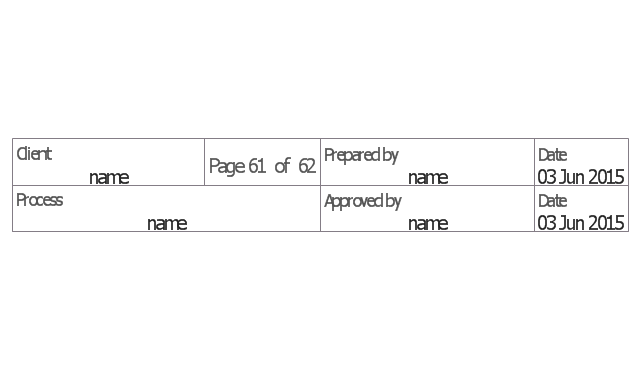
Title block
Title block, title block,
Torso pictogram
Torso pictogram, torso pictogram,
The vector stencils library "Sales flowchart" contains 62 sales process flow chart symbols.
Use these flow chart icon set to draw your sales flowcharts, workflow diagrams and process charts with the ConceptDraw PRO diagramming and vector drawing software.
The sales process flowchart symbols library "Sales flowchart" is included in the Sales Flowcharts solution from the Marketing area of ConceptDraw Solution Park.
Annotation
Annotation, annotation,
Card
Card, card,
Check / audit (diamond)
Check / audit (diamond), check, audit,
Check / audit (square)
Check / audit (square), check, audit,
Collate
Collate, collate,
Comment / note symbol (brace)
Comment / note symbol (brace), brace callout, comment, note,
Communication link
Communication link, communication link,
Compare (diamond)
Compare (diamond), compare,
Compare (square)
Compare (square), compare,
Completed form
Completed form, completed form, document,
Concurrency symbol (fork / join)
Concurrency symbol (fork / join), concurrency symbol,
Conditional selector
Conditional selector, conditional selector,
Control transfer
Control transfer, control transfer,
Database
Database, database,
Data input / output
Data input / output, data input, data output,
Decision
Decision, decision,
Decision indicator - No
Decision indicator - No, decision indicator, no,
Decision indicator - Yes
Decision indicator - Yes, decision indicator, yes,
Delay
Delay, delay,
Direct access storage
Direct access storage, direct access storage,
Disk storage
Disk storage, disk storage,
Display
Display, display,
Divided process (table view)
Divided process (table view), divided process,
Document
Document, document,
Entity (rounded)
Entity (rounded), entity,
Event
Event, event,
Extract
Extract, extract, part, device,
Flow line
Flow line, flow line, arrow, connector,
Internal storage
Internal storage, internal storage,
Junction symbol
Junction symbol, junction symbol,
Lined document
Lined document, lined document,
Lined / shaded process
Lined / shaded process, lined process, shaded process,
Loop limit
Loop limit, loop limit,
Manual file
Manual file, manual file,
Manual input
Manual input, manual input,
Manual operation
Manual operation, manual operation,
Merge
Merge, merge,
Multi document
Multi document, multi document,
Multi process
Multi process, multi process,
Off-page reference - arrow
Off-page reference - arrow, off-page reference,
Off-page reference - incoming
Off-page reference - incoming, off-page reference,
Off-page reference - outgoing
Off-page reference - outgoing, off-page reference,
On-page reference/ Inspection point
On-page reference/ Inspection point, on-page reference, inspection point,
Or
Or, or,
Page
Page, page,
Paper tape
Paper tape, paper tape,
Predefined process
Predefined process, subroutine, predefined process,
Prepare conditional
Prepare conditional, preparation, prepare conditional,
Process step
Process step, process step,
Reference point
Reference point, reference point,
Sequential access storage
Sequential access storage, sequential access storage,
Sort
Sort, sort,
Start (circle)
Start (circle), start,
Start (ellipse)
Start (ellipse), start,
Stickman pictogram
Stickman pictogram, stickman pictogram,
Stored data
Stored data, stored data,
Summary
Summary, summary,
Tagged document
Tagged document, tagged document, document,
Tagged process
Tagged process, tagged process,
Terminal point
Terminal point, terminal point,
Title block
Title block, title block,
Torso pictogram
Torso pictogram, torso pictogram,
HelpDesk

How to Create an Audit Flowchart
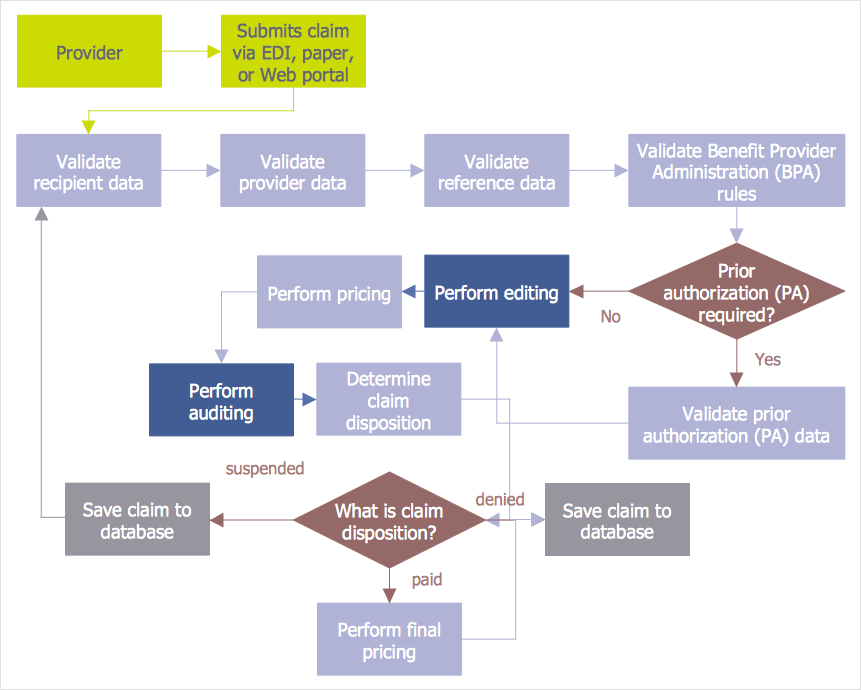
Audit flowcharts are often used in auditors activity. This is the most effective way of preparation and documentation of the audit process. Financial audit process has a clear structure, and therefore audit flowchart is often used to denote an audit process. This is the most effective way of preparation and documentation of the audit process. Flowcharts are often used in auditors activity. A flowchart may be created at any stage of an audit process as an aid in the determination and evaluation of a client's accounting system. ConceptDraw DIAGRAM allows you to create professional accounting flowchart quickly using the professional Audit Flowcharts solution.
HelpDesk

How to Create an Accounting Flowchart

An Accounting flowchart is a specialized type of flowchart. With the help of an accounting flowchart, you can visually describe tasks, documents, people responsible for execution at each stage of the accounting workflow. Find out how you can easily create an accounting flowchart of any complexity using Accounting Flowchart Solution from the ConceptDraw Solution Park.
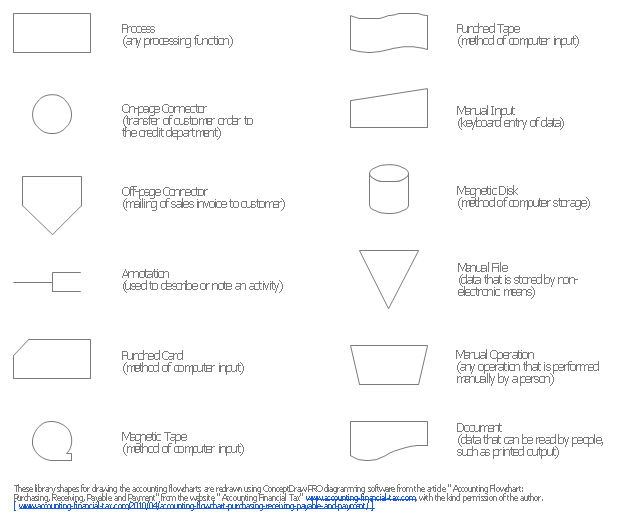
The vector stencils library "Accounting flowcharts" contains 14 symbols for drawing accounting flow charts.
This library was created according the article " Accounting Flowchart: Purchasing, Receiving, Payable and Payment"
http:/ / accounting-financial-tax.com/ 2010/ 04/ accounting-flowchart-purchasing-receiving-payable-and-payment/
from the website " Accounting Financial Tax" http:/ / accounting-financial-tax.com , with the kind permission of the author.
The example "Design elements - Accounting flowcharts" was created using the ConceptDraw PRO diagramming and vector drawing software extended with the Accounting Flowcharts solution from the Finance and Accounting area of ConceptDraw Solution Park.

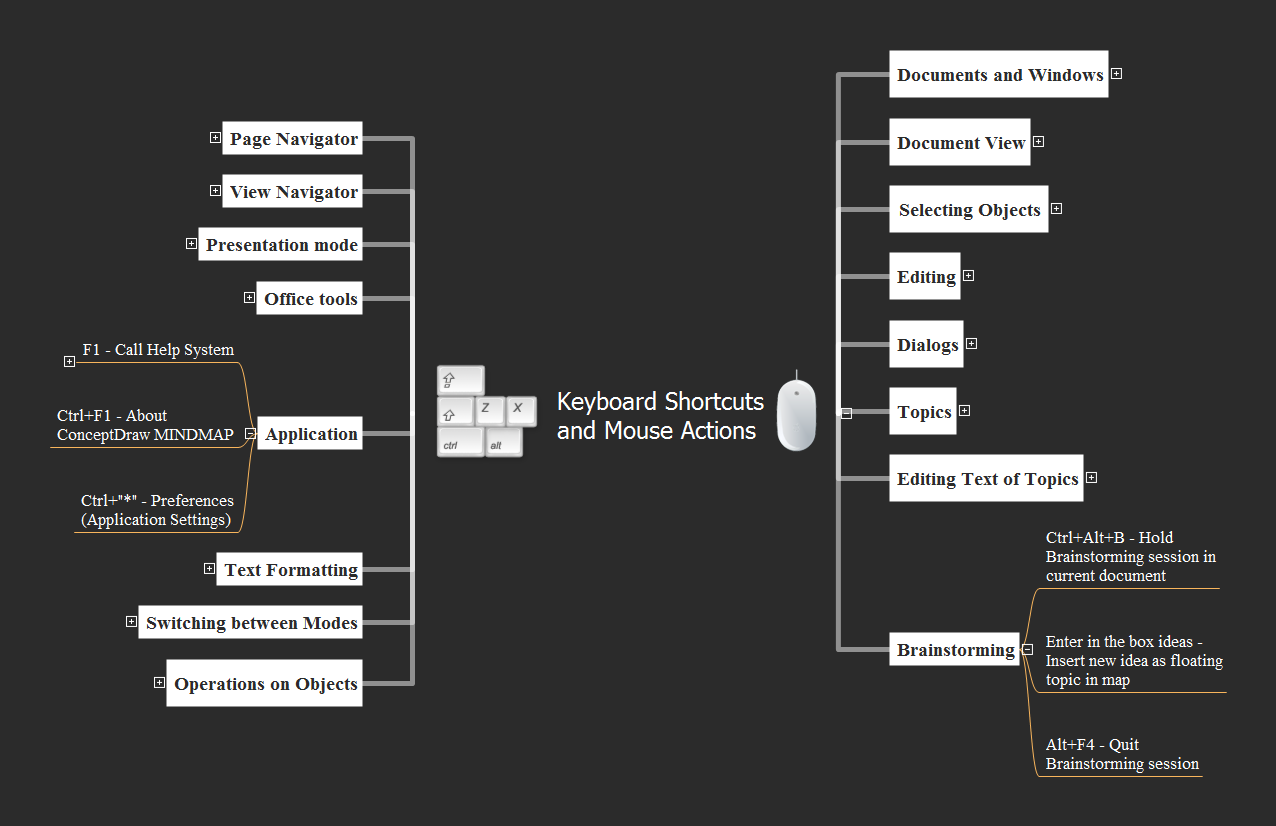
Keyboard Shortcuts and Mouse Actions

Mind Maps are an advanced technique used to solve a wide range of professional tasks, personal growth tasks, business tasks, household tasks that occur in everyday life. When you need to make a difficult decision in terms of lack of information, to prepare a report, design a presentation in original way, to organize a brainstorming session, to develop plan for the next week / month / year, to make notes during the lecture, in all these cases the mind mapping technique will be effective. The essence of the method consists in structuring the information, in visualization of objects and concepts, and also in setting the associative relationships. This method is popular in teaching and when explaining new information, and lets represent it in a concise and easily perceived form. Mind Maps can be also effectively used to represent different computer knowledge and helpful information about the use of different applications. ConceptDraw MINDMAP is powerful software for designing different Mind Maps, including the Mind Map demonstrating the keyboard shortcuts and mouse actions that are utilized in ConceptDraw MINDMAP.