Made with
ConceptDraw
DIAGRAM 18

Venn Diagram Examples for Problem Solving

Sometimes the problems cannot be solved as easily as we want them to be, so for making it easier to understand them in order to simplify the tasks, it is better to create a diagram. In this way, with the help of a drawing, it can become clear what to focus on as well as what aspects to pay more attention to.

Having the examples of the problem-solving process in a way of a Venn diagram may lead to making it possible to create the needed scheme of what should be done as well as what work should be finished first within some project or an organization as a whole.

Any Venn diagram can also be called as a primary one. The other names for it are logic diagram, set diagram, etc. It is simply one of the so many types of the diagrams that are used for showing all the possible logical relations between some finite collection of a few or a lot of the different sets.
Venn Diagram Problem Solving Example

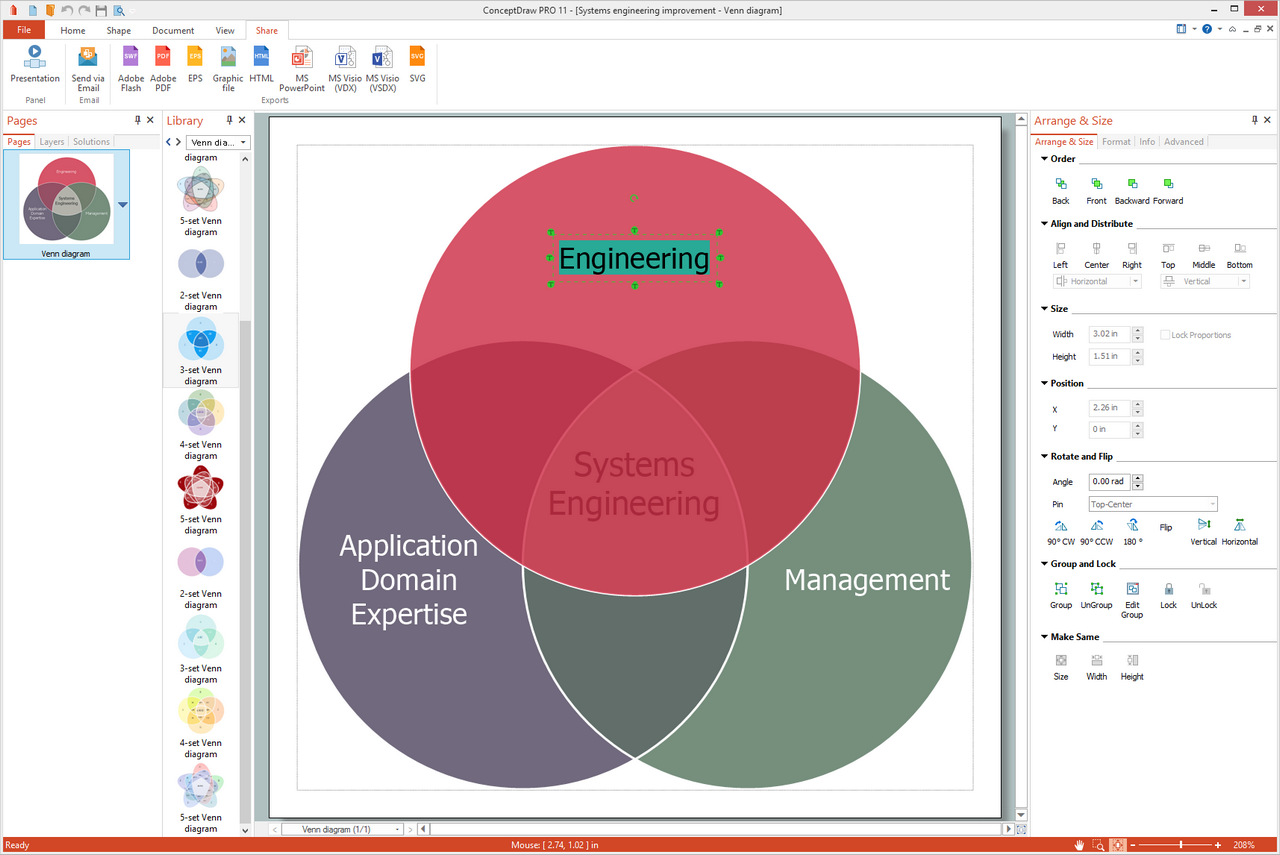
Example 1. Venn Diagram Problem Solving

The mentioned type of diagrams can be also used for depicting different elements in a way of the points in the plane as well as the sets in a way of the regions that can be found inside some closed curves. Any Venn diagram created with the help of the ConceptDraw DIAGRAM software may consist a lot of the overlapping closed curves such as circles, each of which is known for representing some set.

The mentioned points inside each of the curves are labelled with a letter “S” representing the elements of the set S in this way. At the same time, the points that can be found outside the boundary, are those which represent the elements which cannot be found in the “S” set.

In this way, the set of all the existing elements (which are known to be members of both sets S and T) can be represented in a visual way by the area of the overlap of the “T” and “S” regions.

In Venn diagrams the curves are usually overlapped in the way its creator wants them to be, showing all the possible relations in between the previously described sets. The mentioned “Venn diagrams” were conceived by John Venn in about 1880.

Since then, they are used for teaching the so-called “elementary set theory”. Besides, they can be also used for illustrating some simple set relationships in either logic, statistics, probability, linguistics or computer science, or both.

Any Venn diagram in which the area of each of its shapes seems to be proportional to the number of all the elements that it contains, is known to be called as a “scaled” or an “area-proportional” Venn diagram that is being constructed with the simple closed curves drawn in a plane.

The principle of all the Venn diagrams is that the sets (also known as “classes”) can be represented by regions in a special relation to one another. Due to such relation, all the possible logical relations of the mentioned classes can be indicated in the very same diagram showing the connections to each other.

In this way, the diagram leaves enough room for any possible relation of the classes to illustrate, and the given (or “actual”) relation can be after specified by indicating that some region is either not-null or null.
Venn Diagram Problem Solving Example

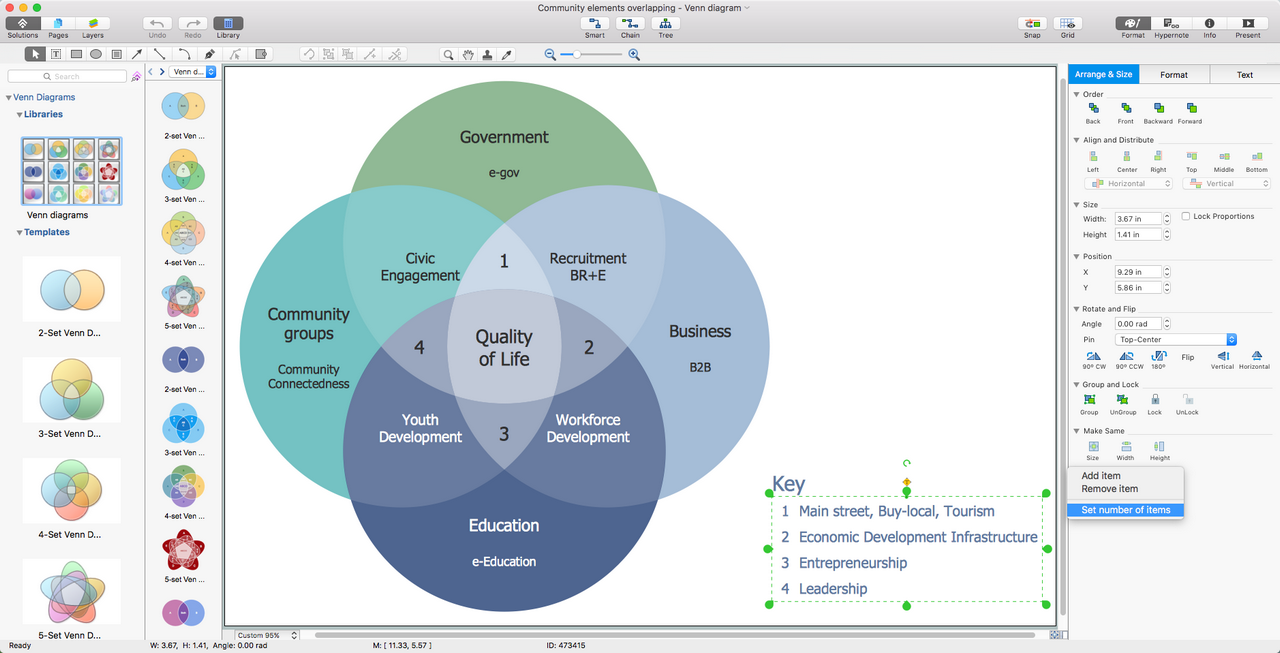
Example 2. Venn Diagram Problem Solving

Venn diagrams usually are those that comprise the overlapping circles and the interior of such circles can symbolically represent all the elements that the set includes. At the same time, the exterior is known to be representing those elements that are not members of the set and so they are not connected with it at all.

After being introduced by John Venn in 1880, the Venn diagrams were further developed in the 20th century. Thus, in 1963 D. W. Henderson showed that the existence of an n-Venn diagram that has n-fold rotational symmetry implied that n was a key number, called as “prime”. It was also showed that all symmetric Venn diagrams exist when n is either 7 or 5.

Venn diagrams are known to be similar to Euler diagrams, but still the first ones are more commonly used and many of those who made them know, that each of such diagrams for n component sets has to contain all 2n possible zones that are known to be corresponding to some combination of either exclusion or inclusion in each of the existing component sets.

It is also widely known that, to compare to the Venn diagrams, the Euler ones contain only the actually possible zones in some given context, but both Euler diagrams as well as Venn diagrams were incorporated as part of instruction in a so-called “set theory” in the 1960s as part of the new math movement. Since then, they have also been adopted in the curriculum of many other fields and nowadays they can be used for most of the needed problem-solving processes as long as there is enough information to add to them.
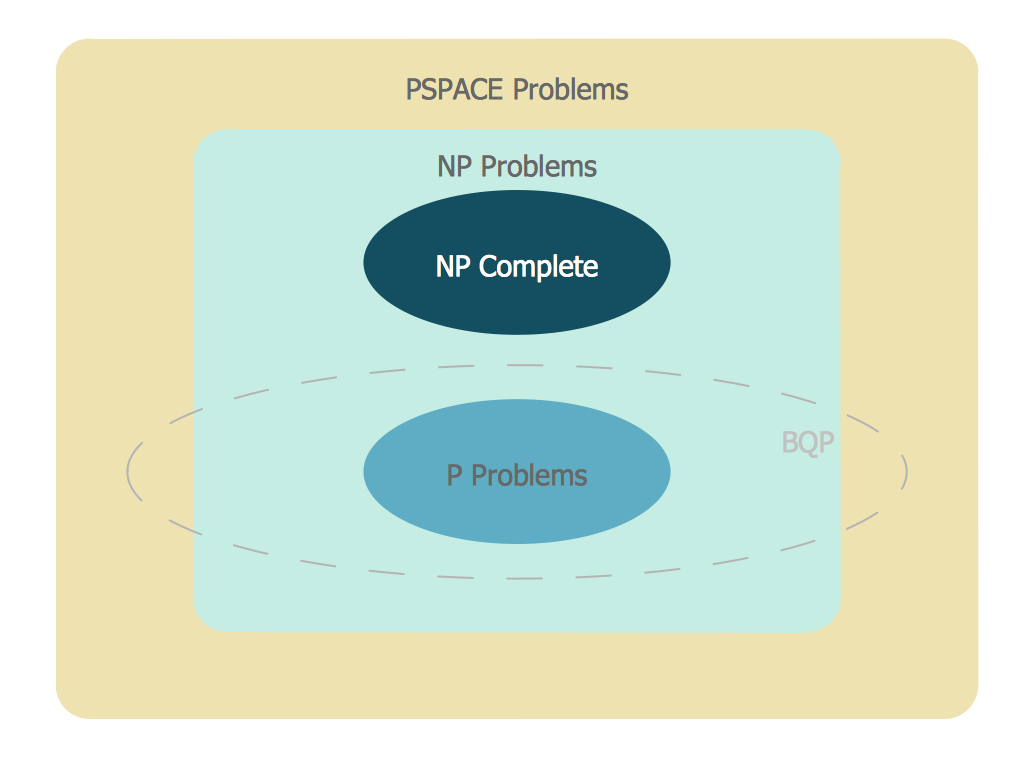
Venn Diagram Examples for Problem Solving — BQP Complexity

Example 3. Venn Diagram Problem Solving — BQP Complexity. The suspected relationship of BQP to other problem spaces.

In the Business Diagrams solution, there are the pre-made examples that can be always used for making the unique, great looking diagrams, such as the 2-set Venn ones of any needed colour, the 3-set one, the 4-set ones and the 5-set ones. Having the already previously created samples of the Venn diagrams can help any ConceptDraw DIAGRAM user make it possible to make the needed drawing within only a few minutes by editing the existing ones.

Taking this opportunity of using the already previously design diagrams, such as the Venn ones from the Business Diagrams solution, can simplify your work of the drawings and save your time. One of the examples, that is available for all the ConceptDraw DIAGRAM users is the “Venn Diagram — Internet Marketing Professions”. Next, the “Venn Diagram — Path to Sustainable Development” is another template of the Venn diagram created by using three circles where such notes as “Environmental”, “Social” and “Economic” are used.

TEN RELATED HOW TO's:
Sometimes it's difficult to find a path in work processes or to understand the requirements, especially when you are a newcomer. To get your thoughts straight, create a workflow diagram, and put everything on it. This will not only help you to get into the workflow, but also show it’s weaknesses. This illustration captures the workflow process of payment an invoice for the electricity consumed by certain enterprise. It was drawn in ConceptDraw DIAGRAM using its solution for Workflow Diagrams. Making a workflow charts means that you need to depict consistently all processes engaged to the workflow process. Then, you should connect them with symbols meaning study and analysis. Next, add symbols of decisions. A work flow diagram made precisely and correctly can help to clarify your work flow to any person.Workflow Diagram *
Picture: Workflow Diagram
Related Solution:
A flowchart is a simple but very functional tool when it comes to understanding a workflow or to removing unnecessary stages from a process. When drawing flowcharts, keep in mind that there are four common types of flowcharts, like document flowcharts and data flowcharts that show control over a data or document flow over a system. To show controls on a physical level, use system flowcharts. In addition, to show controls in a program, you can draw a program flowchart. This flowchart diagram represents the piece of an article editing process, that involves the author and editor. It was created using the Basic Flowchart notation that consists from the basic flowchart symbols. The start and the end of the process are indicated with "Terminator" symbols. The "Process" symbols show the action steps consisting from making edits and searching for a compromise, when the author does not agree with the suggestions of the editor. The "Process" symbol is the general symbol in process flowcharts. The "Decision" symbol indicates a branching in the process flow. There are two branches indicated by a Decision shape in the current flowchart (Yes/No, Disagree/Agree). This basic flowchart can be used as a repeating unit in the workflow diagram describing the working process of some editorial office.Types of Flowcharts *
Picture: Types of Flowcharts
Related Solution:
Big and complex projects sometimes need some simplification of plans and schedules. That's why Program Evaluation and Review Technique was invented and first implemented in 1958. You can create PERT diagrams effortlessly with ConceptDraw DIAGRAM and share them with your colleagues. Program Evaluation Review Technique (PERT) is a method that is used to assess and analyze projects. PERT is a valuable tool for the project management practice. PERT gives an assessment and analysis of the time needed to the project completion. A PERT chart is a visual tool that delivers a graphical view of a project timeline. It is used to display the sequences and dependences of project tasks necessary to complete a project. ConceptDraw DIAGRAM delivers the possibility to build a PERT along with other diagrams applied to assist management process by using its Seven Management and Planning Tools solution.Program Evaluation and Review Technique <br>(PERT) with ConceptDraw DIAGRAM  *
Picture: Program Evaluation and Review Technique (PERT) with ConceptDraw DIAGRAM
Related Solution:
ConceptDraw DIAGRAM is a powerful Venn Diagram maker.ConceptDraw DIAGRAM - the best Venn Diagram Maker
Picture: Venn Diagram Maker
Related Solution:
A Venn diagram, sometimes referred to as a set diagram, is a diagramming style used to show all the possible logical relations between a finite amount of sets. Having ConceptDraw DIAGRAM software one allows anyone who cares for their drawings to look not only nice but also smart and professional.Venn Diagram Examples for Problem Solving. Chomsky Hierarchy
Picture:
Venn Diagram Examples for Problem Solving
Computer Science. Chomsky Hierarchy
Related Solution:
You need design Cylinder Venn Diagram? Nothing could be easier with ConceptDraw DIAGRAM software.Cylinder Venn Diagram
Picture: Cylinder Venn Diagram
Related Solution:
There are many tools to manage a process or to illustrate an algorithm or a workflow. Flowcharting is one of those tools. However, it may be difficult to show complex processes that require multiple attributes or several people in a simple flowchart, so a cross-functional flowchart would be a solution for that situation. To create such flowchart, group processes and steps to labeled rows or columns, and divide those groups with horizontal or vertical parallel lines. It is worth mentioning that there are different types of cross-functional flowcharts, like opportunity or deployment flowchart. This diagram shows a cross-functional flowchart that was made for a trading process. It contains 14 processes, distributed through 5 lines depicting the participants who interact with the process. Also there are connectors that show the data flow of information between processes. The cross-functional flowchart displays a detailed model of the trading process, as well as all participants in the process and how they interact with each other. The lines in the flowchart indicates the position, department and role of the trading process participants.Cross-Functional Flowchart
Picture: Cross-Functional Flowchart
Related Solution:
Using the ready-to-use predesigned objects, samples and templates from the Business Diagrams Solution you can create your own professional-looking Venn Diagrams quick and easy.2 Circle Venn Diagram
Picture: 2 Circle Venn Diagram. Venn Diagram Example
Related Solution:
Samples, templates and libraries contain vector clip art for drawing the Aerospace Illustrations.Aerospace - Design Elements *
Picture: Aerospace - Design Elements
Related Solution:
What is the accounting cycle? The accounting cycle is a sequence of steps that occur in the accounting period and include the processes of identifying, collecting, analyzing documents, recording transactions, classifying, summarizing, and reporting financial information of an organization.What is the Accounting Cycle? *
Picture: What is the Accounting Cycle?
Related Solution:
ConceptDraw
DIAGRAM 18