Tree Network Topology Diagram
Tree Network Topology Diagram
Computer network diagrams, including all of the network topology diagrams, can be created with the help of ConceptDraw DIAGRAM software and they all can be made only within a couple of hours or even minutes using our solutions. There are eight basic topologies, which are: “Point-to-point”, “Bus”, “Star”, “Ring or circular”, “Mesh”, “Tree”, “Hybrid” and “Daisy chain”. So you can always make Point-to-point network topology diagram, Bus network topology diagram, Star network topology diagram, Ring network topology diagram, Mesh network topology diagram, Tree network topology diagram, Hybrid network topology diagram and Daisy chain network topology diagram. With ConceptDraw DIAGRAM application you will find it much simpler to create any of those, mentioned above diagrams.
“Bus” topology includes the possibility of making the “Linear bus” topology and the “Distributed bus” topology diagrams. The “Point-to-point” topology diagram can be made using a dedicated link between its two endpoints. “Mesh” network diagram describes the network, where the nodes relay data for the network itself. All of the nodes in this “mesh” topology diagram cooperate with each other in the process of the data distribution within the network. “Mesh” network topology can be used for both wireless and wired networks. The “ring” topology is quite similar to the “bus” one. In this topology data travels around the ring, but in only one direction. When one of the nodes sends data to another node, then this data passes through each of the intermediate nodes on the ring until it reaches the planned destination. Then, the intermediate nodes transmit this data to keep the signal strong and so each of the nodes is a peer, and there is no hierarchical relationship of clients in the “ring” topology. “Hybrid” network topologies are those, which combine a few different types of topologies. For instance, it can be the “ring” topology and the “mesh” topology, it can be also a “mesh” one and “bus” one, “star” network topology combined with the “mesh” one, etc.
A “tree” network, if it is connected to another “tree” network, will still be a “tree” one. This type of network topologies has a hierarchy of nodes and its highest level has a single (also known as a “root”) node, which is connected with another single or multiple node or nodes. There is the lower level nodes in “tree” computer network topology, which is also connected to a single node or multiple nodes in the next level under the previous, the higher one. “Tree” computer networks have not so many levels, but each of the nodes in this “tree” network has definite nodes, which are connected to it at the next, which is a lower, level in this network topology hierarchy. Shortly to say, the “tree” computer network topology is a combination of both “Star” and “Bus” computer network topologies.
A “hybrid” network topology can be used for illustrating the two different basic network topologies, which are connected to each other. There is another topology called “fully connected computer network topology”. It can be also known as a “full mesh computer network topology” and it is one of the existing computer network topologies, where there is a direct link between all pairs of the nodes within this topology. In this “fully connected computer network topology” with “n”-nodes there are n(n-1)/2 direct links. The computer networks, which are designed with this type of the computer network topology called “a full mesh computer network topology”, are usually very expensive to have. Although they provide a good reliability as there are many paths for data and all of them are provided by the many redundant links, which are all between the nodes. This “fully connected computer network topology” or, as it is also known, a “full mesh computer network topology” can be seen in many of the military applications.
In case you want to create one of the mentioned above computer network topology diagrams, then you can use ConceptDraw DIAGRAM application, as it allows to use another application for getting the solutions from for working with the first mentioned software. This another product of CS Odessa is called “ConceptDraw STORE” and downloading it can help you with your drawings as within this application you can always find any needed solution, such as “Computer and Networks” solution, which can also be found in the Computer and Networks area of ConceptDraw Solution Park on this site. This solution provides ConceptDraw DIAGRAM users with a bunch of templates and a huge variety of libraries, full of symbols of local area network (LAN) and wireless LAN (WLAN) equipment.
You can always take this chance to save your time with ConceptDraw DIAGRAM software, as it provides all those needed examples and templates of ready-to-use charts, flowcharts, schemes, plans, matrices and diagrams, including the “Tree” network topology ones, created by IT professionals of CS Odessa based in Ukraine.
Our product “ConceptDraw DIAGRAM is a very special and unique tool, which is now very popular among those who deal with drawings, including the web designers, marketing managers and other IT specialists and engineers. There is, obviously, a reason for this software to be that popular and this reason is the following: ConceptDraw DIAGRAM application allows its users to create any drawing and it usually takes only a couple of hours or even, sometimes, a couple of minutes, as having the solutions we offer simplifies our clients’ work. Having the professionally looking templates and stencils, which are design elements for making the network topology diagrams, including the “Tree” network topology diagram and others. Downloading ConceptDraw DIAGRAM software can allow you to also use ConceptDraw STORE after downloading it on this site as this another application can be very useful for you as you can find solutions, including the “Computer and Networks” one there.
The Computer and Networks solution from Computer and Networks area of ConceptDraw Solution Park provides examples, templates and vector stencils library with symbols of local area network (LAN) and wireless LAN (WLAN) equipment.
Use it to draw the physical and logical network topology diagrams for wired and wireless computer communication networks.
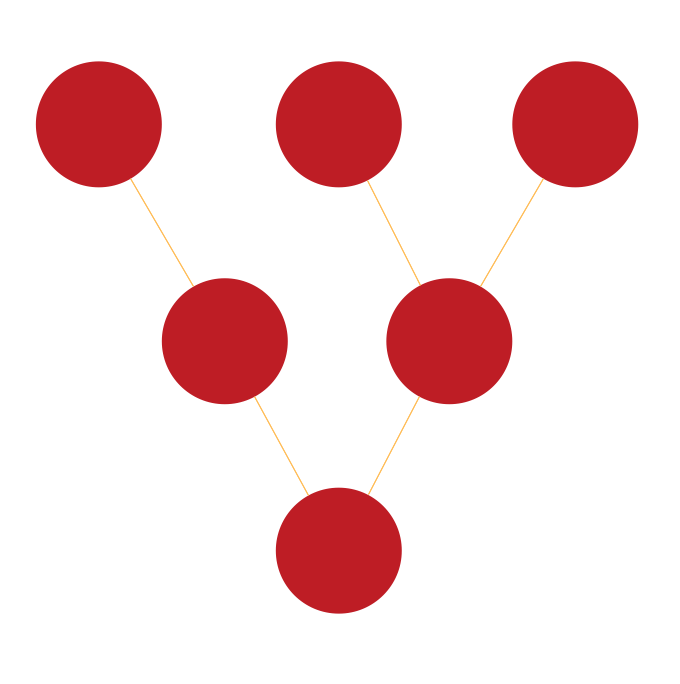
Pic. 1 Tree Network Topology

Pic. 2. Tree Network Topology Diagram
"definition: Tree topology is a combination of Bus and Star topology.
An example of this network could be cable TV technology. Other examples are in dynamic tree based wireless networks for military, mining and otherwise mobile applications. The Naval Postgraduate School, Monterey CA, demonstrated such tree based wireless networks for border security. In a pilot system, aerial cameras kept aloft by balloons relayed real time high resolution video to ground personnel via a dynamic self healing tree based network."
[Network topology. Wikipedia]
See Also Network Topologies:
- Bus Network Topology
- Star Network Topology
- Ring Network Topology
- Mesh Network Topology
- Fully Connected Network Topology