
Precise Notation.
Clearer Explanations
Add mathematical expressions to your ConceptDraw DIAGRAM drawings with LaTeX—a typesetting system that turns plain-text commands into formatted notation.
Consistent
equations.
Give mathematical symbols and expressions a coordinated appearance.
Complex
notation.
Represent formulas and matrices clearly in technical diagrams.
Reusable
source.
Keep notation as plain text that is easy to share and revise.
From text to typeset notation.
- 01 / SELECTSelect a drawing object.
- 02 / INSERTEnter your LaTeX snippet.
- 03 / SWITCHExit text editing and activate selection mode.
- 04 / CONVERTClick “Convert to LaTeX.”
Inline Formulas
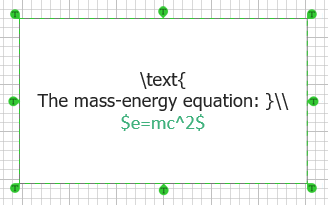
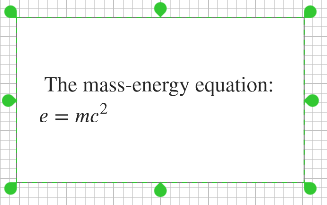
Place your equation between $ symbols to include it within text.
Numbered Equations
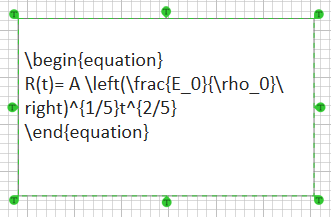
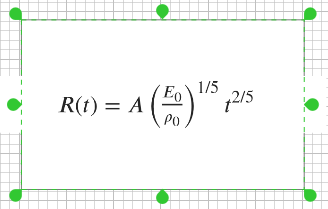
Use the equation environment to create a numbered formula.
Matrices
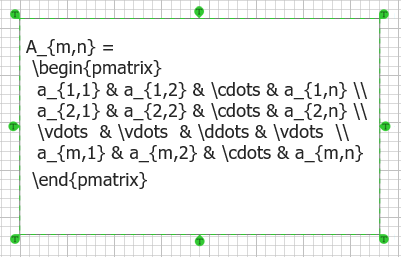
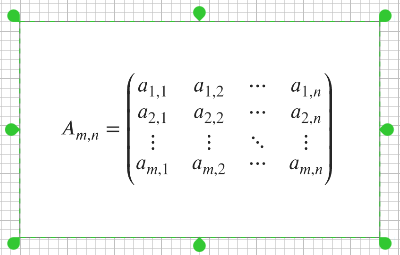
Use the matrix environment to arrange values in rows and columns.