Made with
ConceptDraw
DIAGRAM 18

Venn Diagram

Venn Diagrams are illustrations used in the branch of mathematics known as set theory. They show the mathematical or logical relationship between different groups of things (sets).

A Venn Diagram was introduced by the British philosopher and mathematician John Venn
(1834-1923) in 1881 and visually shows all the possible logical relations between the sets. This diagram can be interpreted as the relationships of sets which may have some (but not all) elements in common.

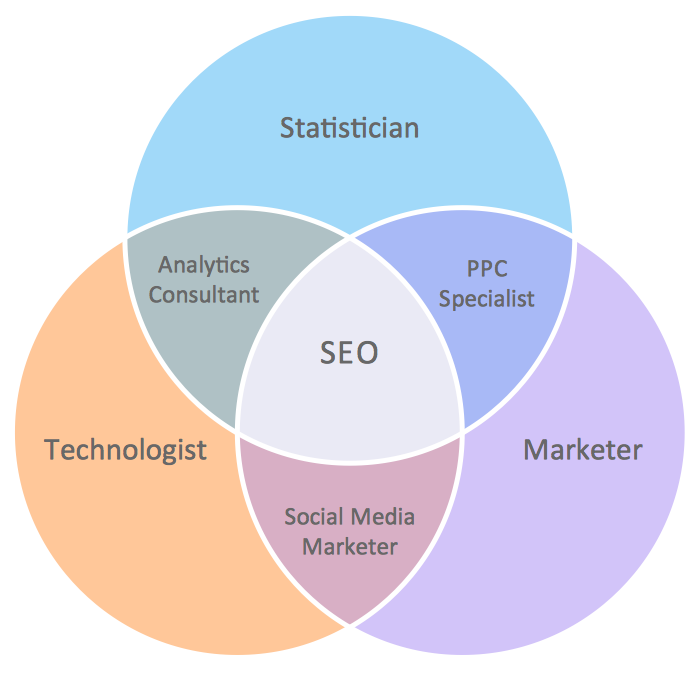
Venn Diagram — Relationship Marketing

Example 1. Venn Diagram — Relationship Marketing

The combined area of sets in a Venn Diagram is called the union of sets. Sometimes there is a rectangle around the Venn diagram to show the space of all possible elements. This rectangle represents so-called Universal set. A Venn Diagram is usually used to divide up two or more objects to highlight similarities and differences.

Venn Diagrams visualize all the possible logical relations between sets. They are used to illustrate simple set relationships in logic, statistics, mathematics, sociology, philosophy, marketing, etc. Venn Diagrams are also commonly used to visually summarize the status and future viability of a project.
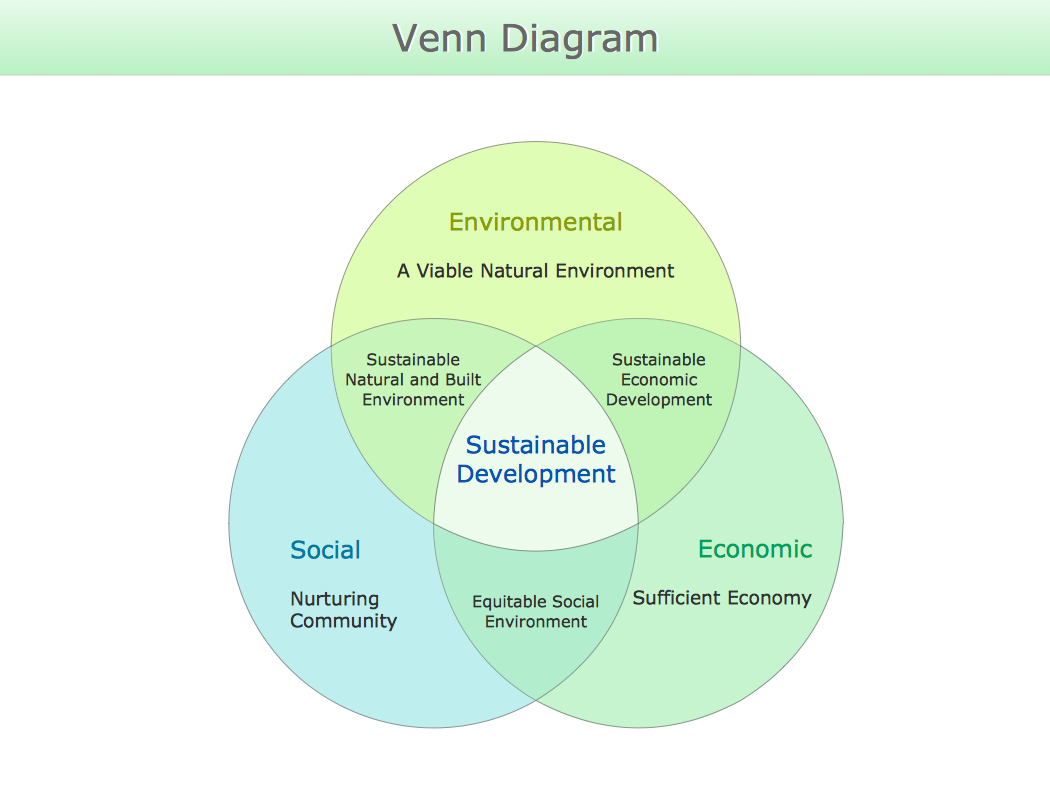
Venn Diagram - Sustainable Development

Example 3. Venn Diagram — Sustainable Development

There are some similar diagram types, based on Venn Diagram:

  1. Euler diagrams similar to Venn Diagrams, but they may not describe all the possible relations.
  2. Johnston diagrams, which are used to illustrate statements in propositional logic, such as "Neither A nor B is true", and are a visual way of illustrating truth tables.
  3. Karnaugh maps or Veitch diagram are another way of visually representing Boolean expressions.
  4. Peirce diagrams, devised by Charles Peirce, are extensions to Venn diagrams which include information on existential statements, disjunctive information, probabilities, and relations.
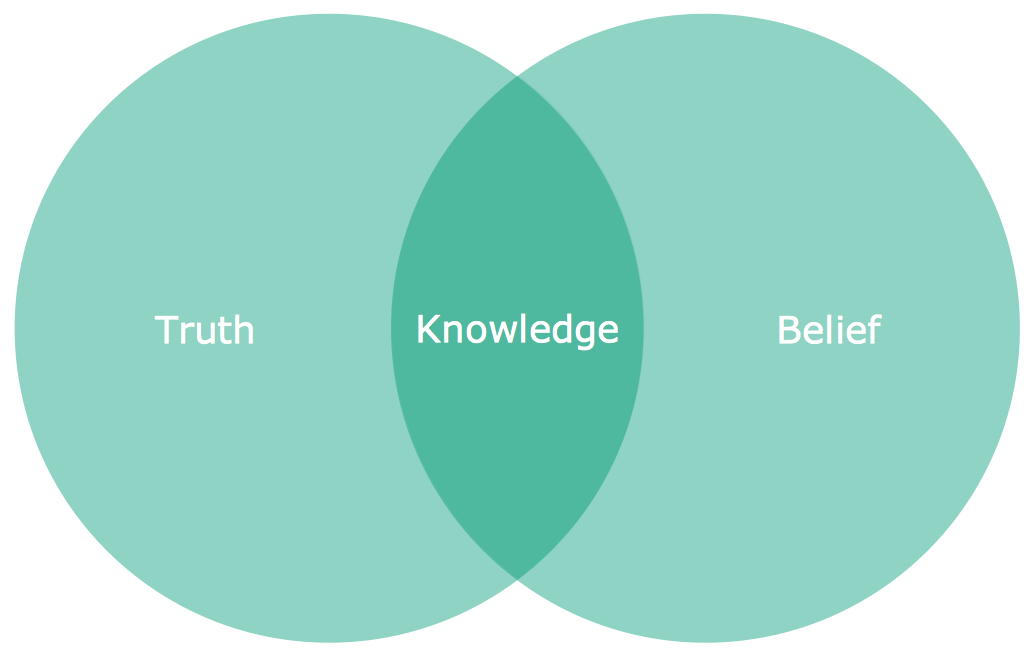
Venn Diagram — Knowledge

Example 3. Venn Diagram — Knowledge

This simple example was created in ConceptDraw DIAGRAM using the Business Diagrams Solution. It shows the use of Venn Diagram to compare two people groups. One circle represents all the information people know about the stock market in Britain, the other circle represents all the information they know about stock market in Germany. Any features the two areas share can be written in the intersection of the circles. The result shows at a glance what the two markets have in common and what features are different.

Use Business Diagrams solution to quick and easy design your own Venn Diagram of any complexity.

The Venn Diagrams designed with ConceptDraw DIAGRAM are vector graphic documents and are available for reviewing, modifying, converting to a variety of formats (image, HTML, PDF file, MS PowerPoint Presentation, Adobe Flash or MS Visio), printing and send via e-mail in one moment.




TEN RELATED HOW TO's:
A waterfall model describes software development process as a sequence of phases that flow downwards. SSADM is one of the implementations of waterfall method. It’s easier to learn about structured systems analysis and design method (SSADM) with ConceptDraw DIAGRAM because this software has appropriate tools for creating data flow diagrams. You can use all the three main techniques of SSADM method with special tools and predesigned templates. This data flow diagram illustrates the Structured Systems Analysis and Design Method. This method method considers analysis, projecting and documenting of information systems. Data flow models are the most important elements of SSADM and data flow diagrams are usually used for their description. It includes the analysis and description of a system as well as visualization of possible issues.Structured Systems Analysis and Design Method
Picture: Structured Systems Analysis and Design Method. SSADM with ConceptDraw DIAGRAM
Related Solution:
The ConceptDraw vector stencils library Cisco Products Additional contains equipment symbols for drawing the computer network diagrams.Cisco Products Additional. <br>Cisco icons, shapes, stencils and symbols *
Picture: Cisco Products Additional. Cisco icons, shapes, stencils and symbols
Related Solution:
ConceptDraw DIAGRAM diagramming and vector drawing software extended with Seating Plans solution from the Building Plans area of ConceptDraw Solution Park is the best for quick and easy drawing the seating arrangement plans.Seating Arrangement *
Picture: Seating Arrangement
Related Solution:
The UML diagram is a powerful tool which lets visually represent all system's components, the interactions between them and relationships with external user interface. The Rapid UML solution for ConceptDraw DIAGRAM software offers diversity of UML flowchart symbols for drawing all types of UML diagrams.UML Flowchart Symbols *
Picture: UML Flowchart Symbols
Related Solution:
An organizational structure defines how activities such as task allocation, coordination and supervision are directed towards the achievement of organizational aims. It is convenient to use a powerful software for developing and representing the organizational structures. ConceptDraw DIAGRAM diagramming and vector drawing software extended with Organizational Charts Solution from the Management Area is ideal for achievement this goal.Organizational Structures *
Picture: Organizational Structures
Related Solution:
The diagrams with highest level in the hierarchy define the main processes or subsystems with external and internal data sources. To detail them, DFD Library is used to build a system of lower level diagrams. This decomposition continues hereinafter it is meaningless. This data flow diagram of a system of a library management is a context-level DFD. The data flow diagram of this type depicts the large system as a solid process, and does not input any explanation of its content. It is an ordinary practice - creation of a context-level data flow diagram when starting system development. This DFD was made using ConceptDraw solution designed especially for data flow diagrams development. One can find out Data Flow Diagrams Solution in a Solution Park of ConceptDraw and can use in as addition to the common Conceptdraw DIAGRAM diagramming tools.DFD Library System *
Picture: DFD Library System
Related Solution:
Program Structure Diagram is a visual representation of a program's organization, showing its components and their relationships.Program Structure Diagram
Picture: Program Structure Diagram
Is it possible to draw a diagram as quickly as the ideas come to you? The innovative ConceptDraw Arrows10 Technology included in ConceptDraw DIAGRAM is a simple and powerful tool to create any type of diagram. You mau choose to start from one of plenty diagram templates or to use your own idea.How To Draw a Diagram *
Picture: How To Draw a Diagram
ConceptDraw DIAGRAM is a software for producing flow charts. The software delivers built-in object libraries with vector stencils that allows you to use RapidDraw technology. By clicking on direction arrows one can add a new object to flowchart. Users can start drawing their own flowchart diagrams in fast and simple way.Diagram Flow Chart *
Picture: Diagram Flow Chart
Related Solution:
Louisiana is a state located in the southern region of the United States. The vector stencils library Louisiana contains contours for ConceptDraw DIAGRAM diagramming and vector drawing software. This library is contained in the Continent Maps solution from Maps area of ConceptDraw Solution Park.Geo Map — USA — Louisiana *
Picture: Geo Map — USA — Louisiana
Related Solution:
ConceptDraw
DIAGRAM 18