Made with
ConceptDraw
DIAGRAM 18

UML Deployment Diagram. Design Elements

UML Deployment Diagram is a type of Structure Diagrams that shows the physical deployment of information generated by the software programs.

The information generated by the software is called “artifact”. The hardware with installed software is called “node”. Thus, UML Deployment Diagram models the physical deployment of artifacts on nodes.

UML Deployment Diagram is intended for visualization of elements and components of the program that exist only on the stage of its runtime. The development of the Deployment Diagram is the last stage of the specification of the software system model.

UML Deployment Diagram represents the nodes as boxes, and the artifacts as rectangles within the boxes. The nodes can have subnodes that are represented as nested boxes. One node on the UML Deployment Diagram can conceptually describe more than one physical node.

There are two types of nodes: device nodes and execution environment nodes.

Device nodes are the computing resources with capability of processing memory and executing of software. An execution environment node (EEN) is a computer system that is located inside a device node.

The other shapes the most used in UML Deployment Diagrams are:

  • Communication path - a line that connect two device nodes and represents communications between them.
  • Package - a file shaped box that groups together all the device nodes.
  • Data Store, Frames, Components UML, and others.

The Rapid UML Solution for ConceptDraw DIAGRAM contains 13 vector stencils libraries with 393 interactive shapes that you can use to design your UML diagrams.

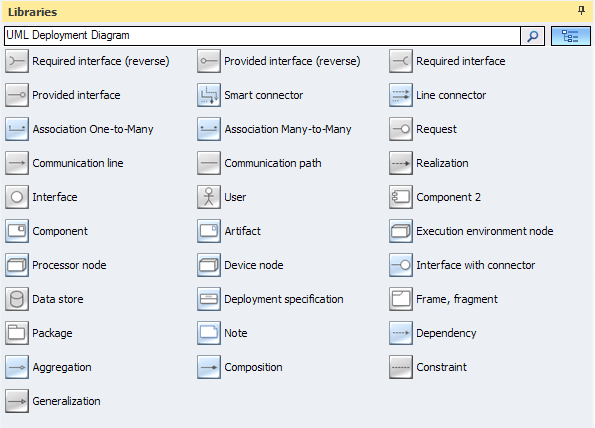
To design a Deployment Diagram use the UML Deployment Diagram library.

UML Deployment Diagram library contains 31 shapes:

  • Device node
  • Artifact
  • Component
  • Component 2
  • Deployment specification
  • User
  • Data store
  • Package
  • Dependency
  • Communication path
  • Communication line
  • Request
  • Association Many-to-Many
  • Association One-to-Many
  • Frame, fragment
  • Note
  • Aggregation
  • Composition
  • Constraint
  • Generalization
  • Realization
  • Interface with connector
  • Processor node
  • Execution environment node
  • Smart connector
  • Line connector
  • Interface
  • Provided interface
  • Provided interface (reverse)
  • Required interface
  • Required interface (reverse)
UML Deployment Diagram library

Pic.1. UML Deployment Diagram Library
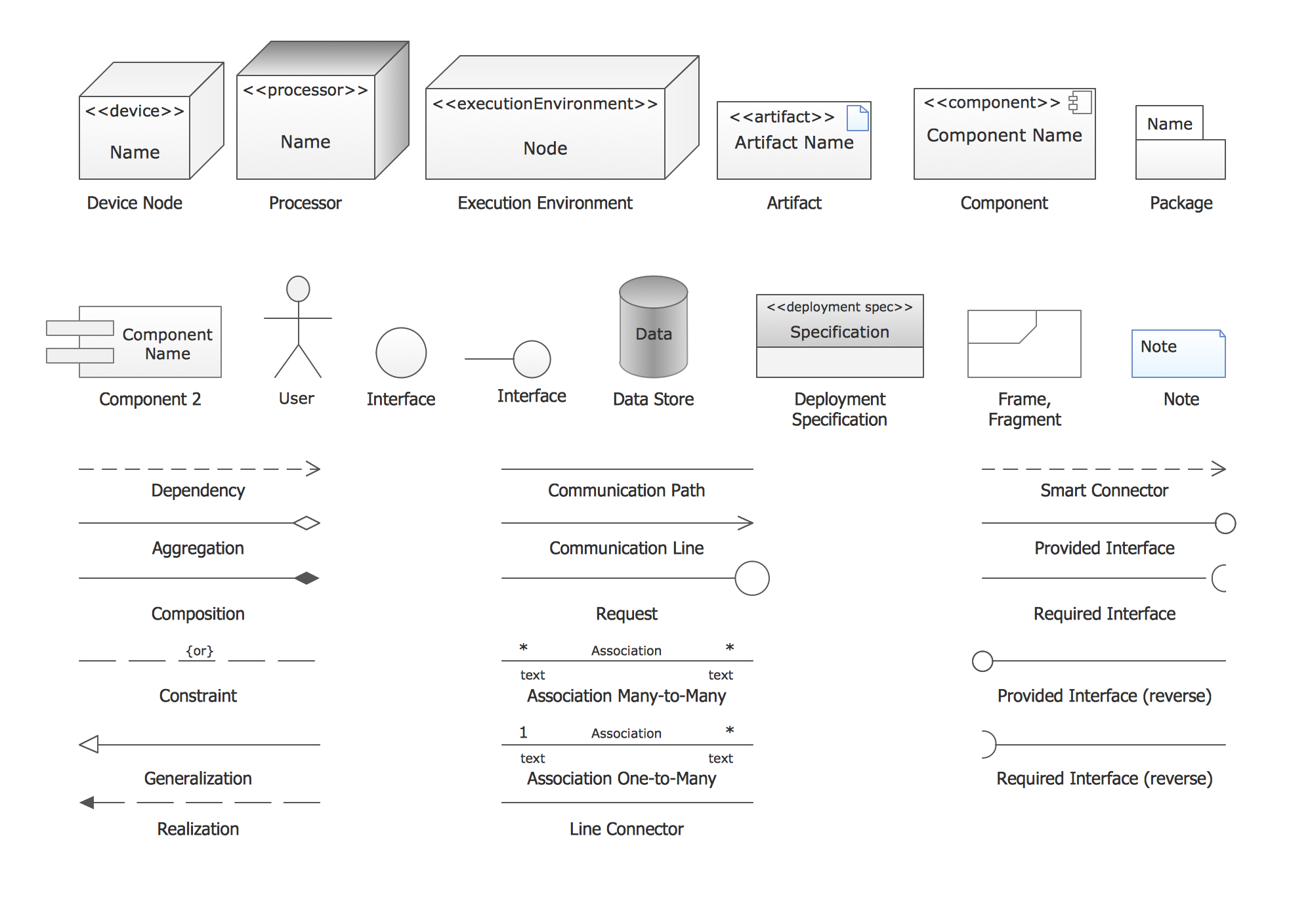
UML Deployment Diagram. Design Elements *

Pic.2. UML Deployment Diagram Library Elements

ConceptDraw Rapid UML solution provides UML Deployment Diagram library of vector stencils for drawing the deployment diagrams using deployment blocks and assembly connectors.

Use design element from the UML Deployment Diagram library to draw your own UML deployment diagrams of complex systems and software applications.
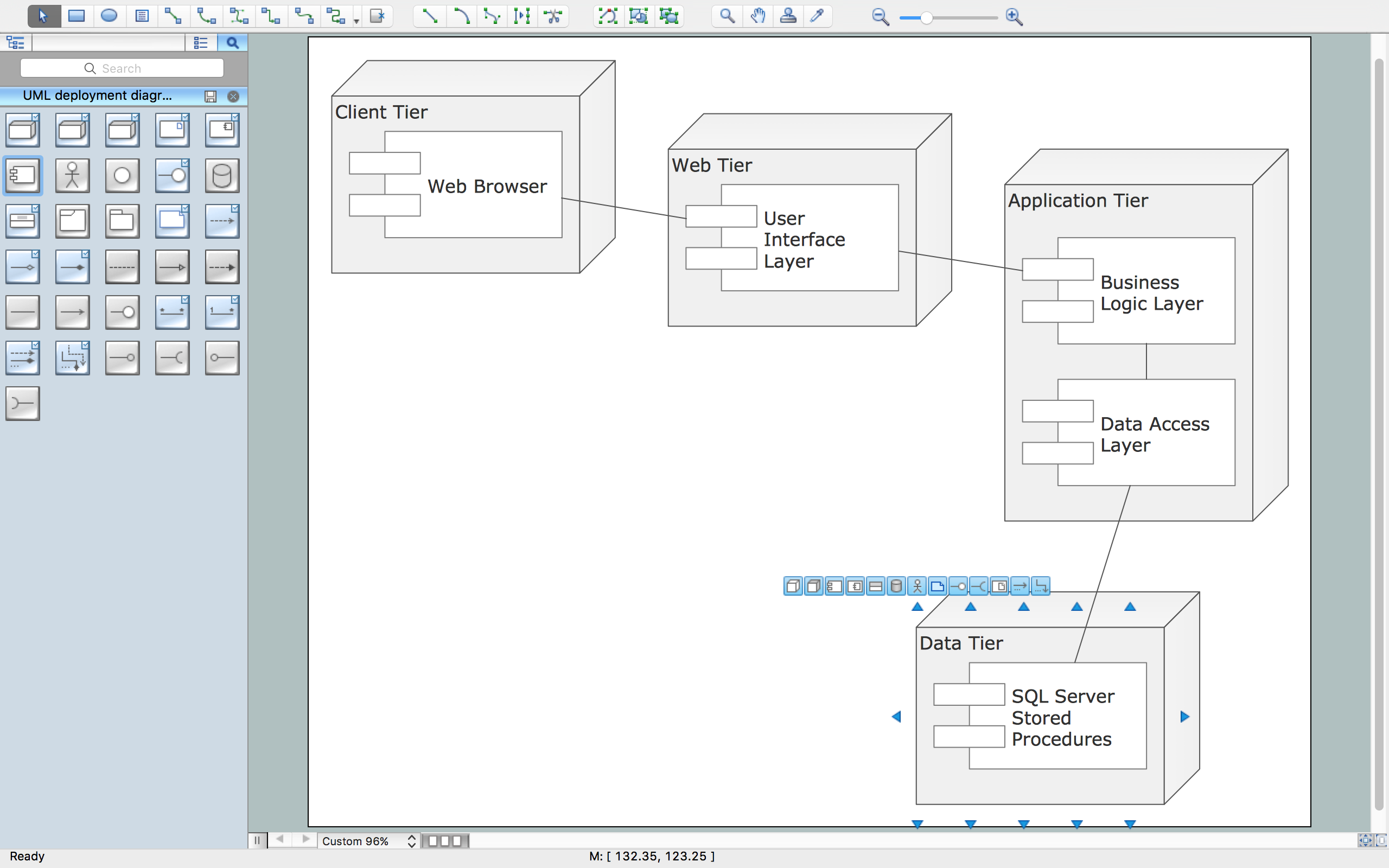
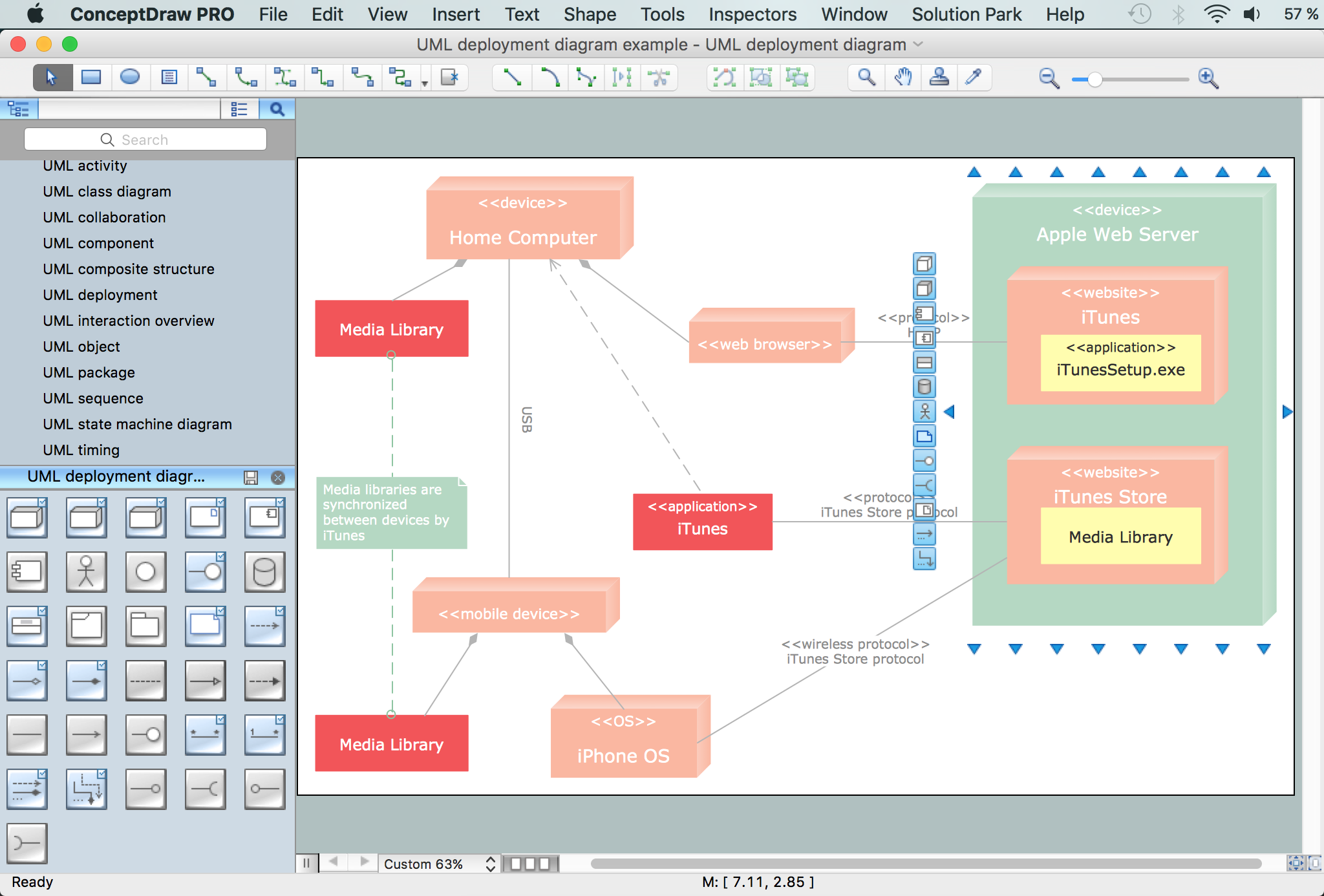
UML Deployment Diagram

UML Deployment Diagram

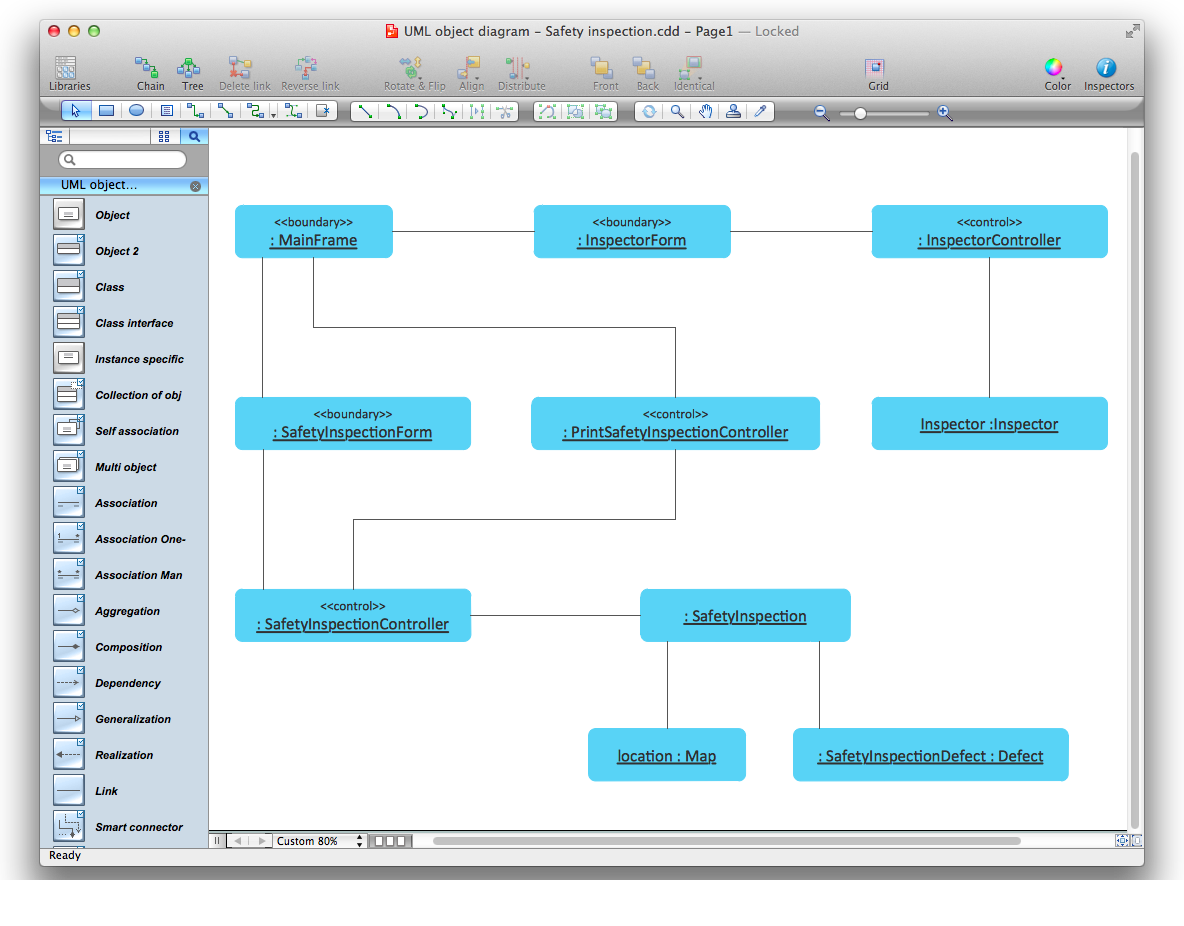
This sample was created in ConceptDraw DIAGRAM diagramming and vector drawing software using the UML Deployment Diagram library of the Rapid UML Solution from the Software Development area of ConceptDraw Solution Park.

UML Diagram Solution


TEN RELATED HOW TO's:
UML state machine's goal is to overcome the main limitations of traditional finite-state machines while retaining their main benefits. ConceptDraw has 393 vector stencils in the 13 libraries that helps you to start using software for designing your own UML Diagrams. You can use the appropriate stencils of UML notation from UML State Machine library.UML State Machine Diagram.Design Elements *
Picture: UML State Machine Diagram.Design Elements
Related Solution:
ConceptDraw DIAGRAM system design software is a product of CS Odessa that was developed especially for making it much simpler to create all the needed diagrams, charts, flowcharts, schemes and other drawings when there is such a need in it. Having the Specification and Description Language (SDL) solution installed from the ConceptDraw STORE application may be another bonus to any ConceptDraw DIAGRAM diagramming and drawing software’s user as it offers both stencil libraries with the design elements and the pre-made examples of the diagrams, such as the SDL ones.System Design *
Picture: System Design
Related Solution:
No building project can exist without an electrical circuit map. It’s more convenient to develop electrical drawing with a proper software which would contain vector shapes and electrical symbols. This will help in the future if any problems appear. This circuit diagram shows the scheme of a location of components and connections of the electrical circuit using a set of standard symbols. It can be use for graphical documentation of an electrical circuit components. There are many of different electric circuit symbols that can be used in a circuit diagram. Knowing how to read circuit diagrams is a useful skill not only for professionals, but for any person who can start creating his own small home electronic projects.Electrical Drawing Software and Electrical Symbols *
Picture: Electrical Drawing Software and Electrical Symbols
Related Solution:
It’s a challenge for any administer to set a brand new corporate network. Talking about network parameters, we should mention that network layout is important for network efficiency and reliability. After the budget is accepted, you need to make a network topology draft. The diagram of computer network layout is a tool of IT specialists and corresponding departments of diversified organizations. Also the responsibilities of any network or system administrator include making network layout diagrams, since they are important piece of any network documentation package. ConceptDraw solution for networking and diagramming offers more than 1000 vector object, composed into the 40 libraries that are designed to to getting started with making professional network layout diagrams.Network Layout *
Picture: Network Layout
Unfortunately, a man can’t predict the future and no one is safe from natural disasters, such as floods, earthquakes, hurricanes or fires. Nonetheless, what you can do to ensure safety for you and your relatives is to create an emergency plan, so everyone will know what to do if emergency happens. Keep that plan simple and train it several times a year so that no one could forget any details of it. Fire and emergency plans are important to supply people with a visual safety solution. This diagram presents a set of standard symbols used to depict fire safety, emergency, and associated information. Using clear and standard symbols on fire emergency plans provides the coherence of collective actions , helps to avoid embarrassment, and improves communications in an emergent situation. The fire emergency symbols are intended for the general emergency and fire service, as well as for building plans ,engineering drawings and insurance diagrams. They can be used during fire extinguishing and evacuation operations, as well as trainings. It includes vector symbols for emergency management mapping, emergency evacuation diagrams and plans.Emergency Plan
Picture: Emergency Plan
Related Solution:
The UML diagram is a powerful tool which lets visually represent all system's components, the interactions between them and relationships with external user interface. The Rapid UML solution for ConceptDraw DIAGRAM software offers diversity of UML flowchart symbols for drawing all types of UML diagrams.UML Flowchart Symbols *
Picture: UML Flowchart Symbols
Related Solution:
The diagrams with highest level in the hierarchy define the main processes or subsystems with external and internal data sources. To detail them, DFD Library is used to build a system of lower level diagrams. This decomposition continues hereinafter it is meaningless. This data flow diagram of a system of a library management is a context-level DFD. The data flow diagram of this type depicts the large system as a solid process, and does not input any explanation of its content. It is an ordinary practice - creation of a context-level data flow diagram when starting system development. This DFD was made using ConceptDraw solution designed especially for data flow diagrams development. One can find out Data Flow Diagrams Solution in a Solution Park of ConceptDraw and can use in as addition to the common Conceptdraw DIAGRAM diagramming tools.DFD Library System *
Picture: DFD Library System
Related Solution:
A flowchart is a powerful tool for examining processes. It helps improving processes a lot, as it becomes much easier to communicate between involved people, to identify potential problems and to optimize workflow. There are flowcharts of different shapes, sizes and types of flowchart vary from quite basic process flowcharts to complex program flowcharts. Nevertheless, all these diagrams use the same set of special symbols like arrows to connect blocks, parallelogram to show data receiving or rectangles for showing process steps. Basic flowcharts are used to represent a simple process algorithm. A basic flowchart notation consists of rectangles (business processes), arrows (the flow of information, documents, etc.). The same notation is used in items such as the "decision", which allow you to do the branching. To indicate the start of the entire business process and its termination can be used the "Terminator" element. The advantages of Basic Flowchart are simplicity and clarity. With it you can quickly describe the business process steps. Creating of Basic Flowchart does not require any special knowledge, as easily understand by employees with different levels of education and IQ.Types of Flowchart — Overview
Picture: Types of Flowchart: Comprehensive Overview
Related Solution:
Remote Networking - We explain the method most people use to connect to the Internet.Using Remote Networking Diagrams *
Picture: Using Remote Networking Diagrams
Creating a detailed network plan can cause a lot of headache to an unexperienced user. And it is worth mentioning that ConceptDraw DIAGRAM is a decent tool for creating a network diagram, a tool that is easy-to-use. To get an accurate diagram use the vector shapes from the special libraries that represent workstations, network appliances, wiring systems and connect them with smart-connectors, just as simple as that. This communication network diagram displays the way different components of a computer network communicate with each other. When representing network information, such as depicting all the equipment in a large network, it is helpful to make visual representation. Network diagram provides an easy way to show the way the connections between an equipment in a large network. This diagram of a communication network depicts a network composed of three sub-networks. It uses a network equipment symbols to represent the different devices that make up a network communication including routers, Ethernet devices and end-point equipment.ConceptDraw DIAGRAM <br> Network Diagram Tool *
Picture: ConceptDraw DIAGRAM Network Diagram Tool
Related Solution:
ConceptDraw
DIAGRAM 18