Risk Diagram (Process Decision Program Chart)
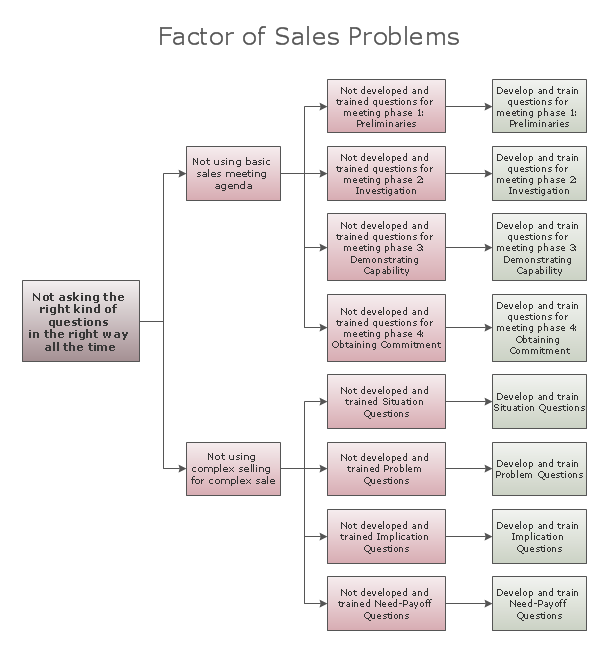
Risk Diagram (Process Decision Program Chart)Process Decision Program Chart (PDPC) is a commonly used technique that was designed in order to help prepare the contingency plans. The emphasis of the PDPC is identifying the consequential impact of failure on activity plans as well as creating the appropriate contingency plans in terms of limiting the risks. Planning to make the tree diagrams and/or the process diagrams can be extended by a couple of levels when the PDPC can be applied to the bottom level tasks on those diagrams. Any contingency plan is a plan that is known to be devised for an outcome other than in the usual, an expected plan. Being often used for a risk management in case some exceptional risk would have some catastrophic consequences. The contingency plans can often be devised by different businesses or governments. Thus, in case there are many employees of a company that are traveling together on an aircraft and it crashes, it kills all aboard. Same way, the company could be ruined or severely strained by such a loss. But nowadays a lot of the companies have the procedures to follow in the event of such a disaster. The mentioned plan may include the standing policies to mitigate a disaster's potential impact, such as limiting the number of employees on any one aircraft or requiring the employees to travel separately from each other. The contingency plans during times of crisis are often developed in order to explore as well as to prepare for any eventuality. Many governments during the Cold War made the previously described contingency plans for protecting themselves as well as their citizens from the nuclear attack. Today the contingency plans are still in place for dealing with any terrorist attacks or other catastrophes. |
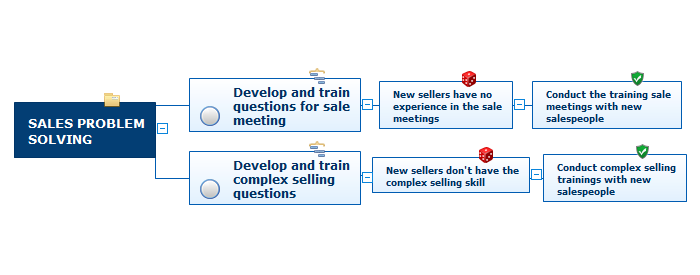
Example 1. Sales Problem Solving
The Process Decision Program Chart (PDPC), that can be created both in ConceptDraw DIAGRAM and ConceptDraw MINDMAP application, from the bottom level of some activity box adds levels for identifying the consequences of some failure after it is clarified what exactly went go wrong as well as finding out the possible countermeasures (the so-called risk mitigation action plan).
Risk management is known to be the assessment, the prioritization and the identification of risks being defined in ISO 31000 as “the effect of uncertainty on objectives”. Any risk management activity is known to be followed by both economical and coordinated application of different resources to monitor, to control as well as to minimize the probability or the impact of some unfortunate events. It can be also done for a reason of maximizing the realization of different opportunities.
Any risk management’s objective is known to be the process of assuring some uncertainty that does not deflect any endeavor from the business goals. Different risks can come from different sources. The uncertainty in financial markets same as the threats from the project failures are all risks, same as the legal liabilities, the accidents, the natural disasters, the events of some uncertain or some unpredictable root-cause, same as the credit risks.
Some of the risk management standards have been criticized for having no measurable improvement on a risk. At the same time, the confidence in decisions and estimates seems to increase. Making the mindmaps with the help of either ConceptDraw DIAGRAM or ConceptDraw MINDMAP software is a way of representing the situation some company is in as well as a way of helping the things go the way they are expected to by the employees who work in this organization, taking into consideration the risks as well as the main objective of the projects or company’s existence.
Any mind map is simply a diagram that is usually used for visual organization some information. A mind map is always hierarchical, showing the relationships among many different pieces of the whole. Being created around a single concept and drawn as a usually large image in the center of some blank page, a mindmap is a commonly used as well as a very popular drawing to make by using the ConceptDraw MINDMAP application — one of the numerous drawing applications for creating the needed schemes.
Any associated representations of the key ideas such as images, parts of the words as well as the whole words can be added to any needed mindmap to be made. The main ideas are known to be connected directly to the central concept, and other ones are known to be branched out from those which are decided to be the key ones. Any mind map can be also drawn by hand being considered to be a type of a spider diagram, but making such drawing by using the professionally developed application such as a ConceptDraw MINDMAP is much simpler making it possible to finish with the needed drawing within only a few minutes.
Mentioning the steps of any problem-solving in a way of a chart or a mind map is the best way to do rather than writing about the solutions even though some tables are used. Any representation of any information in a way of an illustration, such as a chart, a scheme, a mindmap or a diagram, is what can be understood the best as it was proven for many times that having the data to be explained it was always better to make it all clarified by putting its parts in order with some flowchart drawn.