Made with
ConceptDraw
DIAGRAM 18

Mycosis

Mycosis is an infection caused by fungi (yeast or mold). It can affect skin, nails, hair, mucous membranes, lungs, throat, urinary tract, and other organs and systems of organs in humans and animals. Fungi spread out spores into the air or environment and millions of fungi species live everywhere: on surfaces, items, plants, in soil, on the skin of humans and animals, and can cause health problems. Anyone can get a fungal infection, however, people with a weakened immune system, after operations, transplantation of organs, having changes in hormone levels, or taking immunosuppressant medications have a higher risk for fungal infections and complications of them.

Symptoms of mycosis depend on the kind of infection. The most common fungal skin infections are jock itch, athlete's foot, yeast infections, and ringworm. A fungal infection may cause irritation, redness, itching, swelling, scaly skin, blisters, rashes, bumps, peeling or cracking skin, stinging or burning sensations in the infected area, and other symptoms. Plural mycoses are life-threatening and occur when fungal infection invades the tissues and causes superficial, subcutaneous, and systemic diseases.

Common ways to get fungal infections include injuries, breaking skin, breathing fungi spores with the air, ingestion of spores in the organism with dirty or spoiled food, direct contact with an infected person or animal, visiting public spaces like public showers or locker rooms without sandals or flip-flops, sharing private items (towels, shoes, sports equipment, etc.). However, many fungi can live in the human body, but grow and harm only under certain circumstances.

There are superficial, subcutaneous, and deep or invasive fungal infections. As a rule, superficial fungal infections are not serious and are easily treated, however, treatment takes some time. At the same time, deep fungal infections are life-threatening, especially in people with a weakened immune system.

  • Superficial fungal infections affect the skin, nails, and mucous membranes. They include ringworm, onychomycosis, candidiasis, tinea, and pityriasis versicolor. Ringworm, tinea or dermatophytosis is caused by around 40 species of fungi that affect the scalp, feet, and other areas of the skin. Tinea pedis fungi include Trichophyton rubrum, Epidermophyton floccosum, Trichophyton interdigitale. Onychomycosis is a fungal nail infection caused by dermatophytes, yeasts, or molds (Trichophyton rubrum, Trichophyton interdigitale, Candida albicans, Scopulariopsis brevicaulis) entering the nail through small cracks in it, cuts on the skin around the nail, or small separations between the nail and nail bed. The yeast Candida also causes thrush infection.
  • Subcutaneous infections are underneath your skin and are more common in tropical and subtropical areas. They are the result of entering fungi into a cut, wound, or scratch, and cause rashes, redness, ulcers, and other symptoms on your skin. These include sporotrichosis, chromoblastomycosis, and eumycetoma.
  • Deep fungal infections are those that affect the lungs, blood, brain, heart or other organs of the human body. These are histoplasmosis, blastomycosis, coccidioidomycosis, aspergillosis, candidiasis, cryptococcosis, pneumocystis pneumonia, and mucormycosis.
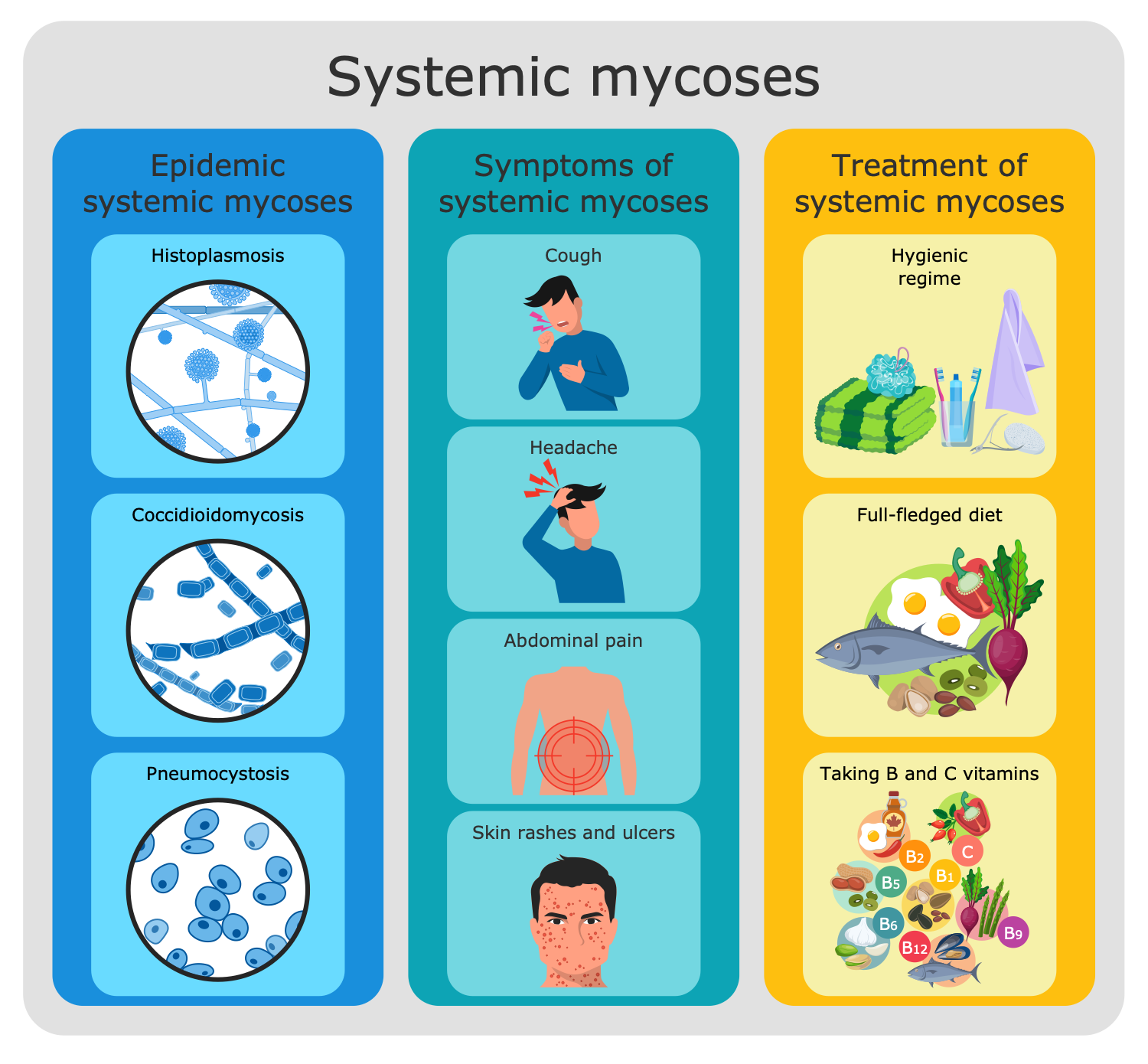
Mycosis - Different Forms

Example 1. Mycosis - Different Forms

Antifungal medications are used to treat mycosis. They are targeted the fungal cell membranes and the fungal cell walls without harming the cells of the human body. There are provided different forms of antifungals: lotions, creams, liquids, sprays, mouthwashes, drops, powder, shampoo, oral pills, and IV medication. The form of medication is chosen by your doctor depending on the fungi type, contaminated area, and degree of severity. Some treatments are available without a prescription, however, it is highly recommended to check with your doctor before treatment. Depending on the severity of the infection, treatment can take a short or long time, and sometimes in several stages to fully cure the infection.

Prevention of infection with mycosis includes practicing personal hygiene, keeping skin and nails clean and dry, daily change of underwear, using shoes in public bathrooms, showers, or locker rooms, using protective gloves when working with soil, also wearing protective masks and clothing when cleanup mold in the premises. In addition, don’t share your personal items, towels, or sports equipment, wear shoes that allow your feet to breathe, and take antibiotics only if they are prescribed by the doctor.
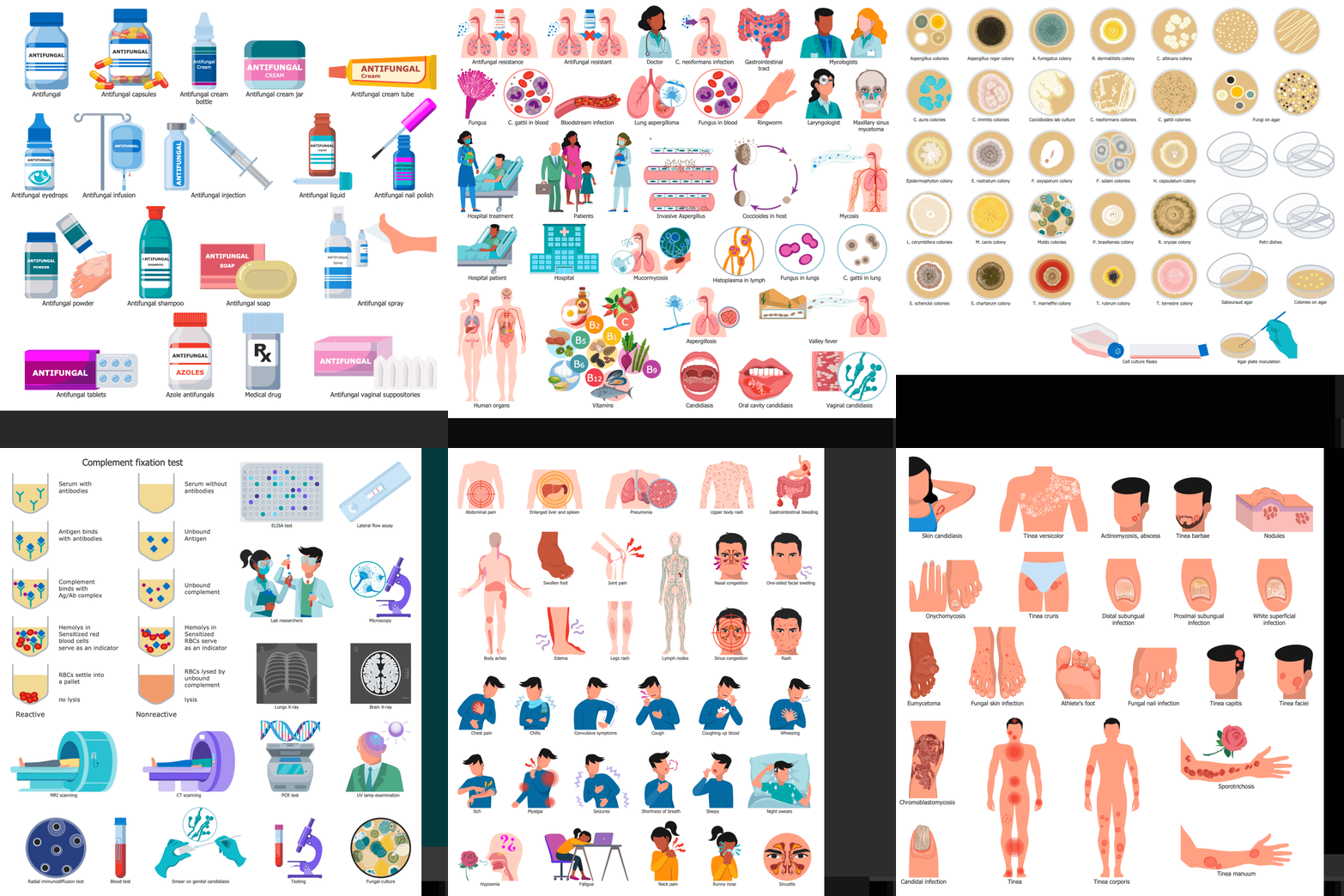
Medical Mycology Libraries Design Elements

Example 2. Medical Mycology Libraries Design Elements

Striving to find the best software for medical mycology illustration, turn your attention to ConceptDraw DIAGRAM software and Medical Mycology solution. Due to the powerful drawing tools and included multifarious collection of 365 predesigned vector clipart, pictograms, and illustrative samples, it is the best assistant for creating infographics, diagrams, illustrations, and drawings.

Use Medical Mycology solution to outline the groups of mycosis pathogens, show the most dangerous fungi types and indicate who is in the at-risk group. List the ways to prevent mycosis and fungal diseases and offer an overview of the most common symptoms of mycosis to detect disease at the earliest stage. The solution is also useful to illustrate the methods of mold control and cleanup premises, kinds of antifungal medication, and ways to treat systemic mycoses.
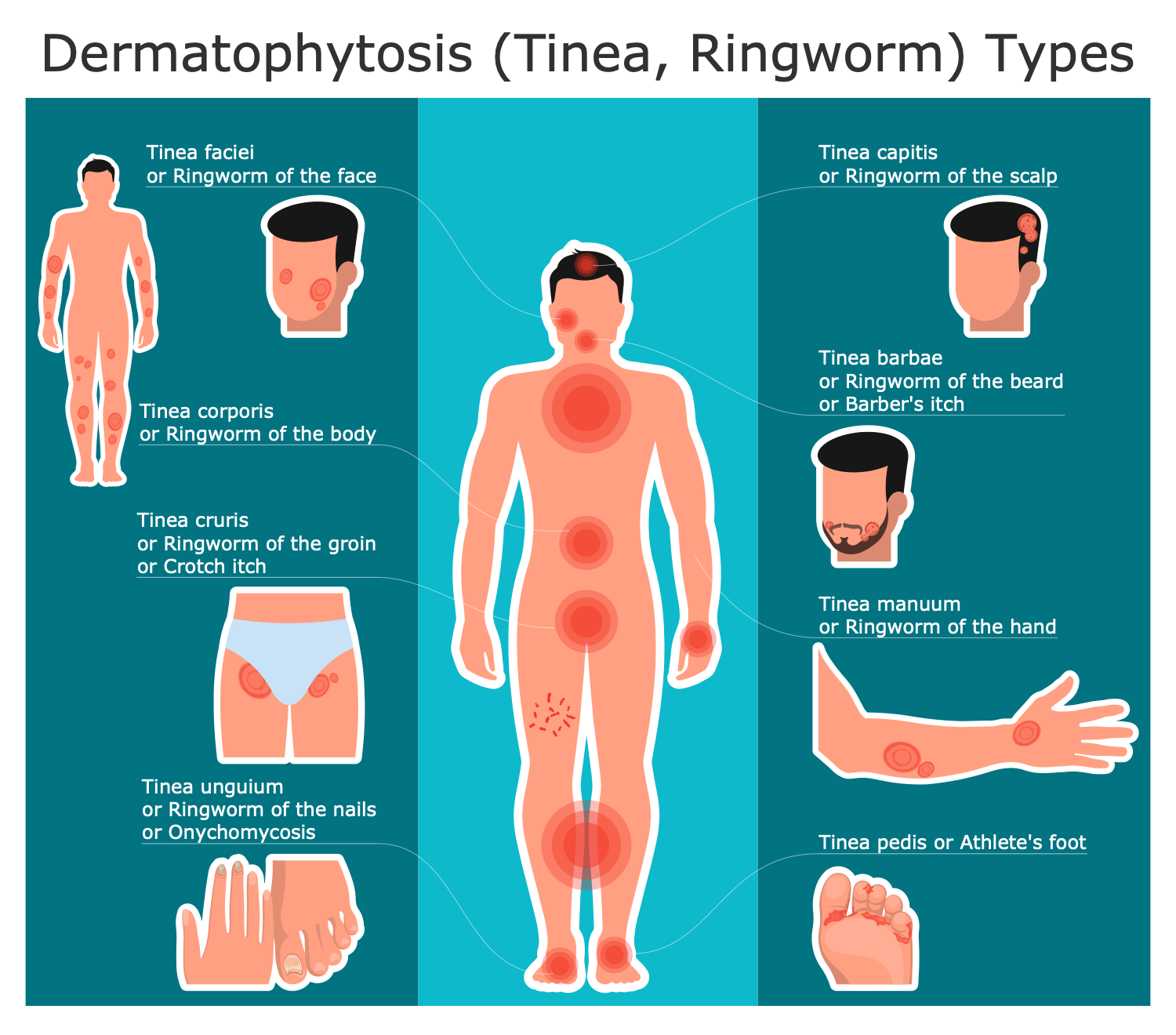
Dermatophytosis Types

Example 3. Dermatophytosis Types

The mycology infographics you see on this page were created in ConceptDraw DIAGRAM software using the Medical Mycology Solution. They successfully demonstrate the solution's capabilities and the professional results you can achieve. An experienced user spent 10-15 minutes creating each of these samples.

Use the powerful tools of the Medical Mycology Solution for ConceptDraw DIAGRAM software to create your own infographics and diagrams of any complexity fast and easy, and then successfully use them in your work activity.

All source documents are vector graphic documents. They are available for reviewing, modifying, or converting to a variety of formats (PDF file, MS PowerPoint, MS Visio, and many more graphic formats) from the ConceptDraw STORE. The Medical Mycology Solution is available for all ConceptDraw DIAGRAM users.

TEN RELATED HOW TO's:
Accounting is a cornerstone of any business, it’s basement. If you want to have a visual representation of your finance management, use audit flowchart symbols to document the money flow. Although some would say that accounting is boring, it is very a responsible duty. The audit flowchart symbols is supplied with ConceptDraw Audit Flowcharts solution as a vector objects library. Together with Conceptdraw Drawing capabilities it forms the helpful tool for audit process planning and setting the steps of audit by designing audit flow charts. Audit Flow charts are used to organize fiscal information tracking process as well as in accounting, finance and investment management.Audit Flowchart Symbols
Picture: Audit Flowchart Symbols
Related Solution:
Data structure diagram (DSD) is intended for description of conceptual models of data (concepts and connections between them) in the graphic format for more obviousness. Data structure diagram includes entities description, connections between them and obligatory conditions and requirements which connect them. Create Data structure diagram with ConceptDraw DIAGRAM.Data structure diagram with ConceptDraw DIAGRAM
Picture: Data structure diagram with ConceptDraw DIAGRAM
Diagramming is an astonishing way to visualize business processes. The list of the most common business process flowchart symbols is quite long starting from basic flowcharts, continuing with SIPOC diagrams. Business process modeling was never easier than now, with special ConceptDraw Business Process Mapping solution. To carry out all professional standard requirements for business processes mapping, it is necessarily to follow the special graphical notations. ConceptDraw Business Process Mapping solution offers an exhaustive suite of tools to aid business process mapping. There are three vector libraries SIPOC Diagrams, Business Process Flowcharts, and Swim Lanes that contains totally more than 50 symbols of standard BPM notations. This is all that professionals need to effectively evaluate and manage quality in business processes.Business Process Flowchart Symbols *
Picture: Business Process Flowchart Symbols
Related Solution:
If you need to describe some process, diagramming is a perfect tool for almost any imaginable purpose. The set of the most commonly used flow charts symbols is quite wide and includes symbols for operations, processes, data inputs and outputs. You can see the full list of all the symbols used for flowcharting in Flowcharts solution from Diagrams area in ConceptDraw Solution Park. A flow chart is often used for visual representation of a sequential process flow. The flowchart approach to any process is to divide it into some sequential actions. What makes a flow chart so popular and clear to make out is the set of standard flowchart symbols that has the same reading independently from processes described with their applying. The current drawing represents the vector library containing the pack of standard flowchart symbols. This library is supplied with ConceptDraw Flowcharts solution.Flow Chart Symbols
Picture: Flow Chart Symbols
Related Solution:
A flowchart is a simple but very functional tool when it comes to understanding a workflow or to removing unnecessary stages from a process. When drawing flowcharts, keep in mind that there are four common types of flowcharts, like document flowcharts and data flowcharts that show control over a data or document flow over a system. To show controls on a physical level, use system flowcharts. In addition, to show controls in a program, you can draw a program flowchart. This flowchart diagram represents the piece of an article editing process, that involves the author and editor. It was created using the Basic Flowchart notation that consists from the basic flowchart symbols. The start and the end of the process are indicated with "Terminator" symbols. The "Process" symbols show the action steps consisting from making edits and searching for a compromise, when the author does not agree with the suggestions of the editor. The "Process" symbol is the general symbol in process flowcharts. The "Decision" symbol indicates a branching in the process flow. There are two branches indicated by a Decision shape in the current flowchart (Yes/No, Disagree/Agree). This basic flowchart can be used as a repeating unit in the workflow diagram describing the working process of some editorial office.Types of Flowcharts *
Picture: Types of Flowcharts
Related Solution:
Use ConceptDraw DIAGRAM diagramming and business graphics software to draw your own flowcharts of computer algorithms.Process Flow app for macOS *
Picture: Process Flow app for macOS
Related Solution:
The ConceptDraw Flowchart component includes a set of samples and templates. This geathered as flowchart maker toolbox which focused on drawing flowcharts of any industry standards.Flowchart Components
Picture: Flowchart Components
Related Solution:
Data flow diagrams are the graphical tool, used in the visualization of data flow of some data processing systems. It is the valuable process modeling tool. Also designing DFD is the important component of the initial part of any information system development project. The standard symbols are used to represent the interaction of a system components and how various kinds of components influence on data flow. The ConceptDraw Data Flow Diagrams solution is design to assist professional software engineers in making DFDs according to Gane and Sarson, and Yourdon and Coad notations. Do you imagine yourself as a successful IT specialist? To your mind, they all use data flow diagram examples to learn and to get inspired. Aren’t you still with us?Data Flow Diagram Examples *
Picture: Data Flow Diagram Examples
Related Solution:
ConceptDraw DIAGRAM is a world-class diagramming platform that lets you display, communicate, and present dynamically. It′s powerful enough to draw everything from basic flowcharts to complex engineering schematics. Video tutorials on ConceptDraw products. Try it today!Business  Process Mapping — How to Map a Work Process *
Picture: Business Process Mapping — How to Map a Work Process
Related Solutions:
Event-Driven Process Chain Diagrams for improvement throughout an organisation. ConceptDraw DIAGRAM - software that reduces the time needed to create a business process model.Graphical Symbols to use in EPC diagrams *
Picture: Graphical Symbols to use in EPC diagrams
Related Solution:
ConceptDraw
DIAGRAM 18