DFD Flowchart Symbols
A Data Flow Diagram (DFD) is a graphical technique which allows effectively model and analyze the information processes and systems. DFD visualizes the flow of data and neatly represents the information processing in a process depending on the inputs and outputs, lets illustrate and analyze the work of a whole system and also its individual parts. DFDs display where the data are stored, from where they are come and where they go to. Often the DFD is created as a detailed plan for the further creation of a system.
DFDs are ideal tool for modeling processes, describing business events, interactions and functional requirements, for demonstration and explaining the course and passage of information in a process, and also for structured design and displaying physical systems involving data storage and transfer.
There are two types of Data Flow Diagrams:
- physical DFDs - which describe how a system works or will be work when implemented, and include involved people, files, hardware, storage centers and other elements;
- logical DFDs - which display the necessity of certain operations and activities for transferring the data from point A to point B.
The ability to fast and easy create the DFDs is made possible with Data Flow Diagrams solution from the Software Development area of ConceptDraw Solution Park. For designing the Data Flow Diagrams are used simple DFD flowchart symbols which are connected each other by arrows depicting the data flow from one step to another.
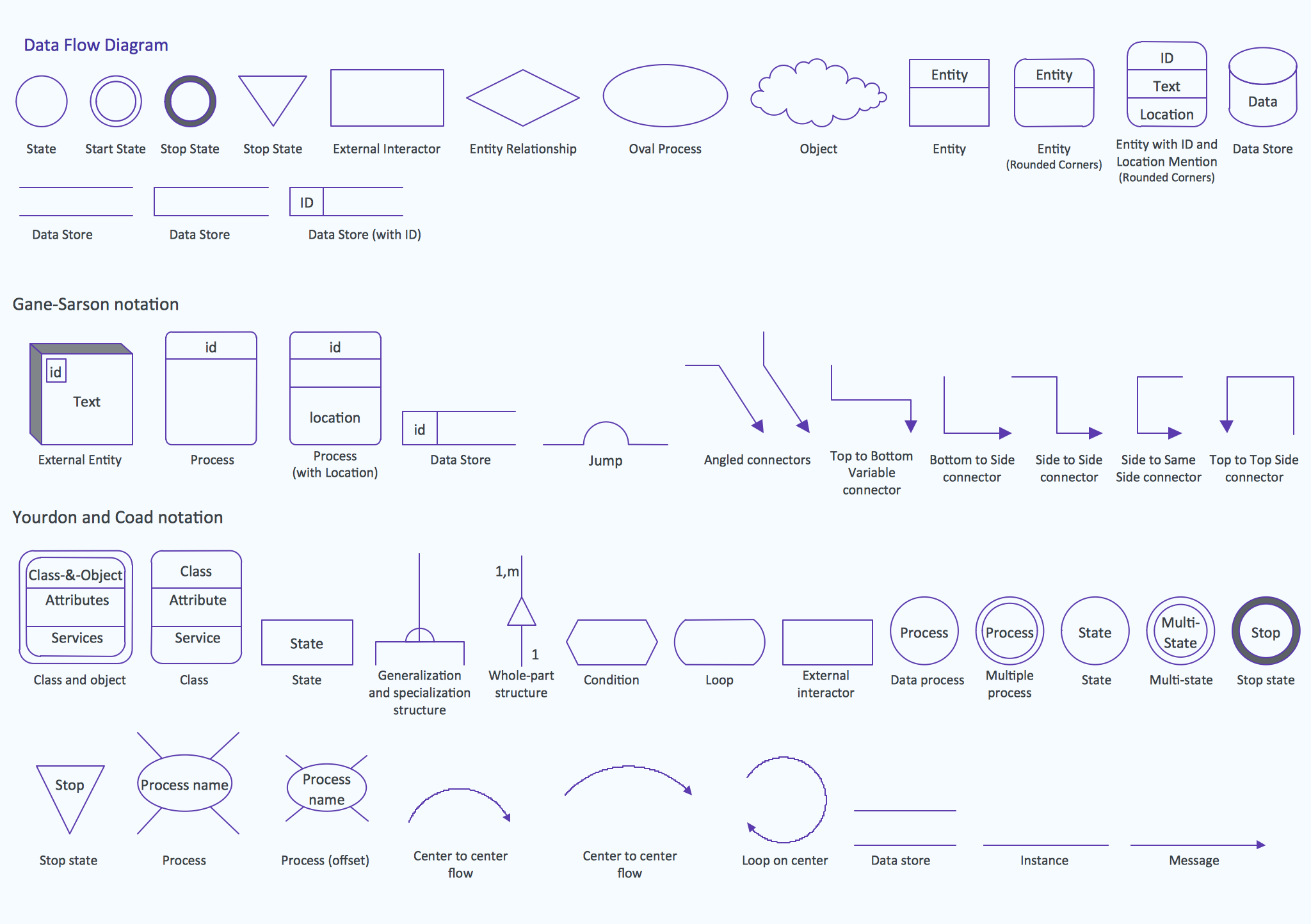
The set of all commonly used symbols for DFDs is comprehensible for all analysts and users thanks to the standardized notation systems: Gane/Sarson and Yourdon/Coad notations.
When designing the DFDs, use the following major objects:
- Process object - represents a task which processes the data within application or performs actions on their base.
- Multiple Process object - represents the set of sub-processes.
- Data Flow object - represents the data movement within the application, the arrows depict direction of this movement.
- Data Store object - represents where the data are stored.
- External Entity object - represents the entity outside the application which interacts with this application via entry point.

Example 1. DFD Flowchart Symbols
All these and many other DFD flowchart symbols are offered by 3 libraries of the Data Flow Diagrams solution and allow easy analyze and devise the data flows for any business process or a system:
- Data Flow Diagrams library contains 15 symbols for DFDs;
- Gane-Sarson Notation library contains 12 symbols of Gane-Sarson DFD notation;
- Yourdon and Coad Notation library 22 symbols of Yourdon-Code DFD notation.
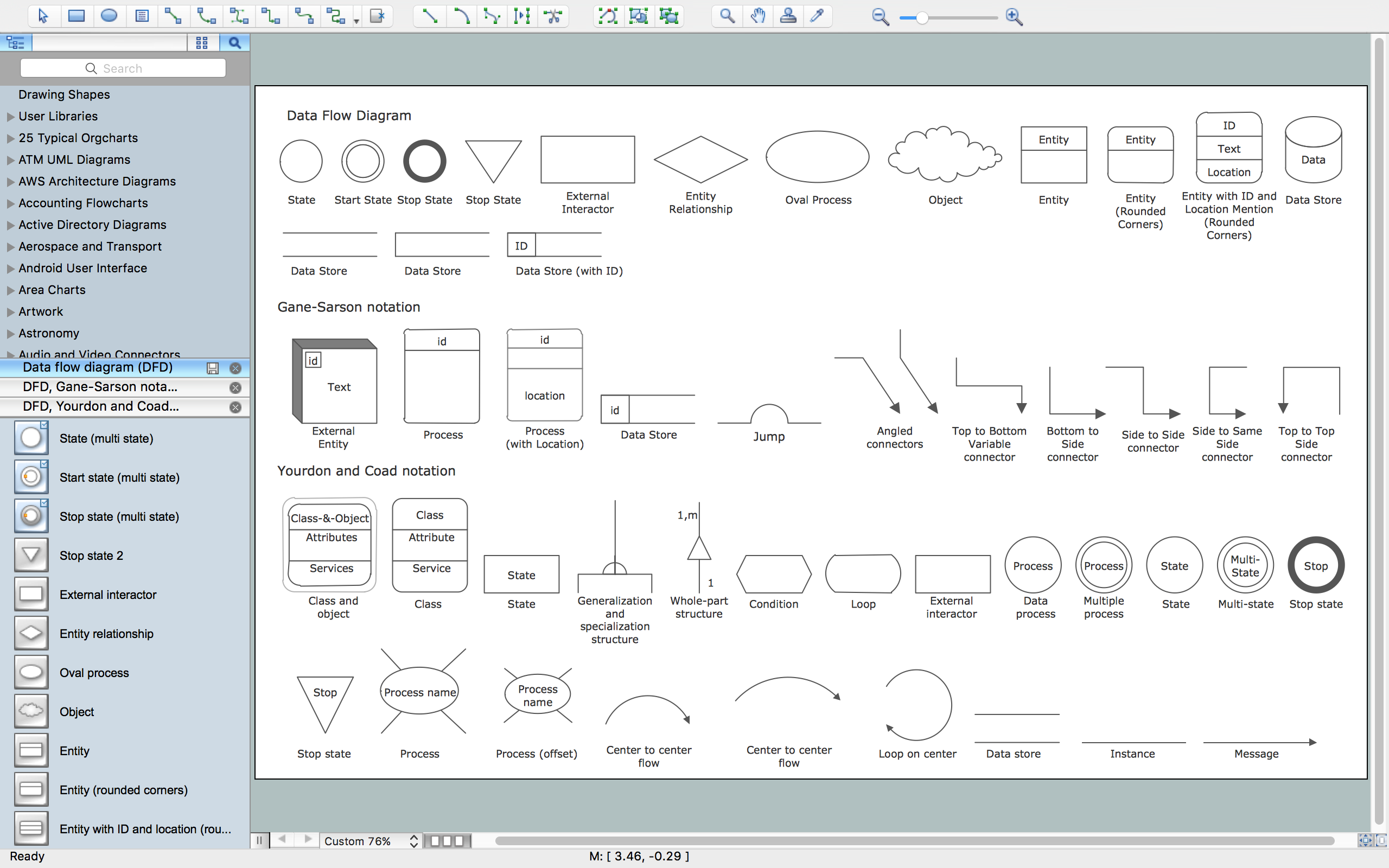
Example 2. Data Flow Diagram Library Design Elements
The ConceptDraw DIAGRAM makes the DFDs diagramming process easy and efficient. To design any Data Flow Diagram in a few clicks, follow the next simple steps:
- drag-and-drop desired icons from the libraries to your document and type the text;
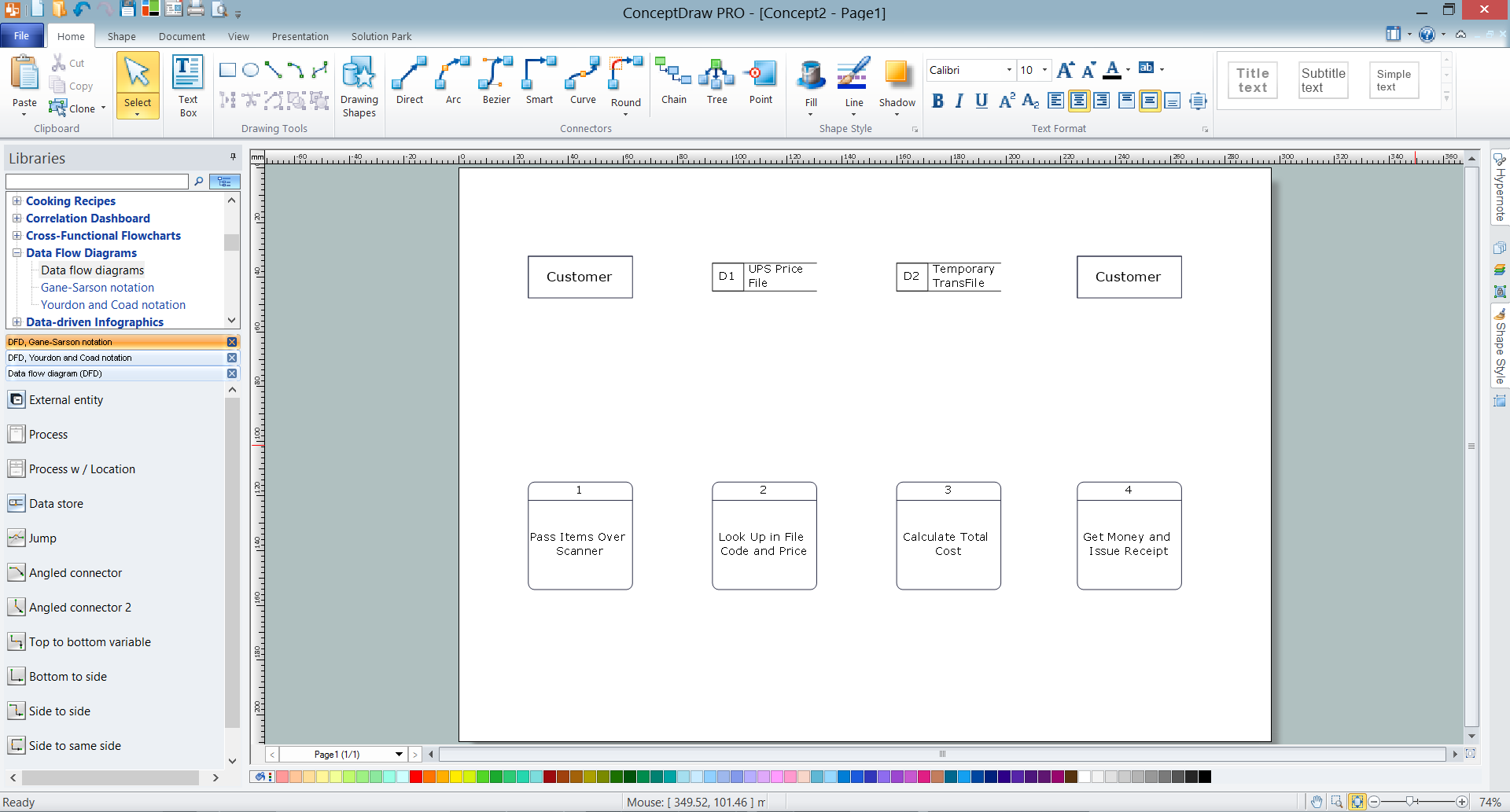
Example 3. Adding objects to DFD and typing text
- connect the objects with ConceptDraw connector tools from the Home toolbar or place connector arrows from the libraries to display the data flow;
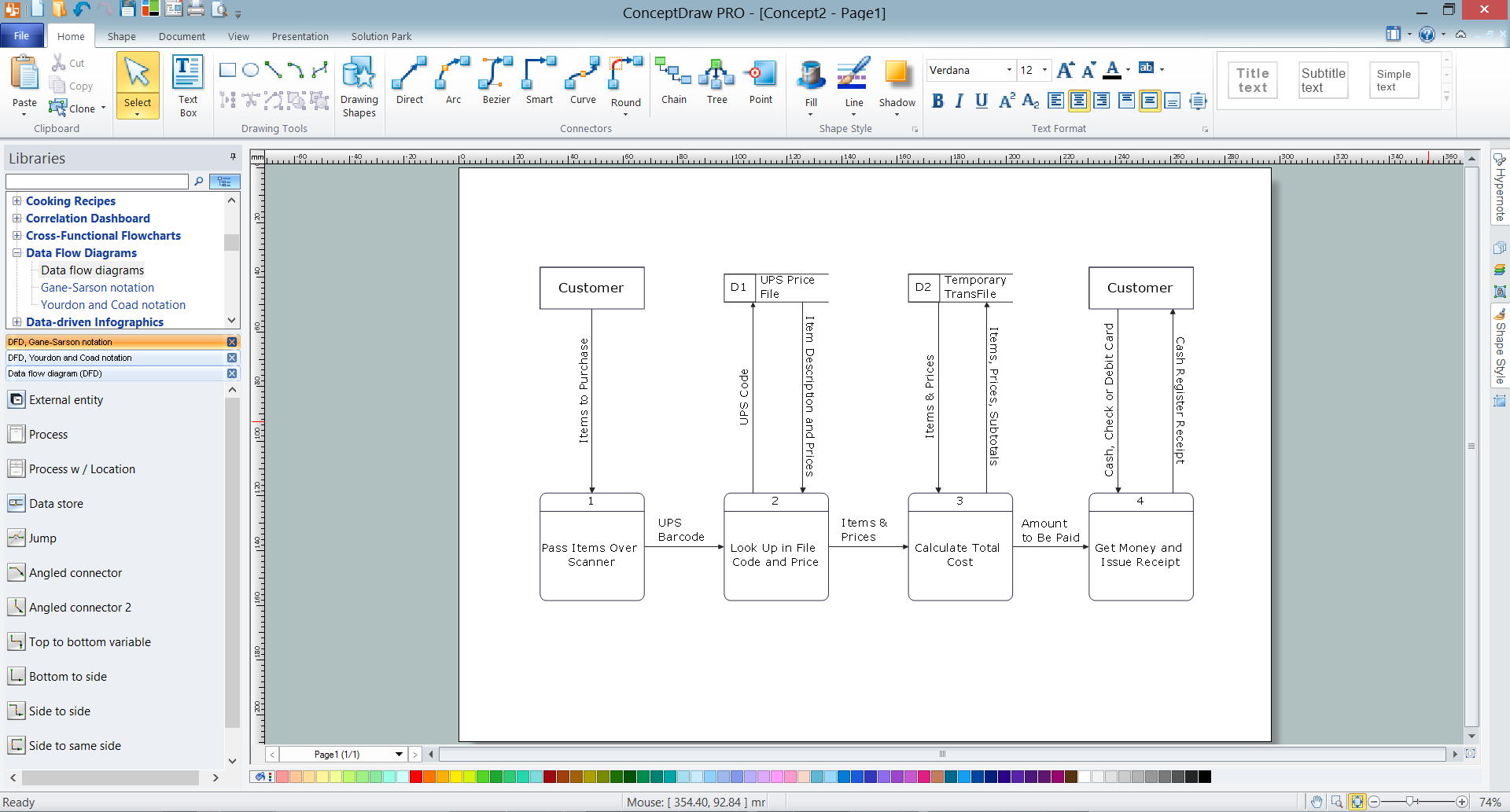
Example 4. Adding connectors to DFD
- resize and format the objects, add background color according to your taste.

Example 5. Data Flow Diagram

The Data Flow Diagrams solution includes also the set of predesigned templates which make easier drawing process of Data Flow Diagrams.

Example 6. Data Flow Diagram Template
All templates and also collection of DFD samples are available from ConceptDraw STORE and can be used and changed according to your needs.
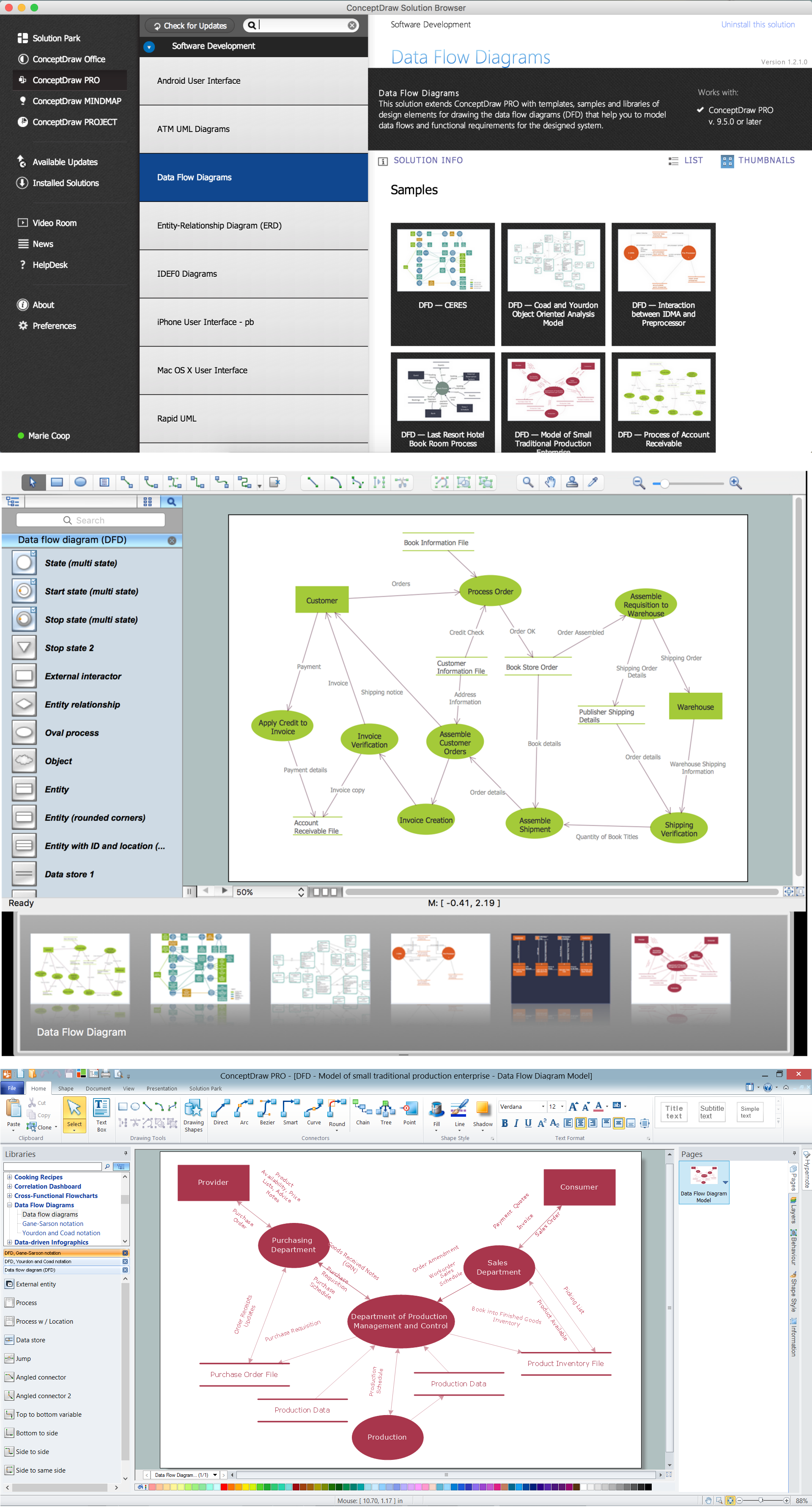
Example 7. Data Flow Diagrams Solution
The Data Flow Diagrams is a powerful professional tool for effective modeling the data flows, designing the data-oriented and process-oriented models, creating a lot of various types of diagrams of any complexity - Data Flow diagrams, Data Process diagrams, Data Flowcharts, Structured Analysis diagrams, Information Flow diagrams, and others.
Any Data Flow Diagram designed in ConceptDraw DIAGRAM can be then easy printed to share with colleagues, exported to various formats, including PPT, PDF, MS Visio, HTML, and many other graphic formats.

TEN RELATED HOW TO's:
Risk Diagram (PDPC) - ConceptDraw OFFICE suite is a software for Risks Diagram making. This diagram identifies possible risks in accomplishing corrective actions. With the Risks Diagram, one analyzes each action separately in a tree of all actions and develops a preventive action in response of each potential obstacles or circumstances which may be a risk.
Picture: CORRECTIVE ACTIONS PLANNING. Risk Diagram (PDPC)
ConceptDraw DIAGRAM extended with Chemistry solution is effective for drawing various organic chemistry schemes, diagrams, illustrations thanks to the included collection of predesigned organic chemistry symbols
Picture: Organic Chemistry Symbols
Related Solution:
State Diagram UML of Online Store. This sample was created in ConceptDraw DIAGRAM diagramming and vector drawing software using the UML Class Diagram library of the Rapid UML Solution from the Software Development area of ConceptDraw Solution Park.
This sample shows the work of the medical shop and is used at the creation of the medical shop or pharmacy project, for understanding the process of shopping in the medical shop, for keeping purchases, for medical supplies.
Picture: UML Class Diagram Example - Medical Shop
Related Solution:
UML state machine's goal is to overcome the main limitations of traditional finite-state machines while retaining their main benefits. ConceptDraw is ideal for software designers and software developers who need to draw UML State Machine Diagrams.
Picture: State Machine Diagram
You need create a Sales Process Map? Use the ConceptDraw DIAGRAM software which is ideal for the sales process management, marketing and engineering thanks to the powerful Sales Flowcharts solution from the Marketing area of ConceptDraw Solution Park.
Picture: Sales Process Map
Related Solution:
In order to be successful, you have to promote your business on the market. One of the ways for planning this promotion is to create a social media DFD Flowchart which will contain all the details of your business strategy. Social media is a very influential tool, and it's a mistake to ignore it.
The following flowchart represents a best way to estimate social media posts, and gives a strategy of responses. This flowchart is designed in the format of cross-functional flowchart. With this format, we can divide the process into three distinct phases. This approach helps to generate well-considered and balanced response on social networks activities. Using ConceptDraw solution for Social Media Response, your reaction to social media posts will positively mirror the values and mission of your business.
Picture: How to Create a Social Media DFD Flowchart
Related Solution:
There are many tools to manage a process or to illustrate an algorithm or a workflow. Flowcharting is one of those tools. However, it may be difficult to show complex processes that require multiple attributes or several people in a simple flowchart, so a cross-functional flowchart would be a solution for that situation. To create such flowchart, group processes and steps to labeled rows or columns, and divide those groups with horizontal or vertical parallel lines. It is worth mentioning that there are different types of cross-functional flowcharts, like opportunity or deployment flowchart.
This diagram shows a cross-functional flowchart that was made for a trading process. It contains 14 processes, distributed through 5 lines depicting the participants who interact with the process. Also there are connectors that show the data flow of information between processes. The cross-functional flowchart displays a detailed model of the trading process, as well as all participants in the process and how they interact with each other. The lines in the flowchart indicates the position, department and role of the trading process participants.
Picture: Cross-Functional Flowchart
Related Solution:
A Data Flow Diagram (DFD) is a graphical technique which allows effectively model and analyze the information processes and systems. The ability to fast and easy create the DFDs is made possible with Data Flow Diagrams solution from the Software Development area of ConceptDraw Solution Park. For designing the Data Flow Diagrams are used simple DFD flowchart symbols which are connected each other by arrows depicting the data flow from one step to another.
Picture: DFD Flowchart Symbols
Related Solution:
UML Interaction Overview Diagram schematically shows a control flow with nodes and a sequence of activities that can contain interaction or sequence diagrams.
Picture: Interaction Overview Diagram
Use the set of special professionally developed swim lane flowchart symbols - single, multiple, vertical and horizontal lanes from the Swimlanes and Swimlanes BPMN 1.2 libraries from the Business Process Diagram solution, the Swim Lanes library from the Business Process Mapping solution as the perfect basis for your Swim Lane Flowcharts of processes, algorithms and procedures.
Picture: Swim Lane Flowchart Symbols
Related Solution: