Made with
ConceptDraw
DIAGRAM 18

IDEF9 Standard

IDEF9 method, as well as other IDEF methods, was developed in the framework of the BBC USA program on information integration for coordinated development (The Air Force Information Integration for Concurrent Engineering (IICE)). IDEF9 method is one of the methods, which constitute the technology of the work with existing information and knowledge. In particular, IDEF9 method (Business Constraint Discovery) is developed for calculation and analysis of conditions and limitations in business-systems. The main motivation for development of such method was the perception of the fact, that conditions and limitations, influenced on the enterprise structure, usually are poorly defined and studied. An organization can normally function (which frequently happens) without knowledge about conditions and limitations, which acts in its system, in other words, without knowledge about requirements of this system.Nevertheless, if there is a task to improve the functioning of the production system, to increase its effectiveness and adapt the enterprise to new market conditions, the knowledge about the enterprise system requirements is critically significant.

Each object of the production system has its own requirements, and their fulfillment affect the execution of the production task in general. Accordingly, if there is a necessity to change the system behavior (to increase the effectiveness or production) it is necessary to know which requirements of the system objects must be satisfied for this. As a result of using IDEF9 method, system requirements are specified and cataloged. Thus, it is always possible to check easily how much system requirements are satisfied and correspondingly to change work conditions for gaining the necessary result. By knowing the system requirements it is also possible to explain why at the moment the system works this way and how to improve its work. IDEF9 method is an indispensable tool of a business-engineer, as with its help is it possible to define how the system will work and which requirements will have to be satisfied for the system work accordingly to the project.

Accordingly to IDEF9 method, requirement is a kind of a connection between system parts, which must obligatory exist at the given conditions set (context). The condition is considered as fulfilled if all conditions of its existence in the given context are fulfilled. Requirement is a connection type, which can be established between system objects, between processes, between objects and processes, between processes and objects properties, etc.

Requirements are described by statements. An example of the requirement statement to objects: “Only heads of departments are authorized to sign waybills.” An example of the requirement statement of the process to objects: “Transportations are only allowed in the presence of a signed waybill” or “Credit giving out is only possible at monthly paying off the percents on the credit.” An example of the requirement statement of the process to object properties: “Maximum carrying capacity of the elevator is 500 kg.”

In that way, the system is represented in the view of a set of objects and processes, which have definite requirements for system functioning. Also into the system description the purpose of the work of this system is usually included. This is necessary for definition of only those requirements of objects and processes, which are important for execution of the considered task.At the system projecting the requirements define which rules, conditions, limitations and necessary connections the project must involve. The production system represents the set of objects, executing one or several functions under the influence of requirements for reaching the preset goal.

Requirements are divided into:

  • Inner (in), which influence inside the system;
  • Outer (on) which influence outside the system or which are managed outside the system;
  • Belonging to the system (of), which belong to the system and are controlled by it;
  • Intersystem (between), which connect systems between each other in the capacity of objects of a big system.

Also the requirements are divided into enabling and limiting in the context of the considered conditions. Surely, limiting requirements are more obvious and become apparent in the form of following problem symptoms: excess costs, low quality, terms increase, etc. Such symptoms are called evidence of existing of the requirements in a system.

The set of opinions, proving the necessity of definition and providing the requirement for system objects is called rationale for the requirement. The consequences of the influence of the requirement on the system are called effects of the requirements. Effects can be direct and indirect, intended and unintended, desirable and undesirable in the framework of the considered context.

It is necessary the sufficient number of evidence of requirements existence, otherwise the requirement will remain undefined. The effective definition of requirements and their management lets quickly identify requirements and react upon the typical industrial problems of requirements, listed below:

  • The cost of the requirement execution exceeds the requirement value;
  • An existing requirement does not correspond to the enterprise purposes anymore;
  • The requirement provokes unforeseen and undesired effects;
  • Objects of the system, responsible for the requirements fulfillment are incapable to provide the requirements fulfillment;
  • The requirement does not have an obvious mechanism of provision.

Also systems overloaded with outdated or inappropriate requirements lose productivity and waste resources on execution of these requirements.

Potential users of IDEF9 method are business owners, organization managers, system projecting and planning specialists and analysts. The knowledge of system requirements may help in Business Process Reengineering (BPR), Total Quality Management (TQM) and in strategic planning..

There is an example of the procedure of definition, confirmation and further improving of the requirement. The given procedure consists of following stages:

  1. Information collection (Collect) – implies the collection of data about the system and getting evidence of the requirement necessity.
  2. Classification (Classify) - definition of system conditions, objects, objects’ properties, processes and connection types.
  3. Hypotheses formation (Hypothesize) – selection of requirements-candidates, based upon received data and evidence.
  4. Requirement realization (Substantiate) – collection of examples for definition of the best requirement-candidate.
  5. Requirement check-up (Challenge) - checking-up of the requirement with the engagement of the interested persons.
  6. Requirement improvement (Refine) – modernizations, checkout, improvement of the requirement and adding details to the requirement characteristics.

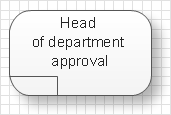
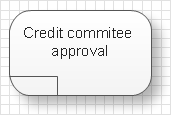
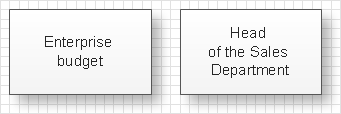
Accordingly to IDEF9 method requirements are displayed in the form of visual schemes. Requirements on the schemes are displayed by way of rounded rectangles, objects and processes in the form of rectangles. Connections between objects of the scheme are represented by way of lines. The connection, indicating at obliging circumstances, is represented in the form of a line with the black little circle at the end. There are also used junctions, which are shown on the scheme in the form of squares with the definition of the junction type: &, O, X.

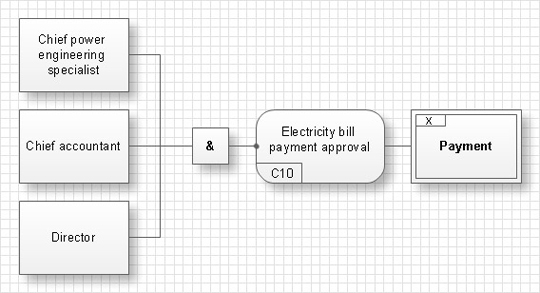
For example there is a following requirement: “An account for payment of consumed electricity must be signed by the head specialist of the power engineering, by the chief accountant and the head of the enterprise.” The corresponding scheme will have the following view:

Here the double-sided rectangle presents the context of a task, the rounded rectangle shows the requirement itself, and rectangles represent objects, which influence on the requirement execution. & junction shows that the requirement needs an influence of all objects, i.e. the account should be signed by each of the three faces.

Analogously it is possible to compose a scheme of the selection of requirements-candidates, a scheme, reflecting requirement effects and a scheme showing which requirements should be executed for reaching the general goal.

An effective management of changes is significantly facilitated by way of definition and documenting of business-requirements. The knowledge about the business-requirements which exist and how they interrelate between each other in the best way is insufficient sometimes. Nevertheless the requirements trigger, manage and bound the behavior of objects of the business-system and affect them so that the final goal is reached with more or less costs of resources and time. IDEF9 method is developed to help with definition and analysis of the requirements.

IDEF9 Standard *

NINE RELATED HOW TO's:
When describing any computer network, we imagine a set of devices and nodes, arranged in some way. Talking about network structures, we should distinguish physical and logical network topologies, as physical topology is about devices location and logical topology illustrates data flow. In the same time, they do not have to match, and some devices, such as repeaters, may have a physical star layout, but a bus logical topology. There are two main types of computer network topologies: Physical topology that show the physical organization of a network - equipment and types of connections. Star network topology involves a set of devices that is connected to a single hub (router). Ring network topology means that, devices connected according this topology have two connections, connecting with nearby devices to make a loop. Bus network topology is the topology presented at the current diagram. It is similar to a ring topology. The difference is that data moves up and down a linear connection, copying itself where network equipment works as bus-stations along the way. This network topology can be used for small network, or when adding an extra device into a network.Network Topologies
Picture: Network Topologies
Related Solution:
Wireless networking is useful visual tool for identification of all required equipment, and calculation the cost of creating or updating wireless computer networks. ConceptDraw DIAGRAM extended with Wireless Networks Solution from the Computer and Networks Area is the best wireless network diagramming software.Wireless Networking
Picture: Wireless Networking
Related Solution:
Any building project must respond to some requirements. Moreover, finding a drawing software for developing a waste water plan is significant. Designing plumbing plans may be difficult in the beginning, but practice makes perfect. Layout of plumbing fixtures and, kitchen equipment a is a very important part of the home's interior design. If you do not want to find out suddenly the bath in your kitchen, or stove in your bathroom, you need to pay due attention to this plan. ConceptDraw Building Plans libraries give you a number of vector objects. Using them you can quickly and professionally sketch a plan of kitchen or bathroom in proper scale and with objects depicting your desired equipment. Then your contractor never will confuse a bath with a stove and a washing machine with a toilet and your house will be really a home of your dreams.Building Drawing Software for Designing Plumbing
Picture: Building Drawing Software for Designing Plumbing
Related Solution:
A Venn diagram, sometimes referred to as a set diagram, is a diagramming style used to show all the possible logical relations between a finite amount of sets. Having ConceptDraw DIAGRAM software one allows anyone who cares for their drawings to look not only nice but also smart and professional.Venn Diagram Examples for Problem Solving. Chomsky Hierarchy
Picture:
Venn Diagram Examples for Problem Solving
Computer Science. Chomsky Hierarchy
Related Solution:
A requisition form is one of the documents used for accounting in different manufacturing processes. There are two main types of requisition: a purchasing requisition and material requisition and difference between them is significant. Creating a flowchart might help you in understanding all the details of accounting process. Flowcharts are a best visual method for dividing a large and complicated procedure into a several little clear pieces. The main value-ability of an effective flowchart is its simpleness. Material requisition flowcharts are used to document the process of relationships between the different departments and the purchasing department within an organization. The flow chart gives the step-by-step guide on how is carried out the procurement process of the materials necessary for the functioning of the organization. This type of flowchart along with many other business flowcharts, one can easy create using ConceptDraw Flowcharts solution.Material Requisition Flowchart
Picture: Material Requisition Flowchart. Flowchart Examples
Related Solution:
Block diagrams solution extends ConceptDraw DIAGRAM software with templates, samples and libraries of vector stencils for creating the block diagram. Create block diagrams, electrical circuit diagrams, schematics, and more in minutes with ConceptDraw DIAGRAM.Create Block Diagram *
Picture: Create Block Diagram
ConceptDraw DIAGRAM is a powerful diagramming and vector drawing software. Extended with Chemical and Process Engineering Solution from the Industrial Engineering Area of ConceptDraw Solution Park, it became the best Chemical Engineering software.Chemical Engineering *
Picture: Chemical Engineering
Related Solution:
ConceptDraw DIAGRAM is a powerful electrical design software. The Electrical Engineering solution from the Engineering area of ConceptDraw Solution Park allows you easy, quick and effective draw the professional looking electrical, circuit and wiring diagrams and schemes, maintenance and repair diagrams for electronics and electrical engineering, and many other types of diagrams.Electrical Design Software *
Picture: Electrical Design Software
Related Solution:
The best way to visualize the introduction to Cloud computing architecture is to create diagrams and schematics representing what is a cloud computing and how it works. For their design, we recommend to use a powerful ConceptDraw DIAGRAM diagramming and vector drawing software supplied with Cloud Computing Diagrams solution from the Computers and Network area of ConceptDraw Solution ParkIntroduction to Cloud Computing Architecture *
Picture: Introduction to Cloud Computing Architecture
Related Solution:
ConceptDraw
DIAGRAM 18