Workflow Diagram Software Mac
Workflow diagramming
Business Process Model and Notation, or BPMN, is well-known to be a graphical representation for specifying the business processes in a business process model, being developed by the Business Process Management Initiative and maintained by the Object Management Group. The Business Process Model and Notation is simply a standard for business process modelling, providing a graphical notation for specifying the business processes in a Business Process Diagram, based on a flowcharting technique very similar to activity diagrams from Unified Modelling Language, also known as UML. The aim of using BPMN is to support the business process management within some particular organization. It can be used by both business users as well as technical users in a way of providing a notation that is intuitive to the business users, yet able to represent complex process semantics.
The primary goal of Business Process Model and Notation is to provide a standard notation readily understandable by all business stakeholders, which includes the business analysts creating and refining the processes as well as the technical developers responsible for implementing these processes. The business managers are usually also involved in such processes, monitoring and managing them. Nowadays, there are a few competing standards for such business process modelling languages used by the modelling tools and processes. In 2014, BPMN was complemented by a new standard for building the so called “Decision Model and Notation standard” — the decision models.
BPMN was developed in order to support only the concepts of modelling, applicable to business processes, while other types of modelling done by organizations for non-process purposes were out of scope for BPMN. The examples of modelling excluded from BPMN are, nowadays, the organizational structures and the functional breakdowns, as well as “data models”. BPMN is known to be used to show the flow of data, such as messages, as well as the association of the data artifacts to activities, having its models consisting of the simple diagrams constructed from a fixed set of the design symbols. Using such models means simplifying the understanding of the business activities' flow and process for both business developers and business users. There are four basic element categories, used in BPMN, which are flow objects (such as events, activities and gateways), connecting objects (message flow, sequence flow, association), swim lanes (lane, pool), and artifacts (group, data object, annotation), used for enabling the creation of the simple business process diagrams, which also permit making new types of flow objects in order to make the diagrams more understandable.
The weaknesses of BPMN can relate to support for routine work, confusion and ambiguity in sharing BPMN models, support for knowledge work and support for decision-making business rules. Despite of the mentioned weaknesses, the Business Process Models are very widely used, especially in a way of the business process workflow diagrams, using the ConceptDraw DIAGRAM business process workflow diagrams software, that works on Mac providing the design objects as well as the pre-made examples of already existing business process workflow diagrams, such as the one, explaining the business process of purchasing the goods, when the money’s received and the manufacturing process takes place, getting through quality assurance to make sure that the final product is good enough for the customer. Going through “inventory” stage, the goods appear to be packed and shipped to the customer. The distributing process can involve logistic procedures, such as storing the produced goods at the warehouses and delivering them locally. In case the goods go abroad, they might be checked as the customs clearance point, but after being confirmed as safe at the customs and after paying all taxes, they can be simply taken by the client if he prefers to pick them up himself, meeting the requirements of his contract with the shipper.
ConceptDraw DIAGRAM is a Workflow Diagram Software, which can be used both on Windows and Mac, being a great alternative to MS Visio, but for Mac OS. Once you distil a particular business activity into a set of linear, then you can call this self-contained process a “workflow” one. This term is used for describing the transformation of materials through goods and services provided to a customer base.
The mentioned “workflows” can represent the abstract concepts as well as the development phases of a system, and, of course, the real-time processes, for example the processes of production or manufacturing, customs clearance, delivery or distribution, storing at the warehouses on the way to the customer, etc. The described representations all can be displayed in the way of creating the workflow diagram as well as the process flow diagram.
ConceptDraw DIAGRAM software is known to be the best Mac software for drawing such business process as well as workflow diagrams within any business activity. Rich with a set of samples and templates of the pre-made diagrams, having also the specific features for drawing such diagrams faster, makes this software very comfortable in use for its users to draw their own great looking as well as smart looking workflow diagrams.

Pic.1 Workflow Diagram Software Mac OS X
Using the ConceptDraw DIAGRAM professional Mac OS X software for drawing workflow diagram means ensuring yourself in getting the final professionally looking result within only a few hours, or even minutes, depending on the fact if you use the available for all ConceptDraw DIAGRAM users “Workflow Diagrams solution” with its stencil libraries and templates or not as well as how familiar you are now with the mentioned application. The solutions from this site can be also found in the ConceptDraw STORE application, as this tool was developed especially for the ConceptDraw DIAGRAM users to make their work with drawing the flowcharts, charts, diagrams, maps, schemes and other schematics, including the business process workflow diagrams, in a very short period of time getting a very good looking result.
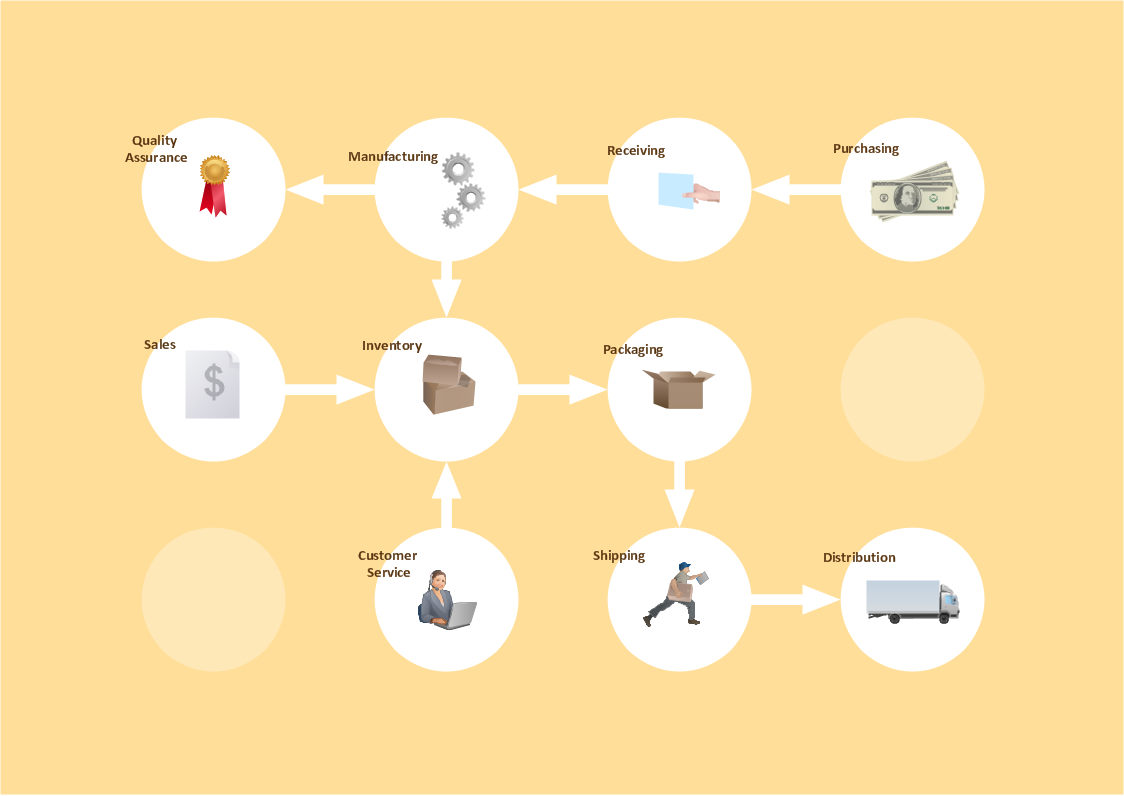
Pic.2 Workflow diagram sample: business process.
This example shows a workflow diagram that clearly illustrates stages a business consists of and relations between all parts of business.
No other workflow software Mac OS X gives you all this:
- Design and document using a wide range of pre-drawn workflow symbols and smart connectors.
- Great value for the money, only $199 dollars.
- Free technology support.
- Free examples and built-in templates to help you draw workflow rapidly.
See also Samples:
TEN RELATED HOW TO's:A Home Area Networks (HAN) is a type of local area network that is used in an individual home. The home computers can be connected together by twisted pair or by a wireless network. HAN facilitates the communication and interoperability among digital devices at the home, allows to easier access to the entertainments and increase the productivity, organize the home security. This example was created in ConceptDraw DIAGRAM using the Computer and Networks Area of ConceptDraw Solution Park and shows the home network diagram.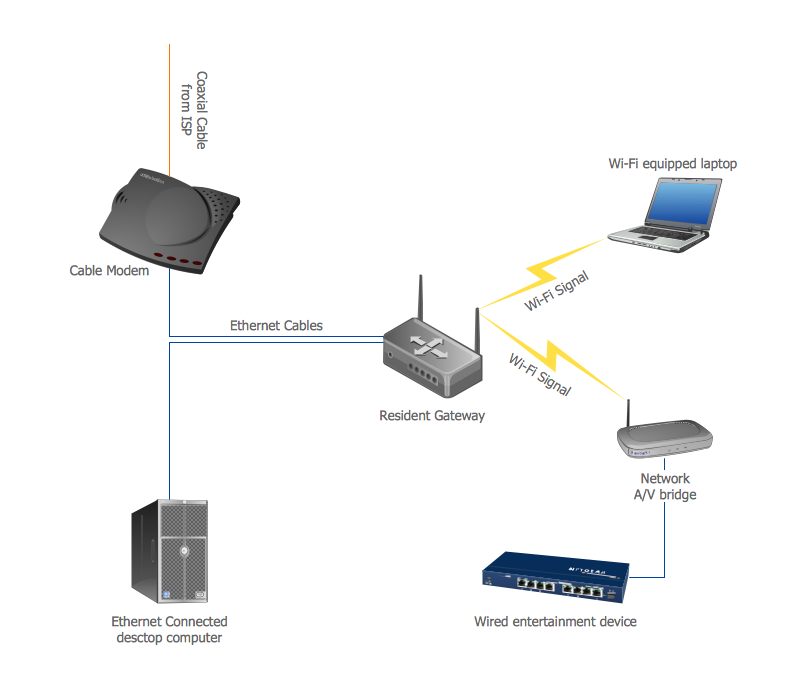 Picture: Home area networks (HAN). Computer and Network ExamplesRelated Solution:The vector stencils library COM and OLE from the solution Software Engineering contains 15 symbols of the COM and OLE objects for ConceptDraw DIAGRAM software.
 Picture: COM and OLE DiagramProcess mapping helps with sharing business results and reorganizing workflow. In almost every case, after creating a sales process flowchart the steps that are redundant become obvious for a manager. It's easy to find a flowchart examples that will help in developing one for your business. This sales process flowchart consists of a sequence of steps that represent a simple sale process. Each step is shown graphically by a rectangle representing processing steps or an activity, or a diamond representing a decision. These rectangles are linked by arrows, that indicate the direction of the sales workflow. ConceptDraw Sales Flowcharts solution delivers a the full set of classical flowchart notation symbols, along with sales-related icons and pictograms.
 Picture:Sales Process FlowchartFlowchart ExamplesRelated Solutions:Flow chart is a diagrammatic representation of an algorithm and essential part of planning the system. Flow charts are widely used in technical analysis and programming for easy writing programs and explaining them to others. So, one of the most popular type of flow charts is Technical Flow Chart. Technical Flow Chart can be drawn by pencil on the paper, but it will be easier to use for designing a special software. ConceptDraw DIAGRAM diagramming and vector drawing software extended with Flowcharts Solution from the Diagrams Area of ConceptDraw Solution Park will be useful for this goal.
 Picture: Technical Flow ChartRelated Solution:The ConceptDraw DIAGRAM is a best flow chart tool for the job. The samples and templates included in the basic set allows users to draw any type of a flowchart. The vector stencils created by designers give ability to draw great-looking flowchart. Flowcharts give to users the ability to represent structural data visually.
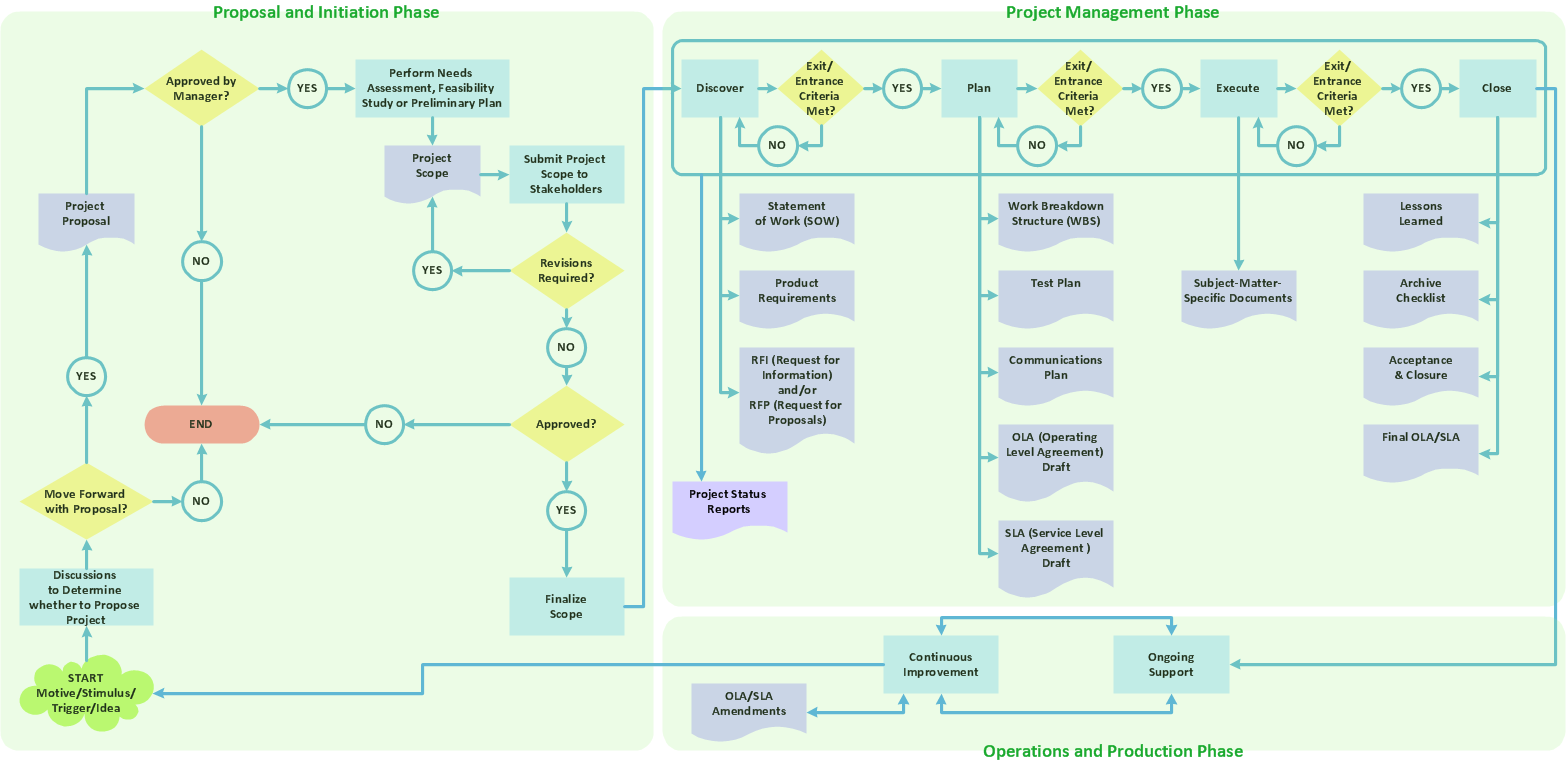 Picture: Use the Best FlowChart Tool for the JobRelated Solution:A Process Flow Diagram (PFD) is a diagram which shows the relationships between the main components in a system. Process Flow Diagrams are widely used by engineers in chemical and process engineering, they allows to indicate the general flow of plant process streams and equipment, helps to design the petroleum refineries, petrochemical and chemical plants, natural gas processing plants, and many other industrial facilities. ConceptDraw DIAGRAM diagramming and vector drawing software extended with powerful tools of Flowcharts Solution from the Diagrams Area of ConceptDraw Solution Park is effective for drawing: Process Flow Diagram, Flow Process Diagram, Business Process Flow Diagrams.
 Picture: Process Flow DiagramRelated Solution:The Event-driven Process Chain ( EPC ) Diagrams allows users to present business process models in terms of work flows. The EPC diagram can shows various vayes how to reach positive company performance.
 Picture: EPC - Business Processes in Terms of Work FlowsRelated Solution:To draw SysML diagrams use the ConceptDraw DIAGRAM software extended with the Rapid UML solution from the Software Development area of ConceptDraw Solution Park.
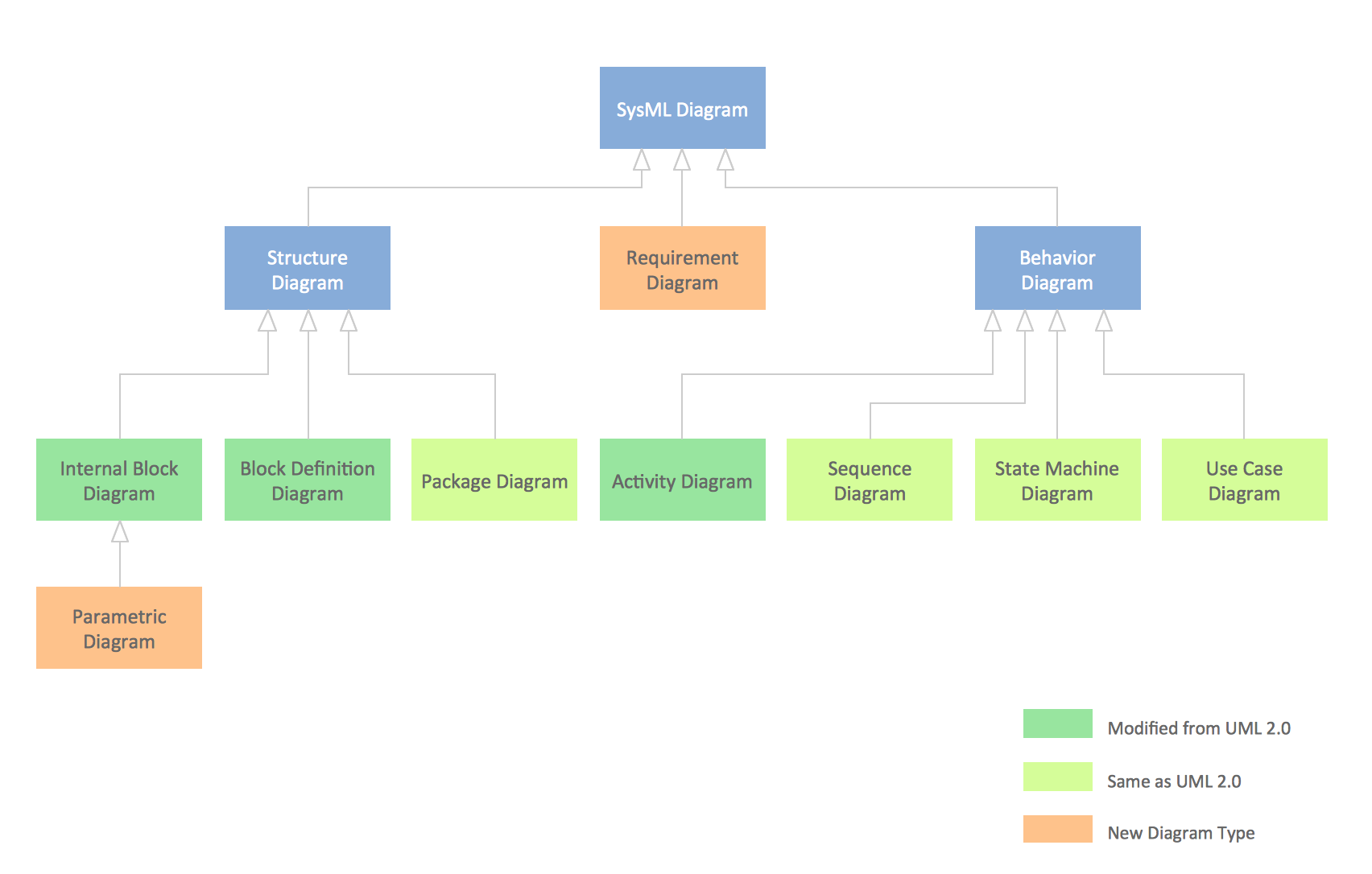 Picture: SysML DiagramRelated Solutions:Event-Driven Process chain Diagrams for improvement throughout an organisation. ConceptDraw DIAGRAM - software that reduces the time needed to create a business process model.
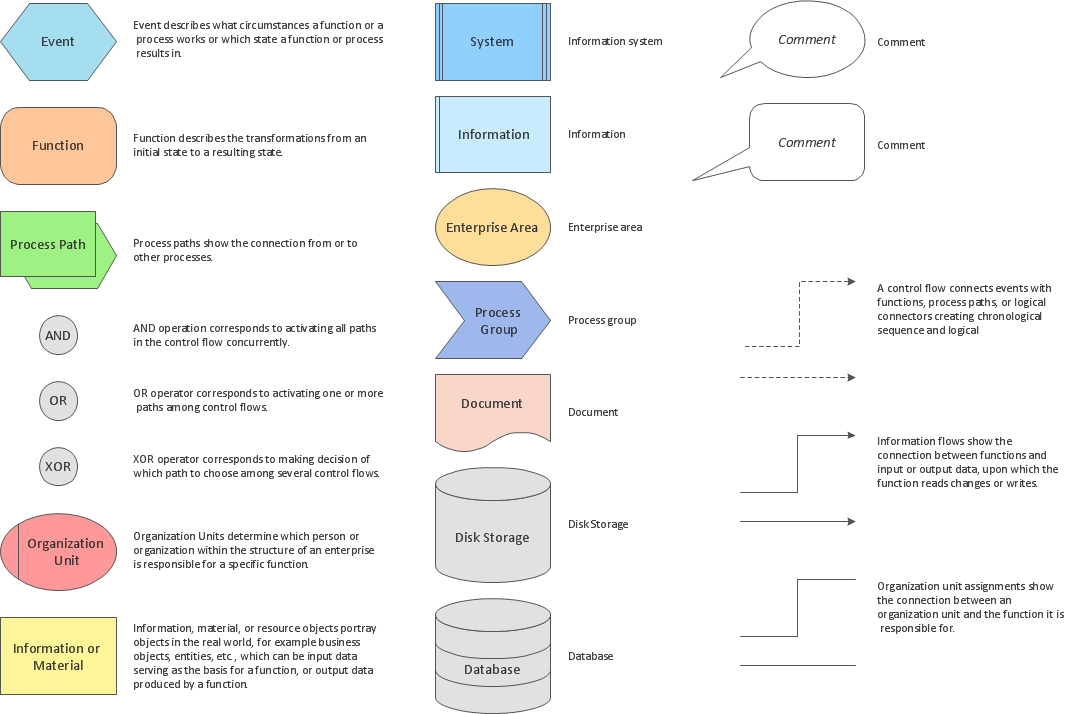 Picture: Software for Drawing EPC DiagramsRelated Solution:Business graphic applications show a special knowledge representations and include many features for creating schematic pictures. These graphic tools are known as flowchart maker or flowchart maker software.
 Picture: Flowchart MakerRelated Solution:ConceptDrawDIAGRAM 18