Made with
ConceptDraw
DIAGRAM 18

Business process Flow Chart —
Event-Driven Process chain (EPC) diagrams

Event-Driven Process Chain (EPC)

A flowchart called “event-driven process chain” (also known as simply “EPC”) is used for modelling the business processes, configuring a so-called “enterprise resource planning” implementation as well as for improving the business processes. The usage for controlling the work share, including controlling the instances of the autonomous workflows, is possible in so-called “workflow management”, but they are not yet implemented.

The “event-driven process chain” method was developed by Mr. Scheer in the early 1990s for laying out the business process workflows. This method can be used by many different companies for the purpose of modelling, analyzing and redesigning any business processes going on within this business field of activity. Both events and functions mentioned in such “event-driven process chain” graph provide many different connectors, letting the business processes execute in an alternative and parallel way. There are no restrictions appearing to exist on the structures of EPCs, but non-trivial structures can involve parallelism and have ill-defined execution semantics. Once they are as we described, then they resemble “UML activity diagrams”.

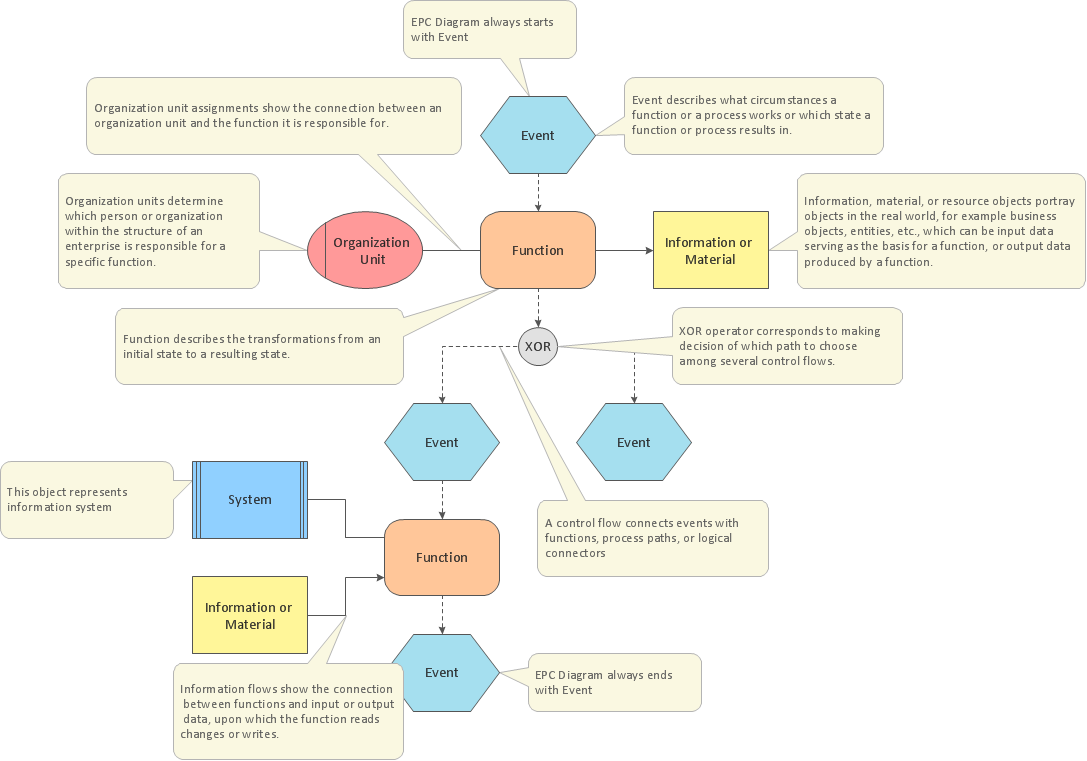
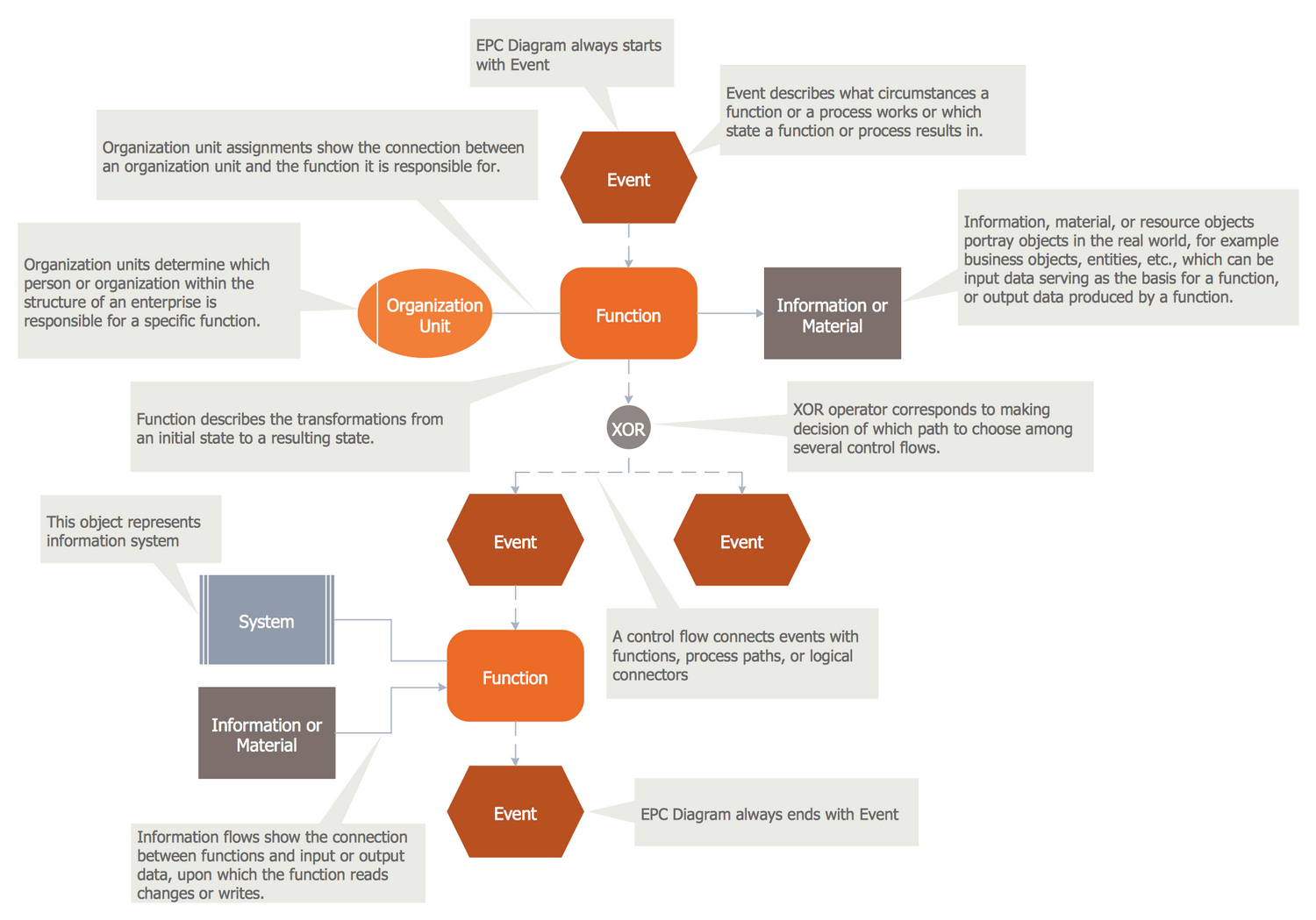
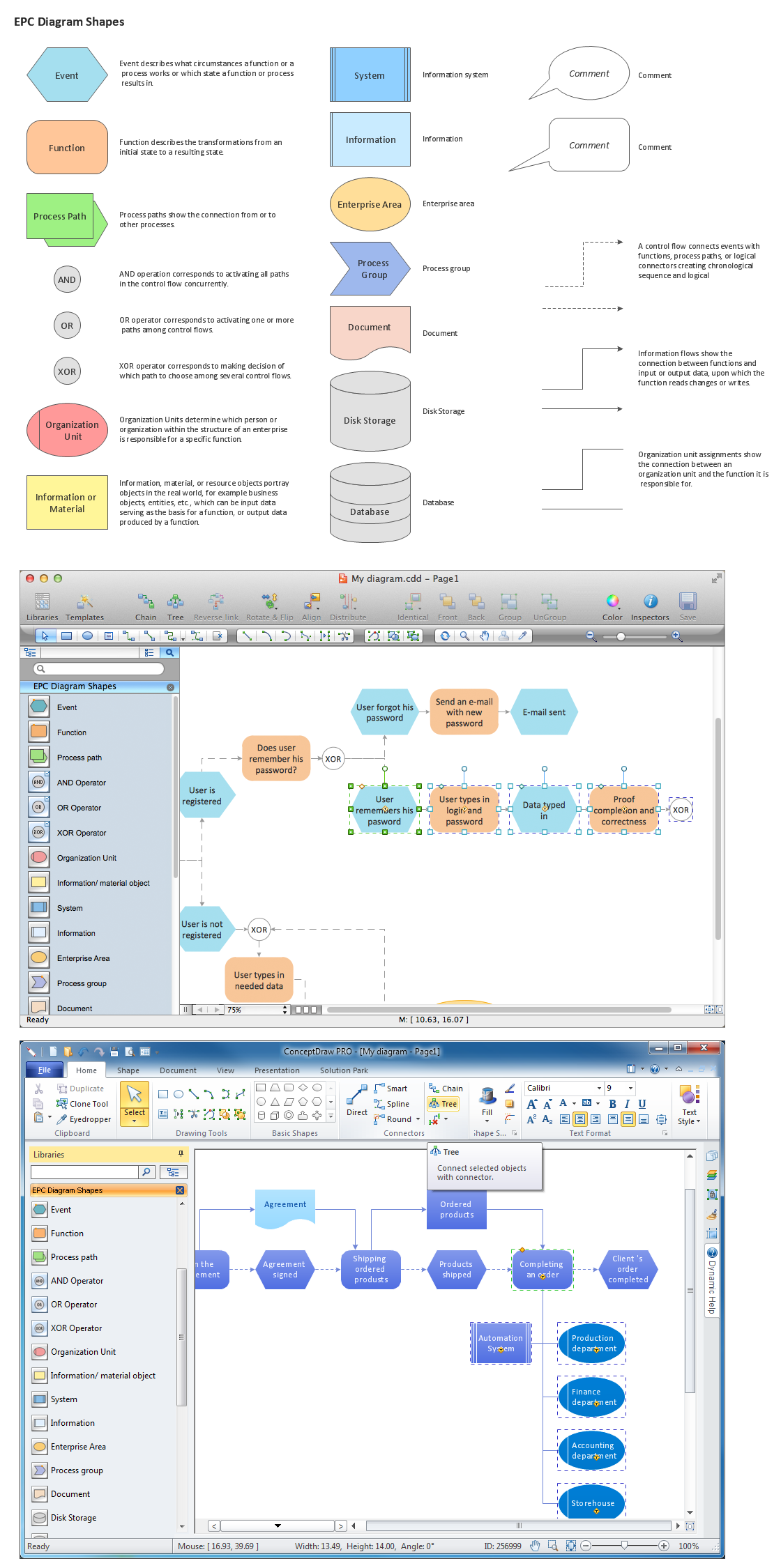
There are many elements which are used in the “event-driven process chain diagrams”, which are “events” (passive elements that describe under what circumstances a function or a process works or which state a function or a process results in), “functions” (active elements that model the tasks or the activities within one company and also describe the transformations from an initial state to a resulting state), “Organization units” (determine which organization within the structure is responsible for which function), “logical connectors” (show the logical relationships between elements in the control flow) and many other.

There are in total three kinds of logical relationships, which are defined in event-driven process chains. One of these relationships is called “Branch and Merge”: it is used when there is a need to make a decision of which path to choose among a few control flows. A branch may have one control flow (which is usually incoming) as well as two or more so-called “outgoing” control flows. In case this condition is fulfilled, a branch activates only one of the “outgoing” control flows and it also deactivates the others. The counterpart of a branch is a “merge”, which may have two or more “incoming” flows and one “outgoing” control flow.

Another kind of relationships within a logical structure can be “Fork and Join” correspond which is meant to be used for activating all paths in the control flow. A “fork” may have only one incoming control flow as well as two or more outgoing control flows. Once the condition within “Fork and Join” correspond relationship is fulfilled, then a “fork” activates all of the “outgoing control flows” which go in parallel to each other. A join may have two or more “incoming control flows” as well as one “outgoing control flow”. In the “Event-driven Process Chain diagram” it never matters in what way the concurrency is achieved. A “fork” in the EPC is represented by an opening “AND” connectors and a “join” is represented as a closing “AND” connectors.

The third kind of relationships is “OR”, which corresponds for activating one or more paths among the control flows. An opening “OR” connector may have one “incoming control flow” and more than one “outgoing control flows”. Once the condition is fulfilled, an opening “OR” connector activates one or more control flows and it deactivates the rest of them. The counterpart to it is the closing “OR” connector. Once at least one of the “incoming control flows” is activated, then the closing “OR” connector will pass the control to the next element after it.

A “control flow” is another kind of relationships and it is used for connecting the events with functions, process paths or logical connectors creating a chronological sequence as well as logical interdependencies between them. A “control flow” is usually represented as a dashed arrow. “Information flows” though show the connection between functions as well as “input” or “output” of data. “Organization unit assignments” are the kind of relationship that shows the connection between an organization unit and the function it is responsible for.

The “Process paths” as a kind of relationship can be used as navigation aid within the event-driven process chain. These “Process paths” are there for showing the connection from (or to) other processes. This “process path” relationship is represented as a compound symbol, which is composed of a “function symbol” superimposed upon another so-called “event symbol”. In order to employ the “process path” symbol in an “event-driven process chain diagram”, a symbol has to be connected to the “process path” symbol, indicating the process being diagrammed incorporating the entirety of a second process. This second process is usually, for a purpose of a diagrammatic simplicity, is represented by a single symbol.
Event-Driven Process Chain (EPC)

Pic. 1. Event-Driven Process Chain (EPC)

You can create event-driven process chain diagrams with the help of many different applications, but the best tool is ConceptDraw DIAGRAM software extended with “EPC” Solution. Making “event-driven process chain diagram” with the aid of Data Flow Diagrams solution, which can be found in the Software Development area of ConceptDraw Solution Park on this site and so downloaded from as well as in ConceptDraw STORE, which is a new product of CS Odessa. ConceptDraw DIAGRAM application is always very simple in use and the process of creating such diagram will appear to be fun and entertaining as you will have all of the necessary tools for making great looking diagrams, such as templates and examples to simplify your work of drawing smart and professionally looking event-driven process chain diagrams.

ConceptDraw DIAGRAM is a software for making business process flowcharts diagrams. The Event-driven Process Chain (EPC) Diagrams allows managers visually present business process models for making decisions for business.

The EPC is able to cope with extremely diverse and complex businesses processes. EPC diagram as a result can represent the various elements in a way which is easy to understand. A Process Flow Diagram tabulates process components' structure values in various real modes.

Business process Flow Chart — <br>Event-Driven Process chain (EPC) diagrams *

Pic. 2. Business process Flow Chart Tool — Event-Driven Process chain (EPC) diagram, Process flow diagram tool

Event-driven Process Chain Diagrams EPC solution contains also a set of different examples and templates. All EPC diagram samples and templates are available from ConceptDraw STORE, you can open them and change something as needed, and thus get already your own new EPC diagram

.
Login and registration processing - EPC diagram

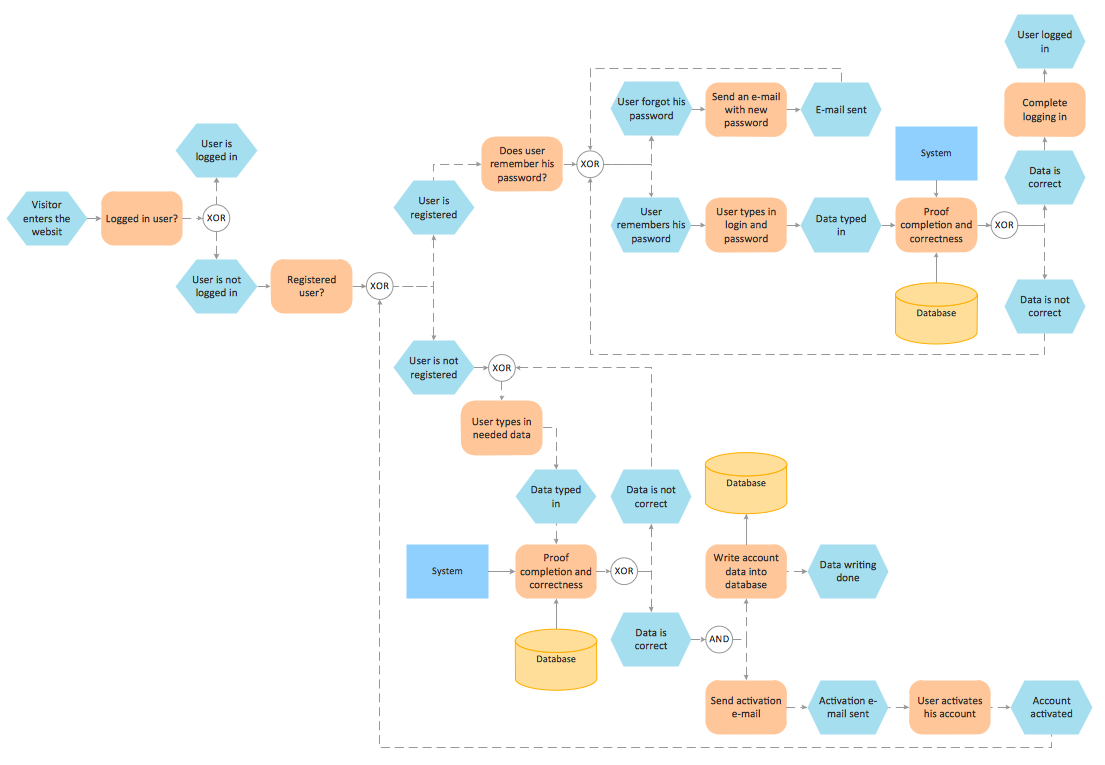
Pic. 3. Login and registration processing — EPC diagram.

The Event-driven Process Chain Diagrams solution extends ConceptDraw DIAGRAM software with EPC templates, samples, and vector shape library for the drawing of EPC business process flowcharts.
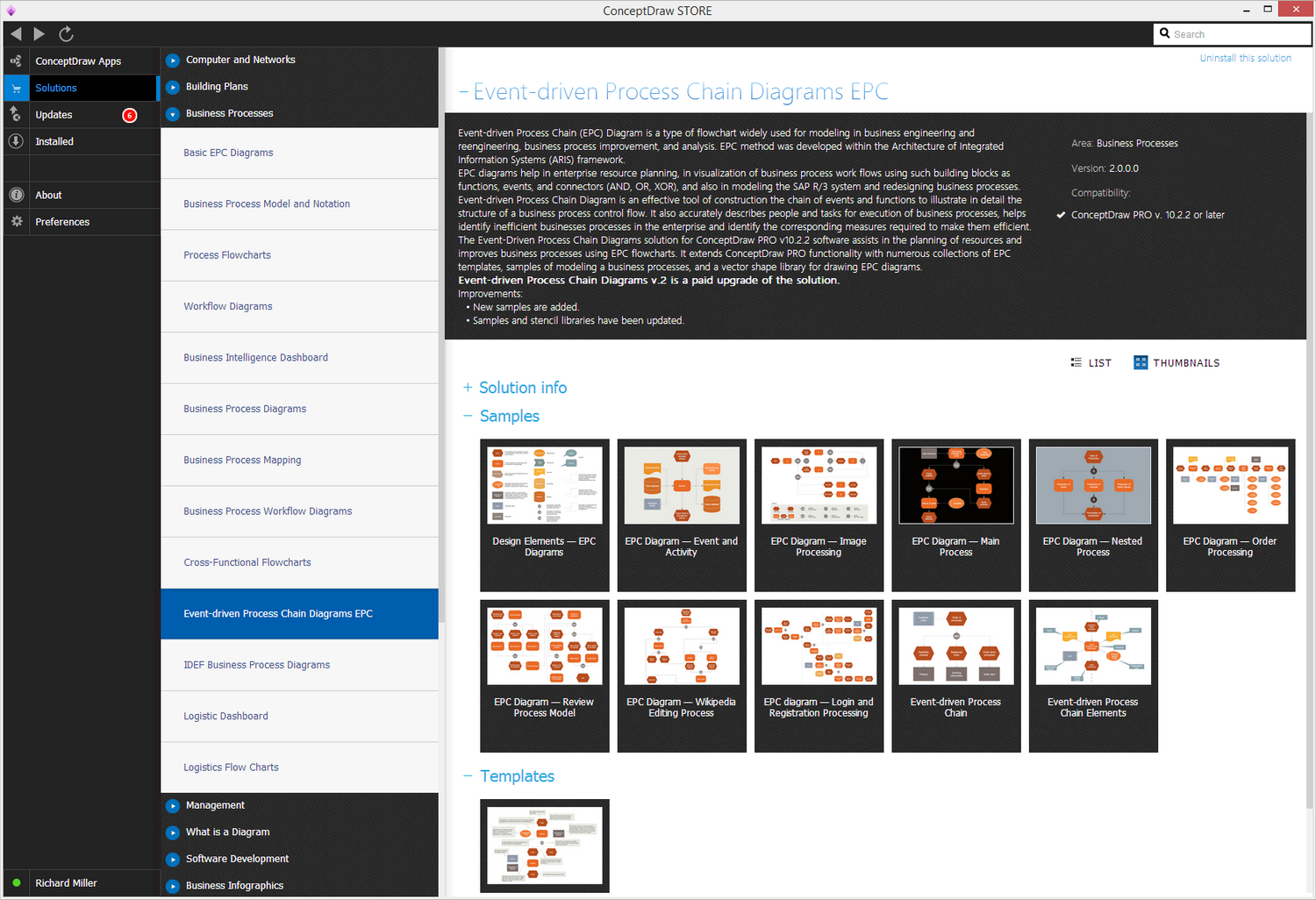
EPC solution

Pic. 4. Event-Driven Process chain (EPC) solution

The Event-driven Chain Diagrams solution assists in the planning of resources and improves business processes using EPC flowcharts.


TEN RELATED HOW TO's:
Process Flow Chart is a visual illustration of overall flow of activities in producing a product or service. How do you make a Process Flow Chart usually? Drawing process flow charts, diagrams and maps is quite complex and lengthy process, especially if you draw free-hand. But now thanks to the ConceptDraw DIAGRAM diagramming and vector drawing software extended with Flowcharts solution from the Diagrams area of ConceptDraw Solution Park this process became simple and fast. A confirmation of this can serve many Process Flow Chart examples included in Flowcharts solution.Process Flow Chart Examples *
Picture: Process Flow Chart Examples
Related Solution:
Flow chart is a diagrammatic representation of an algorithm and essential part of planning the system. Flow charts are widely used in technical analysis and programming for easy writing programs and explaining them to others. So, one of the most popular type of flow charts is Technical Flow Chart. Technical Flow Chart can be drawn by pencil on the paper, but it will be easier to use for designing a special software. ConceptDraw DIAGRAM diagramming and vector drawing software extended with Flowcharts Solution from the Diagrams Area of ConceptDraw Solution Park will be useful for this goal.Technical Flow Chart *
Picture: Technical Flow Chart
Related Solution:
To create an Audit Process FlowChart you only need Conceptdaw Software.Basic Audit Flowchart. Flowchart Examples
Picture: Basic Audit Flowchart. Flowchart Examples
Related Solution:
There are many tools to manage a process or to illustrate an algorithm or a workflow. Flowcharting is one of those tools. However, it may be difficult to show complex processes that require multiple attributes or several people in a simple flowchart, so a cross-functional flowchart would be a solution for that situation. To create such flowchart, group processes and steps to labeled rows or columns, and divide those groups with horizontal or vertical parallel lines. It is worth mentioning that there are different types of cross-functional flowcharts, like opportunity or deployment flowchart. This diagram shows a cross-functional flowchart that was made for a trading process. It contains 14 processes, distributed through 5 lines depicting the participants who interact with the process. Also there are connectors that show the data flow of information between processes. The cross-functional flowchart displays a detailed model of the trading process, as well as all participants in the process and how they interact with each other. The lines in the flowchart indicates the position, department and role of the trading process participants.Cross-Functional Flowchart
Picture: Cross-Functional Flowchart
Related Solution:
The term “cloud” is very popular and widely used now, it is a server, data processing centre, or a network which lets to store the data and software, provides access to them, allows to run applications without installation and gives the possibility to process data hosted remotely via the Internet connection. For documenting the Cloud Computing Architecture with a goal to facilitate the communication between stakeholders are successfully used the Cloud Computing Architecture diagrams. It is convenient and easy to draw various Cloud Computing Architecture diagrams in ConceptDraw DIAGRAM software with help of tools of the Cloud Computing Diagrams Solution from the Computer and Networks Area of ConceptDraw Solution Park.How to Build Cloud Computing Diagram<br>Principal Cloud Manufacturing *
Picture: How to Build Cloud Computing DiagramPrincipal Cloud Manufacturing
Related Solution:
A requisition form is one of the documents used for accounting in different manufacturing processes. There are two main types of requisition: a purchasing requisition and material requisition and difference between them is significant. Creating a flowchart might help you in understanding all the details of accounting process. Flowcharts are a best visual method for dividing a large and complicated procedure into a several little clear pieces. The main value-ability of an effective flowchart is its simpleness. Material requisition flowcharts are used to document the process of relationships between the different departments and the purchasing department within an organization. The flow chart gives the step-by-step guide on how is carried out the procurement process of the materials necessary for the functioning of the organization. This type of flowchart along with many other business flowcharts, one can easy create using ConceptDraw Flowcharts solution.Material Requisition Flowchart
Picture: Material Requisition Flowchart. Flowchart Examples
Related Solution:
Visual information is easier to perceive. You can teach even a child to make diagrams with a good flowchart example that would be interesting for it. Flowcharts can be fun, it’s not about business processes or programming algorithms. This flowchart shows step by step process of manufacturing of Nixtamal The product which is obtained by processing maize with calcium hydroxide. We must assume that the Aztecs were very fond of this product, if the recipe of its production came to our times. This flow chart was designed using ConceptDraw DIAGRAM with its solution for designing flowcharts of various types, sizes and purposes. ConceptDraw Flowcharts solution consists from the library of flowchart symbols, containing the set vector objects. Also there are a lot of diverse templates and samples of flow charts.Flowchart Examples and Templates for ConceptDraw DIAGRAM
Picture: Flowchart Examples and Templates
Related Solution:
ConceptDraw DIAGRAM software extended with Fishbone Diagrams solution from the Management area of ConceptDraw Solution Park is perfect for Cause and Effect Diagram creating. It gives the ability to draw fishbone diagram that identifies many possible causes for an effect or a problem. Causes and Effects are usually grouped into major categories to identify these sources of variation. Causes and Effects in the diagram show relationships among various factor. Fishbone diagram shows factors of Equipment, Process, People, Materials, Environment and Management, all affecting the overall problem.Cause and Effect Diagram *
Picture: Cause and Effect Diagram
Related Solution:
This sample was created in ConceptDraw DIAGRAM diagramming and vector drawing software using the Flowcharts solution from the Diagrams area of ConceptDraw Solution Park. This sample shows the Flowchart of the Subprime Mortgage Crisis. This Flowchart describes the decline in housing prices when the housing bubble burst and what it caused on the housing and financial markets. You can also see the Government and Industry responses in this crisis situation.Flowchart on Bank. <br>Flowchart Examples *
Picture: Flowchart on Bank. Flowchart Examples
Related Solution:
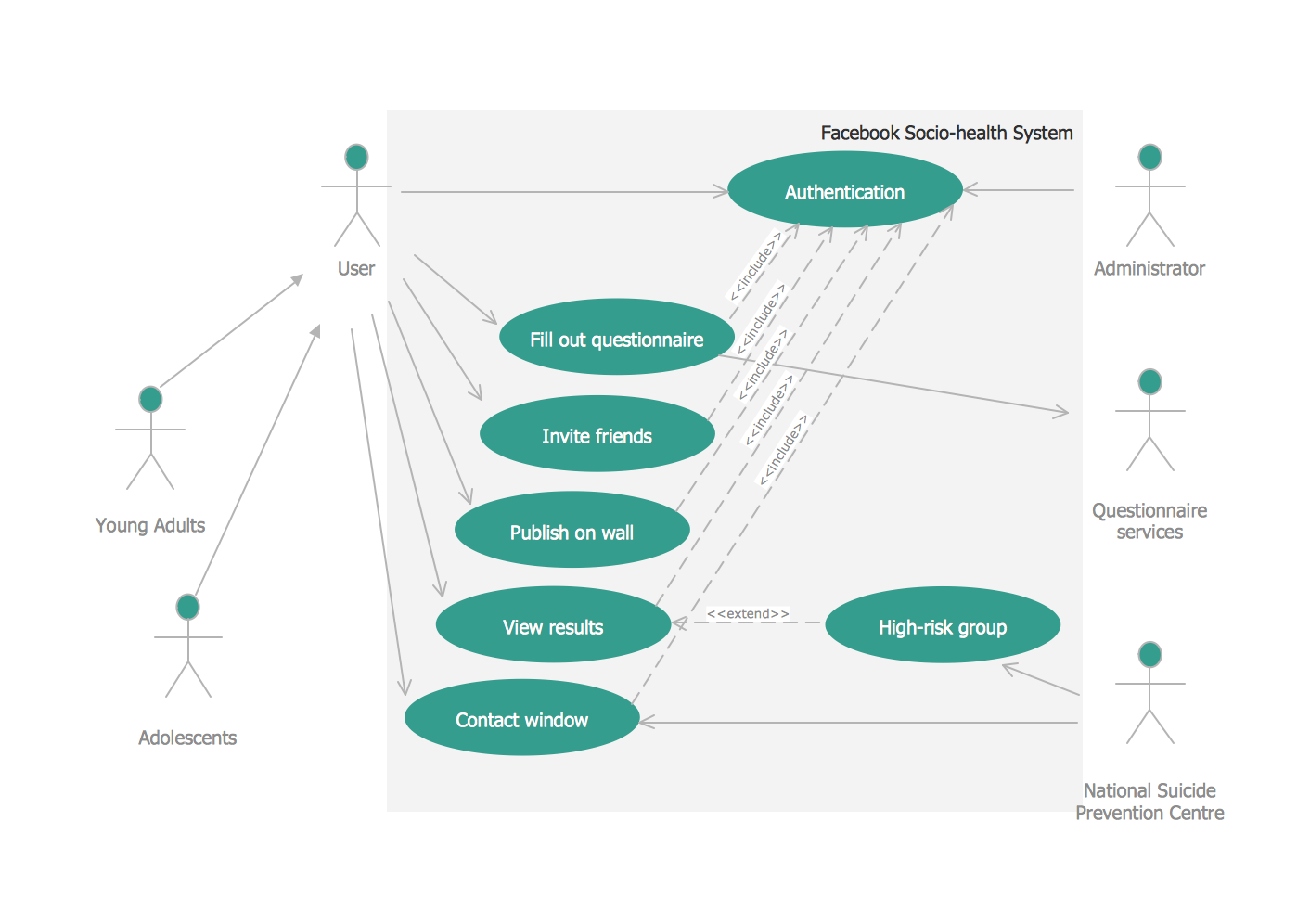
Use case diagrams are used at the development of software and systems for definition of functional system requirements or system of systems. Use case diagram presents the consecution of object’s actions (user’s or system’s) which are executed for reaching the definite result.Use Case Diagrams technology with ConceptDraw DIAGRAM  *
Picture: Use Case Diagrams technology with ConceptDraw DIAGRAM
ConceptDraw
DIAGRAM 18