The Best Tool for Business Process Modeling
Event Driven Process Chain (EPC)
An event-driven process chain is well known as well as a commonly used type of flowchart, especially within the business process modelling science. They can be also used in order to configure a so called “enterprise resource planning” implementation. They can be very useful in the process of the business process improvement as well as for controlling the work share with instances of the autonomous workflows. It is a process chain used in a “workflow management” and in other fields of the business activity.
The method of the “event-driven process chain” was developed by August-Wilhelm Scheer in 1990s within the framework of so called “Architecture of Integrated Information Systems”. Nowadays different businesses use the made event-driven process chain diagrams for laying out their business process workflows, used by many companies for many different business processes, such as analyzing, redesigning the business processes themselves as well as for modelling.
The mentioned “event-driven process chain method” was the one developed within the framework of “Architecture of Integrated Information Systems” (or simply “ARIS”), as it was mentioned before, and the statement that event-driven process chains are ordered graphs was also one of those found in other so called “directed graphs”. There are no restrictions appearing for existing on the possible structure of EPCs. At the same time, the non-trivial structures involve parallelism having the so called “ill-defined execution semantics”. Thus, in this case they are known to be called as “UML activity diagrams”.
There are a few elements which are used in the usual “event-driven process chain diagram”. They can be events, which are simply are passive elements in the described before “event-driven process chains”. They are used for describing under what circumstances a function (or a process) works. They also can be used for clarifying which of them a process results in or for stating a function. At the same time, “functions are known to be the “active” elements in an event-driven process chain, being used for modelling the activities or tasks within one company, describing the transformations simply from an initial state to a resulting one.
The process owner is known to be responsible for a function, being a part of some organization unit usually represented in a way of a square with a single vertical line. “Organization units” are meant to be determining which exactly organization within one particular structure of some enterprise is the one responsible for some specific function, represented in a way of an ellipse with a single vertical line.
The material, resource objects and information in the event-driven process chain portray objects in the real world, such as business entities, objects and other, inputting data serving it as the basis for a function or outputting it produced by a function. The so called “logical relationships” between elements in the control flow in the event-driven process chain are known to be described by the “logical connectors”. They are known to be functions and events. Having these “logical connectors”, it is always possible to split the control flow from one flow to at least two or even more flows. It is usually done for synchronizing the control flow from two or over two flows to just one.
A control flow as an element of an event-driven process chain is used for connecting events with functions, logical connectors or process paths. They are used for creating the logical interdependencies as well as the chronological sequence between them. Such “control flow” element is usually represented simply as a dashed arrow, when the “information flows” show the connections between different functions and so the input (or output) data. Another element of any event-driven process chain is the “organization unit assignments”. They are used for showing the different connections between an organization unit itself and the function, which it is responsible for. One of the last, “process paths” element is commonly used as a navigation aid in the event-driven process, for showing the connection from (or to) other processes. Every process path is known to be represented in a way of a compound symbol, being composed of a function symbol. In order to employ such process path symbol in an “Event-driven Process Chain diagram”, this symbol gets connected to the process path symbol, indicating the fact that this particular process incorporates the entirety of a second process which is represented by a single symbol.
It is also important to mention the three existing kinds of logical relationships within the event-driven process chains, which are branch and merge, fork and join and an 'OR' relationship. The first one correspond to making the decision of which exactly path it is better to choose out of a few control flows. A “fork and join” one corresponds to activating all the paths in the “control flow”, when “OR” relationship corresponds to activating one or over one in the control flows. Such opening “OR” connector may have one incoming control flow as well as two or more “outgoing” control flows, so when the condition is fulfilled, the mentioned “opening OR” connector can activate one or over control flows. When there is at least one of all the incoming control flows finally activated, then the closing “OR connector” can pass the control to the next element, going after it.
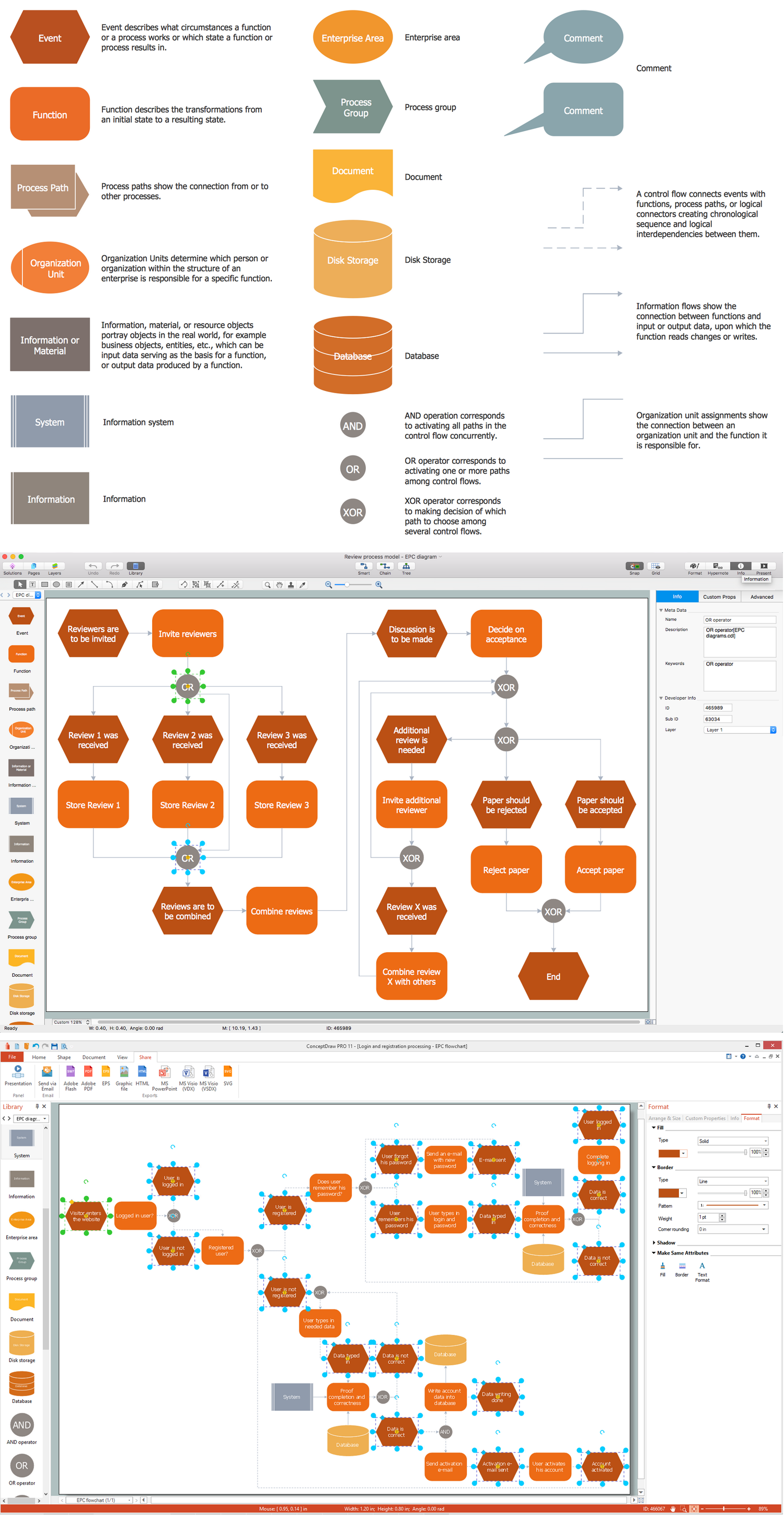
Pic.1 The Best Tool for Business Process Modeling
ConceptDraw DIAGRAM diagramming and vector drawing software offers you the Event-driven Process Chain Diagrams EPC solution from the Business Processes Area of ConceptDraw STORE.

Pic.2 Event Driven Process Chain (EPC) Diagram. Login and Registration Processing Sample.
If you are among of those who want to create a great looking event-driven process chain diagram, then one of the best tools may be the application, developed especially for the purpose of making such drawings — ConceptDraw DIAGRAM diagramming and drawing software is here on this site for being downloaded and used for creating any needed schematics, such as charts, flowcharts, any diagram, including the event-driven process chain one, map, plan and so many more drawings.
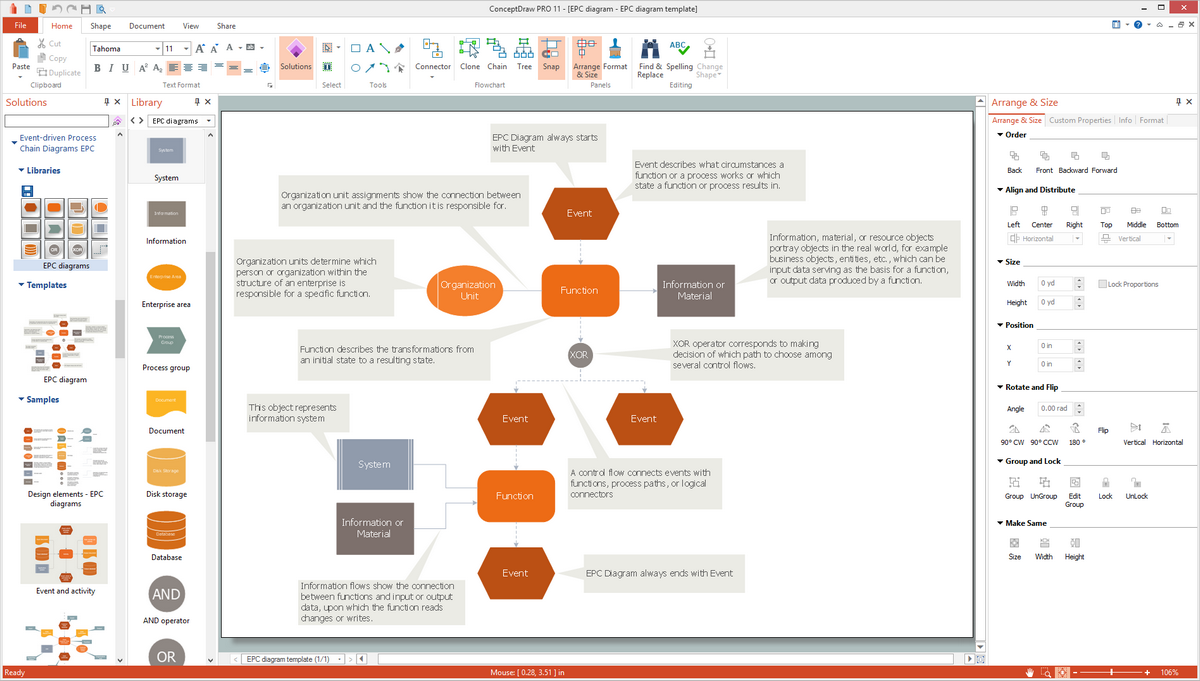
Pic.3 Event Driven Process Chain (EPC) templates, samples, and symbols
The Event-driven Chain Diagrams solution assists in the planning of resources and is excellent business process improvement tools using EPC flowcharts.