BCG Matrix
The growth–share matrix is also known to be called the “product portfolio matrix”, “BCG matrix” or “Boston Consulting Group analysis”, “Boston Box”, “Boston matrix”, or simply a “portfolio diagram”. This matrix is simply a chart which was created in 1970 by Bruce Henderson especially for the Boston Consulting Group in order to help the corporations to conduct the analysis of all their business units, e.g. their product lines. Using growth–share matrix helps any company to allocate the existing resources and so it can be used as one of the analytical tools widely used in product management, brand marketing, portfolio analysis and strategic management.
The growth–share matrix offers a so called "map" of some organization's product or service representing both the strengths and the weaknesses of the product as well as the organization itself. With help of such matrix, it is easier to track the current profitability of the organization, including its cashflows which become simpler to manage. There are a few indicators with help of which it is simpler to follow what is going on with the organization itself. One of the main indicators of the cash generation is a the market growth rate and the relative market share. Within the described matrix there are different scatter graphs may be used for ranking different business units based on their growth rates as well as the market shares.
The so called “cash cows” are the companies which have the high market share in a quite slowly growing industry. The mentioned units usually generate cash in the excess of its needed amount for maintaining the business, being regarded as boring and staid, in a so called "mature" market. Such companies are known to be "milked" on a full time basis with the less investment the better, as those money may be wasted in such industry with that low growth.
Another unit within the BCG is called the “Dogs”, sometimes “pets”, being the units with low market share in a slowly growing industry. The described units are usually known to be "breaking even", meaning they are generating just enough cash for maintaining the business's market shares. Owning such “break-even unit” may provide the social benefit of offering the jobs as well as the synergies which can be assisting some other business units, but at the same time not generating any cash for the company itself. A so called “assets ratio” is used by many investors for judging the situation getting to know if a company is being managed well enough. It is well-known that it is always better to sell off he mentioned companies described above.
Another unit is known to be the “question marks” or, sometimes, called as “problem children”. They are businesses which are operating in a high-growth market with a low market share, being a starting point for most of the existing businesses, having a potential to gain the market share in order to become “stars” for making it possible to become “cash cows” later, when their market growth slows. If such “question marks” do not become the market leaders, then after a few years of the cash consumption, they may de-generate to become “dogs” once the market growth declines. It is very important to analyse the “question marks” very carefully for determining if it worth to invest in them in order to grow the market shares.
“Stars” are known to be the units in a fast-growing industry having a high market share. There’s always the hope that such “stars” one day may become “cash cows” some day, hopefully soon. Although, they require lots of funding for “fighting” their competitors and for maintaining their growth rate. Once the industry growth slows, it is always possible for the stars to become the “cash cows” in case they become those amongst the market leaders. Otherwise, they become “dogs” in case they have a very low relative market share. Usually, all business units become either “dogs” or “cash cows”. Although, most of the business units start as “question marks”, turning into “stars” later. Once the market stops growing, the business unit becomes a “cash cow” turning into a “dog” at the end of the cycle.
There are many alternatives vying with the “growth–share matrix”, but the mentioned matrix is still known to be the most widely used. In order to create such matrix, you can always use ConceptDraw DIAGRAM software drawing all the units from a scratch. Although, having all the needed tools for making it faster, you can always download a new product of CS Odessa — a ConceptDraw STORE application. Having the mentioned product developed by the IT specialists of CS Odessa, you can be always sure in a fact that the final drawing will look simply very smart as well as professional as long as you download the Matrices Solution from ConceptDraw STORE application.

Example 1. BCG Matrix
Having the mentioned solution means having enough tools for making the professionally looking Matrices, including the BCG ones. Once you download the mentioned solution, you will find all ten pre-made vector shapes which are all ready-to-be used for completing your drawings. Apart from the mentioned Boston Consulting Group analysis, you can always conduct any other analysis, creating the matrices, such as Ansoff one, Competitive Strategies, Four-quadrant, Quality function deployment and Porter’s generic strategies ones, as well as Chore chart, Flow process chart, Porter’s value chain diagram, Positioning map, etc. Having the pre-made drawings as your drafts you will find your task of drawing the needed matrix much simpler editing the exiting template so it looks the way you want it to look like. The most important thing to know is that you have a chance to make the drawing much quicker having all the needed tools for that.
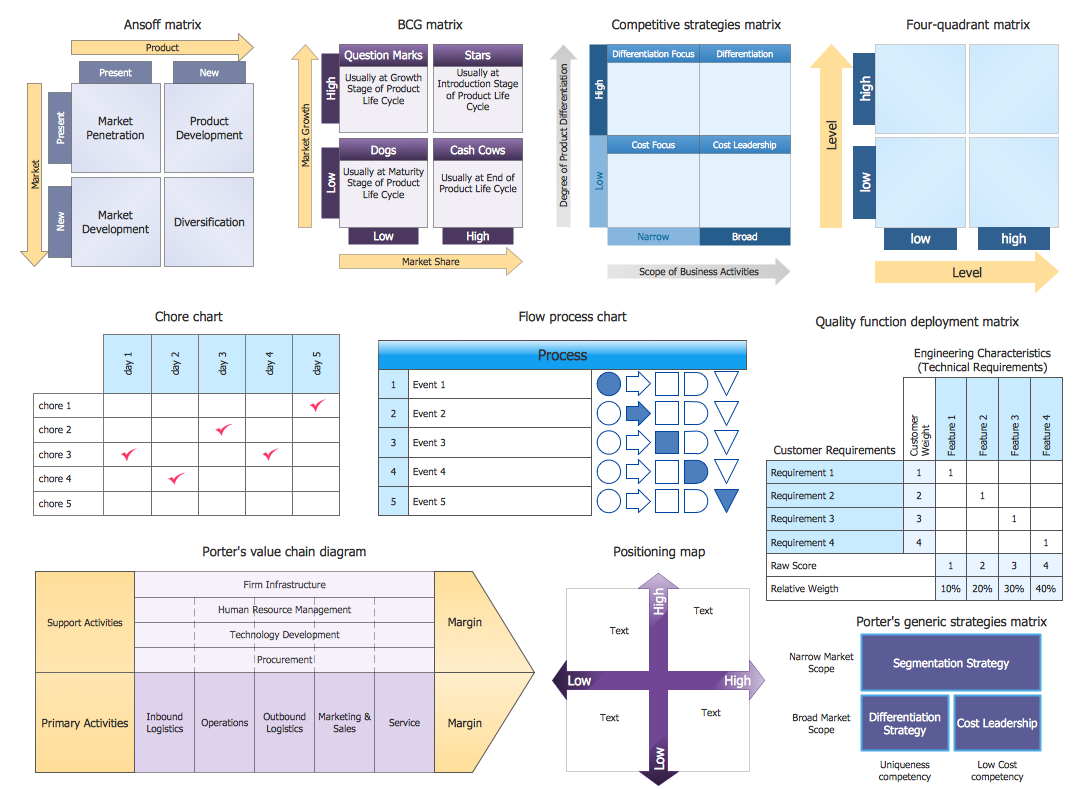
Example 2. Matrices Library Design Elements
Once you have the growth–share matrix created in ConceptDraw DIAGRAM you can always export it to almost any other application, as well as to print it off, to save on your desktop for using on your site, in your presentations or some other business documentation in order to see where each of the companies being analysed is “Cash Cows”, which one belongs to the “Stars”, which one — to the “Questions Marks” and which one — to the “Dogs”.
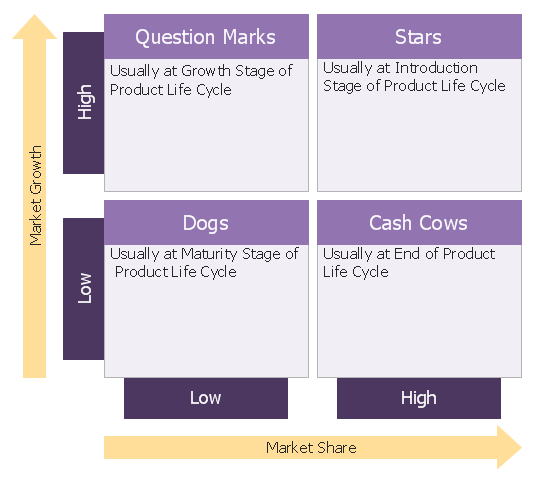
Example 3. Boston Growth Share Matrix Template
This template was created in ConceptDraw DIAGRAM using the Matrices solution. This is a Boston Growth Share Matrix Template which can be useful for easy drawing your own BCG Matrix.
All source documents are vector graphic documents. They are available for reviewing, modifying, or converting to a variety of formats (PDF file, MS PowerPoint, MS Visio, and many other graphic formats) from the ConceptDraw STORE. The Matrices Solution is available for all ConceptDraw DIAGRAM or later users.