 Business-specific Drawings
Create a Workflow Diagram Quickly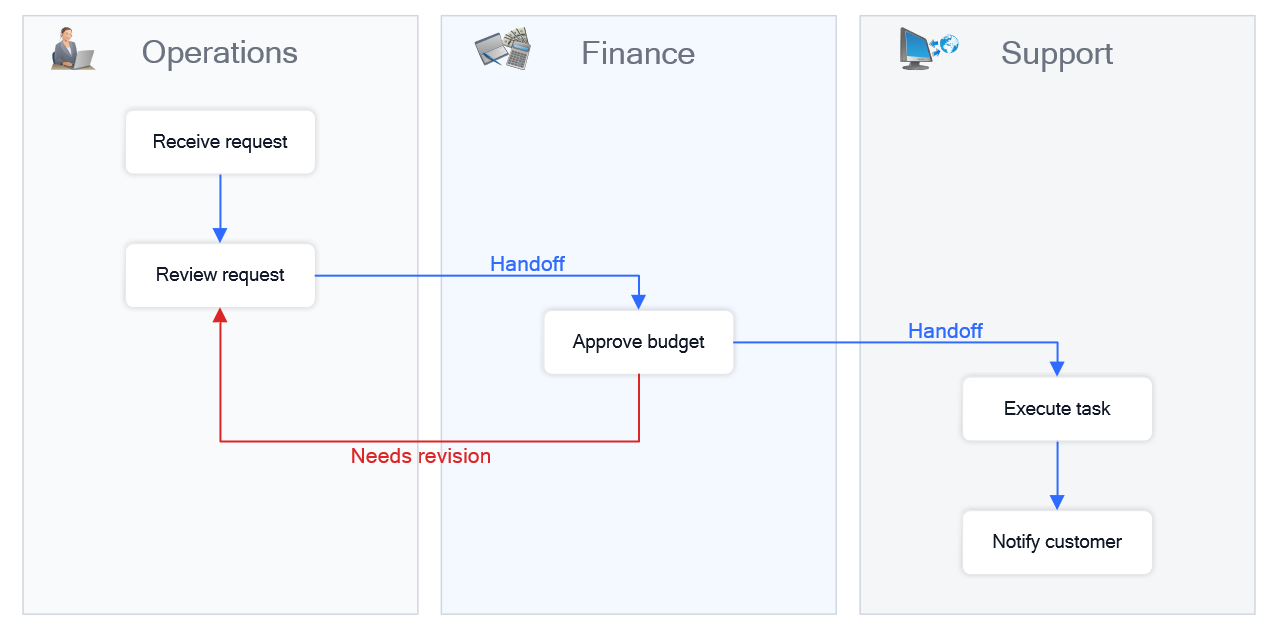
Quick answer: Create a workflow diagram in minutes by opening a ready-made template and mapping tasks, roles, and process steps. What you will get: a clear visual representation of how work moves across people, steps, and decisions. Open template and start editing → No setup required — start with a ready-made example. Start with a Workflow TemplateThe fastest way to create a workflow diagram is to start with a template and adapt it to your process.
Result: Result: You create a working workflow diagram in minutes without building from scratch. Build a Workflow Diagram Step by StepIf you prefer to build your diagram manually, you can map your workflow step by step.
Result: Result: You create a structured diagram that shows how work moves across your process. A workflow diagram shows how tasks move through a process. You can create one in just a few simple steps. 
This diagram builds step by step — showing how a workflow comes together in just a few simple actions. Example of a workflow diagram showing how tasks move between roles and steps. When to Use a Workflow Diagram
Tips for Clear Workflow Diagrams
Continue Working with Your DiagramOnce your workflow diagram is ready, you can refine, expand, and share it with your team. ConceptDraw DIAGRAM provides templates, libraries, and tools for ongoing process management. |