BPMN 2.0
HelpDesk
How to Create a BPMN Diagram Using ConceptDraw PRO
 Business Process Diagrams

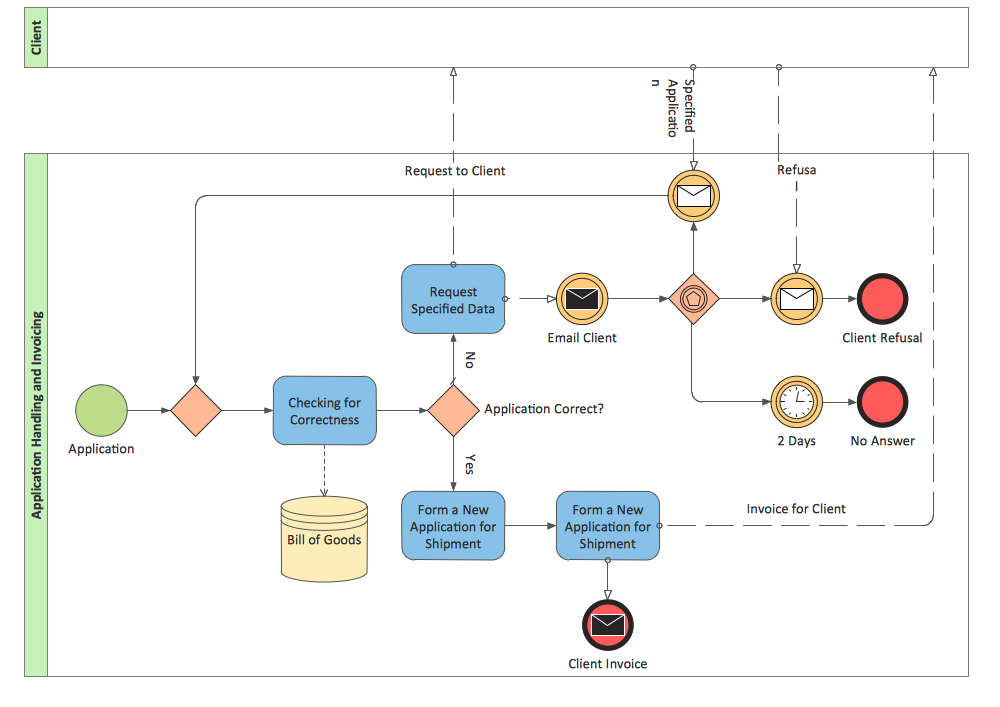
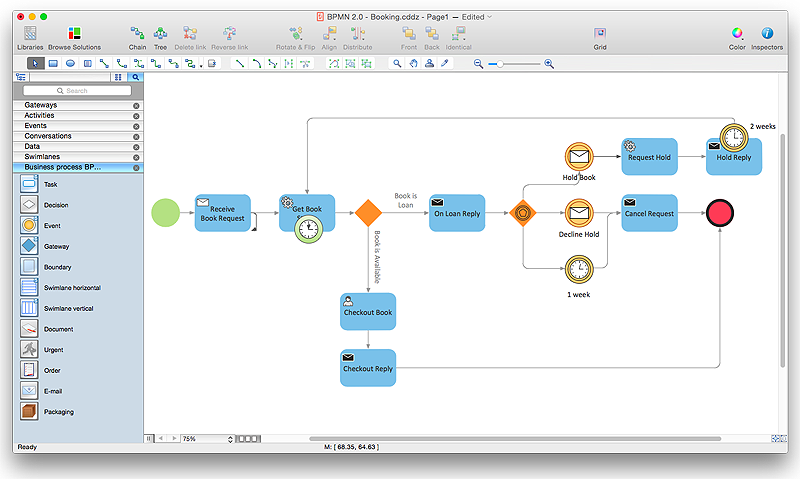
Business Process Diagrams solution extends the ConceptDraw PRO BPM software with RapidDraw interface, templates, samples and numerous libraries based on the BPMN 1.2 and BPMN 2.0 standards, which give you the possibility to visualize equally easy simple and complex processes, to design business models, to quickly develop and document in details any business processes on the stages of project’s planning and implementation.
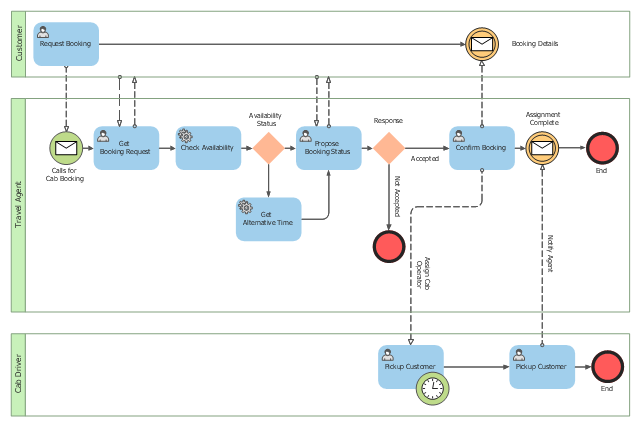
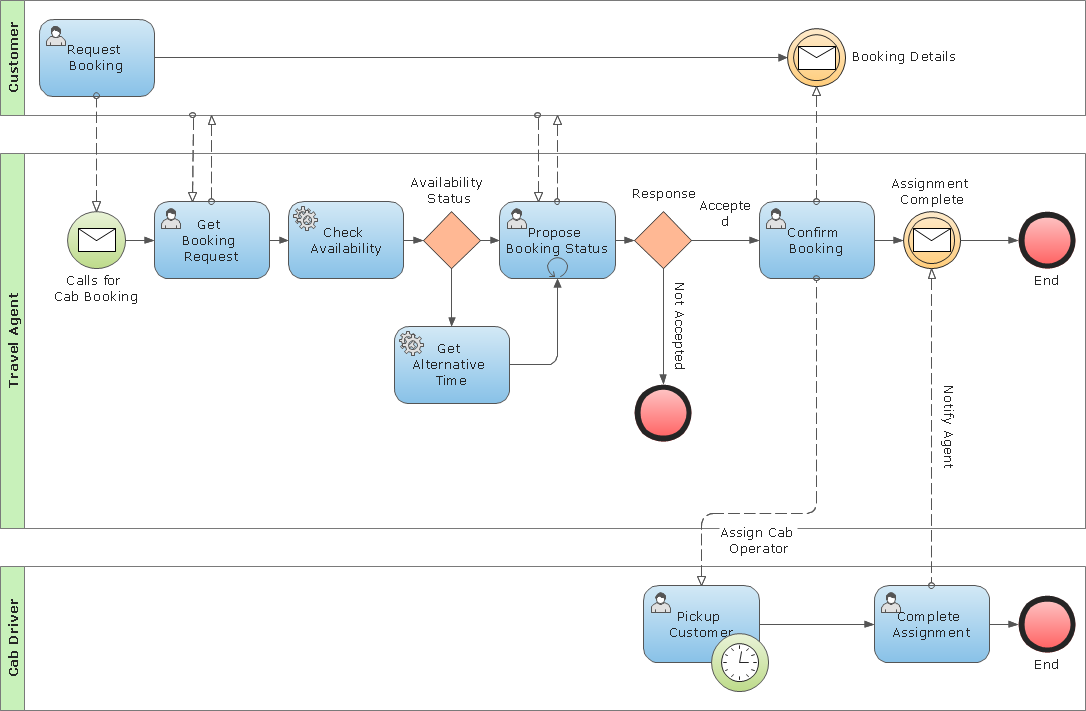
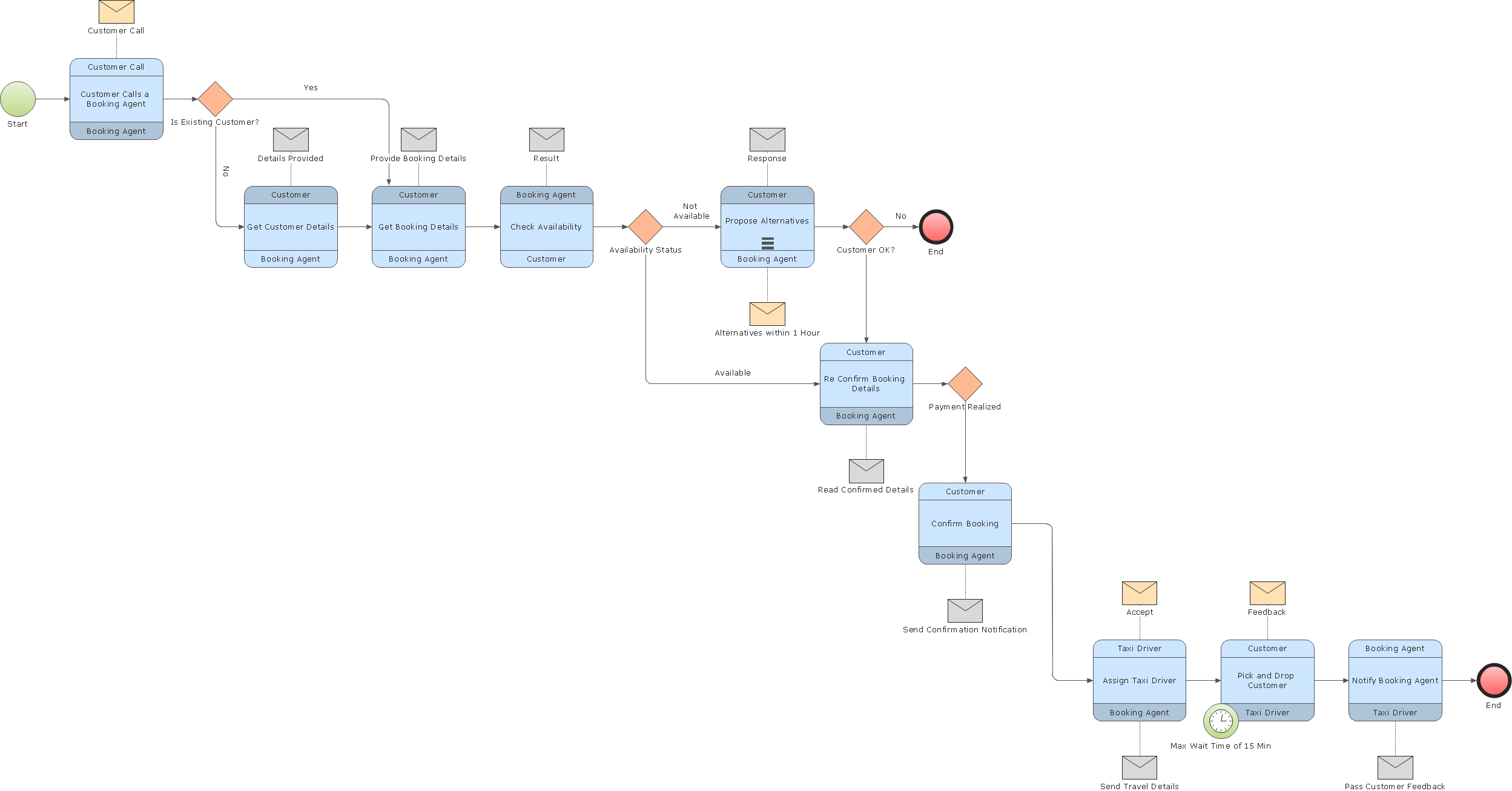
This BPMN (Business Process Model and Notation) collaboration diagram sample depicts interactions between customer, travel agent and cab driver, which are defined as a sequence of activities, and represent the message exchange during a cab booking process.
"Business process modeling is used to communicate a wide variety of information to a wide variety of audiences. BPMN is designed to cover this wide range of usage and allows modeling of end-to-end business processes to allow the viewer of the Diagram to be able to easily differentiate between sections of a BPMN Diagram. There are three basic types of sub-models within an end-to-end BPMN model: Private (internal) business processes, Abstract (public) processes, and Collaboration (global) processes...
Collaboration (global) processes.
A collaboration process depicts the interactions between two or more business entities. These interactions are defined as a sequence of activities that represent the message exchange patterns between the entities involved. Collaboration processes may be contained within a Pool and the different participant business interactions are shown as Lanes within the Pool. In this situation, each Lane would represent two participants and a direction of travel between them. They may also be shown as two or more Abstract Processes interacting through Message Flow. These processes can be modeled separately or within a larger BPMN Diagram to show the Associations between the collaboration process activities and other entities. If the collaboration process is in the same Diagram as one of its corresponding private business process, then the activities that are common to both processes can be associated." [Business Process Model and Notation. Wikipedia]
The business process modeling diagram example "Cab booking public process - Collaboration BPMN 2.0 diagram" was designed using the ConceptDraw PRO diagramming and vector drawing software extended with the Business Process Diagram solution from the Business Processes area of ConceptDraw Solution Park.
"Business process modeling is used to communicate a wide variety of information to a wide variety of audiences. BPMN is designed to cover this wide range of usage and allows modeling of end-to-end business processes to allow the viewer of the Diagram to be able to easily differentiate between sections of a BPMN Diagram. There are three basic types of sub-models within an end-to-end BPMN model: Private (internal) business processes, Abstract (public) processes, and Collaboration (global) processes...
Collaboration (global) processes.
A collaboration process depicts the interactions between two or more business entities. These interactions are defined as a sequence of activities that represent the message exchange patterns between the entities involved. Collaboration processes may be contained within a Pool and the different participant business interactions are shown as Lanes within the Pool. In this situation, each Lane would represent two participants and a direction of travel between them. They may also be shown as two or more Abstract Processes interacting through Message Flow. These processes can be modeled separately or within a larger BPMN Diagram to show the Associations between the collaboration process activities and other entities. If the collaboration process is in the same Diagram as one of its corresponding private business process, then the activities that are common to both processes can be associated." [Business Process Model and Notation. Wikipedia]
The business process modeling diagram example "Cab booking public process - Collaboration BPMN 2.0 diagram" was designed using the ConceptDraw PRO diagramming and vector drawing software extended with the Business Process Diagram solution from the Business Processes area of ConceptDraw Solution Park.
Business process modeling
Business Process Modeling Notation

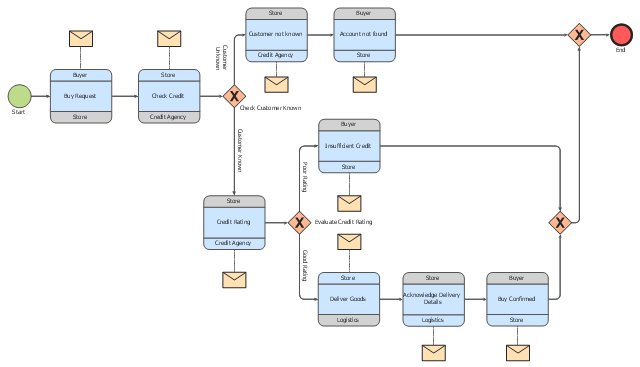
This choreography BPMN (Business Process Model and Notation) diagram sample shows the logistics workflow.
"Logistics is the management of the flow of goods between the point of origin and the point of consumption in order to meet some requirements, for example, of customers or corporations. The resources managed in logistics can include physical items, such as food, materials, animals, equipment and liquids, as well as abstract items, such as time, information, particles, and energy. The logistics of physical items usually involves the integration of information flow, material handling, production, packaging, inventory, transportation, warehousing, and often security. The complexity of logistics can be modeled, analyzed, visualized, and optimized by dedicated simulation software. The minimization of the use of resources is a common motivation in logistics for import and export." [Logistics. Wikipedia]
The business process modeling diagram example "Logistics - Choreography BPMN 2.0 diagram" was designed using the ConceptDraw PRO diagramming and vector drawing software extended with the Business Process Diagram solution from the Business Processes area of ConceptDraw Solution Park.
"Logistics is the management of the flow of goods between the point of origin and the point of consumption in order to meet some requirements, for example, of customers or corporations. The resources managed in logistics can include physical items, such as food, materials, animals, equipment and liquids, as well as abstract items, such as time, information, particles, and energy. The logistics of physical items usually involves the integration of information flow, material handling, production, packaging, inventory, transportation, warehousing, and often security. The complexity of logistics can be modeled, analyzed, visualized, and optimized by dedicated simulation software. The minimization of the use of resources is a common motivation in logistics for import and export." [Logistics. Wikipedia]
The business process modeling diagram example "Logistics - Choreography BPMN 2.0 diagram" was designed using the ConceptDraw PRO diagramming and vector drawing software extended with the Business Process Diagram solution from the Business Processes area of ConceptDraw Solution Park.
Business process modeling
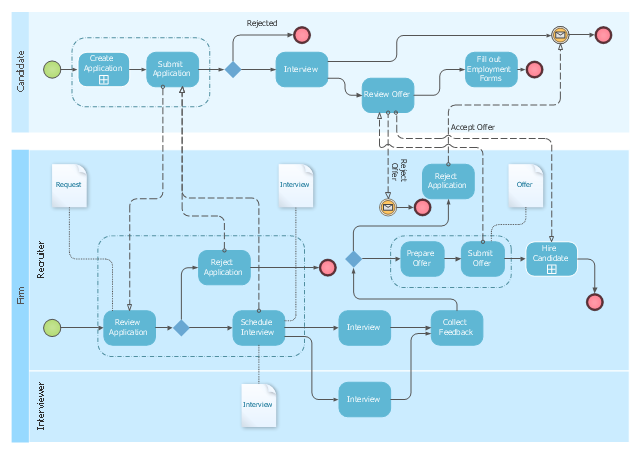
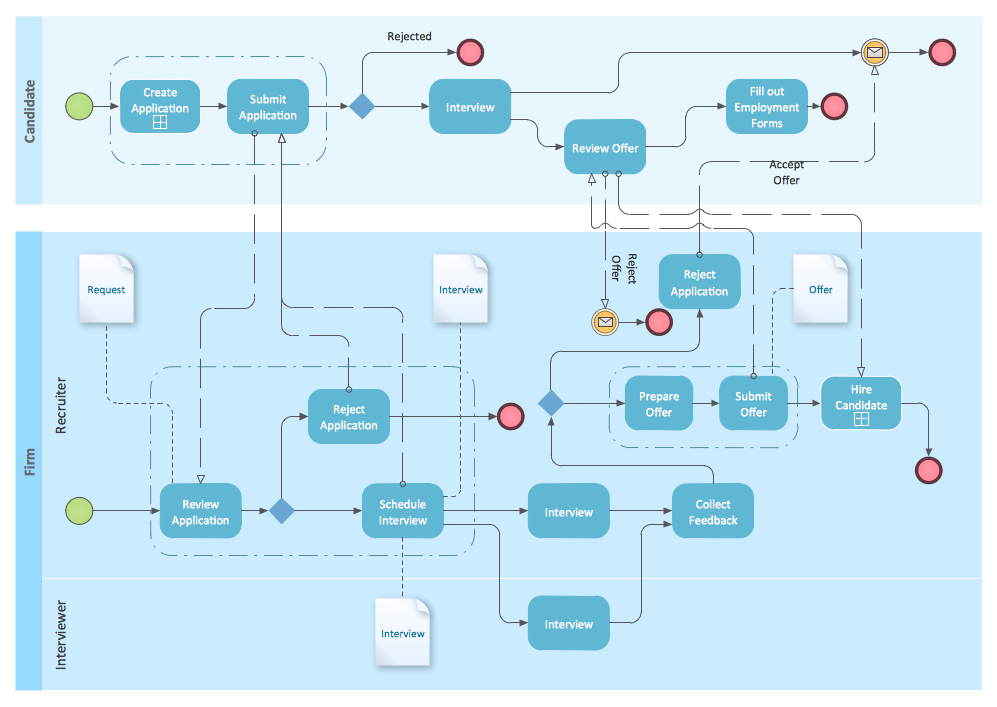
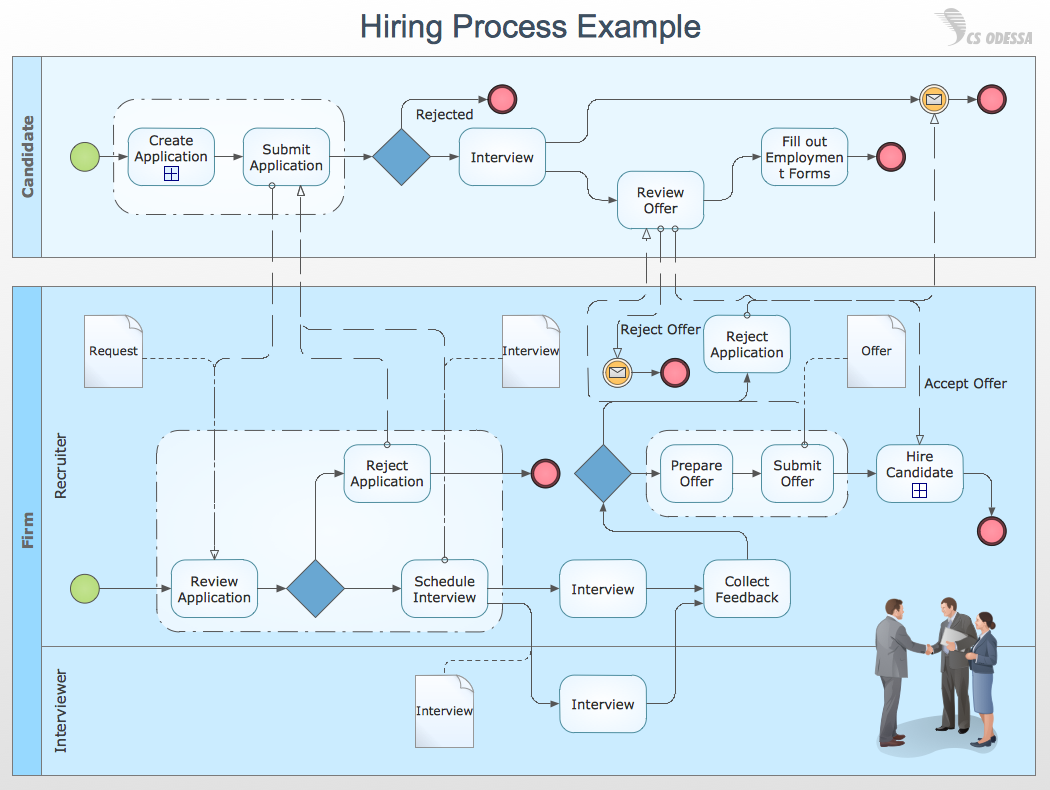
This BPMN diagram sample shows the recruitment (hiring) process workflow.
"Recruitment refers to the process of attracting, screening, selecting, and onboarding a qualified person for a job. At the strategic level it may involve the development of an employer brand which includes an "employee offering".
The stages of the recruitment process include: job analysis and developing some person specification; the sourcing of candidates by networking, advertising, and other search methods; matching candidates to job requirements and screening individuals using testing (skills or personality assessment); assessment of candidates' motivations and their fit with organizational requirements by interviewing and other assessment techniques. The recruitment process also includes the making and finalizing of job offers and the induction and onboarding of new employees.
Depending on the size and culture of the organization, recruitment may be undertaken in-house by managers, human resource generalists and/ or recruitment specialists. Alternatively, parts of the process may be undertaken by either public-sector employment agencies, commercial recruitment agencies, or specialist search consultancies." [Recruitment. Wikipedia]
The BPMN (Business Process Model and Notation) diagram example "Hiring process BPMN 1.2 diagram" was created using the ConceptDraw PRO diagramming and vector drawing software extended with the Business Process Diagram solution from the Business Processes area of ConceptDraw Solution Park.
"Recruitment refers to the process of attracting, screening, selecting, and onboarding a qualified person for a job. At the strategic level it may involve the development of an employer brand which includes an "employee offering".
The stages of the recruitment process include: job analysis and developing some person specification; the sourcing of candidates by networking, advertising, and other search methods; matching candidates to job requirements and screening individuals using testing (skills or personality assessment); assessment of candidates' motivations and their fit with organizational requirements by interviewing and other assessment techniques. The recruitment process also includes the making and finalizing of job offers and the induction and onboarding of new employees.
Depending on the size and culture of the organization, recruitment may be undertaken in-house by managers, human resource generalists and/ or recruitment specialists. Alternatively, parts of the process may be undertaken by either public-sector employment agencies, commercial recruitment agencies, or specialist search consultancies." [Recruitment. Wikipedia]
The BPMN (Business Process Model and Notation) diagram example "Hiring process BPMN 1.2 diagram" was created using the ConceptDraw PRO diagramming and vector drawing software extended with the Business Process Diagram solution from the Business Processes area of ConceptDraw Solution Park.
Employee recruitment workflow
Business Process Modeling Notation Template
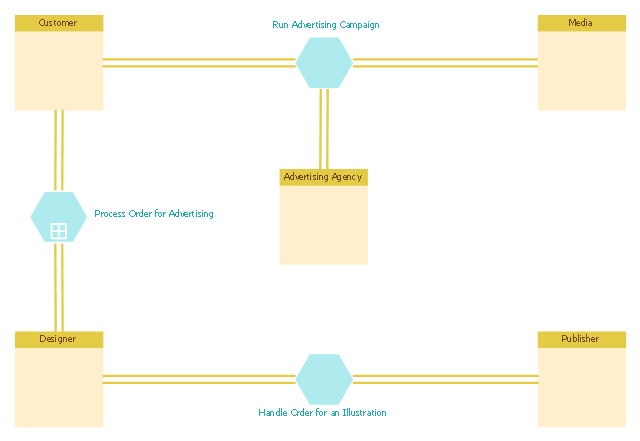
This BPMN (Business Process Model and Notation) diagram sample shows the advertising creation process workflow.
"Types of advertising.
Virtually any medium can be used for advertising. Commercial advertising media can include wall paintings, billboards, street furniture components, printed flyers and rack cards, radio, cinema and television adverts, web banners, mobile telephone screens, shopping carts, web popups, skywriting, bus stop benches, human billboards and forehead advertising, magazines, newspapers, town criers, sides of buses, banners attached to or sides of airplanes ("logojets"), in-flight advertisements on seatback tray tables or overhead storage bins, taxicab doors, roof mounts and passenger screens, musical stage shows, subway platforms and trains, elastic bands on disposable diapers, doors of bathroom stalls, stickers on apples in supermarkets, shopping cart handles (grabertising), the opening section of streaming audio and video, posters, and the backs of event tickets and supermarket receipts. Any place an "identified" sponsor pays to deliver their message through a medium is advertising." [Advertising. Wikipedia]
The business process modeling diagram example "Advertising creation process - Conversation BPMN 2.0 diagram" was designed using the ConceptDraw PRO diagramming and vector drawing software extended with the Business Process Diagram solution from the Business Processes area of ConceptDraw Solution Park.
"Types of advertising.
Virtually any medium can be used for advertising. Commercial advertising media can include wall paintings, billboards, street furniture components, printed flyers and rack cards, radio, cinema and television adverts, web banners, mobile telephone screens, shopping carts, web popups, skywriting, bus stop benches, human billboards and forehead advertising, magazines, newspapers, town criers, sides of buses, banners attached to or sides of airplanes ("logojets"), in-flight advertisements on seatback tray tables or overhead storage bins, taxicab doors, roof mounts and passenger screens, musical stage shows, subway platforms and trains, elastic bands on disposable diapers, doors of bathroom stalls, stickers on apples in supermarkets, shopping cart handles (grabertising), the opening section of streaming audio and video, posters, and the backs of event tickets and supermarket receipts. Any place an "identified" sponsor pays to deliver their message through a medium is advertising." [Advertising. Wikipedia]
The business process modeling diagram example "Advertising creation process - Conversation BPMN 2.0 diagram" was designed using the ConceptDraw PRO diagramming and vector drawing software extended with the Business Process Diagram solution from the Business Processes area of ConceptDraw Solution Park.
Business process modeling
Types of Flowcharts


"A swim lane (or swimlane) is a visual element used in process flow diagrams, or flowcharts, that visually distinguishes responsibilities for sub-processes of a business process. Swim lanes may be arranged either horizontally or vertically. In the accompanying example, the swimlanes are named Customer, Sales, Contracts, Legal, and Fulfillment, and are arranged vertically. ...
When used to diagram a business process that involves more than one department, swimlanes often serve to clarify not only the steps and who is responsible for each one, but also how delays, mistakes or cheating are most likely to occur.
Many process modeling methodologies utilize the concept of swimlanes, as a mechanism to organize activities into separate visual categories in order to illustrate different functional capabilities or responsibilities (organisational roles). Swimlanes are used in Business Process Modeling Notation (BPMN) and Unified Modeling Language activity diagram modeling methodologies." [Swim lane. Wikipedia]
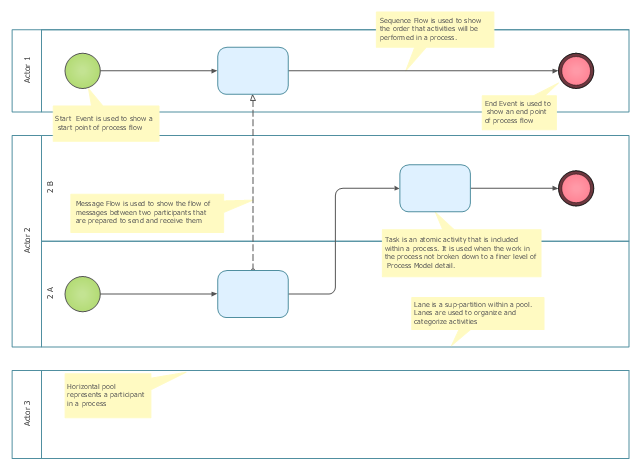
The template "Business process swim lane diagram BPMN 1.2" for the ConceptDraw PRO diagramming and vector drawing software is included in the Business Process Diagram solution from the Business Processes area of ConceptDraw Solution Park.
When used to diagram a business process that involves more than one department, swimlanes often serve to clarify not only the steps and who is responsible for each one, but also how delays, mistakes or cheating are most likely to occur.
Many process modeling methodologies utilize the concept of swimlanes, as a mechanism to organize activities into separate visual categories in order to illustrate different functional capabilities or responsibilities (organisational roles). Swimlanes are used in Business Process Modeling Notation (BPMN) and Unified Modeling Language activity diagram modeling methodologies." [Swim lane. Wikipedia]
The template "Business process swim lane diagram BPMN 1.2" for the ConceptDraw PRO diagramming and vector drawing software is included in the Business Process Diagram solution from the Business Processes area of ConceptDraw Solution Park.
Swim lane diagram BPMN 1.2 template
Business Process Modeling Tools
Business Process Modeling Software for Mac

BPMN
How to Draw Business Process Diagrams with RapidDraw Interface
- Business Process Diagrams | BPMN 2.0 | How to Create a BPMN ...
- BPMN 2.0 | BPMN | How to Create a BPMN Diagram Using ...
- Logistics - Choreography BPMN 2.0 diagram | Process Flowchart ...
- Cab booking public process - Collaboration BPMN 2.0 diagram ...
- How to Create a BPMN Diagram Using ConceptDraw PRO ...
- Bpmn 2 0 Diagram Drawing Software
- Cross-Functional Flowchart (Swim Lanes) | Swim Lane Flowchart ...
- Business Process Diagrams | Business Process Modeling Notation ...
- Business process diagram BPMN 1.2 - Hiring process | How to Draw ...
- BPMN 2.0 | Cab booking public process - Collaboration BPMN 2.0 ...
- Design elements - Swimlanes BPMN 2.0 | Business Process ...
- BPMN 2.0 | How to Create a BPMN Diagram Using ConceptDraw ...
- BPMN 2.0 | Business Process Modeling Software for Mac | Business ...
- BPMN | Types of Flowcharts | BPMN 2.0 | Example For Bpmn
- Bpmn 2 0 Diagram
- Bpmn Process Diagram
- Advertising creation process - Conversation BPMN 2.0 diagram ...
- Invoice payment process - Flowchart | Application handling and ...
- BPMN 2.0 | Business Process Diagrams | Business Process ...
- Types of Flowcharts | BPMN 2.0 | BPMN | Bpmn Example


