Structured Systems Analysis and Design Method. SSADM with ConceptDraw DIAGRAM
Structured Systems Analysis and Design Method (SSADM) is the method which is used at projecting and analysis of information systems. This method was developed for government of Great Britain in the beginning of 80th of the past century. It was accepted as the national standard of Great Britain for information systems development in 1993. Thus SSADM usage is expedient for those who work with governmental organizations as this method is a standard for these organizations.
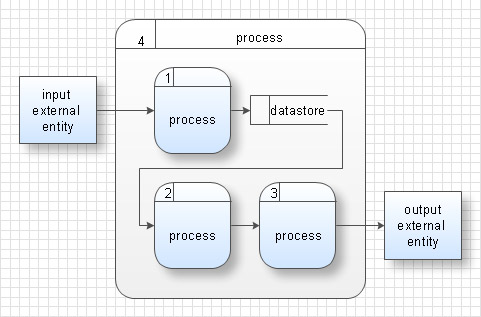
SSADM is based on the data flow diagrams. At the early stages of projecting at description of models (functional, informational and event-trigger) the top-down method is used.
At the description of data flows out of the system and into the system DFD, which denote boundaries of the system, are used.
At the description of data models LDS (Logical Data Structure) diagrams are used. LDS describes which data the system operates with. It is created for existing system and is added at the development of the new one.
For modelling events, happened in the system, ELN (Entity Life History) diagrams are used. These diagrams support states indications and the possibility of description not only consecutive but parallel or reiterative events and also description of the choice of events course.
ELN describes how data change in the system in the course of time at different variants of events.
Thus, the most important SSADM elements are flows modelling with the help of DFD, data logic modelling with the help of LDS and description of entities behavior.
Analysis, projecting and documenting of information system accordingly to SSADM involves 6 main stages.
Each stage is divided into several steps, which define tasks that should be fulfilled at the given stage. The system is studied for getting system requirements. Detailed project is created on the logic level and then transformed into physical project.
SSADM stages:
- Analysis of the existing system or estimation of practicability. It involves the analysis of the existing system and creation of DFD for visualization of known problems and system description. If the system is developed from the beginning than the projecting starts from definition of new system requirements.
- Requirements definition. On the basis of available data about the system new functions, which the system must execute are defined. Also boundaries of the future system and data which will be processed by the system are defined. Infological model of requirements is constructed.
- Definition of technical requirements and device equipment cost. Definition of the expected profit with the introduction of new functions.
- Development of logical data model. Specification of the list of functional requirements. After development of the logical project the adding of new requirements on SSADM is forbidden. Only correction of the existing requirements, their specification and concrete definition are allowed.
- Projecting of logical requirements. Specification of requirements.
- Physical projecting. Physical information model and specification to program elements are developed and optimized. Specifications to program elements are specified and documentation is drawn up.
The advantages of SSADM are the precise definition and support of so-called “non functional requirements”. Such requirements define the level of the quality with which the system must execute its functions. For example, access limitations, the mean time of lifelength to denial, time of the response, safety requirements, etc.
In comparison with other methods of information system projecting, particularly with E. Yordon and A. Young methods, SSADM is characterized with presence of clear consecution of steps at projecting.
-solution.png "Structured Systems Analysis and Design Method solution")

Pic.1. Structured Systems Analysis and Design Method solution
The following features make ConceptDraw DIAGRAM the best Data Flow Diagram software:
- You don't need to be an artist to draw professional looking diagrams in a few minutes.
- Large quantity of ready-to-use vector objects makes your drawing diagrams quick and easy.
- Great number of predesigned templates and samples give you the good start for your own diagrams.
- ConceptDraw DIAGRAM provides you the possibility to use the grid, rules and guides. You can easily rotate, group, align, arrange the objects, use different fonts and colors to make your diagram exceptionally looking.
- All ConceptDraw DIAGRAM documents are vector graphic files and are available for reviewing, modifying, and converting to a variety of formats: image, HTML, PDF file, MS PowerPoint Presentation, Adobe Flash, MS Visio.
- Using ConceptDraw STORE you can navigate through ConceptDraw Solution Park, managing downloads and updates. You can access libraries, templates and samples directly from the ConceptDraw STORE.
- If you have any questions, our free of charge support is always ready to come to your aid.
TEN RELATED HOW TO's:
ConceptDraw DIAGRAM diagramming and vector drawing software extended with Target and Circular Diagrams solution from the Marketing area of ConceptDraw Solution Park is perfect for the Circular Flow Diagram creating.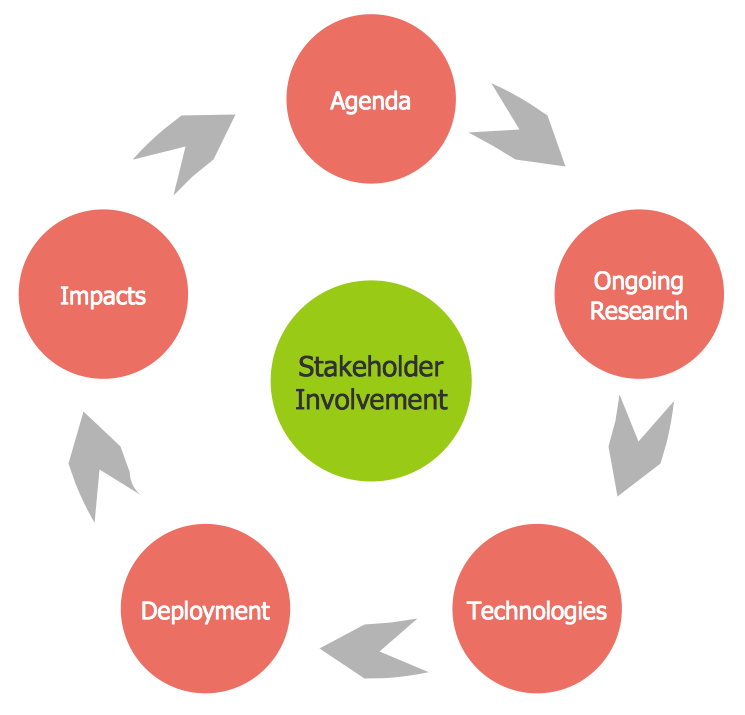
Picture: The Circular Flow Diagram
Related Solution:
TOWS Matrix is an effective tool which allows to analize the external opportunities and threats by means of analyzing the internal strengths and weaknesses of a company. ConceptDraw DIAGRAM diagramming and vector drawing software extended with SWOT and TOWS Matrix Diagrams Solution from the Management Area will help design TOWS Matrix for your company without efforts.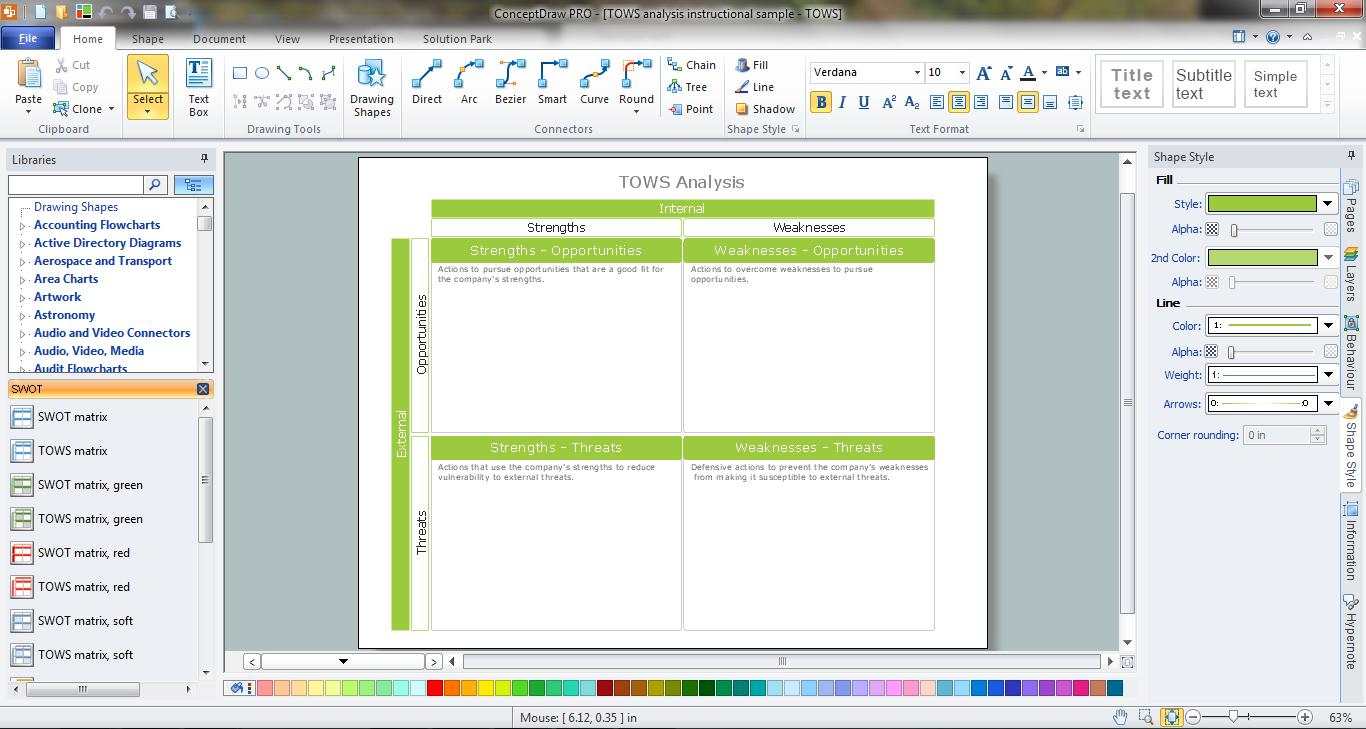
Picture: TOWS Matrix
Related Solution:
In case you need to make a plan for your own future hotel or to do it for someone else, then you can always find the way to make such template very quickly and to have a very good looking result in the end. Whichever type of the hotels you want to illustrate in a way of a floor plan, you can always do it with ConceptDraw DIAGRAM drawing application.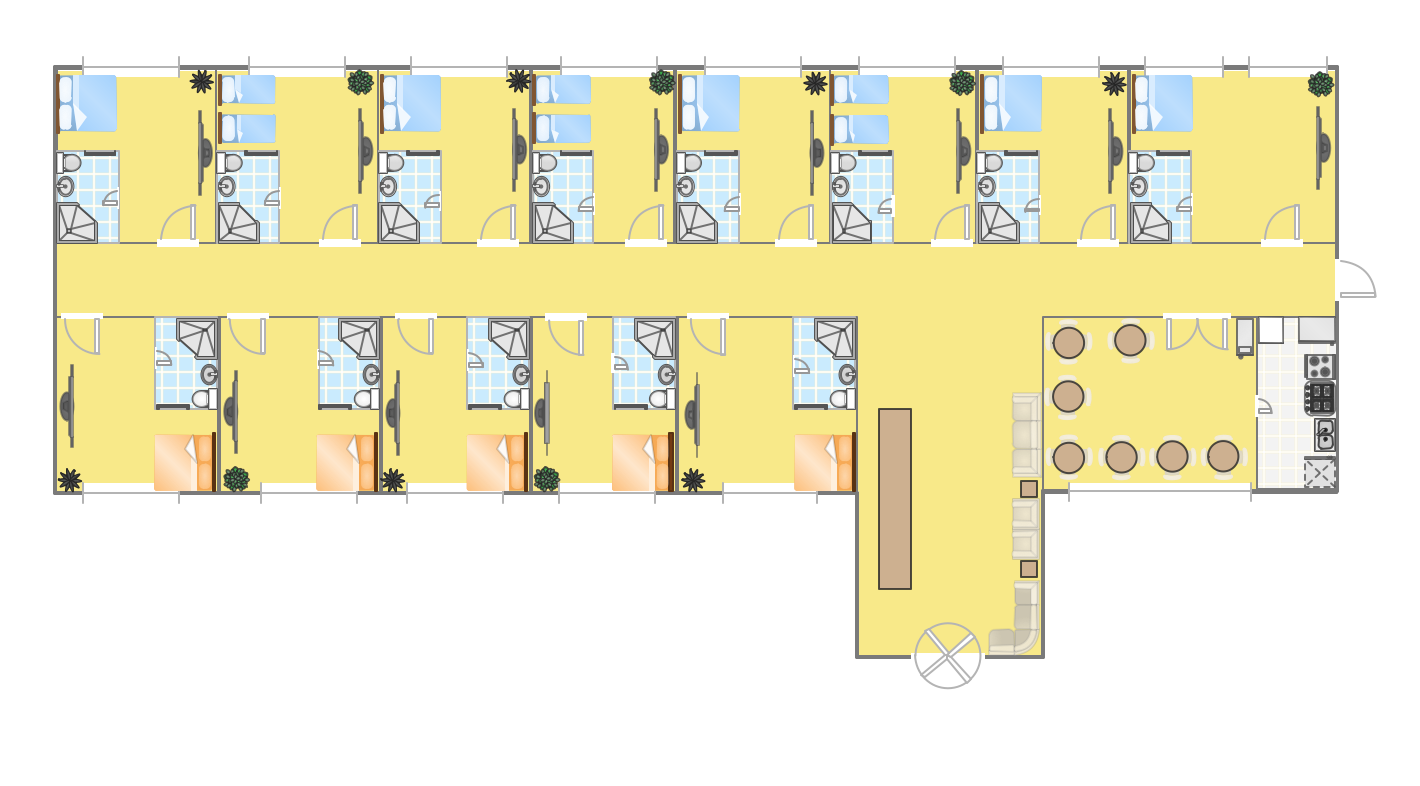
Picture: Hotel Plan. Hotel Plan Examples
Related Solution:
Fishbone diagram is a powerful tool used for solving business problems and obstacles. ConceptDraw DIAGRAM software extended with Fishbone Diagrams solution from the Management area of ConceptDraw Solution Park is a helpful tool for cause and effect analysis. It gives the ability to easy identify many possible causes and factors which cause the effects and to draw Fishbone Diagrams for problem solving.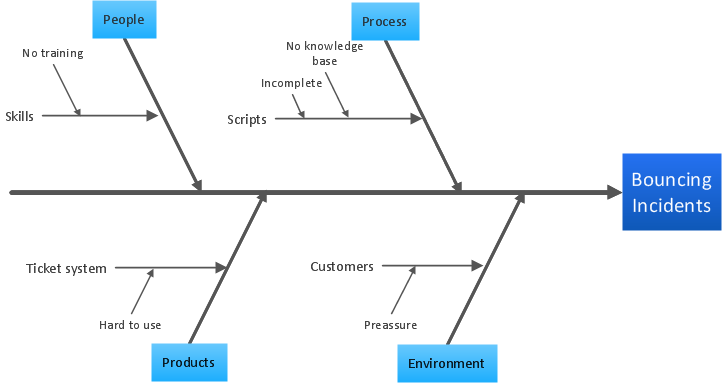
Picture: Cause and Effect Analysis - Fishbone Diagrams for Problem Solving
Related Solution:
Account Flowchart Stockbridge System
Flowchart Examples →
Once you decide to create a flowchart mentioning all the processes , you can always use well as professionally software — ConceptDraw
Picture:
Account Flowchart Stockbridge System
Flowchart Examples
Related Solution:
As restaurant industry is growing rapidly nowadays, researches show that almost half of the adults have worked in a restaurant or a cafe. Moreover, many of them dream to start their own someday. Unfortunately, it takes a lot of time to write a business plan and to find a great location, although some know how to create a restaurant floor plan in minutes or how to plan budget effortlessly. Hiring employees can also cause a lot of headache, but this is crucial for further success, because every guest comes to restaurant for a good service and delicious food. It is also worth noting that restaurant concept is also important, because it defines target audience and influences the menu.
This diagram represents the floor plan of an ongoing sports-theme establishment - restaurant, cafe, or other food service. A number of widescreen monitors installed along the perimeter provide visitors the opportunity to follow the course of a match from anywhere in the dining room of restaurant or cafe. The most of sports fans believe that food and alcohol is a big part of any sports show. That is why the dining room takes the most space - almost 60% of the total establishment space. Nearly all sports fans consume beverages while watching sports - beer, soda or water at least. Thus, the restaurant floor plan designers added a large lavatory there. Moreover, project developers considered unnecessary the gender division of such delicate place - perhaps they guess that only men are watching football, or believe that alcohol will eliminate the most of gender differences.
Picture: How To Create Restaurant Floor Plan in Minutes
Related Solution:
Analysis is very important part for every business, as it helps to understand the weakness and to see the opportunities, and SWOT is one of the most effective tools. To illustrate the multifunctionality of this tool, let’s imagine a SWOT sample in area of computers networking, which can be carried out to realize the pros and cons of some equipment, for example. Even a network topology or a administer can be a subject for this analysis.
This SWOT analysis matrix illustrate the sample of using this useful technique for comprehension of Strengths and Weaknesses, and for determining the Opportunities open to business and the Threats it encounters. Used in a business scope, it will help to create a perspective niche in the market for particular business. The ConceptDraw SWOT and TOWS Analysis solution gives a lot of templates of both SWOT and TOWS matrices that allow managers and marketers create custom diagrams to perform SWOT or TOWS analysis in context of a particular business.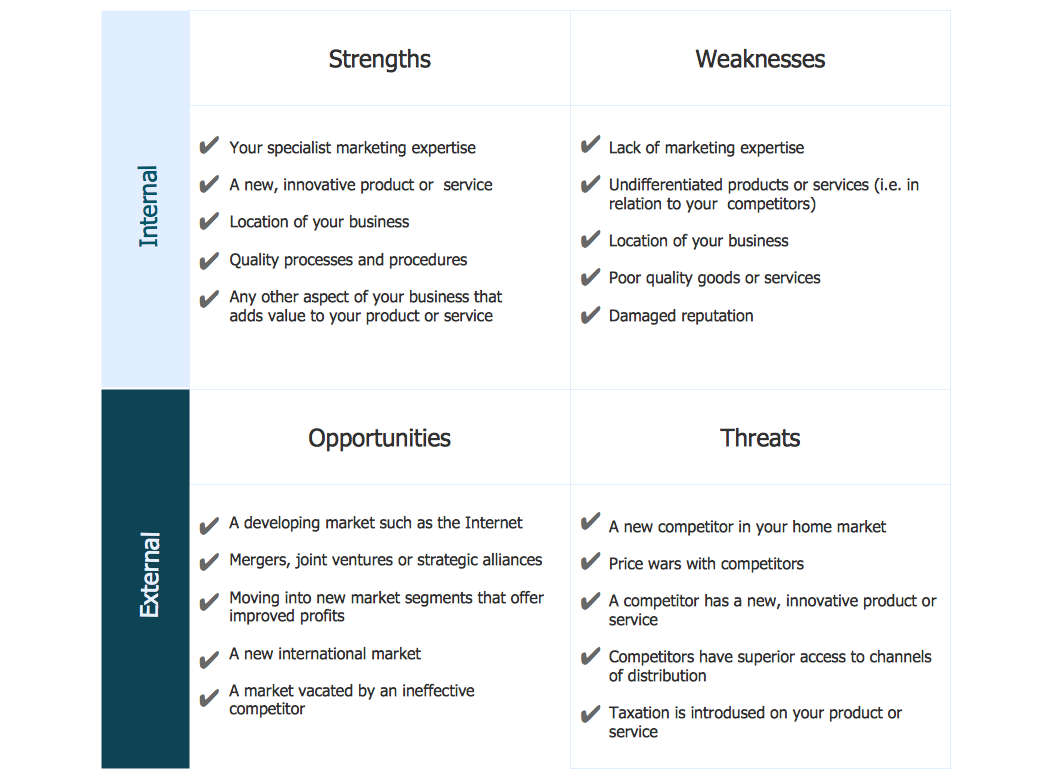
Picture: SWOT Sample in Computers
Unified Modeling Language (UML) is a language of graphic description for object modeling in the field of software engineering. UML was created for definition, visualization, designing of software systems. UML is an open standard that uses graphic notations for creating visual models of object-oriented software systems.
The Rapid UML Solution for ConceptDraw DIAGRAM presentsthe intuitive RapidDraw interface that helps you to make the UML Diagram of any of these 13 types quick and easy.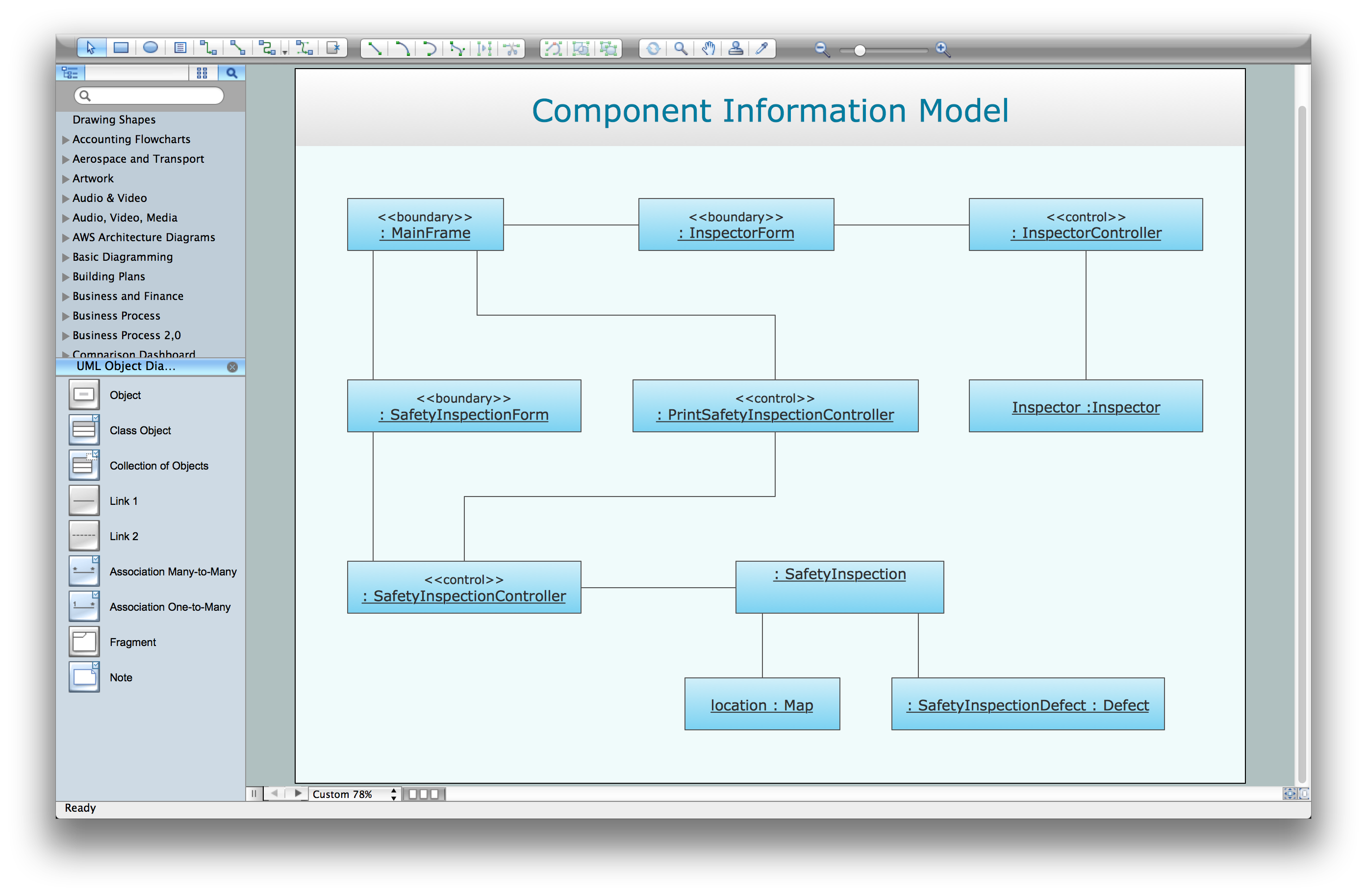
Picture: UML Software
Related Solution:
Learn the most common process flowchart symbols used in business process diagrams and workflow charts. Includes symbol meanings, examples, and a practical reference table.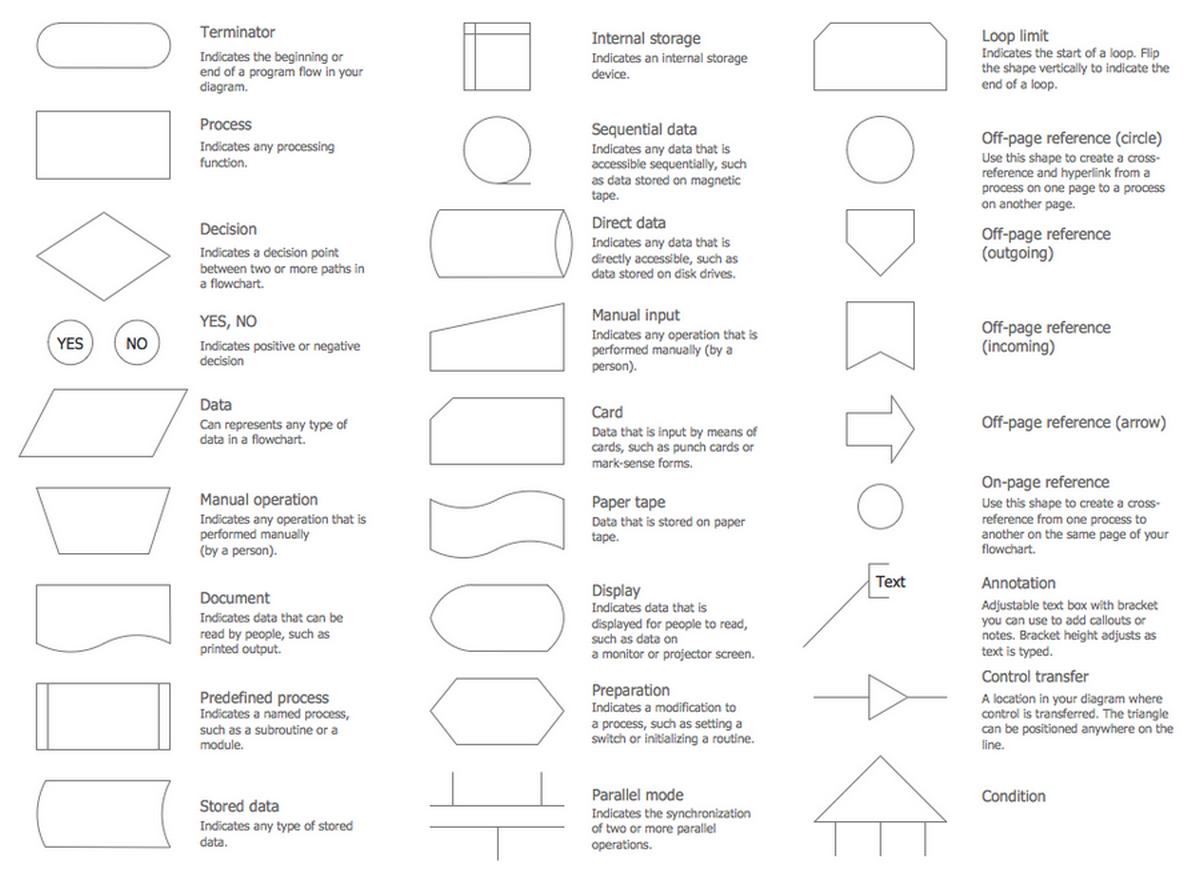
Picture: Process Flowchart Symbols: Meaning, Types and Examples
Related Solution:
The export options in ConceptDraw MINDMAP allow mind maps to be exported in various graphical formats such as images, webpages, or PDF files. They can also be exported into Microsoft Office applications or into different mindmapping programs.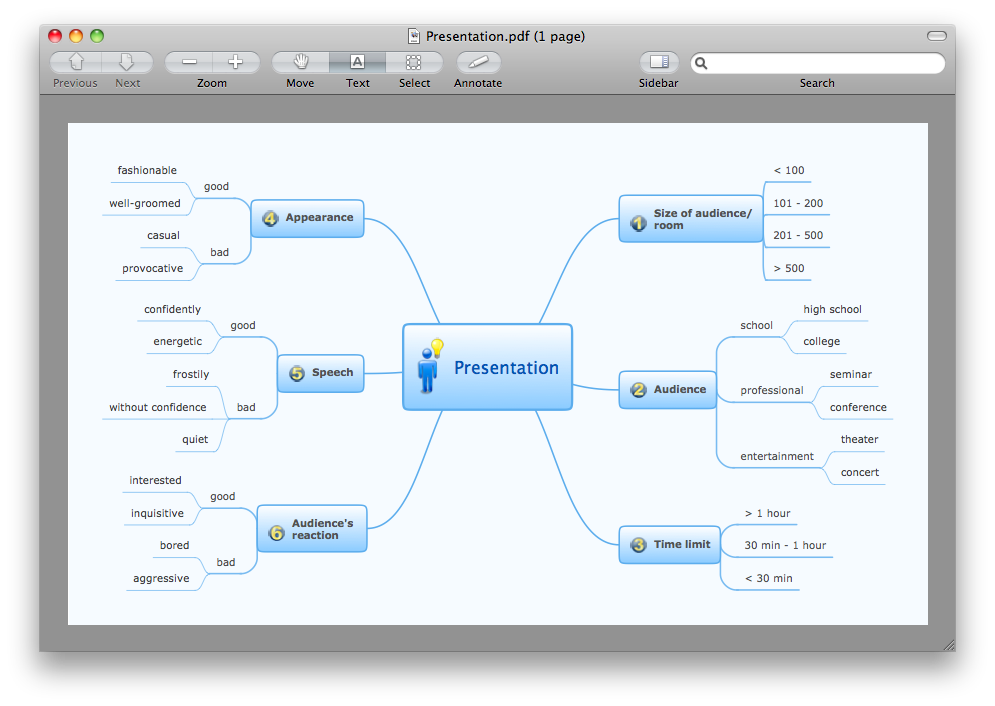
Picture: Export from ConceptDraw MINDMAP to PDF (Adobe Acrobat®) File
Related Solution: