How to Supervise People
ConceptDraw OfficeConceptDraw Office is an integrated set of visualization products and document exchange technologies. ConceptDraw OFFICE consists of a diagramming platform, a mind mapping, and a project management tool. These tools are essential to generate business diagrams, mind maps, project plans, dashboards, presentations, schematics, and any other business visualizations. These tools have access to an online service, ConceptDraw Solution Park that will deliver additional product extensions in the future. This is a time saving assistant for generating your business documents and presentations. ConceptDraw Office consists of a diagramming platform, a mind mapping, and a project management tool. These tools are essential to generate business diagrams, mind maps, project plans, dashboards, presentations, schematics, and any other business visualizations. ConceptDraw MINDMAP SamplesSample mind maps created in ConceptDraw MINDMAP that demonstrate the different capabilities and applications of the program for business, personal, or education use. |
A detailed mind map that includes advice on how to supervise people.
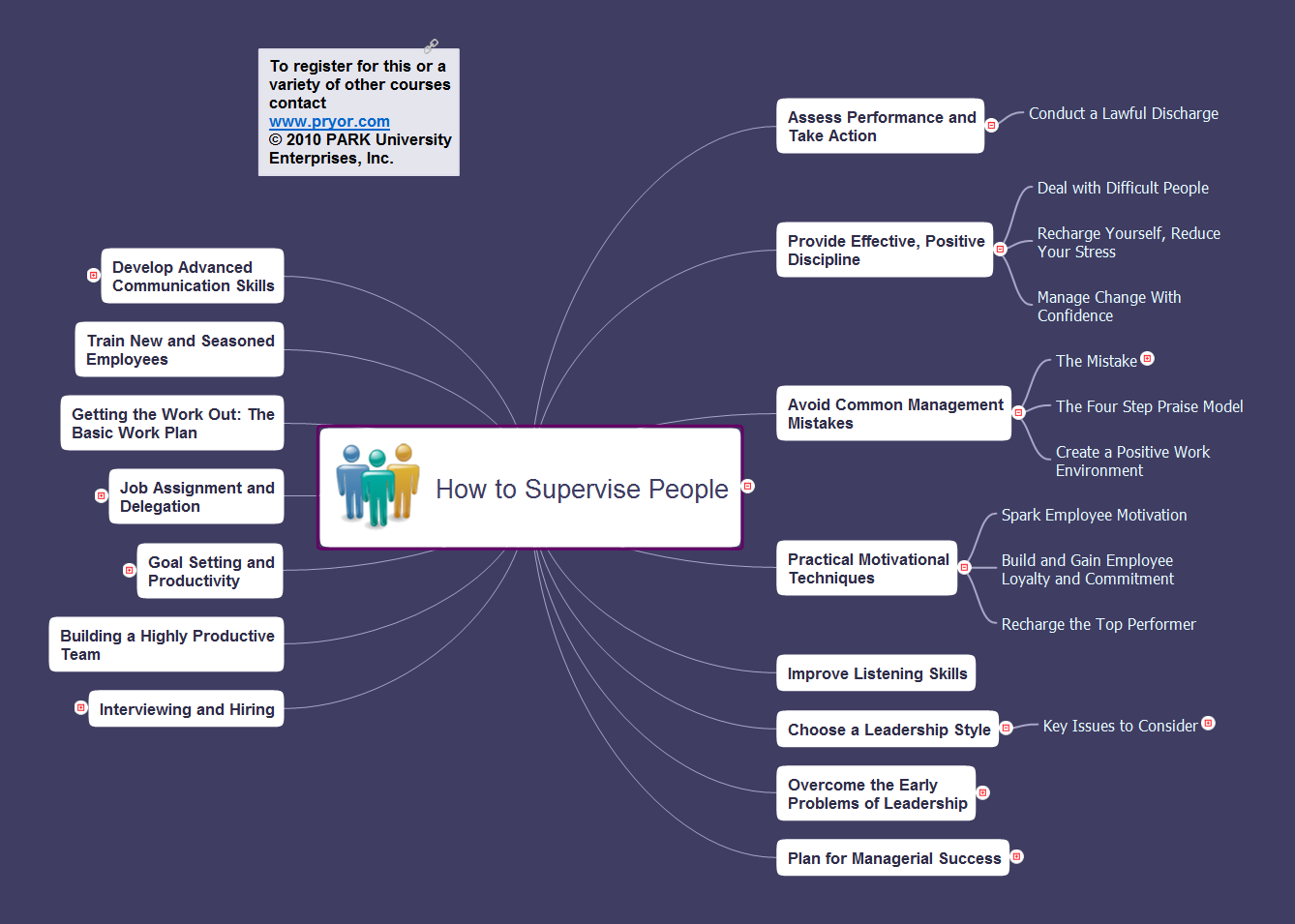
Example 1. How to Supervise People
Export to Outline
-
How to Supervise People
-
Assess Performance and Take Action
- Conduct a Lawful Discharge
-
Provide Effective, Positive Discipline
- Deal with Difficult People
- Recharge Yourself, Reduce Your Stress
- Manage Change With Confidence
-
Avoid Common Management Mistakes
-
The Mistake
- Mediocre Performance
- Boring or Thankless Work
- Money as a Motivator
- Failure to Recognize and Praise Employees
- The Four Step Praise Model
- Create a Positive Work Environment
-
The Mistake
-
Practical Motivational Techniques
- Spark Employee Motivation
- Build and Gain Employee Loyalty and Commitment
- Recharge the Top Performer
- Improve Listening Skills
-
Choose a Leadership Style
-
Key Issues to Consider
- The job to be done.
- Social/emotional relationships.
- Willingness/ability to take initiative.
-
Key Issues to Consider
-
Overcome the Early Problems of Leadership
- Make the Transition Smoothly
- Supervising Friends
- Maintaining Peak Performance
- Supervising Older/More Experienced Employees
- Supervising Younger/Less Experienced Employees
- Steering Clear of the Traps in Supervision
- Set Clear Supervisory Boundaries
-
Plan for Managerial Success
-
Component One
- A favorable attitude toward authority and toward people who are in charge
-
Component Two
- The desire to compete, especially with peers
-
Component Three
- The desire to assert oneself and take charge of situations.
-
Component Four
- A desire to exercise power and authority over other people.
-
Component Five
- A desire to behave in a distinctive and different way, to stand out from the crowd.
-
Component Six
- A well-developed sense of responsibility in carrying out routine work.
-
Component One
-
Interviewing and Hiring
-
Recruitment Sources
- Direct Sourcing
- Referrals
- Temp-to-Hire positions
- Advertising
-
Reduce Employee Turnover with Researched Hiring and Interviewing Techniques
- Behavior based interviewing
- Open-ended questions
- When Filling a Vacant Position
-
Interview Style and Formats
- Panel
- Group
- Peer
- Human resources representative versus hiring manager.
- One-on-one.
- The Interview Process
- How Many Interviews are Enough?
- Hire the Best Suited Candidate
-
Recruitment Sources
- Building a Highly Productive Team
-
Goal Setting and Productivity
- Be SMART about Setting Goals
-
Job Assignment and Delegation
- Why Don't We Delegate
- Why Do Some Employees Resist Taking On Assignments?
- What Can You Delegate?
- Make Job Assignments: No-Nonsense Delegation Guidelines
- Additional Hints
- The Delegation Dilemna
- Getting the Work Out: The Basic Work Plan
- Train New and Seasoned Employees
-
Develop Advanced Communication Skills
- Verbal Communication
- Assert Yourself
- Communicate Effectively
The Benefits for ConceptDraw MINDMAP Brainstorming Software
- ConceptDraw MINDMAP is effective for brainstorming, designing mind maps, idea generating, creative and lateral thinking, creativity and problem solving.
- ConceptDraw MINDMAP is ideal for team and personal work in Business, Marketing and Project Management.
- The libraries with large quantity of vector objects help to illustrate your mind maps and to make them bright, visual and comprehensible.
- Use of View Navigator tool lets create presentations from a mind map: you can simply select the map parts you want to present, sequence your slides, and preview the presentation.
- ConceptDraw MINDMAP provides wide capabilities of importing and exporting in various formats: Microsoft PowerPoint, Microsoft Word, MS Excel, Mindjet MindManager, image, HTML, PDF file.