Made with
ConceptDraw
DIAGRAM 18

Business Processes

In the given article we will consider “business process” and “business processes reengineering” concepts and how the work with business processes is realized in ConceptDraw.

The activity of a company of any size consists of the big amount of business processes which repeat from day to day. This could be a transportation of the load or the new software development, sorting of the correspondence or the creation of the air liner. So any action happened inside the company, which has definite conditions at the input, the result at the output, resources and control mechanism is the business process. At bottom of fact, business process is any action, directed to the final receipt of the direct or indirect profit.

Let’s make some formal definitions.

Business process is:

  • A consequence of actions directed to the transformation of data material flows having the aim to increase their value for a client or the process of creation of the added product cost or services, which satisfy client needs.
  • A quantity of inner correlated steps (functions) which start from one or more inputs and finish with the creation of output (product or service), necessary to a client.
  • A process of transformation of inputs into sets of outputs;
  • A totality of consequent actions for solving of any enterprise task.
  • Business process is an operation, included into the system of operations, the aim of which is production and delivery of services/goods to operations which enter into the system and to other systems as well.

Any process can be optimized and the experience of a great number of companies shows that sometimes it is possible to spend several hours on the process which earlier took several weeks. At this the diminution of the time spent on the produce of goods or service does not influence on the quality of the final result! In our century of the strict competition and market overloaded with services and goods the possibility to accelerate and reduce the price of the final product or a service is of great importance. One of the main reasons of economical progress of Japanese corporations is exactly the thoroughly considered and executed strategy of business processes optimization.

The process of business processes optimizations is called reengineering. At that the matter concerns not small change but radical redesign of the existing business processes.

But to redesign existing business processes it is necessary to clearly conceive the current state of business processes «as is». For description of business processes several methods are developed.

The simplest variant of business processes description is the usage of ordinary block-schemes. This way could be realized with the help of ConceptDraw as there are special libraries of objects and templates for creation of block-schemes. However, this method does not give a visual and convenient result for business processes optimization. Therefore for description of business processes we recommend you to use more complex but more efficient methods.

Methodology of the structural analysis and projection (SA/SD). At the heart of it there lies a methodology of the structural projection of software and information systems. SADT methodology is the continuation of SA/SD method.

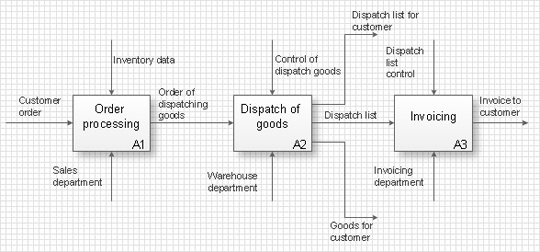
The most worked out and commonly used methodology of business processes description is IDEF methodology. Besides business processes it allows to describe functional blocks, for example production and marketing. ConceptDraw lets creation of business processes description using IDEF0 and IDEF2 methods.

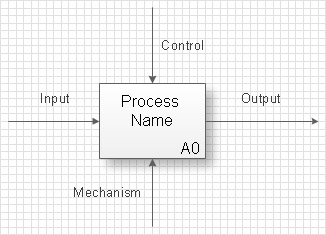
Accordingly to IDEF method, business process is described by following way- this is a rectangle (Activity Box) which defines directly the performed action and four arrows which denote the “input”, “output”, “mechanism” (or resources which are used in the process) and “management” (or the control of the process)

To create the business process description in ConceptDraw it is enough to open Business Processes section from Template Gallery and select a method. Besides IDEF methodology ConceptDraw allows usage of diagrams of business processes modeling (BPML - Business Process Modeling Diagram), diagrams of quality control (TQM Diagram - Total Quality Management Diagram) and symbols of values flows.

After this a scheme or a diagram, is created as simple as any other ConceptDraw diagram- with the help of Drag&Drop mechanism you arrange necessary libraries’ objects on a page of your document and connect them among each other with connectors.

Thus, all the activity of a company can be described as the totality of many small business processes, which can be optimized by the way of reengineering for getting new most effective business processes. The obtained optimized description is called “normative” or “to be” and is realized with the help of the same method with the help of which the description “as is” was created.

Business Processes *

The most worked out and commonly used methodology of business processes description is IDEF methodology. Besides business processes it allows to describe functional blocks, for example production and marketing. ConceptDraw lets creation of business processes description using IDEF0 and IDEF2 methods.

TEN RELATED HOW TO's:
Business Processes description with ConceptDraw. Business-processes it allows to describe functional blocks, for example production and marketing. ConceptDraw lets creation of business processes description using IDEF0 and IDEF2 methods.Business Processes description with ConceptDraw DIAGRAM  *
Picture: Business Processes description with ConceptDraw DIAGRAM
Related Solution:
Workflow Diagram created by using special software based on graphic mastering technology Arrows10. Its automatics follows the global concept of business graphics and diagramming. The practical effectiveness of Arrows10 technology used in ConceptDraw DIAGRAM are around the quick auto-arrows behaving as expected and connecting boxes of workflow diagram from workflow symbol to process flow symbol. ConceptDraw DIAGRAM is a workflow diagram software contains specific features help you to draw diagrams faster, such as RapidDraw, or Arrows10. There is also a rich set of samples and templates to give you an example of data may be visualized as workflow diagram.Workflow Diagram Data *
Picture: Workflow Diagram Data
Related Solution:
A flowchart is a powerful tool for examining processes. It helps improving processes a lot, as it becomes much easier to communicate between involved people, to identify potential problems and to optimize workflow. There are flowcharts of different shapes, sizes and types of flowchart vary from quite basic process flowcharts to complex program flowcharts. Nevertheless, all these diagrams use the same set of special symbols like arrows to connect blocks, parallelogram to show data receiving or rectangles for showing process steps. Basic flowcharts are used to represent a simple process algorithm. A basic flowchart notation consists of rectangles (business processes), arrows (the flow of information, documents, etc.). The same notation is used in items such as the "decision", which allow you to do the branching. To indicate the start of the entire business process and its termination can be used the "Terminator" element. The advantages of Basic Flowchart are simplicity and clarity. With it you can quickly describe the business process steps. Creating of Basic Flowchart does not require any special knowledge, as easily understand by employees with different levels of education and IQ.Types of Flowchart — Overview
Picture: Types of Flowchart: Comprehensive Overview
Related Solution:
Having the already previously created samples of the Venn diagrams can help any ConceptDraw DIAGRAM user make it possible to make the needed drawing within only a few minutes by editing the existing ones.Venn Diagram Examples for Problem Solving — BQP Complexity
Picture: Venn Diagram Examples for Problem Solving
Related Solution:
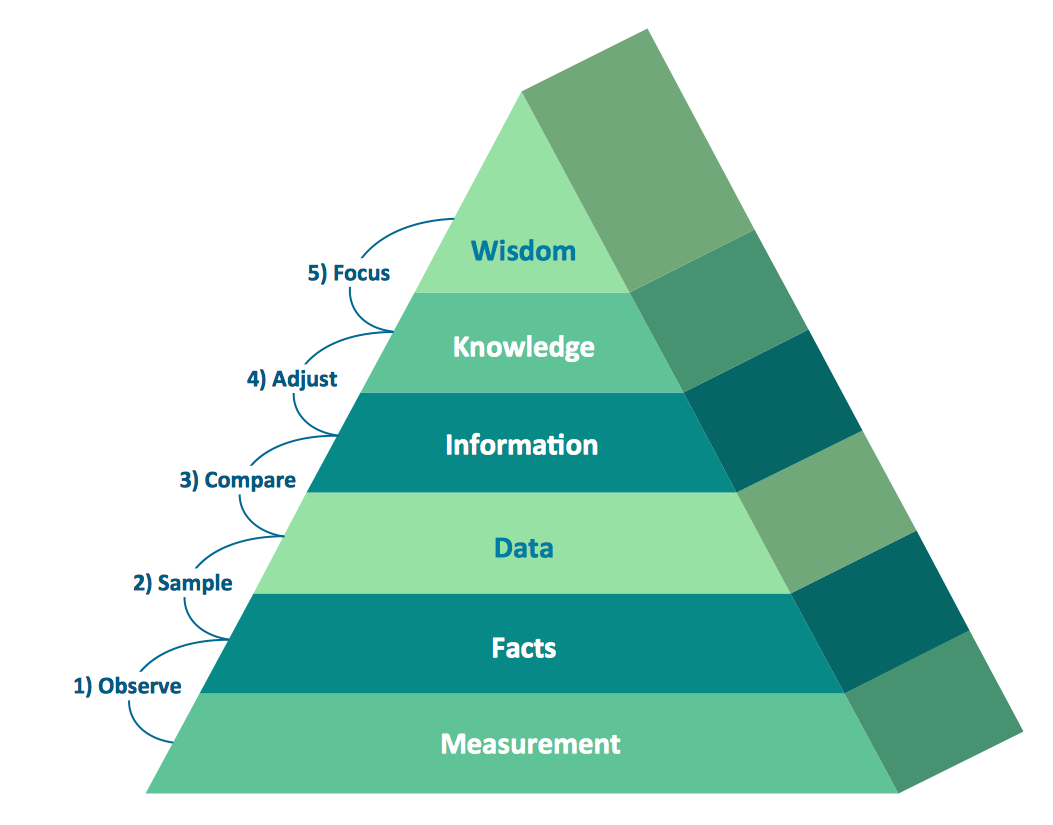
The DIKW Pyramid refers loosely to a class of models for representing purported structural and/or functional relationships between data, information, knowledge, and wisdom.Pyramid Diagram *
Picture: Pyramid Diagram
Related Solution:
Data visualization is an important part of any software design. To understand how diagrams can improve your work, you can use examples of flowcharts that can be easily found on Internet. Flowcharts represent processes as sequences of steps written in appropriate symbols. Launching a website is a complex process. There’s a lot to accomplish, and multiple people who need to participate. This flowchart can be helpful in planning and prioritizing tasks, making the process well-organized and clear for both developers and customers. This example flowcharts was build using ConceptDraw Flowcharts solution. It is really handy and helpful for starting any website project. It includes the set of milestones, and activities that can be easily customized and applied to any individual project.Flowchart Design: Contoh Flowchart
Picture: Flowchart Design: Contoh Flowchart
Related Solution:
While creating flowcharts and process flow diagrams, you should use special objects to define different statements, so anyone aware of flowcharts can get your scheme right. There is a short and an extended list of basic flowchart symbols and their meaning. Basic flowchart symbols include terminator objects, rectangles for describing steps of a process, diamonds representing appearing conditions and questions and parallelograms to show incoming data. This diagram gives a general review of the standard symbols that are used when creating flowcharts and process flow diagrams. The practice of using a set of standard flowchart symbols was admitted in order to make flowcharts and other process flow diagrams created by any person properly understandable by other people. The flowchart symbols depict different kinds of actions and phases in a process. The sequence of the actions, and the relationships between them are shown by special lines and arrows. There are a large number of flowchart symbols. Which of them can be used in the particular diagram depends on its type. For instance, some symbols used in data flow diagrams usually are not used in the process flowcharts. Business process system use exactly these flowchart symbols.Basic flowchart symbols cheat sheet: terminator, process, decision, input/output, flowline, connectors
Picture: Flowchart Symbols: Meaning and Examples
Related Solution:
If you are an advanced diagramming software user, you might use it daily. Traversing the Internet in searching of alternative to MS Visio for MAC and PC, you can fulfill all your requirements with ConceptDraw DIAGRAM. Don’t hesitate to transfer your documents to another operating system. When looking for a smart and simple tool for business diagrams as alternative to MS Visio for Apple OS X platform, ConceptDraw DIAGRAM certainly is the best choice. Making many kinds of business charts, numerous technical drawings is what ConcepDraw DIAGRAM is the best. One can easy create any diagram and complete it perfectly and quickly. The big collection of vector object libraries, templates and samples, make it the best Microsoft Visio alternative: ConceptDraw DIAGRAM is simpler to use, less expensive, and supports project management and mind mapping methods.Alternative to MS Visio for MAC and PC
Picture:
In Searching of Alternative to MS Visio for Mac and PC
with ConceptDraw DIAGRAM
Venn diagrams are illustrations used in the branch of mathematics known as set theory. Create your Venn diagrams for logic problem solving using the ConceptDraw DIAGRAM softwareVenn Diagram Examples for Problem Solving - Venn Diagram as a Truth Table
Picture:
Venn Diagram Examples for Problem Solving
Venn Diagram as a Truth Table
Related Solution:
The purchase or purchasing funnel is a consumer focused marketing model which illustrates the theoretical customer journey towards the purchase of a product or service.Pyramid Diagram *
Picture: Pyramid Diagram
Related Solution:
ConceptDraw
DIAGRAM 18