Data Flow Diagram Process

Accounts Payable Process Flow Chart

Account Flowchart. Flowchart Examples

"Data flow diagrams are one of the three essential perspectives of the structured-systems analysis and design method SSADM. The sponsor of a project and the end users will need to be briefed and consulted throughout all stages of a system's evolution. With a data flow diagram, users are able to visualize how the system will operate, what the system will accomplish, and how the system will be implemented. The old system's dataflow diagrams can be drawn up and compared with the new system's data flow diagrams to draw comparisons to implement a more efficient system. Data flow diagrams can be used to provide the end user with a physical idea of where the data they input ultimately has an effect upon the structure of the whole system from order to dispatch to report. How any system is developed can be determined through a data flow diagram model.
In the course of developing a set of levelled data flow diagrams the analyst/ designers is forced to address how the system may be decomposed into component sub-systems, and to identify the transaction data in the data model.
Data flow diagrams can be used in both Analysis and Design phase of the SDLC.
There are different notations to draw data flow diagrams (Yourdon & Coad and Gane & Sarson), defining different visual representations for processes, data stores, data flow, and external entities." [Data flow diagram. Wikipedia]
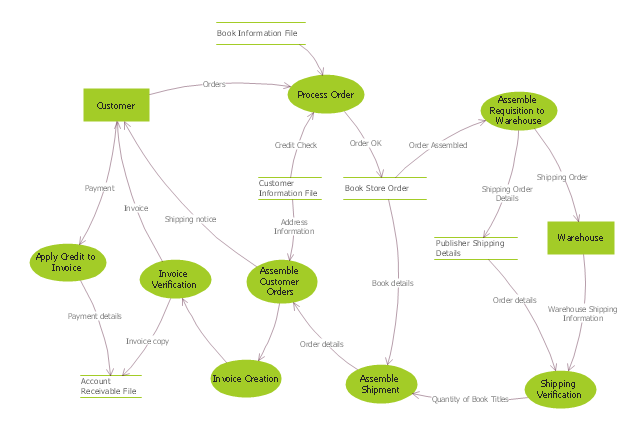
The DFD (Yourdon and Coad notation) example "Process of account receivable" was created using the ConceptDraw PRO diagramming and vector drawing software extended with the Data Flow Diagrams solution from the Software Development area of ConceptDraw Solution Park.
In the course of developing a set of levelled data flow diagrams the analyst/ designers is forced to address how the system may be decomposed into component sub-systems, and to identify the transaction data in the data model.
Data flow diagrams can be used in both Analysis and Design phase of the SDLC.
There are different notations to draw data flow diagrams (Yourdon & Coad and Gane & Sarson), defining different visual representations for processes, data stores, data flow, and external entities." [Data flow diagram. Wikipedia]
The DFD (Yourdon and Coad notation) example "Process of account receivable" was created using the ConceptDraw PRO diagramming and vector drawing software extended with the Data Flow Diagrams solution from the Software Development area of ConceptDraw Solution Park.
Data Flow Diagram
Accounts Payable Flowchart
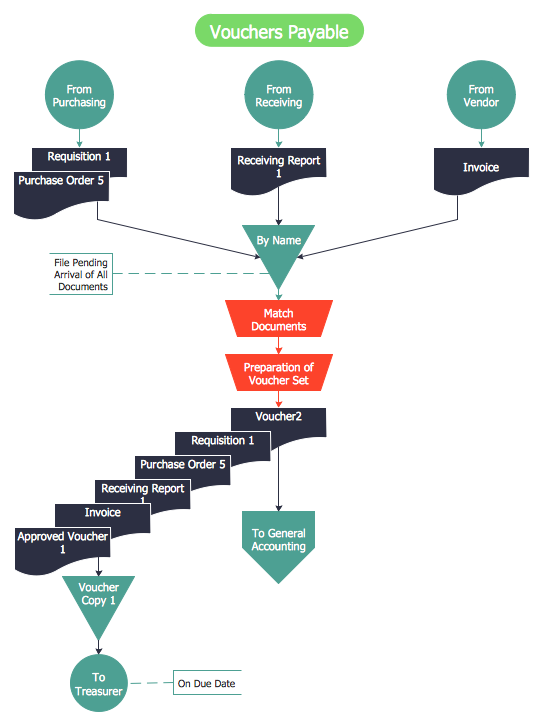
How to Make an Accounting Process Flowchart

Account Flowchart Stockbridge System. Flowchart Examples

Accounting Data Flow from the Accounting Flowcharts Solution
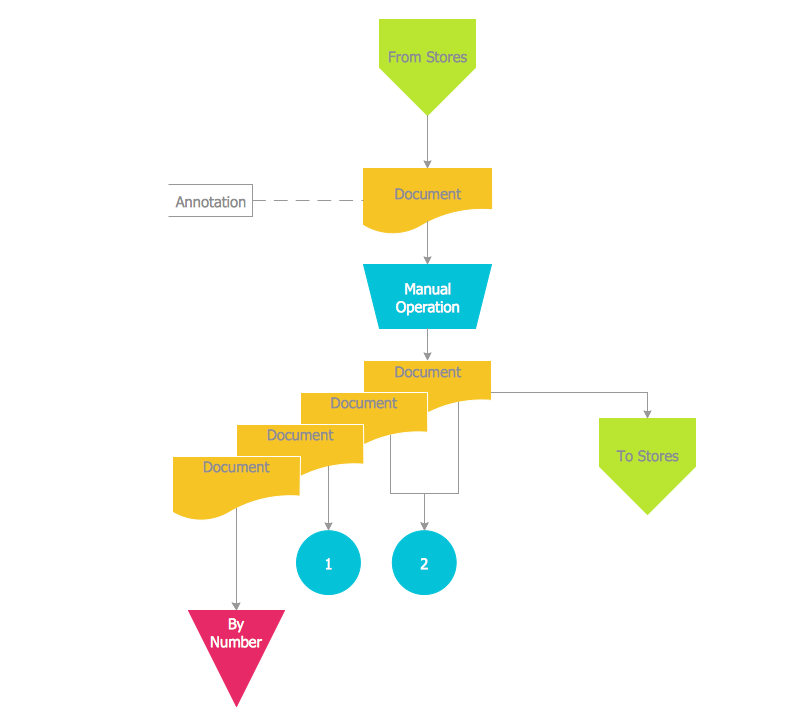
Accounting Flowchart: Purchasing, Receiving, Payable and Payment

 Data Flow Diagrams (DFD)

Data Flow Diagrams solution extends ConceptDraw DIAGRAM software with templates, samples and libraries of vector stencils for drawing the data flow diagrams (DFD).
- Accounts Payable Data Flow Diagram
- DFD - Process of account receivable | Data Flow Diagrams (DFD ...
- DFD - Process of account receivable | Circular Arrows Diagrams ...
- Accounts Payable Flowchart | Accounting Flowchart: Purchasing ...
- Bank Account Opening Process Flow
- DFD - Process of account receivable | Data structure diagram with ...
- Account Flow Chart Sample
- Data Flow Daigram For Opening Bank Account
- Login Flow Chart Sample
- DFD - Process of account receivable | Top 5 Android Flow Chart ...


