

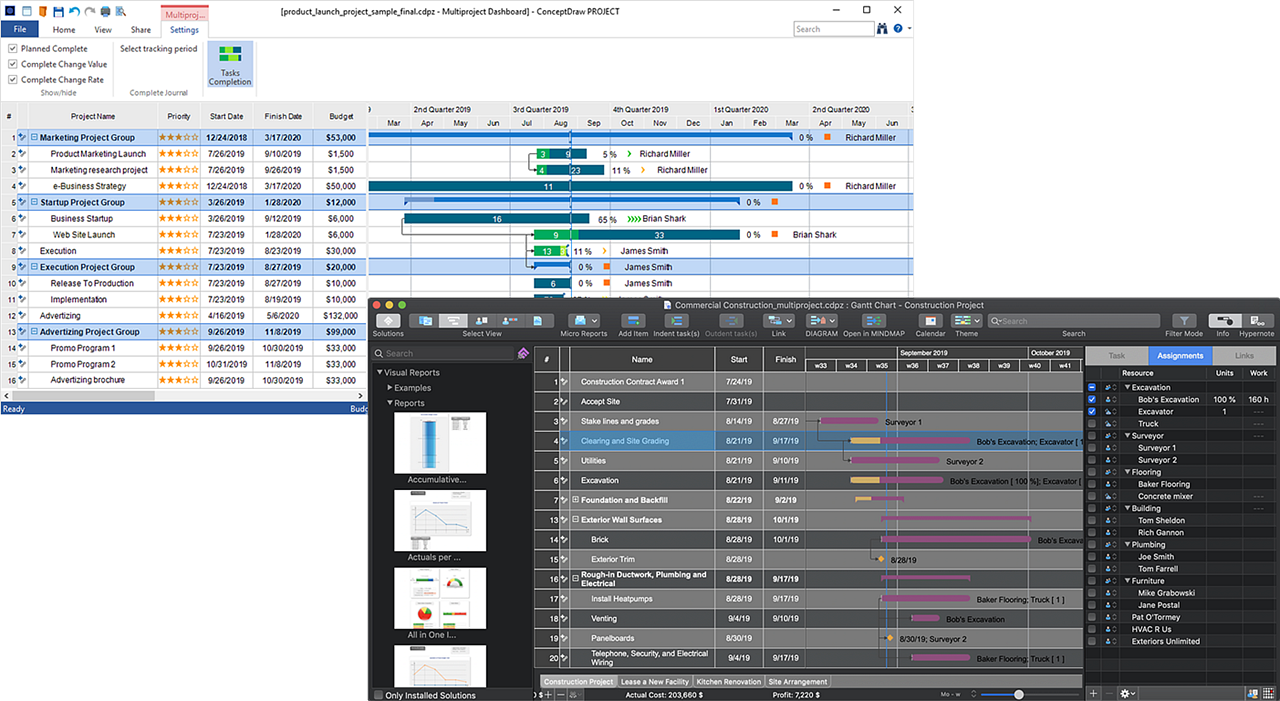
ConceptDraw PROJECT 15 is a full-featured project management solution that keeps you on top of your data through its project dashboards. Project dashboards display all of your key performance indicators on one screen so you can take instant action whenever necessary.
ConceptDraw PROJECT 15 contains an extensive tool set to help project managers. The rich data visualization capability that is provided by ConceptDraw products builds project dashboards, one-click reports, multi-project views, Gantt charts and resource views, resource usage views. The rich visual data presentation supports important project management tasks such as critical planning and change management.
Application Compatibility
- Versions of MS Office supported 2021 and later
- Versions of MS Project 2021 and later
- ConceptDraw MINDMAP 16
- ConceptDraw DIAGRAM 18
- ConceptDraw Office 11
- Mindjet MindManager v7 and later
Display Results and Achievements
Live Dashboard:
Projects data updates automatically
Current projects results are displayed at Project Portfolio View
Project Tracking Icons display status and dynamics
Reports:
Bucket of tabular classic reports to show project status and analyze it:
Current activities, weekly
Resource usage, weekly
Executives, weekly
Costs, monthly
Resource usage, monthly
Executives, monthly
Project
Project finish
Phase start
Planning reports
Project knowledge
Project Diagrams:
Gantt Chart
Resource Usage View
Network Diagram
Pert Charts
WBS
Micro reports
Automatically generated e-mail with text and mind map attachment.
Micro reports are e-mailed to project members
For Project:
Task list, Resource list, Nearest milestone.
For Phase:
Task list, Today task list, Critical task list, Resource list, Milestones, Status.
For Task:
Task status
For Resources:
Assigned task list, Today task list, Project list, Milestones, Objectives.
Presentation:
Slide preview provides easy access to preview and exports options.
Direct export parts of slide preview to image format PNG
Portfolio management
Multiple project Gantt Chart
Project groups
Cross projects links
Common resource pool
Project management
Project planning:
Define objectives
Divide project on phases
Define milestones
Define dead lines
Setup deadlines
Assign resources to tasks
Send out to-do lists
Save Baseline
Resource management:
Resources ability to:
Group
Mark
Add notes
Attach e-mail
Work calendar schedule
Maintain Project Knowledge
Organize project knowledge:
Defining project objectives
Estimating work scope
Testing project hypotheses
Commenting
Outlining results
Documenting results.
Multiple Hyperlinks
Link project documentation to tasks, phases, resources
You can link: url, e-mail, file, folder, Project, Task, Resource
You can add text notes and hyperlinks using the Hypernotes
Editing
Copy-and-Paste
Maps from ConceptDraw MINDMAP can be pasted into
ConceptDraw PROJECT to Gantt View as tasks
Tasks from ConceptDraw PROJECT can be pasted
into ConceptDraw MINDMAP
Imports & Exports
Import/Export MS Project 2007 and later
Import/Export MS Excel 2007 and later
Import/Export MindManager v7 and later
Import/Export ConceptDraw MINDMAP
Export Gantt Charts as PNG
Filtering & Sorting
Sort — Alphanumeric, Alphabetic, Task Percentage Complete, Number, Forwards-Backwards
Miscellaneous
Automatic save
Extensive Keyboard Shortcuts
Ribbon interface — Windows
Shared file format with ConceptDraw MIDMAP
License per User for Macintosh & Windows
Undo/Redo
Send via e-mail
Project samples
Print outline, Gantt Chart or notes
Auto save
No charge technical support
ConceptDraw Solutions
Looking for additional productivity tools? Want to know what 3rd party developers have released for
ConceptDraw PROJECT?
Visit ConceptDraw Solutions for the latest productivity add-ons that are focused on making you more productive each and every day. Come to the ConceptDraw Solutions to see what free and paid solutions are available to you.
We are constantly adding new solutions.
Here some of solutions examples:
Live dashboard “Multipage Multiproject”
Live dashboard “Tactical dashboard”
Live dashboard “Strategy Dashboard”
Reports: bucket reports in ConceptDraw DIAGRAM and ConceptDraw MINDMAP
Project Diagrams Radial tasks
Project Diagrams Milestones Chart
Project Diagrams