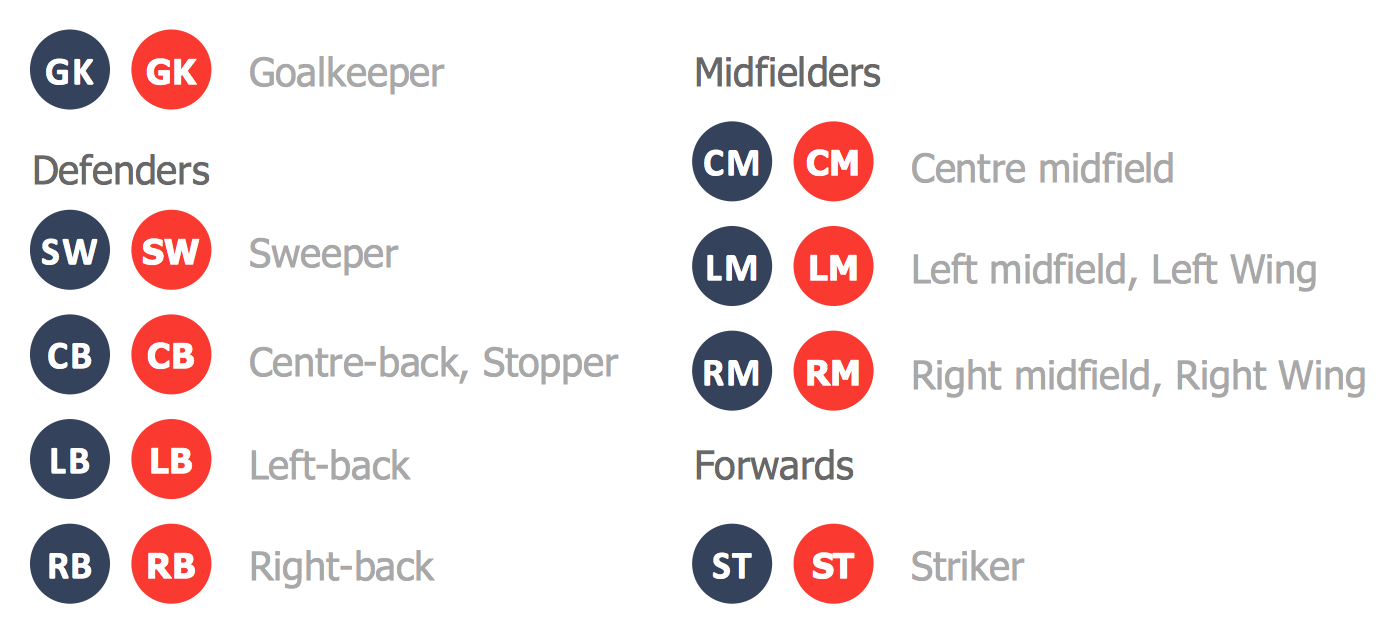
Soccer (Football) Positions
In football, each of the 11 team players covers a specific position on the football field and a team in general is made up of only one “goalkeeper” and ten other players known as “outfield” players. These ten mentioned players fill different defensive, midfield and attacking positions and these positions for each of them depend on their deployed formation. The football players from both sides fill these positions of their sides of the field and they have to stick to them as least until the end of the game.
A long time ago these formations were much more offensively aggressive, especially in the late 1800s. At the end of the 19th century, the so-called “2-3-5 formation” became very popular and so widely used and so these position names became more common and world widely known. There were “full-backs” in defence, also known as the “left-back” and “right-back” separately. In midfield there are “left-half”, “centre-half” and “right-half”. For the forward line there were “outside-left” (also known as “left wing”), “inside-left”, “centre-forward”, “inside-right” and “outside-right” (some people call it “right wing”).
With the evolution of football game and so it becoming more and more popular, both team and tactics formations have very much changed. As a result, many of these positions’ names have changed to reflect their duties in the modern game of football. The "half-back" term is no longer used since the early 1970s as well as "midfield", which was used in naming the positions that play all around the middle third as in “centre midfield” and “wide midfield”.
Nowadays these positions in football are not as rigidly defined as in sports such as, for example, “rugby” or the game of American football. Most of the football players will still play in a limited range of positions throughout their career. The reason for this is that each of the positions requires having a particular set of skills as well as physical attributes so to be able to possess yourself as a professional goalkeeper, you have to be able to catch the football ball being kicked really hard and so being thrown with great force and to manage to do that you need years of practice as well as very good health and good physical conditions. There are, though, a few football players who can no problem play in a number of positions. Such football players are known as “utility players”.
In so-called “Total Football” tactics, the football players are defined only into one position. Goalkeeper is the one most defensive position in a football game. This person’s main job is to stop the other team’s players from scoring by catching, palming or/and punching the ball from shots, crosses and headers. Positioning is an another very important job for goalkeepers and it is well known as one of the hardest to master as keeper. All goalkeepers must wear a different coloured kit. The colours can be very different: yellow, grey, black, green, different shades of blue, etc. They also usually wear the specialised gloves. These gloves’ role is very important: providing better grip on the football ball and protecting their hands from hard shots and headers. They also help make it easier to punch and push the ball away.
There are also players who has the job of the “centre-back” (or called “central defenders”). This job is to stop the opposing players, the “strikers” in particular, from scoring. They have the right and duty to bring the ball out from their so-called “penalty area”. Most of the football teams employ two “centre-backs”, stationed in front of the goalkeeper. There are two main defensive strategies which can be used by “centre-backs”. They are: the “zonal defence” (where each centre-back covers a specific area of the pitch) and the “man-to-man marking” (where each centre-back has the job of covering a particular opposition player). “Centre-backs” usually go forward for set piece corners and free-kicks. The reason for that is that these places are perfect for these players height as their jumping ability give them an aerial goal threat. After the set piece is complete, they retreat to their own half.
The so-called “sweeper” is a type of centre-back that "sweeps up" the ball when the opponent manages to breach the defensive line. These players’ position is rather more fluid than other defenders who mark their designated opponents. The ability of such player is to read the game is even more vital than for a centre-back. But as for the use of a sweeper role — it cannot be considered as popular as the last man can play an attacking opponent onside.
The “left-back” and the “right-back” are the defenders stationed either side of the “centre-backs” in order to provide protection from the attacking wide players. These players often have to defend against the opponent's wingers and these wingers try to take the ball past them down the flanks in order to cross or pass into the penalty area to their attackers. “Full-backs” traditionally do not go up to support the attack. Although they may move up as far as the halfway line which depends on the defensive line being held. Nowadays there is a tendency to use the attacking “full-back” (or “wing-back”) role. From the very beginning, a full-back was the last line of defence. Although as the game developed in the early 20th century, the “centre-half” role became less popular and so came to be called as “centre-back”.
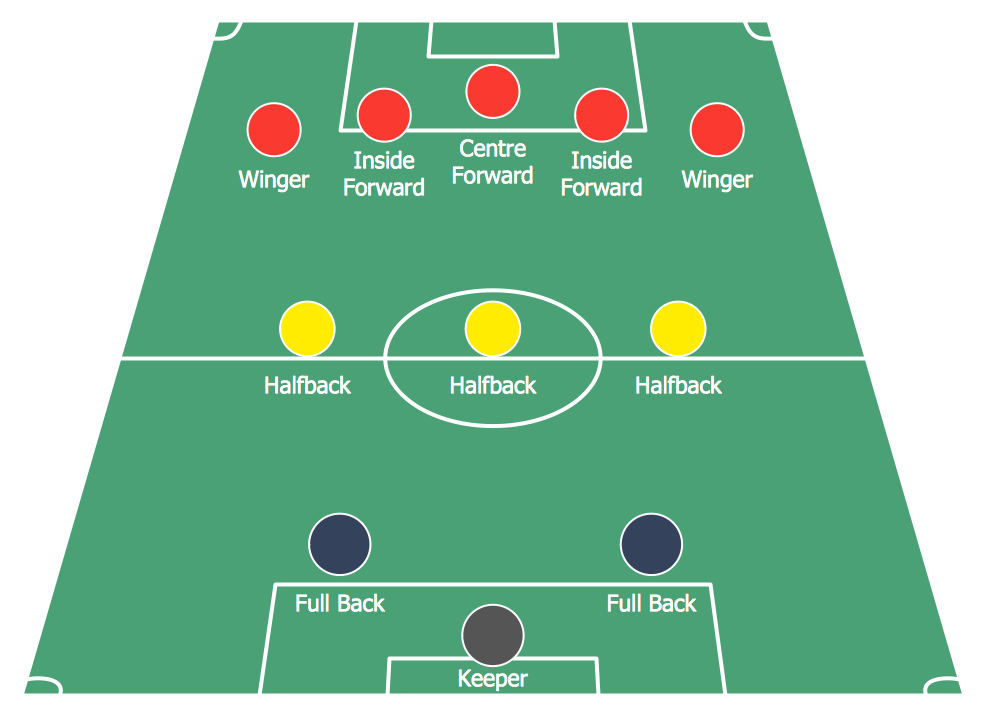
There are also many other positions in soccer or football and they are all can be described in a way of a diagram made in ConceptDraw DIAGRAM This software allows creating such drawing with the use of Soccer solution which can be found and downloaded from the “Sport area” of ConceptDraw Solution Park on this site. It is very useful tool that will help you design the soccer-related drawings of any complexity in only a few minutes once you download it either from this site or from ConceptDraw STORE.
Explaining soccer positions becomes much more easier and time saving with visual drawings. ConceptDraw DIAGRAM software extended with the Soccer solution from the Sport area of ConceptDraw Solution Park is very useful tool that will help you design the soccer-related drawings of any complexity in minutes.
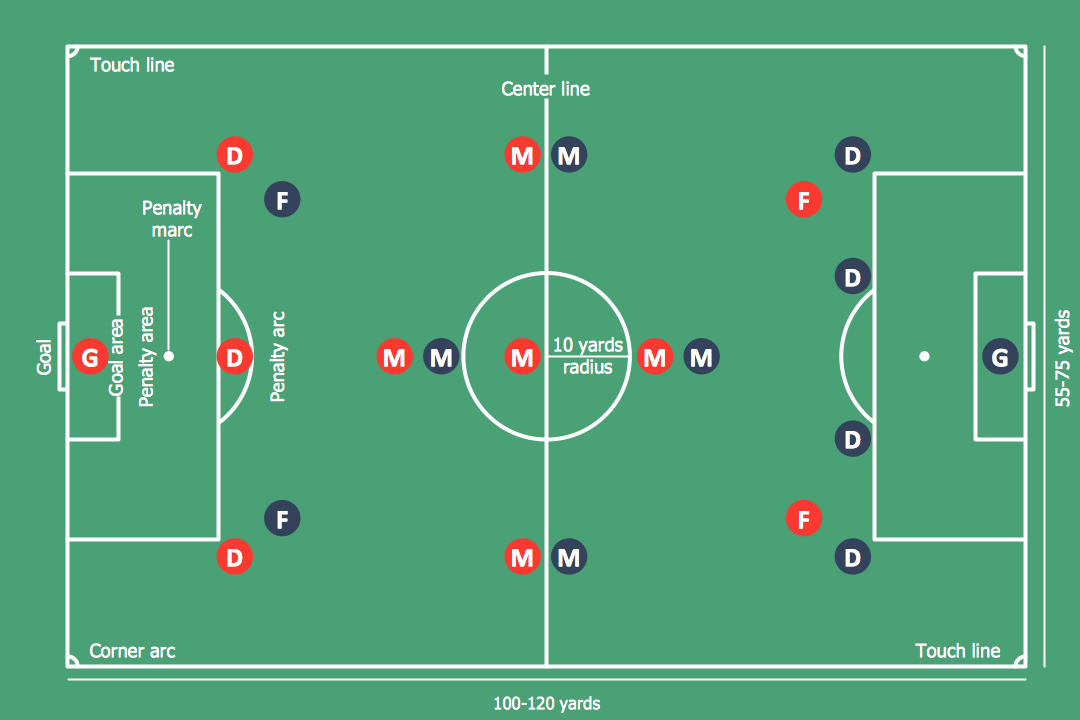
Sample 1. Soccer (Football) Positions
For creating the diagram representing some soccer position, follow next steps:
- From the "Soccer (Football) Fields" library drop a field object to your document;
- From the "Soccer (Football) Positions" library drop all position objects you need to your document;
- Arrange positions on the field according to your drawing idea;
- Add arrows or text labels if needed.

Sample 2. Soccer (Football) Field Dimensions
The samples you see on this page were created in ConceptDraw DIAGRAM using the Soccer Solution. They demonstrate the solution's capabilities and the professional results you can achieve quick and easy. An experienced user spent 10 minutes creating every of these samples.
All source documents are vector graphic documents. They are available for reviewing, modifying, or converting to a variety of formats (PDF file, MS PowerPoint, MS Visio, and many other graphic formats) from the ConceptDraw STORE. The Soccer Solution is available for all ConceptDraw DIAGRAM or later users.
See Also Samples: