Critical Tasks
Project ManagementIn PM solutions we support many project methodologies such as Agile and Simple Projects. Methodology solutions help in implementing best practices in project management. CS Odessa provides Toolbox solutions to support solving issues related to planning, tracking, milestones, events, resource usage, and other typical project management functions. Toolbox Solutions help you deal with common project situations in an extraordinary way. PM PlanningBenefitsPM Planning automatically creates documents that reflect a project’s status for people who have different project roles. Individuals are able to use the reporting capability built into ConceptDraw Solution Park for their benefit. The report capability addresses more than management requirements and is a great tool to guide individual task completions. This solution in ConceptDraw Solution Park improves planning for all team members and is a strong management and productivity tool. ObjectiveExtend your planning and reporting capability, prepare a wide range of project reports, and improve project communications. Solution PurposeCreate project reports that address the needs of project managers and senior management and keep everyone informed on daily progress and monthly objectives. These collective reports help accurately plan, maintain, and finish projects on time. Also available are short Microreports that can you can email to project members to keep everyone updated on project statuses, tasks, and resources. Intended ForProject managers. Products and MethodsReport Basket is a tool for the effective planning of different project stages. The Report Basket makes the process of reporting simple and is a good tool for planning, communicating, making decisions, and doing analytical work. Critical TasksGenerates a mind map that contains topics of Task Type with Tasks that are behind schedule. |
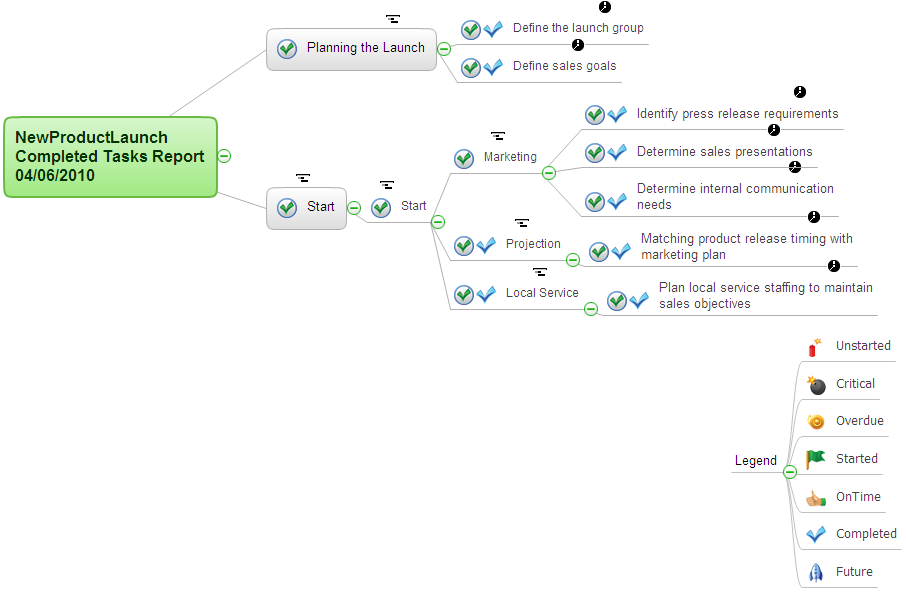
Example 1. Critical Tasks
The Benefits for ConceptDraw MINDMAP Brainstorming Software
- ConceptDraw MINDMAP is effective for brainstorming, designing mind maps, idea generating, creative and lateral thinking, creativity and problem solving.
- ConceptDraw MINDMAP is ideal for team and personal work in Business, Marketing and Project Management.
- The libraries with large quantity of vector objects help to illustrate your mind maps and to make them bright, visual and comprehensible.
- Use of View Navigator tool lets create presentations from a mind map: you can simply select the map parts you want to present, sequence your slides, and preview the presentation.
- ConceptDraw MINDMAP provides wide capabilities of importing and exporting in various formats: Microsoft PowerPoint, Microsoft Word, MS Excel, Mindjet MindManager, image, HTML, PDF file.