Task Board
Project ManagementIn PM solutions we support many project methodologies such as Agile and Simple Projects. Methodology solutions help in implementing best practices in project management. CS Odessa provides Toolbox solutions to support solving issues related to planning, tracking, milestones, events, resource usage, and other typical project management functions. Toolbox Solutions help you deal with common project situations in an extraordinary way. PM AgileBenefitsAll Agile meetings and documents are powered by mission adapted mind map templates, specially tuned for collaborative work. Tracking project Velocity is easy when using ConceptDraw Velocity diagram templates. ObjectiveSupport Agile methods such as user stories, iteration planning, burndown charts, backlogs, and velocity. Solution PurposeThese visual tools assist in the holding of Scrum-meetings, collaborative planning for Sprint, maintaining backlog, and calculating and reporting the Velocity of the team. Intended ForCompanies using Agile methodology; specifically, Scrum; Product Owners, Scrum Masters. Products and methodsIn the background of this solution we use mind mapping for visualization of key events and artifacts of Agile methodology. Key diagrams for visualization are made by ConceptDraw DIAGRAM |
Use Task Board to visualize the Scrum-ban Task Board as a mind map.
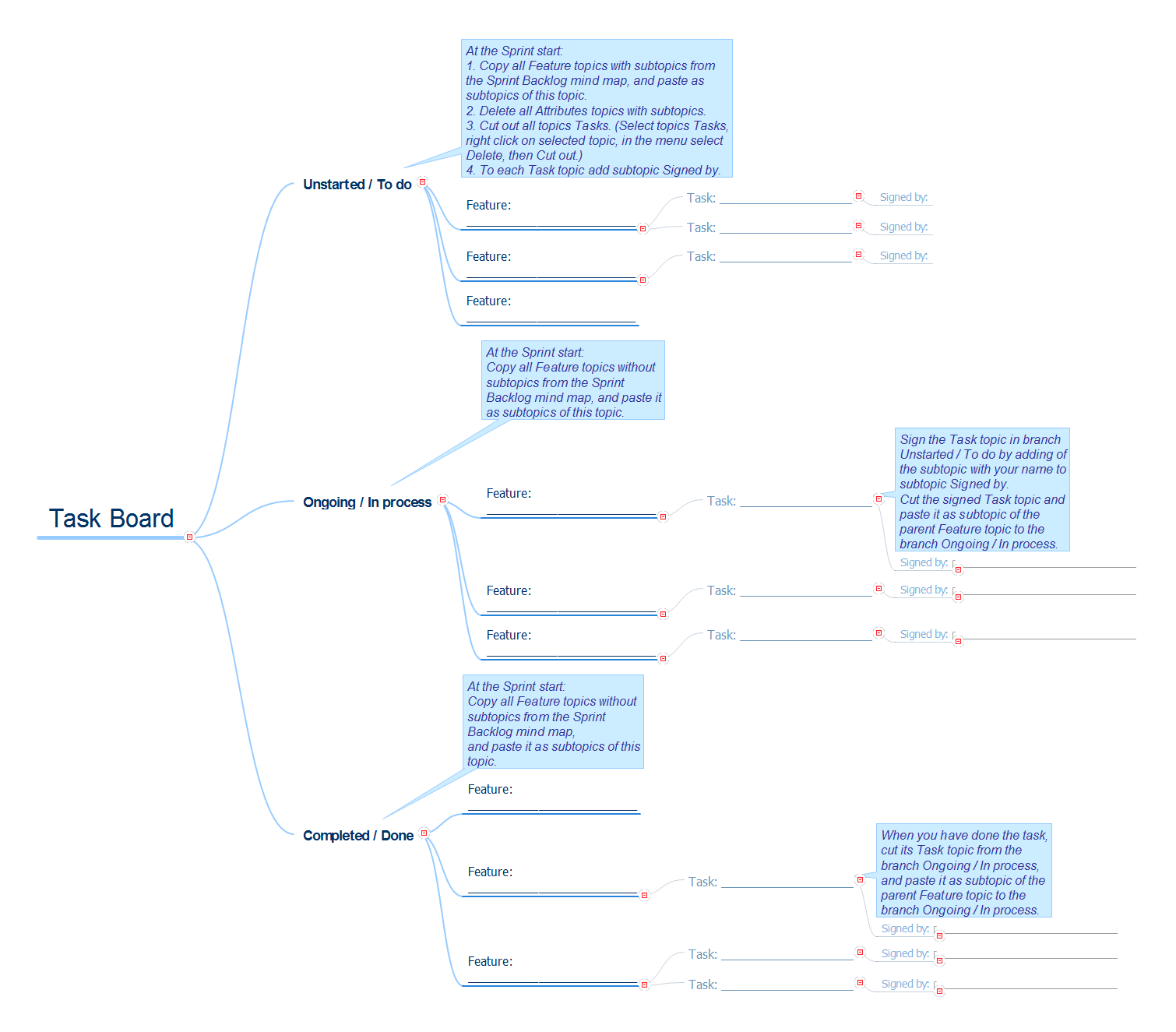
Example 1. Task Board
Export to Outline
Weekend To-Do List
-
Task Board
-
Unstarted / To do
-
Feature: ________________________
-
Task: _____________________
- Signed by:
-
Task: _____________________
- Signed by:
-
Task: _____________________
-
Feature: ________________________
-
Task: _____________________
- Signed by:
-
Task: _____________________
- Feature: ________________________
-
Feature: ________________________
-
Ongoing / In process
-
Feature: ________________________
-
Task: _____________________
-
Signed by:
- ________________________________
-
Signed by:
-
Task: _____________________
-
Feature: ________________________
-
Task: _____________________
-
Signed by:
- ________________________________
-
Signed by:
-
Task: _____________________
-
Feature: ________________________
-
Task: _____________________
-
Signed by:
- ________________________________
-
Signed by:
-
Task: _____________________
-
Feature: ________________________
-
Completed / Done
- Feature: ________________________
-
Feature: ________________________
-
Task: _____________________
-
Signed by:
- ________________________________
-
Signed by:
-
Task: _____________________
-
Feature: ________________________
-
Task: _____________________
-
Signed by:
- ________________________________
-
Signed by:
-
Task: _____________________
-
Signed by:
- ________________________________
-
Signed by:
-
Task: _____________________
The Benefits for ConceptDraw MINDMAP Brainstorming Software
- ConceptDraw MINDMAP is effective for brainstorming, designing mind maps, idea generating, creative and lateral thinking, creativity and problem solving.
- ConceptDraw MINDMAP is ideal for team and personal work in Business, Marketing and Project Management.
- The libraries with large quantity of vector objects help to illustrate your mind maps and to make them bright, visual and comprehensible.
- Use of View Navigator tool lets create presentations from a mind map: you can simply select the map parts you want to present, sequence your slides, and preview the presentation.
- ConceptDraw MINDMAP provides wide capabilities of importing and exporting in various formats: Microsoft PowerPoint, Microsoft Word, MS Excel, Mindjet MindManager, image, HTML, PDF file.