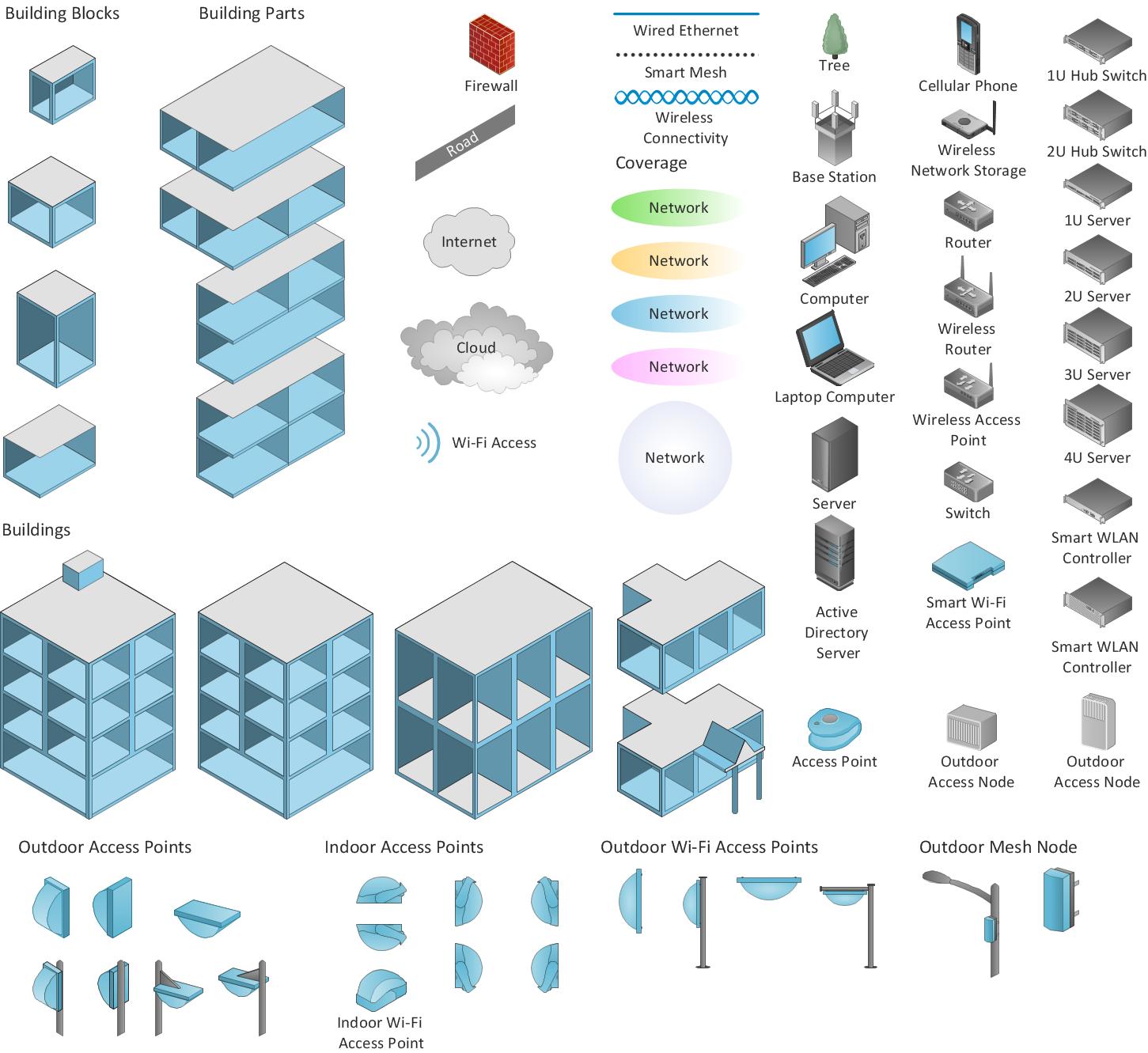
Wireless Networks solution is a bundle of the vector stencils, examples, and templates for drawing different types of wireless network diagrams. Wireless Network solution includes 81 of professional-looking stencils and several samples that you can modify and make your own diagram.
Wireless Networks solution from ConceptDraw Solution Park extends ConceptDraw DIAGRAM diagramming software to help network engineers and designers efficiently design, create and illustrate wireless network diagrams.
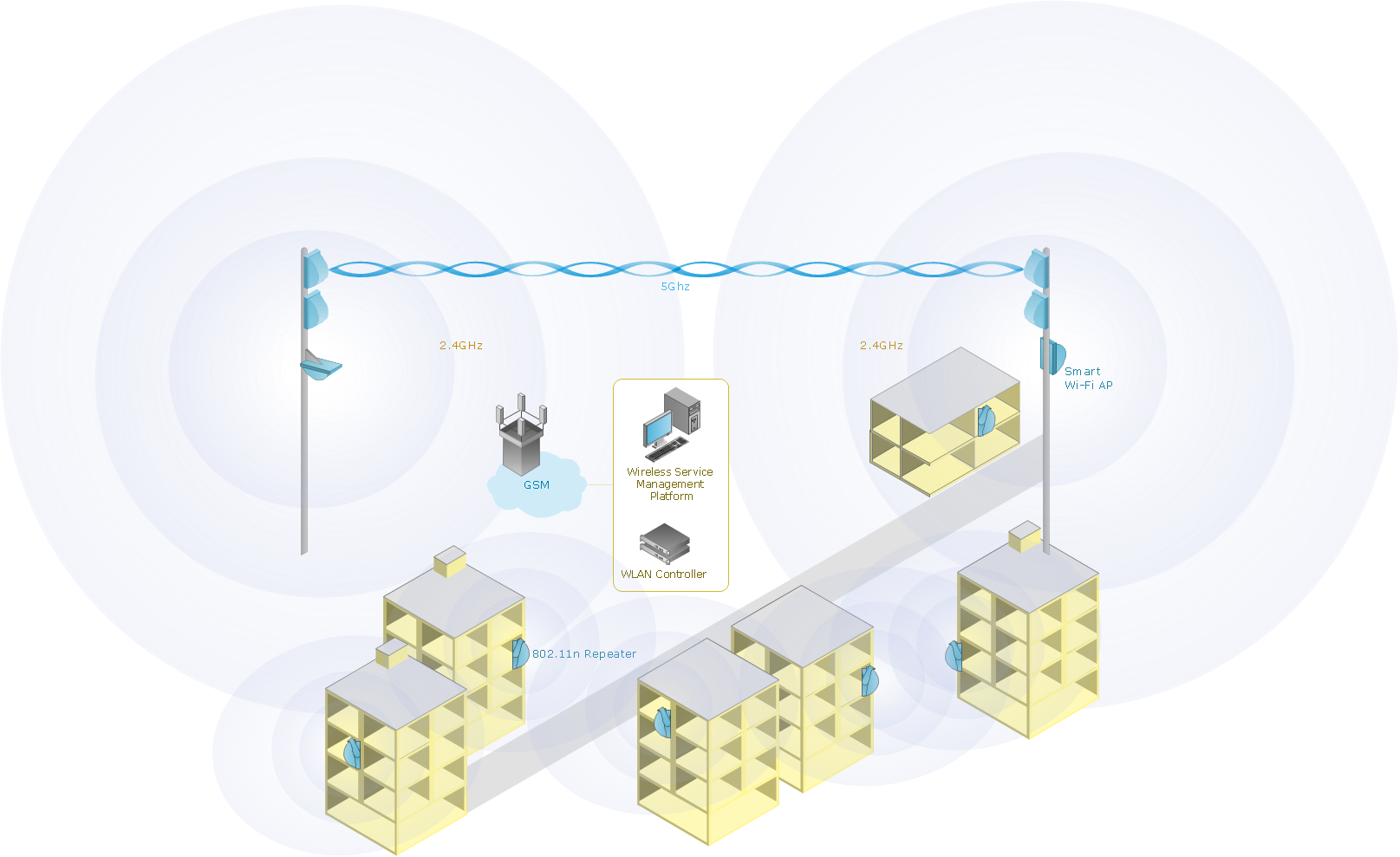
Sample 1. Mobile data offloading - Wireless computer network diagram.
This diagram was created in ConceptDraw DIAGRAM diagramming software using the Wireless Networks solution from ConceptDraw Solution Park.
Use the Wireless Networks solution to design a model of the mobile data offloading process.
How to Draw a Computer Network Diagrams
ConceptDraw Solution Park has a new drawing solution for ConceptDraw DIAGRAM which helps IT Professionals draft and present computer and network installations.
The following features make ConceptDraw DIAGRAM the best Wireless Network Diagram Software:
You don't need to be an artist to draw professional looking diagrams in a few minutes.
Large quantity of ready-to-use vector objects makes your drawing diagrams quick and easy.
Great number of predesigned templates and samples give you the good start for your own diagrams.
ConceptDraw DIAGRAM provides you the possibility to use the grid, rules and guides. You can easily rotate, group, align, arrange the objects, use different fonts and colors to make
your diagram exceptionally looking.
All ConceptDraw DIAGRAM documents are vector graphic files and are available for reviewing, modifying, and converting to a variety of formats: image, HTML, PDF file, MS
PowerPoint Presentation, Adobe Flash, MS Visio.
Using ConceptDraw STORE you can navigate through ConceptDraw Solution Park, managing downloads and updates. You can access libraries, templates and
samples directly from the ConceptDraw STORE.
If you have any questions, our free of charge support is always ready to come to your aid.
Relative value is a value measured in the terms of liquidity, risks, return of one investment or financial instrument relative to another.
Relative values are widely used in:business, economics, investment, management, marketing, statistics, etc.
ConceptDraw DIAGRAM software is the best for drawing professional looking Relative Value Charts. ConceptDraw DIAGRAM provides Divided Bar Diagrams solution from the Graphs and Charts Area of ConceptDraw Solution Park.
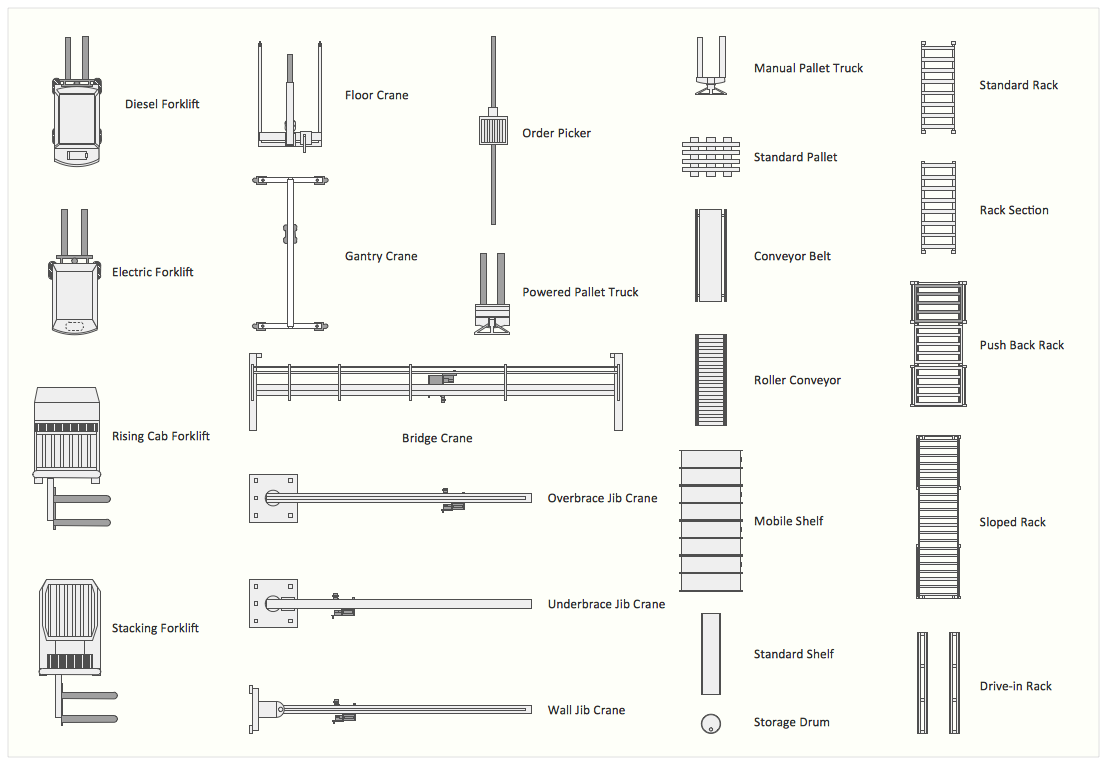
Talking about interior design, we usually mean apartments, houses or establishments. But there’s much more to this, for instance, interiors in warehouses, storage and distribution departments and machine shops also require designing. You can find all the necessary design elements such as cranes and forklifts in Plant Layout Plans solution ConceptDraw Solution Park.
This picture represents content of the Storage and Distribution library, providing the collection of vector images designed to plan layouts of industrial storage facilities (warehouses). Warehouse is a premises and equipment intended for the reception, distribution and storage of products manufactured at the plant, as well as to preparation the product for shipment to the consumer. This vector images library is supplied with ConceptDraw Plant Layout Plans solution. it will help to industrial architects and planners to design plans for industrial storage and shipping facilities.
Picture: Interior Design. Storage and Distribution — Design Elements
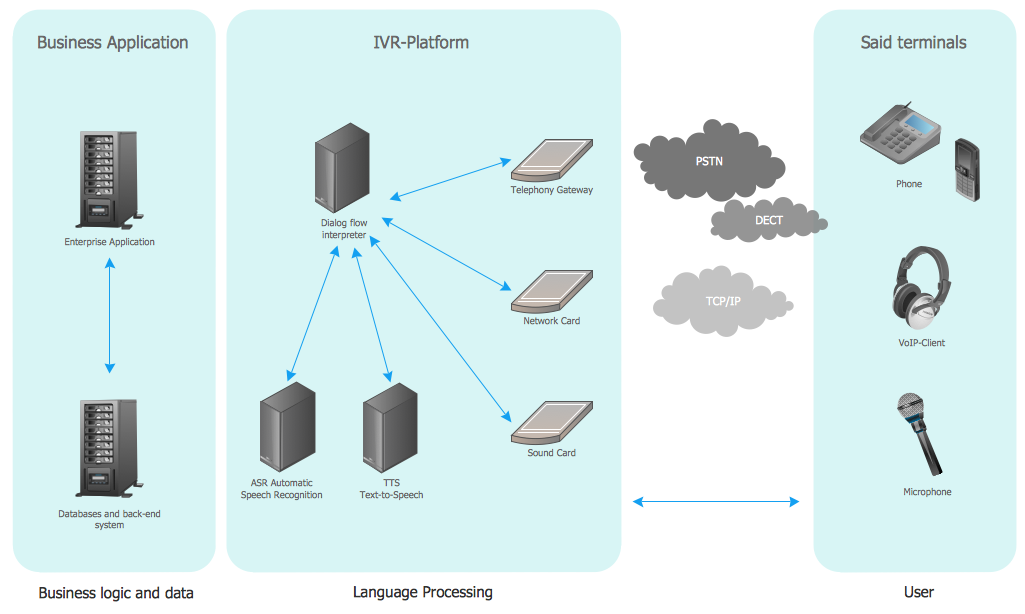
Interactive Voice Response (IVR) is a system of the prerecorded voice messages that allows a computer to interact with humans. IVR performs the function of the routing calls within a call center, using the information entered by the customer on the phone keypad in the touchtone mode.
This example was created in ConceptDraw DIAGRAM using the Computer and Networks Area of ConceptDraw Solution Park and show the Interactive Voice Response (IVR) network.
Picture: Interactive voice response (IVR) networks. Computer and Network Examples
Any modern hotel must have a working computer network and a wifi network, allowing for Internet access for both clients and employees. Designing such networks first requires drawing a hotel network topology diagram, which is a type of a network diagram representing the physical graph of network nodes and connections. Modern digital drawing tools like ConceptDraw DIAGRAM include many templates of the different parts of a network diagram, such as hotel guest-house wifi network, to help you with this task.
Picture: Hotel Network Topology Diagram. Hotel Guesthouse WiFi Network
Wireless Network solution contains template, library and a set of design elements that help network engineers visualize Wireless Network. Network engineers and designers use this solution to design, create and illustrate the wireless networks.
Picture: ConceptDraw DIAGRAM is an Advanced tool for Professional Network Diagrams Creation
System administrators of the whole world successfully use the Active Directory Domain Services. ConceptDraw DIAGRAM offers the Active Directory Diagrams Solution from the Computer and Networks Area with powerful drawing tools developed specially for all specialists which need create various active directory domain diagrams in their work activity.
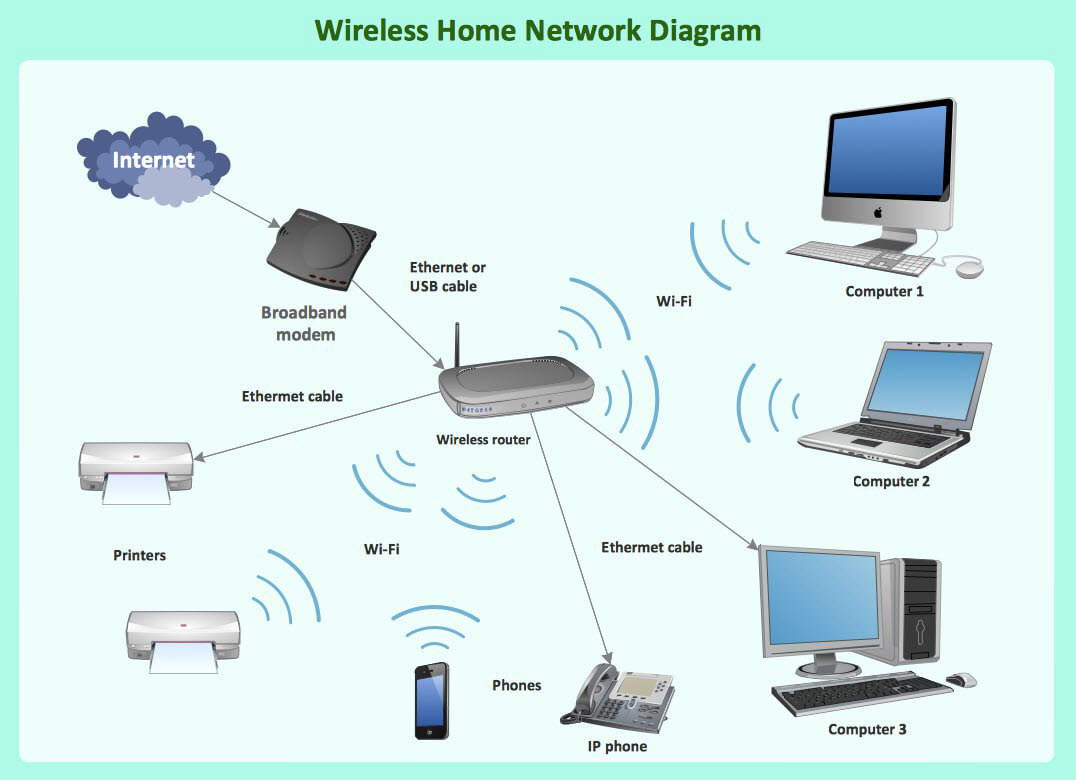
A Wireless network is a type of the computer network that uses the wireless connections for connecting network nodes for data transfer. The wireless networks are very useful, inexpensive, popular and widely used. They are easy setup and do not require the cables installation.
Using the solutions of the Computer and Networks Area for ConceptDraw DIAGRAM you can design the wireless network diagrams of any complexity quick and easy.
Picture: Wireless network. Computer and Network Examples
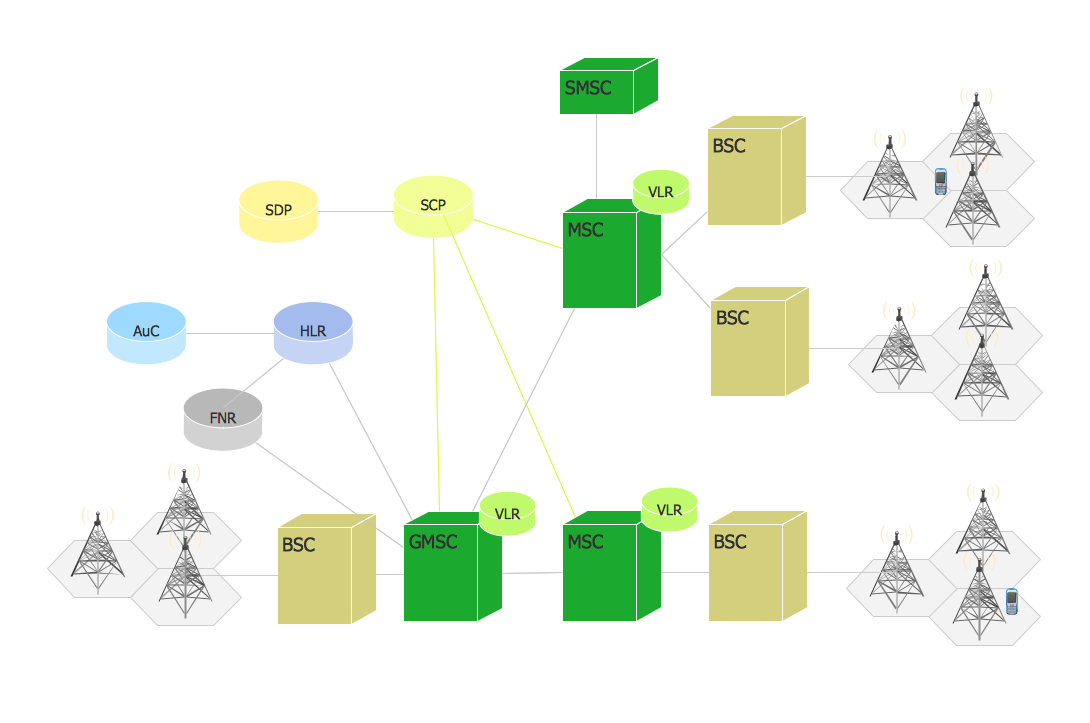
A mobile phone (cell phone) network is a wireless network located on the land areas (cells) that are served by the fixed-location transceivers (base station). A mobile phone receives or makes calls through the base station or transmitting tower.
This example was created in ConceptDraw DIAGRAM using the Computer and Networks Area of ConceptDraw Solution Park and shows the digital cellular technology Global System for Mobile Communications (GSM).
Picture: Phone networks. Computer and Network Examples