How it works : eLearning
Mind Map Training
ConceptDraw MINDMAP is a powerful eLearning tool with the ability to use mind map documents to take notes, build study guides, and archive volumes of information without having to crack open a notebook.
You can hold all of information organized in one place that allows students to easily access everything they need to achieve more in the classroom, without hauling stacks of paper to each class session.
The mind map as an eLearning tool maximizes the efficacy of the customized documents which can include embedded files, hyperlinks and mind map objects.
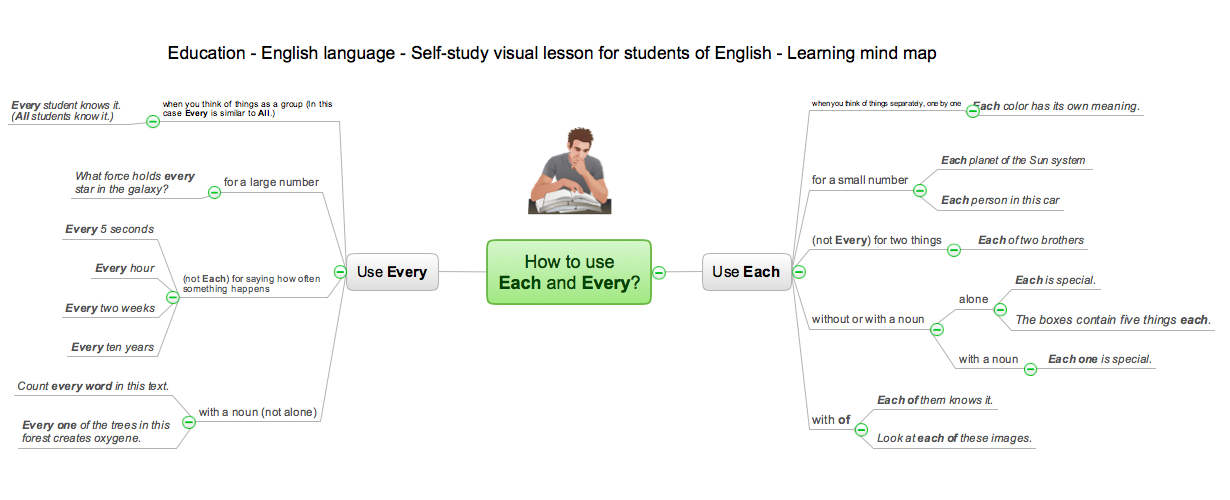
Sample 1. How to use Each and Every mind map sample
for ConceptDraw eLearning for Skype solution
This is example of mindmap for English language e-Learning via Skype.
Use ConceptDraw MINDMAP enhanced with the solution eLearning for Skype to educate and study online.
See also Samples:
TWO RELATED HOW TO's:
Of course it is possible to keep network records in text documents, but it is very difficult to use them later. A more sound way to keep such documentation is to create a network diagram that might represent either logical network structure or physical. These diagrams are easy to understand and you will thank yourself later.
There is a physical network diagram. It is a tool to represent, maintain and analysis of network equipment and interconnections. Network diagram depicts the actual network information in the attractive clear graphic form. One can learn here the LAN cable length, telecommunication type and carrying capacity. The diagram depicts servers, IP address and domain name as well. Also it shows location of hubs, switches, modems, routers, and other network equipment. The sets of special symbols and images delivered with ConceptDraw Network Diagrams solution are used to show network components. Symbols have a standard view. Therefore, various specialists can read the network diagram without any discrepancies.
Picture: Network diagrams with ConceptDraw DIAGRAM
Related Solution:
Business graphic applications show a special knowledge representations and include many features for creating schematic pictures. These graphic tools are known as flowchart maker or flowchart maker software.
Picture: Flowchart Maker
Related Solution: