Weekend To-Do List
CollaborationBeing successful in business is about meeting your defined objectives and adapting to changes occurring in the global market. The ability for an organization to successful adapt to a rapidly changing environment leads to continued growth and success. Failure to adapt, leads to stakeholder disappointment and eventually to extinction if an organization cannot adjust to the situation. Many organizations, who at one time in their history flourished, have been known to flounder because of loss of direction and vision. Keeping an organization moving forward requires strong collaborative team work to transition an organization from one stage to the next in its life cycle. Mistakes in strategy or implementation today are punishing when your team fails to correctly identify an early opportunity. Early opportunities not acted on cease to be success possibilities. Note ExchangeNote: solution requires ConceptDraw MINDMAP or later. The Note Exchange solution for ConceptDraw MINDMAP allows you to upload your mind maps to Evernote, and access them anywhere, on any computer or mobile device. When sending your mind map to Evernote, you can decide to upload a single, or multiple topic(s), an entire branch or branches (topics with subtopics), a whole single page mind map, or the entire file for multi-page documents. The map is sent as an image via email, which you can then access from any computer or mobile device. You can use the Evernote solution as a daily planner, sending day-to-day tasks from your mind map to Evernote. Thanks to the Note Exchange solution, your to-do mind maps are always with you - you can upload a whole map, or specific parts relating to a certain person, task or meeting - and you can access this information instantly, wherever you are. |
Plan and organize your weekend in ConceptDraw MINDMAP ; send it to Evernote with a single click so you can carry with you for reference.
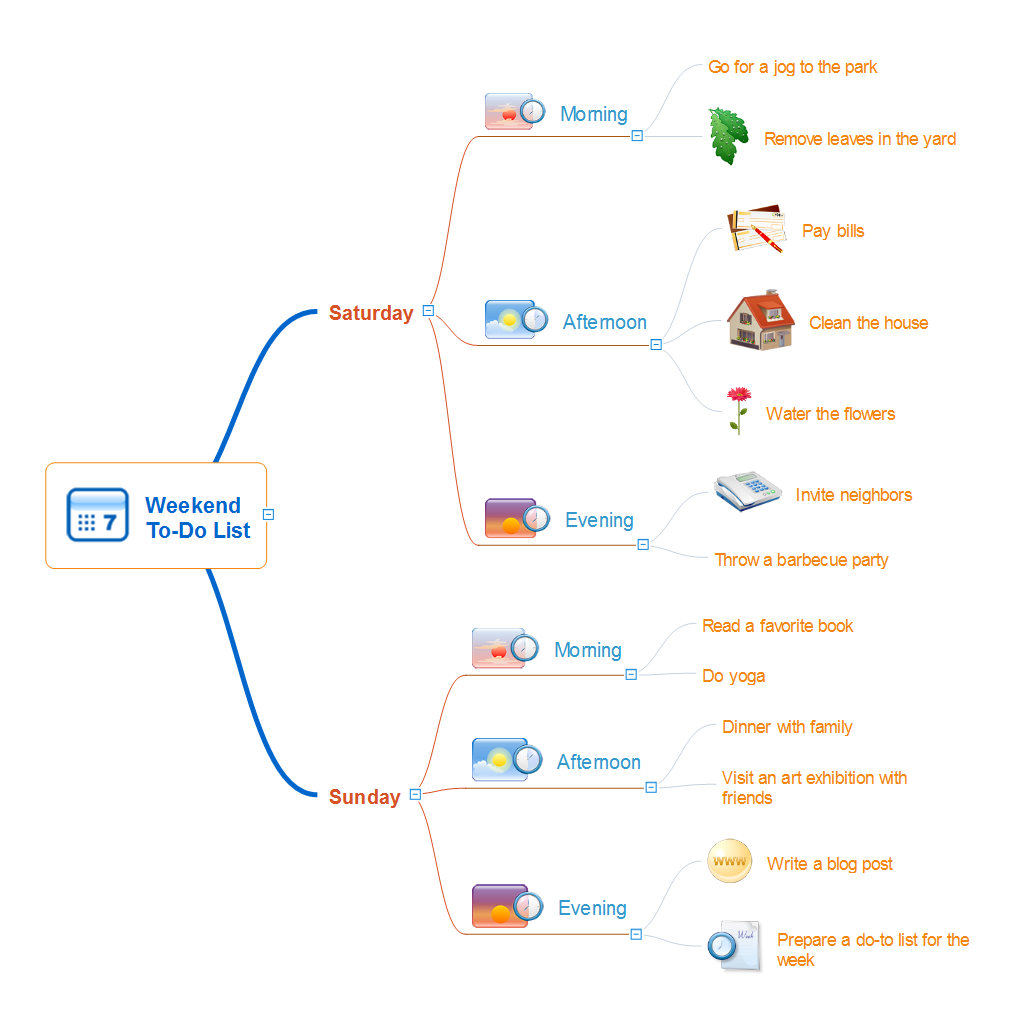
Example 1. Weekend To-Do List
Export to Outline
Weekend To-Do List
-
Saturday
-
Morning
- Go for a jog to the park
- Remove leaves in the yard
-
Afternoon
- Pay bills
- Clean the house
- Water the flowers
-
Evening
- Invite neighbors
- Throw a barbecue party
-
Morning
-
Sunday
-
Morning
- Read a favorite book
- Do yoga
-
Afternoon
- Dinner with family
- Visit an art exhibition with friends
-
Evening
- Write a blog post
- Prepare a do-to list for the week
-
Morning
The Benefits for ConceptDraw MINDMAP Brainstorming Software
- ConceptDraw MINDMAP is effective for brainstorming, designing mind maps, idea generating, creative and lateral thinking, creativity and problem solving.
- ConceptDraw MINDMAP is ideal for team and personal work in Business, Marketing and Project Management.
- The libraries with large quantity of vector objects help to illustrate your mind maps and to make them bright, visual and comprehensible.
- Use of View Navigator tool lets create presentations from a mind map: you can simply select the map parts you want to present, sequence your slides, and preview the presentation.
- ConceptDraw MINDMAP provides wide capabilities of importing and exporting in various formats: Microsoft PowerPoint, Microsoft Word, MS Excel, Mindjet MindManager, image, HTML, PDF file.