Exchange with Evernote on Mac
Exchange fro Mac OS
ConceptDraw MINDMAP Mac OS software, release new Note Exchange solution that allows to work with mindmaps from anywhere using powerful Evernote technology.
ConceptDraw MINDMAP information can be referenced from anywhere on iOS tablets and Mac computers thanks to Evernote now.
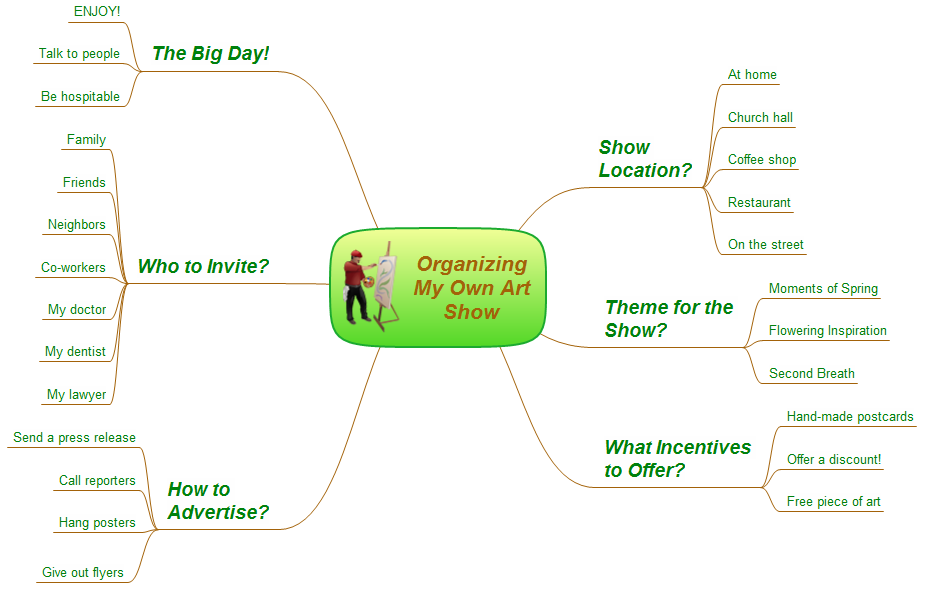
Sample 1. How to organize your own art show
This mind map was created in ConceptDraw MINDMAP by experienced user for 20 minutes as sample for Note Exchange solution.
The Note Exchange solution extends ConceptDraw MINDMAP with the ability to exchange with Evernote, and access mind maps anywhere, on any computer or mobile device via Evernote.
Use the Note Exchange solution for creative planning, sending ideas about the event from your mind map to Evernote.
Thanks to the Note Exchange solution, your to-do mind maps are always with you — you can upload a whole map, or specific parts relating to a certain person, task or meeting — and you can access this information instantly, wherever you are.
See also Samples: