Made with
ConceptDraw
DIAGRAM 18

Best Patio Design Software

The country house offers a unique opportunity to create a cozy corner in nature for a pleasant staying with your family or alone with yourself. This place is called a patio. It is a Spanish word meaning "internal yard". Typically, it is a recreation area allowing you to spend time comfortably.

Each owner sets up a patio in his own way, but it will be useful to know how to arrange it in the best way. It is desired to know what materials to use, what style to choose, and how to design a patio looking stylish and relaxing. Here, should be pleasant and everything you need should be at hand.

Typically, the patio’s construction begins with making a project. This area has a great number of options for implementation and is realized in different styles. You should choose one favorite for you and the most convenient in a particular case. The patio area usually includes different furniture and everything else the owner can imagine. The choice is enormous — barbecue, fireplace, pond with fishes, pool, fountain, etc.

When planning a patio, primarily consider the following points:

  • the most convenient location for a patio on your site;
  • open or closed it will be;
  • style you want design it;
  • materials to use to make the main elements like the pillars, tent, floor;
  • desirable size is;
  • furniture to be placed;
  • decor to choose.

You need obligatory consider the individual characteristics of your site, its size, location, climate, building nuances, and preferences of all family members. In this case, later your patio will become a favorite meeting place for your family and each one will feel comfortable here.

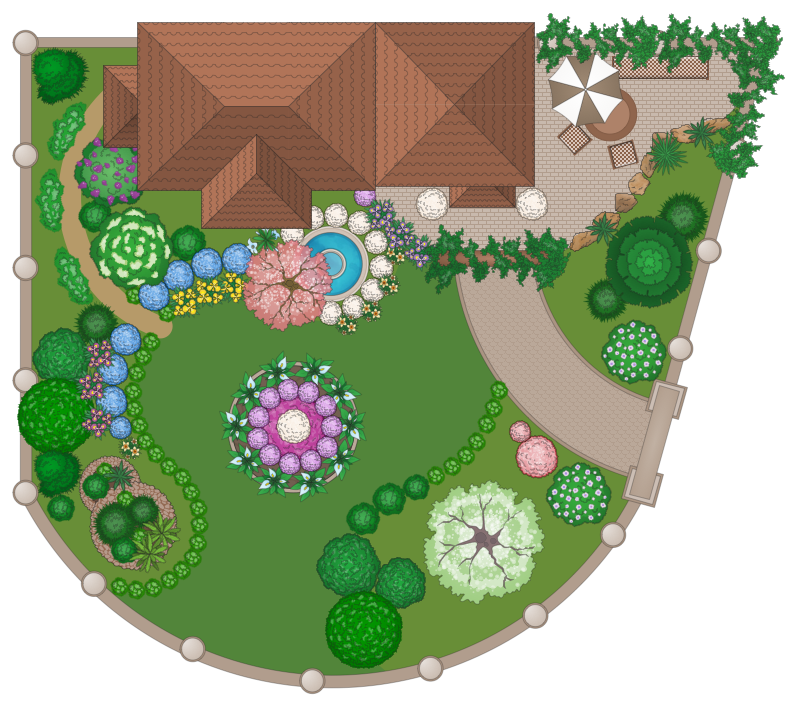
Start your construction by designing a detailed plan for your patio. We recommend using the powerful ConceptDraw DIAGRAM software extended with the Landscape & Garden solution from the ConceptDraw Solution Park. It is the best patio design software for both beginners and professionals.
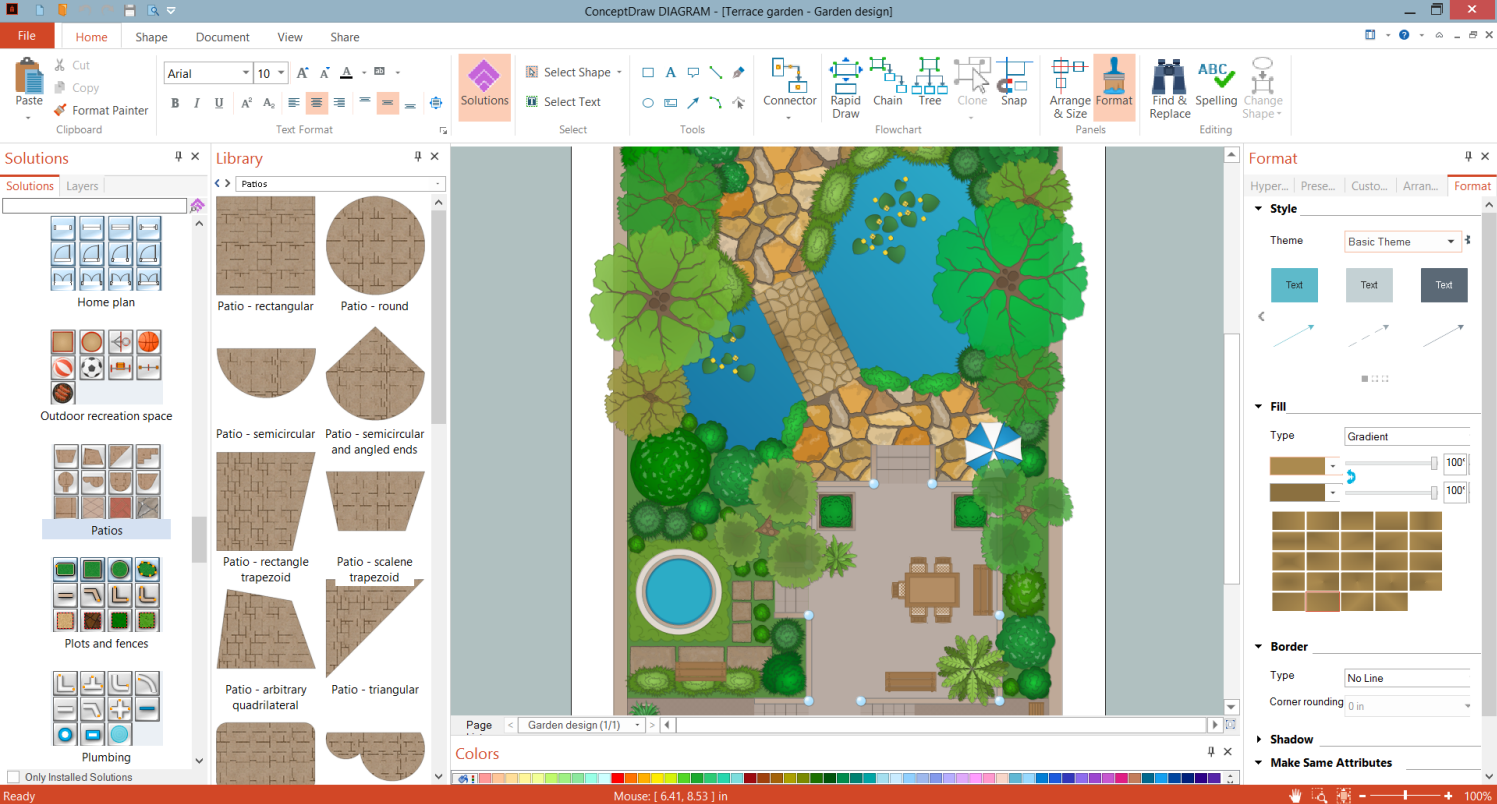
Best Patio Design Software - ConceptDraw DIAGRAM

Example 1. Best Patio Design Software - ConceptDraw DIAGRAM

Landscape & Garden solution provides a wide variety of ready-made samples and examples of landscape and patio designs. There are also included 14 libraries with a large collection of pre-made graphic design elements — outdoor recreation space, furniture, greening, and many more. You have a wide choice and these objects supply you in making designs in minutes. The Patios library is also included and offers the objects of patios of different shapes and textures.
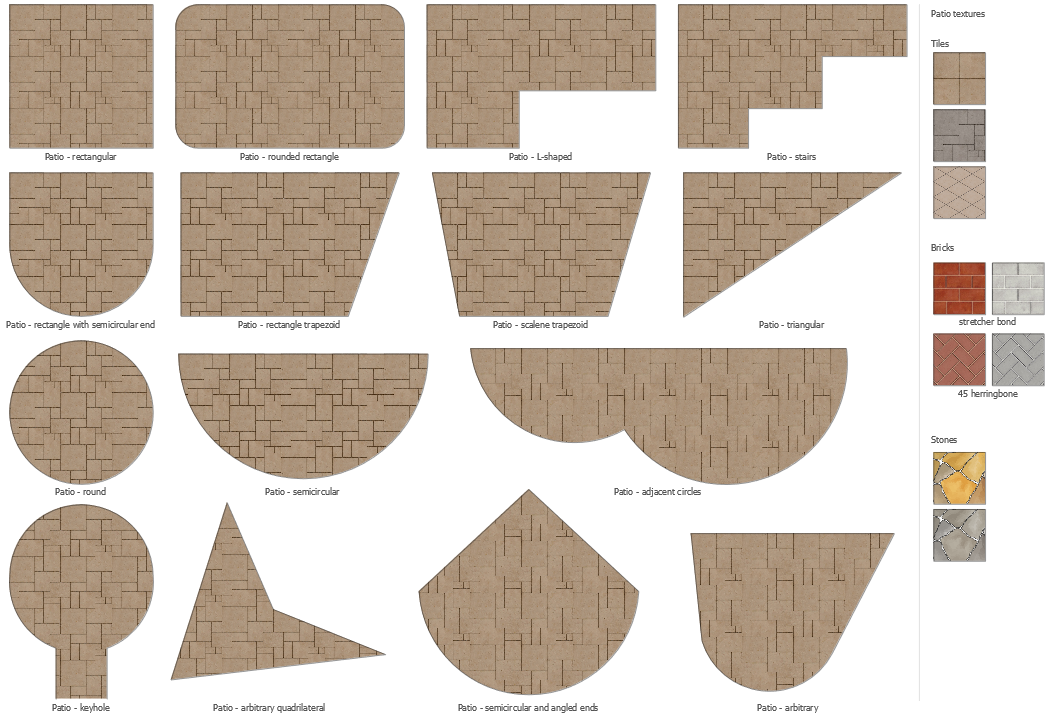
Patios Library Design Elements

Example 2. Patios Library Design Elements

All predesigned objects are vector and easily resizable without loss of quality. You can change the size of the patio area on your plan as you like, to make it the best suitable. Also, you can choose the desired pattern according to the material planned to be used for the floor.
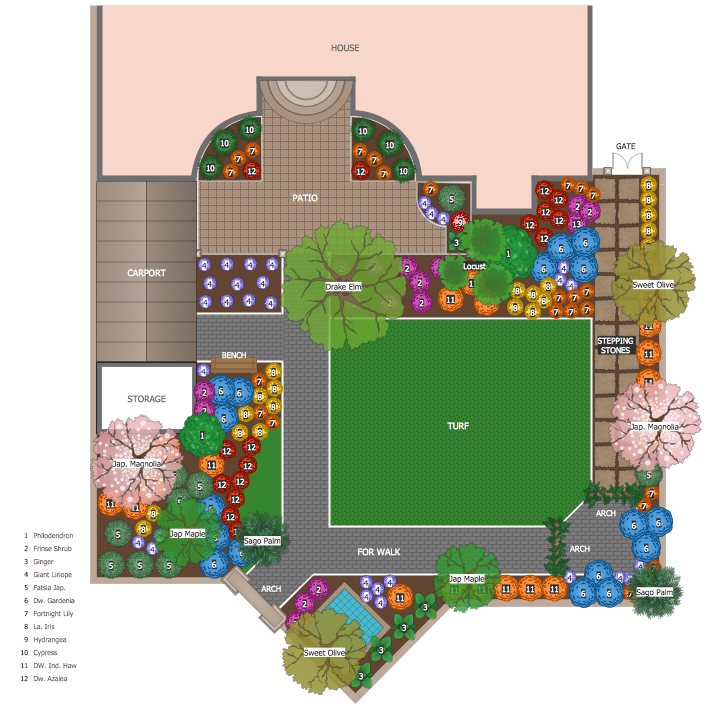
Patio Design - Landscape Garden Layout

Example 3. Patio Design - Landscape Garden Layout

The following features make ConceptDraw DIAGRAM the best patio design software:

  1. You don't need to be an artist to draw professional-looking diagrams in a few minutes.
  2. Large quantity of ready-to-use vector objects makes your drawing diagrams quick and simple.
  3. Great number of predesigned templates and samples give you a good start for your own diagrams.
  4. ConceptDraw DIAGRAM provides you the possibility to use the grid, rules, and guides. You can easily rotate, group, align, arrange the objects, use different fonts and colors to make your diagram exceptionally looking.
  5. All ConceptDraw DIAGRAM documents are vector graphic files and are available for reviewing, modifying, and converting to a variety of formats: image, HTML, PDF file, MS PowerPoint Presentation, Adobe Flash, MS Visio.
  6. Using ConceptDraw STORE you can navigate through ConceptDraw Solution Park, managing downloads and updates. You can access libraries, templates, and samples directly from the ConceptDraw STORE.
  7. If you have any questions, our free of charge support is always ready to come to your aid.


FIVE RELATED HOW TO's:
Any factory needs a clear scheme of all the equipment used in the manufacture processes. So, if you want to place all your machines and equipment on one diagram, you need a good diagramming tool for that. For instance, you can find all the design elements you might need, such as lathes, milling machines or saws on ConceptDraw DIAGRAM Solution Park in Plant Layout Plans solution in appropriate libraries. This drawing represents the Machines and Equipment library delivered by ConceptDraw Plant Layout Plans solution. This vector library is supplied along with other libraries related to industrial architecture planning and interior design. Just planning the proper facilities in a proper right place, allows to manufacture a product in the most effective and economic way. Objects containing in these libraries will be helpful for architects and engineers dealing with industrial buildings design. They are intended to use for designing layouts of plants, warehouses, manufacturing workshop etc.Machines and Equipment — Design Elements
Picture: Interior Design. Machines and Equipment — Design Elements
Related Solution:
Some organization hold offices for years and decades, or even build their own campuses. However, if it’s time for your organization to move to another building, drawing software for designing office layout plan would come in handy. With such software you can save a lot of time and create a new layout or try to save old layout in a new building. This office layout plan is an example of a typical office furniture and equipment arrangement. This drawing provides a graphic view of the office area and its facilities including furniture and office equipment. It can be used as template which represent, desks, files, and other pieces of equipment that can be re-arranged according the certain requirements to office space and facilities. The vector graphic objects that represent various office layout elements such as special office furniture and equipment can help you to shape a number of creative ideas and develop your office layout plan.Building Drawing Software for Design Office Layout Plan
Picture: Building Drawing Software for Design Office Layout Plan
Related Solution:
Designing landscapes nowadays doesn’t require any special skills. Therefore, it’s not rocket science how to use landscape design software and create detailed plans and projects. Special Landscape & Garden Solution from the Building Plans area of ConceptDraw Solution Park provides vivid ready-to-use vector objects of trees, bushes, fences, furniture etc.How To use Landscape Design Software
Picture: How To use Landscape Design Software
Related Solution:
Everyone who starts the construction, repair or remodeling of the home, flat or office, is facing with a need of visualization its ideas for visual explanation how all should to be for the foreman and construction team. It is incredibly convenient to use for this professional home architect software. ConceptDraw DIAGRAM software enhanced with Floor Plans solution provides a lot of built-in drawing tools which allow you quick and easy create design plans for the home of your dreams.Home Architect Software. <br>Home Plan Examples *
Picture: Home Architect Software. Home Plan Examples
Related Solution:
When starting designing a recreation patio area in a country house, prepare a project indicating the location of all elements is indicated. ConceptDraw DIAGRAM vector design software extended with Landscape & Garden solution from the Building Plans area of ConceptDraw Solution Park is a powerful patio layout planner software. Use it and you will be impressed by its ability to assist effectively in the design of outdoor area and patio.Patio Layout Planner Software - ConceptDraw DIAGRAM
Picture: Patio Layout Planner Software
Related Solution:
ConceptDraw
DIAGRAM 18