The vector stencils library "App icons" contains 24 icons of iOS 8 / iPhone 6 software applications.
Use it to design iOS 8 apps GUI prototypes and iPhone 6 software applications user interface sketches and mockups.
The icons example "App icons - Vector stencils library" was created using the ConceptDraw PRO diagramming and vector drawing software extended with the iPhone User Interface solution from the Software Development area of ConceptDraw Solution Park.
Use it to design iOS 8 apps GUI prototypes and iPhone 6 software applications user interface sketches and mockups.
The icons example "App icons - Vector stencils library" was created using the ConceptDraw PRO diagramming and vector drawing software extended with the iPhone User Interface solution from the Software Development area of ConceptDraw Solution Park.
Messages

Calendar

Photos

Camera

Weather

Clock
Maps

Videos

Notes

Reminders
Stocks

Game Center

Newsstand

iTunes Store

App Store

iBooks

Health

Passbook

Passbook (iOS 7)
-app-icons---vector-stencils-library.png--diagram-flowchart-example.png)
Settings

Phone

Mail

Music

Safari

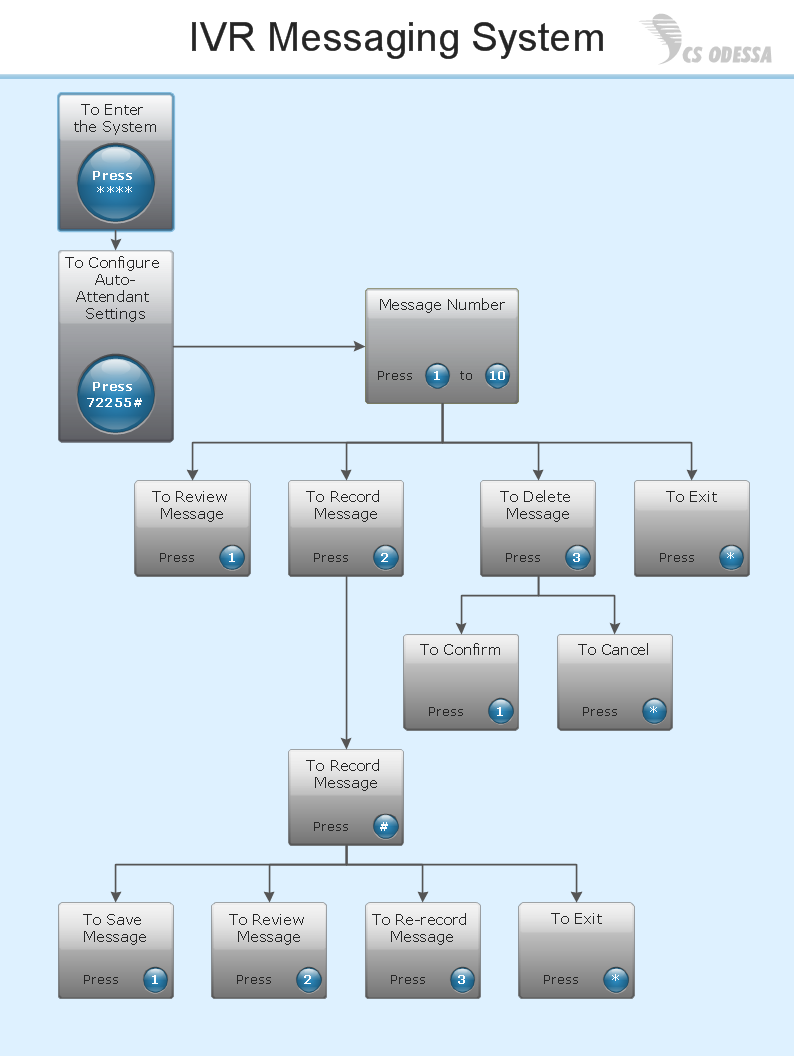
Interactive Voice Response Network Diagram

The vector stencils library "Microsoft Exchange" contains 17 symbols of Microsoft Exchange elements for drawing the logical structure diagrams of Active Directory trees.
"Windows Messaging, initially called Microsoft Exchange, is an e-mail client that was included with Windows 95 (beginning with OSR2), 98 and Windows NT 4.0. ...
Microsoft Exchange gained wide usage with the release of Windows 95, as this was the only mail client that came bundled with it. In 1996, it was renamed to Windows Messaging, because of the upcoming release of Microsoft Exchange Server, and continued to be included throughout later releases of Windows up until the initial release of Windows 98, which by then included Outlook Express 4.0 as the default mail client.
The Windows Messaging email client had two branches of successors:
(1) In software bundled with Windows itself, these were Internet Mail and News in Windows 95 (and bundled with Internet Explorer 3), which was succeeded by Outlook Express 4.0 in Windows 98 (bundled with Internet Explorer 4.0 in Windows 95) and throughout newer Windows systems. These did not use the .pst file type.
(2) Microsoft Outlook became the professional-grade and more direct successor of MS Exchange Client, which still uses the .pst file type." [Windows Messaging. Wikipedia]
The symbols example "Microsoft Exchange - Vector stencils library" was created using the ConceptDraw PRO diagramming and vector drawing software extended with the Active Directory Diagrams solution from the Computer and Networks area of ConceptDraw Solution Park.
www.conceptdraw.com/ solution-park/ active-directory-diagrams
"Windows Messaging, initially called Microsoft Exchange, is an e-mail client that was included with Windows 95 (beginning with OSR2), 98 and Windows NT 4.0. ...
Microsoft Exchange gained wide usage with the release of Windows 95, as this was the only mail client that came bundled with it. In 1996, it was renamed to Windows Messaging, because of the upcoming release of Microsoft Exchange Server, and continued to be included throughout later releases of Windows up until the initial release of Windows 98, which by then included Outlook Express 4.0 as the default mail client.
The Windows Messaging email client had two branches of successors:
(1) In software bundled with Windows itself, these were Internet Mail and News in Windows 95 (and bundled with Internet Explorer 3), which was succeeded by Outlook Express 4.0 in Windows 98 (bundled with Internet Explorer 4.0 in Windows 95) and throughout newer Windows systems. These did not use the .pst file type.
(2) Microsoft Outlook became the professional-grade and more direct successor of MS Exchange Client, which still uses the .pst file type." [Windows Messaging. Wikipedia]
The symbols example "Microsoft Exchange - Vector stencils library" was created using the ConceptDraw PRO diagramming and vector drawing software extended with the Active Directory Diagrams solution from the Computer and Networks area of ConceptDraw Solution Park.
www.conceptdraw.com/ solution-park/ active-directory-diagrams
Exchange organization
Storage group
Sessions
Message formats
Exchange servers

Exchange server
Public folders
Recipient update service
Recipient policy
Message delivery

Mailbox

Exchange virtual server

HTTP virtual directory

Public store
Mailbox store
IMAP virtual server

NNTP virtual server

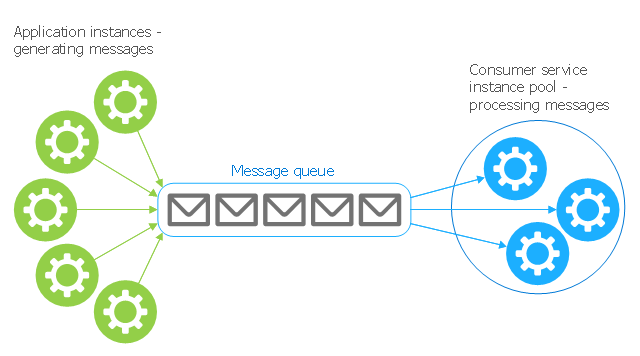
This Azure cloud architecture pattern diagram template was created on the base of figure in the article "Competing Consumers Pattern" from the Microsoft Developer Network (MSDN) website.
"Competing Consumers Pattern.
Enable multiple concurrent consumers to process messages received on the same messaging channel. This pattern enables a system to process multiple messages concurrently to optimize throughput, to improve scalability and availability, and to balance the workload. ...
An application running in the cloud may be expected to handle a large number of requests. Rather than process each request synchronously, a common technique is for the application to pass them through a messaging system to another service (a consumer service) that handles them asynchronously. This strategy helps to ensure that the business logic in the application is not blocked while the requests are being processed. ...
Use a message queue to implement the communication channel between the application and the instances of the consumer service. The application posts requests in the form of messages to the queue, and the consumer service instances receive messages from the queue and process them. This approach enables the same pool of consumer service instances to handle messages from any instance of the application." [msdn.microsoft.com/ ru-RU/ library/ dn568101.aspx]
The Azure cloud system architecture diagram template "Competing consumers pattern" for the ConceptDraw PRO diagramming and vector drawing software is included in the Azure Architecture solutin from the Computer and Networks area of ConceptDraw Solution Park.
"Competing Consumers Pattern.
Enable multiple concurrent consumers to process messages received on the same messaging channel. This pattern enables a system to process multiple messages concurrently to optimize throughput, to improve scalability and availability, and to balance the workload. ...
An application running in the cloud may be expected to handle a large number of requests. Rather than process each request synchronously, a common technique is for the application to pass them through a messaging system to another service (a consumer service) that handles them asynchronously. This strategy helps to ensure that the business logic in the application is not blocked while the requests are being processed. ...
Use a message queue to implement the communication channel between the application and the instances of the consumer service. The application posts requests in the form of messages to the queue, and the consumer service instances receive messages from the queue and process them. This approach enables the same pool of consumer service instances to handle messages from any instance of the application." [msdn.microsoft.com/ ru-RU/ library/ dn568101.aspx]
The Azure cloud system architecture diagram template "Competing consumers pattern" for the ConceptDraw PRO diagramming and vector drawing software is included in the Azure Architecture solutin from the Computer and Networks area of ConceptDraw Solution Park.
Cloud computing system architecture diagram template
 MindTweet
This solution extends ConceptDraw MINDMAP software with the ability to brainstorm, review and organize the sending of Tweets.
- Text Message Screen
- Iphone 6 Plus Icon Text Message
- Messages
- App icons - Vector stencils library | Messages | Campus Area ...
- IVR customer service hotline diagram | IVR diagram multipage ...
- Text Message Iphone Icon Png
- Text To Speech Ivr
- Messages - Template | iPhone User Interface | App icons - Vector ...
- Messages - Vector stencils library | UML Sequence Diagram. Design ...
- Messages - Template | iPhone User Interface | Design elements ...
- IVR diagram multipage sample | Interactive voice response (IVR ...
- Message Ios Png
- iPhone User Interface | Messages - Template | Design elements ...
- IVR services diagram | Interactive voice response (IVR) - Vector ...
- Messages Icon Iphone
- iPhone User Interface | iPhone OS (iOS) graphic user interface (GUI ...
- Messaging Apps
- Messaging For Ios Icon
- App icons - Vector stencils library | Design elements - Apps icons ...
- iPhone OS (iOS) graphic user interface (GUI) - Alarm setting | App ...


