 macOS User Interface
macOS User Interface solution extends the ConceptDraw DIAGRAM functionality with powerful GUI software graphic design features and tools. It provides an extensive range of multifarious macOS Sierra user interface design examples, samples and templates, and wide variety of libraries, containing a lot of pre-designed vector objects of Mac Apps icons, buttons, dialogs, menu bars, indicators, pointers, controls, toolbars, menus, and other elements for fast and simple designing high standard user interfaces of any complexity for new macOS Sierra.
Graphical User Interface Examples

"Designing the visual composition and temporal behavior of GUI is an important part of software application programming in the area of human-computer interaction. Its goal is to enhance the efficiency and ease of use for the underlying logical design of a stored program, a design discipline known as usability. Methods of user-centered design are used to ensure that the visual language introduced in the design is well tailored to the tasks.
The visible graphical interface features of an application are sometimes referred to as "chrome" or "Gui" (Goo-ee). Typically, the user interacts with information by manipulating visual widgets that allow for interactions appropriate to the kind of data they hold. The widgets of a well-designed interface are selected to support the actions necessary to achieve the goals of the user. A model-view-controller allows for a flexible structure in which the interface is independent from and indirectly linked to application functionality, so the GUI can be easily customized. This allows the user to select or design a different skin at will, and eases the designer's work to change the interface as the user needs evolve. Good user interface design relates to the user, not the system architecture.
Large widgets, such as windows, usually provide a frame or container for the main presentation content such as a web page, email message or drawing. Smaller ones usually act as a user-input tool." [Graphical user interface. Wikipedia]
The example "ConceptDraw graphic user interface (Mac)" was created using the ConceptDraw PRO diagramming and vector drawing software extended with the Graphic User Interface solution from the Software Development area of ConceptDraw Solution Park.
The visible graphical interface features of an application are sometimes referred to as "chrome" or "Gui" (Goo-ee). Typically, the user interacts with information by manipulating visual widgets that allow for interactions appropriate to the kind of data they hold. The widgets of a well-designed interface are selected to support the actions necessary to achieve the goals of the user. A model-view-controller allows for a flexible structure in which the interface is independent from and indirectly linked to application functionality, so the GUI can be easily customized. This allows the user to select or design a different skin at will, and eases the designer's work to change the interface as the user needs evolve. Good user interface design relates to the user, not the system architecture.
Large widgets, such as windows, usually provide a frame or container for the main presentation content such as a web page, email message or drawing. Smaller ones usually act as a user-input tool." [Graphical user interface. Wikipedia]
The example "ConceptDraw graphic user interface (Mac)" was created using the ConceptDraw PRO diagramming and vector drawing software extended with the Graphic User Interface solution from the Software Development area of ConceptDraw Solution Park.
GUI design
.png--diagram-flowchart-example.png)
 Android User Interface
The Android User Interface solution allows ConceptDraw DIAGRAM act as an Android UI design tool. Libraries and templates contain a variety of Android GUI elements to help users create images based on Android UI design.
Software development with ConceptDraw DIAGRAM

Software Diagrams

"The iPhone ... is a line of smartphones designed and marketed by Apple Inc. It runs Apple's iOS mobile operating system. ...
The user interface is built around the device's multi-touch screen, including a virtual keyboard. The iPhone has Wi-Fi and can connect to many different cellular networks, including 1xRTT and GPRS (shown as a circle on the status bar), EDGE (shown as a capital E on the status bar), UMTS and EV-DO (shown as 3G), a faster version of UMTS and 4G (shown as a 4G symbol on the status bar), and LTE (shown as LTE on the status bar). An iPhone can shoot video (though this was not a standard feature until the iPhone 3GS), take photos, play music, send and receive email, browse the web, send texts, GPS navigation, tell jokes, record notes, do mathematical calculations, and receive visual voicemail. Other functions — video games, reference works, social networking, etc. — can be enabled by downloading application programs (‘apps’); as of October 2013, the App Store offered more than one million apps by Apple and third parties." [iPhone. Wikipedia]
The example "iPhone OS (iOS) graphic user interface (GUI) - Standby mode" was created using the ConceptDraw PRO diagramming and vector drawing software extended with the Graphic User Interface solution from the Software Development area of ConceptDraw Solution Park.
The user interface is built around the device's multi-touch screen, including a virtual keyboard. The iPhone has Wi-Fi and can connect to many different cellular networks, including 1xRTT and GPRS (shown as a circle on the status bar), EDGE (shown as a capital E on the status bar), UMTS and EV-DO (shown as 3G), a faster version of UMTS and 4G (shown as a 4G symbol on the status bar), and LTE (shown as LTE on the status bar). An iPhone can shoot video (though this was not a standard feature until the iPhone 3GS), take photos, play music, send and receive email, browse the web, send texts, GPS navigation, tell jokes, record notes, do mathematical calculations, and receive visual voicemail. Other functions — video games, reference works, social networking, etc. — can be enabled by downloading application programs (‘apps’); as of October 2013, the App Store offered more than one million apps by Apple and third parties." [iPhone. Wikipedia]
The example "iPhone OS (iOS) graphic user interface (GUI) - Standby mode" was created using the ConceptDraw PRO diagramming and vector drawing software extended with the Graphic User Interface solution from the Software Development area of ConceptDraw Solution Park.
iPhone GUI
-graphic-user-interface-(gui)---standby-mode.png--diagram-flowchart-example.png)
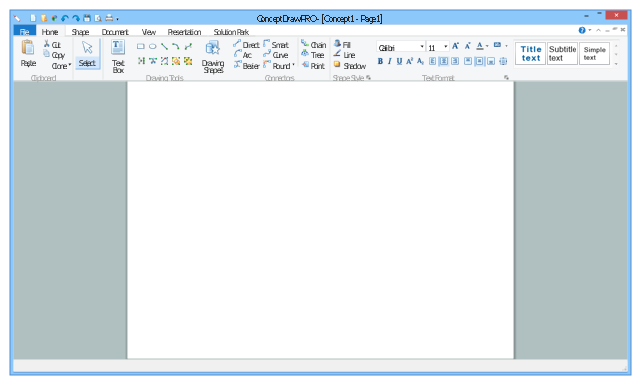
This example shows usage of design elements in the graphic user interface (GUI) of Windows 8 application Ribbon view.
"The Windows Ribbon framework is a rich command presentation system that provides a modern alternative to the layered menus, toolbars, and task panes of traditional Windows applications. ...
The UI of the Ribbon View is the primary feature of the Ribbon framework and provides the next-generation user experience for presenting commands in Windows applications.
The ribbon is a command bar that exposes the major features of an application through a series of tabs at the top of an application window." [msdn.microsoft.com/ en-us/ library/ windows/ desktop/ dd316910%28v=vs.85%29.aspx]
The sample "Ribbon view" was created using the ConceptDraw PRO diagramming and vector drawing software extended with the Windows 8 User Interface solution from the Software Development area of ConceptDraw Solution Park.
"The Windows Ribbon framework is a rich command presentation system that provides a modern alternative to the layered menus, toolbars, and task panes of traditional Windows applications. ...
The UI of the Ribbon View is the primary feature of the Ribbon framework and provides the next-generation user experience for presenting commands in Windows applications.
The ribbon is a command bar that exposes the major features of an application through a series of tabs at the top of an application window." [msdn.microsoft.com/ en-us/ library/ windows/ desktop/ dd316910%28v=vs.85%29.aspx]
The sample "Ribbon view" was created using the ConceptDraw PRO diagramming and vector drawing software extended with the Windows 8 User Interface solution from the Software Development area of ConceptDraw Solution Park.
Application window
Android GUI

 Windows 10 User Interface
Windows 10 User Interface solution extends significantly ConceptDraw DIAGRAM functionality with look-and-feel functions of GUI software and makes it a great assistant for Win10 designers, developers, and software engineers. This solution provides a wide s
- Graphical User Interface Examples | Windows 10 User Interface ...
- Mac OS User Interface Design Examples | How to Design a Mockup ...
- macOS User Interface | Graphical User Interface Examples | iPhone ...
- macOS User Interface | Graphical User Interface Examples | How to ...
- Mac Os Ui Panel
- macOS User Interface | ConceptDraw graphic user interface (Mac ...
- macOS User Interface | How to Design a Mockup of Apple macOS ...
- Mac Ui
- How to Design a Mockup of Apple macOS Sierra GUI | macOS User ...
- macOS User Interface | Software Development Area | Windows 10 ...


