Made with
ConceptDraw
DIAGRAM 18

UML Object Diagram

How To Draw UML Object Diagrams

UML Object Diagram shows the structure of a modelled system at a specific time. UML Object Diagram focuses on some particular set of object instances and attributes, and the links between the instances. A correlated set of object diagrams provides insight into how an arbitrary view of a system is expected to evolve over time. ConceptDraw has four examples that help you to start using software for drawing UML Object Diagrams. You can use the appropriate stencils of UML notation for drawing own UML Object Diagram.
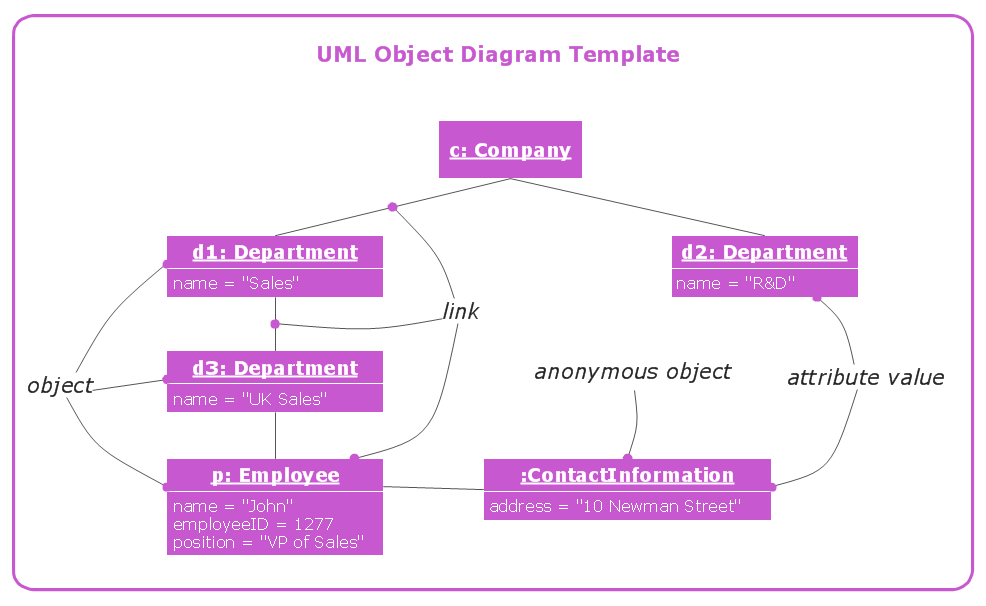
UML Object Diagram *

This UML object diagram template is created using ConceptDraw DIAGRAM diagramming and vector drawing software enhanced with Rapid UML solution from ConceptDraw Solution Park.

Rapid UML solution provides templates, examples and libraries of stencils for quick and easy drawing the all types of system and software engineering diagrams according to UML 2.4 notation.

Use ConceptDraw DIAGRAM with UML object diagram templates, samples and stencil library from Rapid UML solution to show the particular set of system objects, their attributes and the links between them.

THREE RELATED HOW TO's:
Nowadays, it's easy to create any drawing with appropriate software tools. Special Seating Plan solution from Building Plans area has all the design elements possible to create any seating plan that you might need. It might be a plan of a theater, or a cinema or even a wedding plan. A seating plan is an indispensable element of any public event organization. Well thought-out arrangement of seats, furniture and other items help making the event a successful and effective. If you are organizing a spectacular event in a big theater or in a banquet hall, ConceptDraw Seating Plans solution is the tool for you. Especially its library of graphic elements for large and small blocks of seats, stairs, sectors, stage and backstage - just 67 vector objects. The Seating Plans Solution is specially developed for seating plans easy construction. With the help of this solution you'll quickly sketched the seating plan for any eventBuilding Drawing Software for Design Seating Plan
Picture: Building Drawing Software for Design Seating Plan
Related Solution:
ConceptDraw DIAGRAM is ideal for software designers and software developers who need to draw Booch OOD Diagrams.Booch OOD Diagram
Picture: Booch OOD Diagram
The UML diagram is a powerful tool which lets visually represent all system's components, the interactions between them and relationships with external user interface. The Rapid UML solution for ConceptDraw DIAGRAM software offers diversity of UML flowchart symbols for drawing all types of UML diagrams.UML Flowchart Symbols *
Picture: UML Flowchart Symbols
Related Solution:
ConceptDraw
DIAGRAM 18