Two Weeks Task Check List
Project ManagementIn PM solutions we support many project methodologies such as Agile and Simple Projects. Methodology solutions help in implementing best practices in project management. CS Odessa provides Toolbox solutions to support solving issues related to planning, tracking, milestones, events, resource usage, and other typical project management functions. Toolbox Solutions help you deal with common project situations in an extraordinary way. Personal Time ManagementBenefitsThe PM Personal Time Management solution helps every project participant track timeframe, workspace and function in a project with the help of Microreports, calendars, and to-do lists. Every project participant stays informed about task lists, calendars and future tasks for self and colleagues. The PM Personal Time Management solution is good for collaborative work, keeping everyone informed on what and when tasks need to be done. Time Management is critical for the success of any project. ObjectiveImprove personal performance. Solution PurposeGenerate personal to-do list, personal calendar, and project check lists. Communicate using email with one click. Intended ForAll project participants. Products and MethodsIndividuals have access to personal calendars, to-do lists, personal assignment lists, and project checklists. Participants communicate all this with Microreports via email. Two Weeks Task Check ListUse to create an entire project checklist or partial project checklist for the upcoming two weeks. Create document MS Word which contains tasks which are scheduled for the fortnight period, since current week. Double click the icon to open the MS Word document. The document contains the topics and subtopics to which Task Type has been assigned. The document will collect the corresponding Tasks from all pages of multi-page mind map into the single document. |
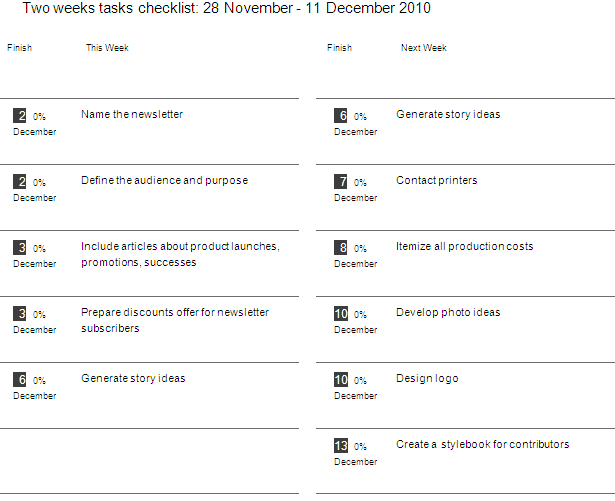
Example 1. Two Weeks Task Check List
The Benefits for ConceptDraw MINDMAP Brainstorming Software
- ConceptDraw MINDMAP is effective for brainstorming, designing mind maps, idea generating, creative and lateral thinking, creativity and problem solving.
- ConceptDraw MINDMAP is ideal for team and personal work in Business, Marketing and Project Management.
- The libraries with large quantity of vector objects help to illustrate your mind maps and to make them bright, visual and comprehensible.
- Use of View Navigator tool lets create presentations from a mind map: you can simply select the map parts you want to present, sequence your slides, and preview the presentation.
- ConceptDraw MINDMAP provides wide capabilities of importing and exporting in various formats: Microsoft PowerPoint, Microsoft Word, MS Excel, Mindjet MindManager, image, HTML, PDF file.