Made with
ConceptDraw
DIAGRAM 18

How Do You Make a Histogram?

How do you make a histogram usually? Drawing of histogram is quite complex and lengthy process. Usually you have a set of data and you draw free-hand your diagram according to these data.

But now thanks to the ConceptDraw DIAGRAM diagramming and vector drawing software extended with Histograms solution from the Graphs and Charts Area of ConceptDraw Solution Park this process became simple and fast.

Designers of ConceptDraw DIAGRAM did the part of work instead for you — now all that you need is simply drag already predesigned histogram object from the Histograms library of Histograms solution and set your own data.
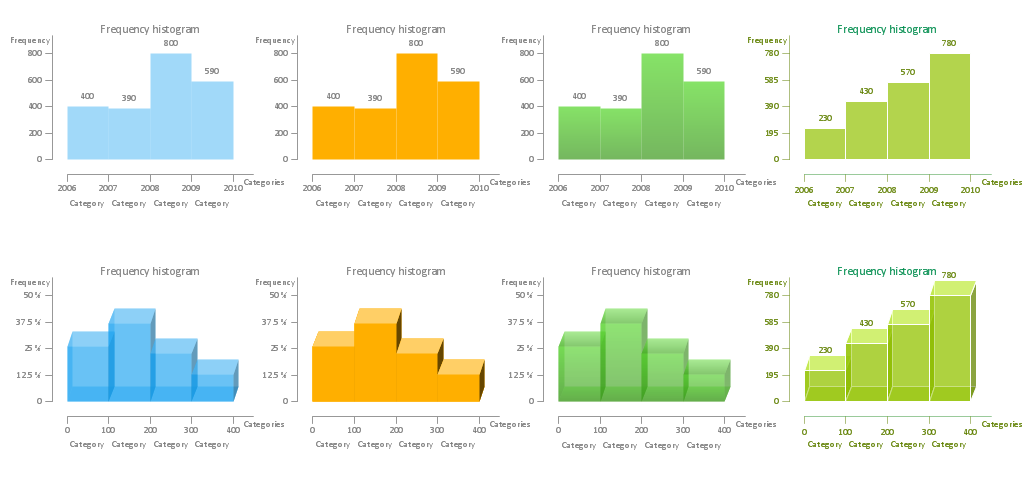
How Do You Make a Histogram - Histograms library Design Elements

Example 1. How Do You Make a Histogram — Histograms library Design Elements

Let's try how simple it is. Your histogram of any complexity will be ready in a few minutes.

You can also use the predesigned templates and samples included in Histograms solution instead of drawing a histogram from the blank document.
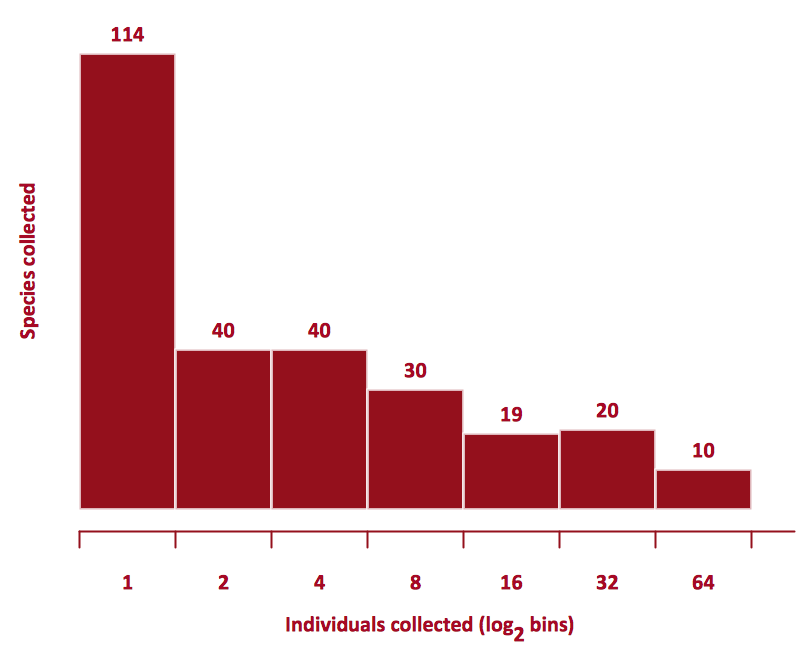
How Do You Make a Histogram?

Example 2. Histogram — Beetles in the river Thames

This sample was created in ConceptDraw DIAGRAM software using one of the objects offered by Histograms library from the Histograms Solution for ConceptDraw Solution Park. This example demonstrates a portion of the solution's capabilities and the professional results you can achieve. An experienced user spent 5 minutes creating this sample.

Use the Histograms Solution for ConceptDraw DIAGRAM to present to your colleagues how do you make a histogram quick, easy and effective.

The Histograms designed with ConceptDraw DIAGRAM is vector graphic documents and is available for reviewing, modifying, converting to a variety of formats (image, HTML, PDF file, MS PowerPoint Presentation, Adobe Flash or MS Visio), printing and send via e-mail in one moment.



FOUR RELATED HOW TO's:
How to draw a Histogram? It's very fast and easy to draw any Histogram using the tools of ConceptDraw DIAGRAM software.How To Draw a Histogram?
Picture: How To Draw a Histogram?
Related Solution:
Perfect charts and graphics diagramming software with rich examples and template. ConceptDraw is ideal to draw Charts and Graphics.Basic Diagramming *
Picture: Basic Diagramming
Related Solution:
If you have doubts about some situation, there are tools that might help you. First used in the Stanford Research Institute in the 60s, SWOT analysis is a great solution and if you need to build a strategy, this tool is very effective. As a result, you will get the clear idea of all the opportunities and threats you might face. This matrix was build for a TOWS analysis performance. A TOWS analysis includes the same process of listing strengths, weaknesses, opportunities and threats as a SWOT analysis. But, unlike SWOT, TOWS analysis primarily takes into account threats and opportunities and then at least - weaknesses and strengths. This is also a is a strategic planning tool. Beyond making a matrix, the strategy manager should investigate ways the organization can take edge of opportunities and reduce threats by turning to advantage strengths and weaknesses. Making SWOT and TOWS analysis uses the same approach and outputs close results. ConceptDraw SWOT and TOWS Matrix Diagrams solution supplies templates of matrices, that help to list clearly the constituents of SWOT and TOWS analysis.SWOT Analysis Solution - Strategy Tools *
Picture: SWOT Analysis Solution - Strategy Tools
Fishbone diagrams work for most entrepreneurs and almost any industry or person having a problem. Professional diagramming software may help you create Fishbone (Cause and Effect or Ishikawa) diagrams. When people are unclear about what is causing an issue, ConceptDraw DIAGRAM will be your lifesaver. When to use a Fishbone diagram? Originally developed as a quality control tool, you may find a Fishbone diagram helpful when used in many cases, such as to analyze a complex problem when there are many causes, for identifying all possible root causes for an effect or a problem, when you need different point of view to look on a problem, to uncover bottlenecks and identify where and why a process doesn't work, for acceleration a process when traditional ways of problem solving consume many time.When To Use a Fishbone Diagram *
Picture: When To Use a Fishbone Diagram
Related Solution:
ConceptDraw
DIAGRAM 18