Made with
ConceptDraw
DIAGRAM 18

Emergency Exit Plan House

Emergency Exit Plan House is a plan representing a floor plan of a private house or multi-floor residential house with shown emergency escapes, location of fire extinguishers, safe and refuge areas. You can also include the evacuation policy and procedure, phone numbers of rescue services, and some specialized additional information. Thought-out a way to alert people in a building about an emergency and set the specialized hazard warning equipment, smoke detectors, etc.

Emergency Exit Plan development also includes a careful assessment of hazards and determining what physical or chemical hazards could cause an emergency in the house.

ConceptDraw DIAGRAM charting and vector drawing software extended with Fire and Emergency Plans solution offer a large collection of examples and samples. The thematic vector design objects and symbols for drawing the Emergency Exit Plan for the house of any area are also included.
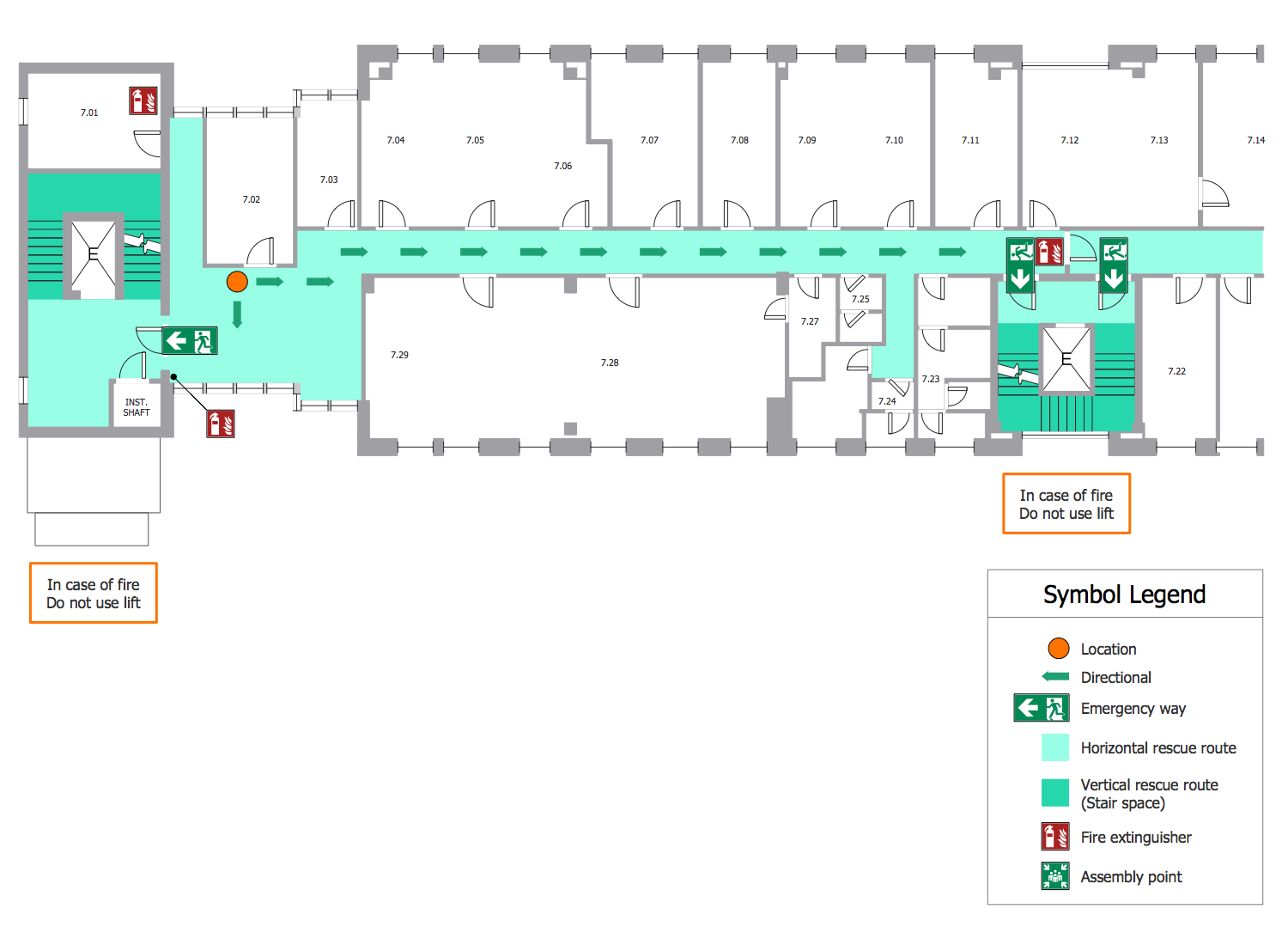
Emergency Exit Plan House

Example 1. Emergency Exit Plan House

ConceptDraw DIAGRAM software allows drawing an Emergency Exit Plan both at the blank document or starting with a ready sample included in the Fire and Emergency Plans solution. Use the desired sample as a template. Customize it to fit your needs using the ready-made library design elements — ISO 7010 safe condition signs, ISO 7010 fire safety signs, fire and emergency planning symbols.

The example you see on this page was created in ConceptDraw DIAGRAM software. The drawing tools and objects from the libraries of Fire and Emergency Plans and Floor Plans solutions from the Building Plans area were used. It demonstrates the solution's capabilities and the professional results you can achieve. An experienced user spent 20 minutes creating it.

Use Fire and Emergency Plans solution for ConceptDraw DIAGRAM to make quick, simply, and effectively your own Emergency Exit Plans from the beginning to the end.

All source documents are vector graphic documents. They are available for reviewing, modifying, or converting to a variety of formats (PDF file, MS PowerPoint, MS Visio, and many graphic formats) from the ConceptDraw STORE. The Fire and Emergency Plans Solution is available for all ConceptDraw DIAGRAM users.




THREE RELATED HOW TO's:
ConceptDraw DIAGRAM diagramming and vector drawing software enhanced with Network Security Diagrams Solution from the Computer and Networks Area of ConceptDraw Solution Park is the best for effective design professional, colorful and attractive Network Security Diagram of any complexity and degree of detailing.Network Security Diagram *
Picture: Network Security Diagram
Related Solution:
Electrical plan is a document that is developed during the first stage of the building design. This scheme is composed of conventional images or symbols of components that operate by means of electric energy. To simplify the creation of these schemes you can use house electrical plan software, which will not require a long additional training to understand how to use it. You only need to install the necessary software ant it’s libraries and you’ll have one less problem during the building projection. Any building contains a number of electrical systems, including switches, fixtures, outlets and other lightening equipment. All these should be depicted in a building electrical plans and included to general building documentation. This home electrical plan displays electrical and telecommunication devices placed to a home floor plan. On the plan, each electrical device is referenced with the proper symbol. Electrical symbols are used for universal recognition of the building plan by different persons who will be working on the construction. Not all possible electric symbols used on a certain plan, so the symbols used in the current home plan are included to a legend. The electrical home plan may be added as a separate document to a complete set of building plans.House Electrical Plan Software
Picture: How To use House Electrical Plan Software
Related Solution:
If you are an advanced diagramming software user, you might use it daily. Traversing the Internet in searching of alternative to MS Visio for MAC and PC, you can fulfill all your requirements with ConceptDraw DIAGRAM. Don’t hesitate to transfer your documents to another operating system. When looking for a smart and simple tool for business diagrams as alternative to MS Visio for Apple OS X platform, ConceptDraw DIAGRAM certainly is the best choice. Making many kinds of business charts, numerous technical drawings is what ConcepDraw DIAGRAM is the best. One can easy create any diagram and complete it perfectly and quickly. The big collection of vector object libraries, templates and samples, make it the best Microsoft Visio alternative: ConceptDraw DIAGRAM is simpler to use, less expensive, and supports project management and mind mapping methods.Alternative to MS Visio for MAC and PC
Picture:
In Searching of Alternative to MS Visio for Mac and PC
with ConceptDraw DIAGRAM
ConceptDraw
DIAGRAM 18