ConceptDraw Arrows10 Technology
Connectors Text
How should diagramming software work? Is it possible to develop a diagram as quickly as the ideas come to you?
The innovative ConceptDraw Arrows10 Technology included in ConceptDraw DIAGRAM is a powerful drawing tool that changes the way diagrams are produced. While making the drawing process easier and faster.
ConceptDraw DIAGRAM is a powerful tool that helps you create a process map diagram quickly and easily. Fine-tuning the objects in ConceptDraw DIAGRAM allows you to create a really professional finished article. ConceptDraw Arrows10 Technology gives drawing connectors a smart behavior that provides quick and precise placement, allows for easy changes and automatic rearrangement.
When adding text to a smart connector, it automatically pins the text to the connector’s longest side. If you move shapes, the text can jump to another portion of the connector when it becomes the longest.
You may unpin or pin back the text by dragging its handle. When adding text to the direct connector, it always pinned to connector′s center and duplicates the connector′s angle.
If you′ll rotate the connector, the text will also rotates and adapts to its new position to maintain readable.
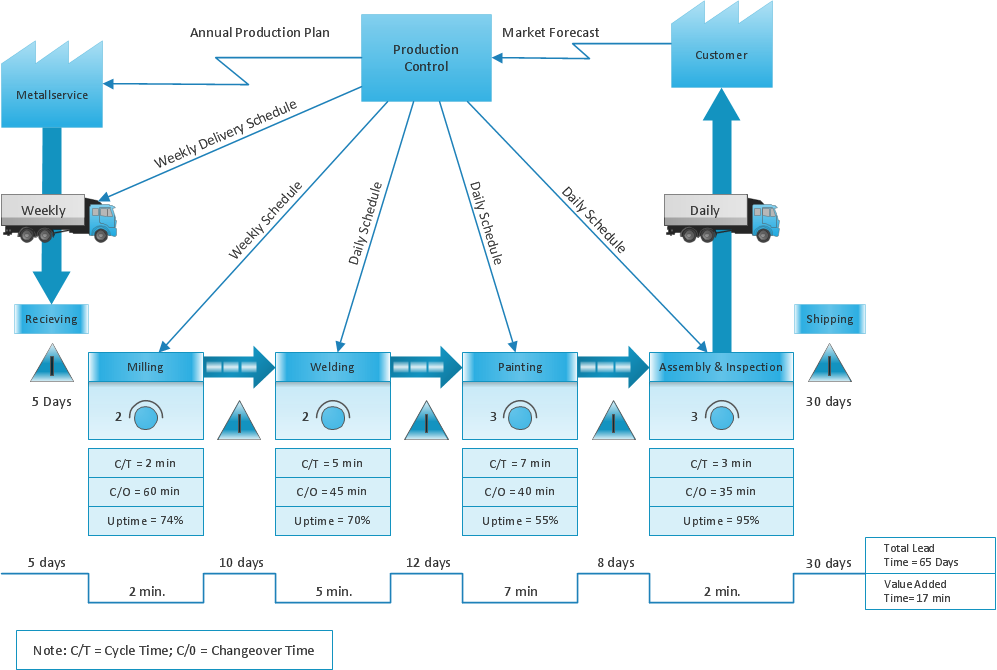
Sample 1. Value stream map example.
ConceptDraw DIAGRAM diagramming software provides vector shapes and connector tools for quick and easy drawing diagrams for business, technology, science and education.
Use ConceptDraw DIAGRAM enhanced with solutions from ConceptDraw Solution Park to create diagrams to present and explain structures, process flows, logical relationships, networks, design schemes and other visually organized information and knowledge.