HelpDesk
How To Create Visio Network Diagram
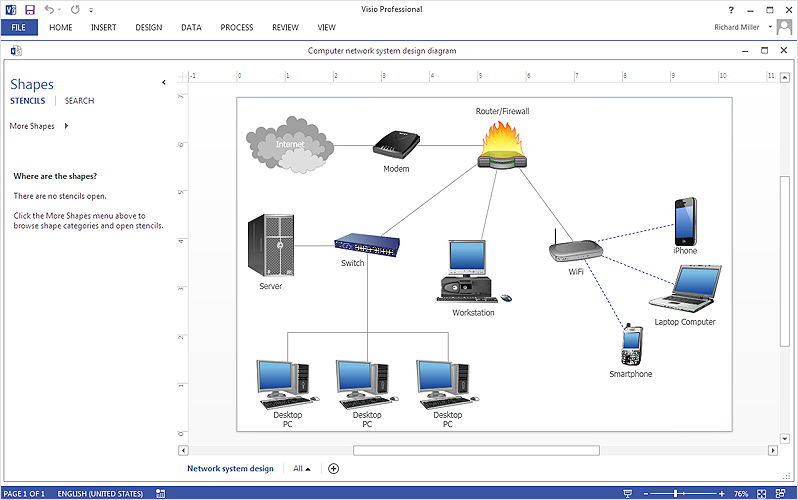
IT professionals are accustomed to using MS Visio for their network diagrams. Nevertheless, ConceptDraw DIAGRAM also powers, and in some cases and more feature-rich product. Given the fact that many professional people committed to MS Visio, ConceptDraw DIAGRAM developers provided users with the opportunity to share their diagrams with MS Visio users. You can use the export to VSDX and VSD format. By exporting your network diagram to MS Visio, you can easily solve the issues in communication with the users of this widespread software product.HelpDesk
How To Create an MS Visio Telecommunication Network Diagram
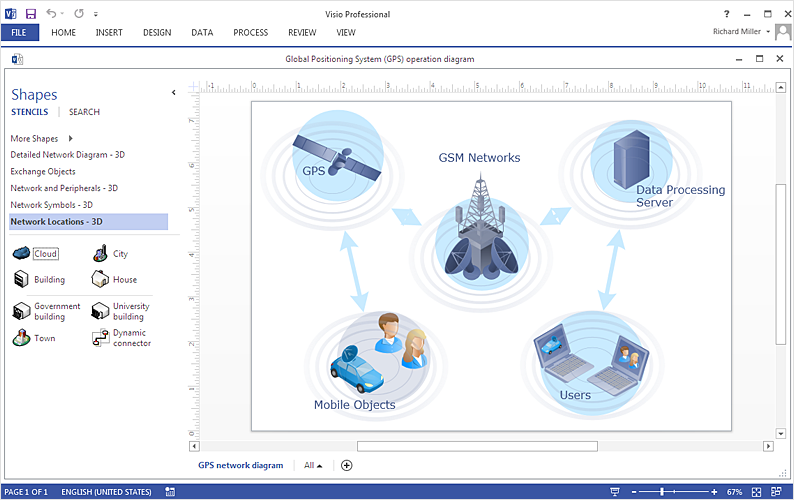
Telecommunication network consists from computers and telecommunication equipment, providing information exchange between network elements. The main purpose of telecommunication networks is to provide access to distributed resources. Making a telecommunication network diagram involves many specific elements of telecommunication technology that can be managed using ConceptDraw DIAGRAM. ConceptDraw DIAGRAM allows you to easily create telecommunication network diagram of any complexity and then export it to MS Visio VSDX and VDX file. Thus you can create a pack of telecommunication network documentation, that you will easily communicate with other specialists, who use MS Visio.In searching of alternative to MS Visio for MAC and PC with ConceptDraw DIAGRAM

Undoubtedly MS Visio is a powerful and multifunctional tool, but however at times occur the instances, when it turns unable of meeting certain users' requirements. At this cases you may need to use an alternative program software, preferably it will be simple, convenient, and at the same time powerful and professional. In searching the alternative to MS Visio for MAC and PC we recommend you to pay attention for ConceptDraw DIAGRAM software, which was developed to satisfy all your drawing needs and requirements. It is a fully-functioned alternative product to MS Visio for both platforms. ConceptDraw DIAGRAM software has many advantages, the main among them are the cross-platform compatibility, a reasonable price, widespread ConceptDraw Solution Park with huge variety of different solutions that offer numerous libraries of specialized vector objects, useful examples, samples, and quick-start templates, extensive import / export capabilities, built-in script language, MS Visio support and certainly free technical support.HelpDesk
How To Make MS Visio Wireless Network Diagram
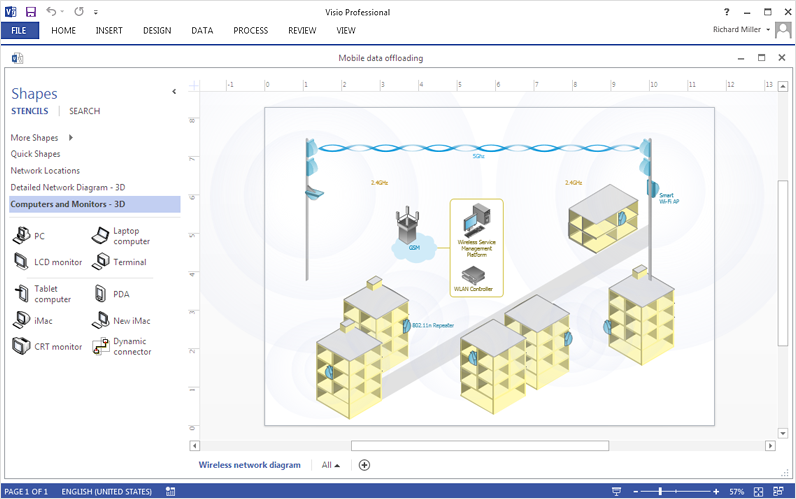
ConceptDraw DIAGRAM allows you to easily create wireless network diagrams and then make an MS Visio file from your network diagram in a single click.
Telecommunication Network Diagrams
Telecommunication Network Diagrams solution extends ConceptDraw DIAGRAM software with samples, templates, and great collection of vector stencils to help the specialists in a field of networks and telecommunications, as well as other users to create Computer systems networking and Telecommunication network diagrams for various fields, to organize the work of call centers, to design the GPRS networks and GPS navigational systems, mobile, satellite and hybrid communication networks, to construct the mobile TV networks and wireless broadband networks.

ConceptDraw DIAGRAM Compatibility with MS Visio

The powerful diagramming and business graphics tools are now not exception, but the norm for today’s business, which develop in incredibly quick temp. But with the abundance of powerful business diagramming applications it is important to provide their compatibility for effective exchange the information between the colleagues and other people who maybe use different software in their work. During many years Microsoft Visio™ was standard file format for the business and now many people need the visual communication software tools that can read the Visio format files and also export to Visio format. The powerful diagramming and vector drawing software ConceptDraw DIAGRAM is ideal from the point of view of compatibility with MS Visio. Any ConceptDraw DIAGRAM user who have the colleagues that use MS Visio or any who migrates from Visio to ConceptDraw DIAGRAM , will not have any problems. The VSDX (Visio′s open XML file format) and VDX formatted files can be easily imported and exported by ConceptDraw DIAGRAM , you can see video about this possibility.
Cisco Network Diagrams
Cisco Network Diagrams solution extends ConceptDraw DIAGRAM with the best characteristics of network diagramming software. Included samples, templates and libraries of built-in standardized vector Cisco network icons and Cisco symbols of computers, network devices, network appliances and other Cisco network equipment will help network engineers, network designers, network and system administrators, as well as other IT professionals and corporate IT departments to diagram efficiently the network infrastructure, to visualize computer networks topologies, to design Cisco computer networks, and to create professional-looking Cisco Computer network diagrams, Cisco network designs and schematics, Network maps, and Network topology diagrams in minutes.

- How To Create a MS Visio Wireless Network Diagram Using ...
- Visio Network Diagram Tool
- Telecommunication Network Diagrams | How To Create a MS Visio ...
- How To Create a MS Visio Telecommunication Network Diagram ...
- How To Create a MS Visio Computer Network Diagram Using ...
- How to Draw a Computer Network Diagrams
- How to Draw a Computer Network Diagrams | Process Flowchart ...
- Sample Visio Network Diagrams
- How To Create a MS Visio Wireless Network Diagram Using
- Cisco Network Diagram Visio
- Visio Network Diagram Template
- Office Import Network Diagram Tool
- Visio Network Templates
- Visio Network Diagram Examples
- Telecommunication Network Diagrams | Cross-Functional ...
- Event-driven Process Chain Diagrams EPC | IDEF0 Visio | Network ...
- Network Topologies | MS Visio Look a Like Diagrams | Hybrid ...
- How to Make Network Diagram | ConceptDraw PRO Compatibility ...
- Computer Network Diagrams | MS Visio Look a Like Diagrams ...
- Visio Network Diagram Storage