Creating a Schedule
ConceptDraw OfficeConceptDraw Office is an integrated set of visualization products and document exchange technologies. ConceptDraw OFFICE consists of a diagramming platform, a mind mapping, and a project management tool. These tools are essential to generate business diagrams, mind maps, project plans, dashboards, presentations, schematics, and any other business visualizations. These tools have access to an online service, ConceptDraw Solution Park that will deliver additional product extensions in the future. This is a time saving assistant for generating your business documents and presentations. ConceptDraw Office consists of a diagramming platform, a mind mapping, and a project management tool. These tools are essential to generate business diagrams, mind maps, project plans, dashboards, presentations, schematics, and any other business visualizations. ConceptDraw MINDMAP TemplatesPredesigned templates covering a variety of themes that can help you get started faster when working on projects and can help to inspire ideas when suffering from Blank Page Syndrome. |
Mind map template for creating a schedule by planning process, daily routine, organizing tasks and possible interruptions.
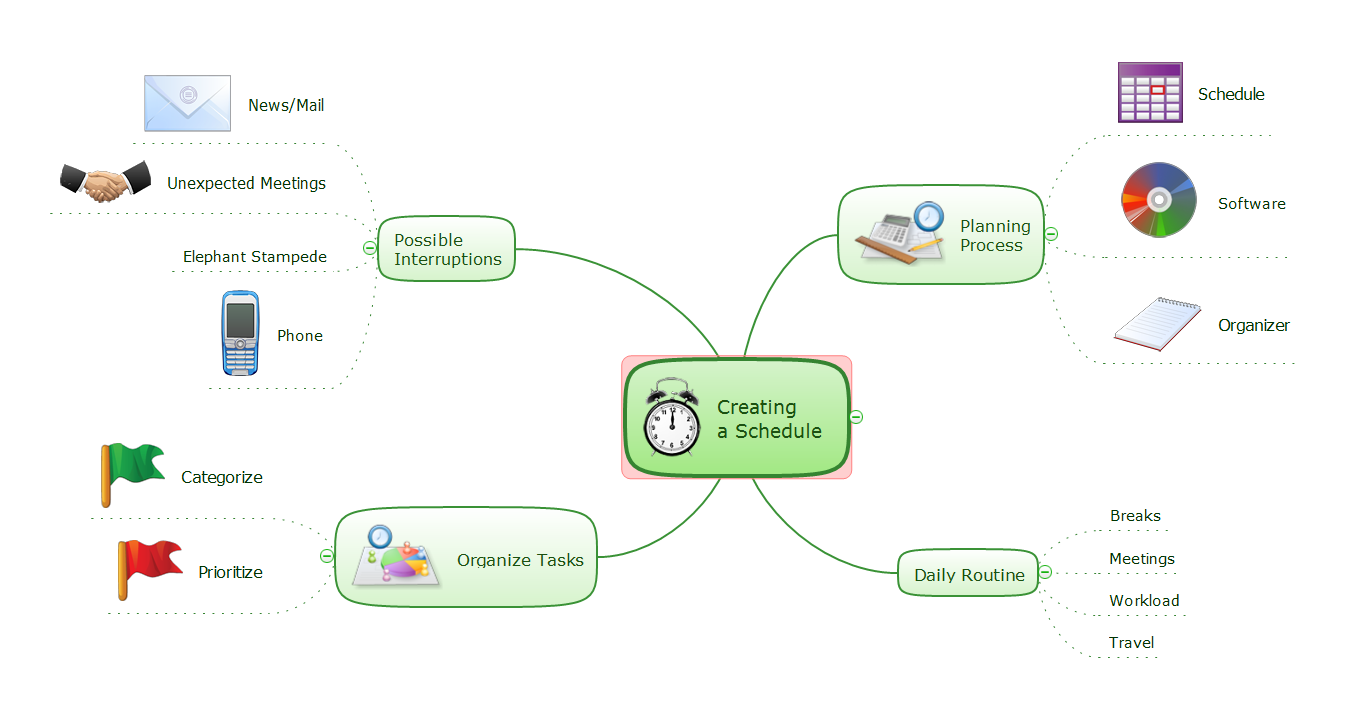
Example 1. Creating a Schedule
Export to Outline
Creating a Schedule
-
Planning Process
- Schedule
- Software
- Organizer
-
Daily Routine
- Breaks
- Meetings
- Workload
- Travel
-
Organize Tasks
- Categorize
- Prioritize
-
Possible Interruptions
- News/Mail
- Unexpected Meetings
- Elephant Stampede
- Phone
The Benefits for ConceptDraw MINDMAP Brainstorming Software
- ConceptDraw MINDMAP is effective for brainstorming, designing mind maps, idea generating, creative and lateral thinking, creativity and problem solving.
- ConceptDraw MINDMAP is ideal for team and personal work in Business, Marketing and Project Management.
- The libraries with large quantity of vector objects help to illustrate your mind maps and to make them bright, visual and comprehensible.
- Use of View Navigator tool lets create presentations from a mind map: you can simply select the map parts you want to present, sequence your slides, and preview the presentation.
- ConceptDraw MINDMAP provides wide capabilities of importing and exporting in various formats: Microsoft PowerPoint, Microsoft Word, MS Excel, Mindjet MindManager, image, HTML, PDF file.