Product Proposal Documents Expanded
ConceptDraw OfficeConceptDraw Office is an integrated set of visualization products and document exchange technologies. ConceptDraw OFFICE consists of a diagramming platform, a mind mapping, and a project management tool. These tools are essential to generate business diagrams, mind maps, project plans, dashboards, presentations, schematics, and any other business visualizations. These tools have access to an online service, ConceptDraw Solution Park that will deliver additional product extensions in the future. This is a time saving assistant for generating your business documents and presentations. ConceptDraw Office consists of a diagramming platform, a mind mapping, and a project management tool. These tools are essential to generate business diagrams, mind maps, project plans, dashboards, presentations, schematics, and any other business visualizations. ConceptDraw MINDMAP SamplesSample mind maps created in ConceptDraw MINDMAP that demonstrate the different capabilities and applications of the program for business, personal, or education use. |
A more detailed mind map that organizes documents required for a product proposal.
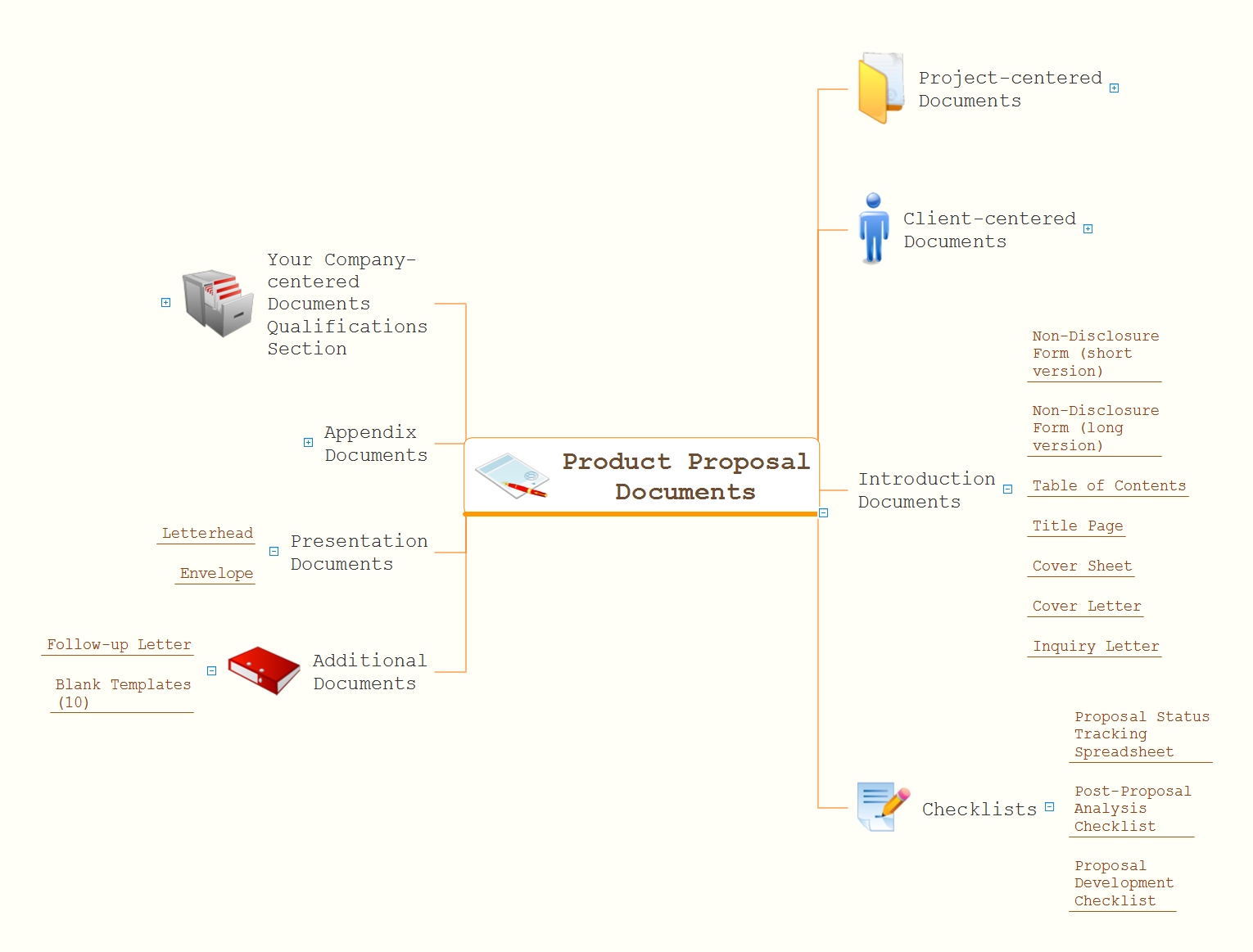
Example 1. Product Proposal Documents Expanded
Export to Outline
Product Proposal Documents Expanded
-
Project-centered Documents
-
Goals and Objectives Section
- Statement of Work
- Expected Results
- Features
- Benefits
- Project Deliverables
- Samples
- Operational Impact
-
Methodology Section
- Outline
- Background
- Sales Plan
- Project Methods
- Technical Approach
- Disaster Recovery Plan
- Project Management
- Production Schedule
- Testing Plan
- Marketing Plan
- Installation Schedule
- System Integration
- Training Plan
- Time Line
- Security Plan
- Maintenance Plan
- Regulations
- Safety Plan
- Storyboard
- Assumptions
- Risk Analysis
- Legal Considerations
- Project Constraints
- Contingency Planning
- Customer Support
-
Evaluation Section
- Evaluation
- System Requirements
- Documentation Requirements
- Requirements
- Acceptance Criteria
- Interface Requirements
-
Project Summary Section
- Recommendations
- Project Summary
-
Budget Section
- Funding Request
- Budget
- Total Cost of Ownership
- Cost/Benefit Analysis
- Supplied Material
- Materials
-
Goals and Objectives Section
-
Client-centered Documents
-
Summary Section
- Executive Summary
- Cost Summary
- SWOT Analysis
-
Needs Assessment Section
- Needs Assessment
- Strengths
- Opportunities
- Weaknesses
- Competitive Analysis
- Threats
- Client Background
- Industry Trends
- Market and Audience
- Client Operations
- Clients Served
-
Summary Section
-
Introduction Documents
- Non-Disclosure Form (short version)
- Non-Disclosure Form (long version)
- Table of Contents
- Title Page
- Cover Sheet
- Cover Letter
- Inquiry Letter
-
Checklists
- Proposal Status Tracking Spreadsheet
- Post-Proposal Analysis Checklist
- Proposal Development Checklist
-
Additional Documents
- Follow-up Letter
- Blank Templates (10)
-
Presentation Documents
- Letterhead
- Envelope
-
Appendix Documents
- Warranty
- Disclaimers
- Financial Statements
- Reference Material
- Benchmark Results
- List of Illustrations
- List of Acronyms
- Schematics
- Standards Compliance
- RFP Cross Reference
- Compliance Matrix
-
Your Company-centered Documents Qualifications Section
- Breakeven Analysis
- Income Projection
- Balance Sheet
- Financial Information
- Strategic Position
- Programs and Activities
- Company Operations
- Facilities
- Portfolio
- References
- Testimonials
- Future Developments
- Additional Products
- Additional Services
- Product Visuals
- Products
- Services Provided
- Company History
- Case Study
- Quality Control
- Qualifications
- Mission Statement
The Benefits for ConceptDraw MINDMAP Brainstorming Software
- ConceptDraw MINDMAP is effective for brainstorming, designing mind maps, idea generating, creative and lateral thinking, creativity and problem solving.
- ConceptDraw MINDMAP is ideal for team and personal work in Business, Marketing and Project Management.
- The libraries with large quantity of vector objects help to illustrate your mind maps and to make them bright, visual and comprehensible.
- Use of View Navigator tool lets create presentations from a mind map: you can simply select the map parts you want to present, sequence your slides, and preview the presentation.
- ConceptDraw MINDMAP provides wide capabilities of importing and exporting in various formats: Microsoft PowerPoint, Microsoft Word, MS Excel, Mindjet MindManager, image, HTML, PDF file.