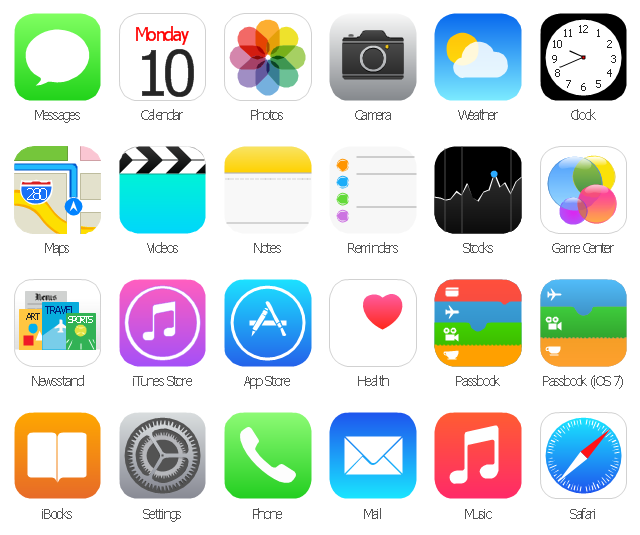
The vector stencils library "App icons" contains 24 icons of iOS 8 / iPhone 6 software applications.
Use it to design iOS 8 apps GUI prototypes and iPhone 6 software applications user interface sketches and mockups.
The icons example "App icons - Vector stencils library" was created using the ConceptDraw PRO diagramming and vector drawing software extended with the iPhone User Interface solution from the Software Development area of ConceptDraw Solution Park.
Use it to design iOS 8 apps GUI prototypes and iPhone 6 software applications user interface sketches and mockups.
The icons example "App icons - Vector stencils library" was created using the ConceptDraw PRO diagramming and vector drawing software extended with the iPhone User Interface solution from the Software Development area of ConceptDraw Solution Park.
Messages

Calendar

Photos
Camera

Weather
Clock
Maps

Videos

Notes
Reminders
Stocks
Game Center
Newsstand

iTunes Store

App Store
iBooks

Health

Passbook
Passbook (iOS 7)
-app-icons---vector-stencils-library.png--diagram-flowchart-example.png)
Settings

Phone

Mail

Music

Safari
Use this template to prototype and design the iPhone user interface.
"At WWDC 2007 on June 11, 2007, Apple announced that the iPhone would support third-party web applications using Ajax that share the look and feel of the iPhone interface. On October 17, 2007, Steve Jobs, in an open letter posted to Apple's "Hot News" weblog, announced that a software development kit (SDK) would be made available to third-party developers in February 2008. The iPhone SDK was officially announced and released on March 6, 2008, at the Apple Town Hall facility.
It is a free download, with an Apple registration, that allows developers to develop native applications for the iPhone and iPod Touch, then test them in an "iPhone simulator". However, loading an application onto a real device is only possible after paying an Apple Developer Connection membership fee. Developers are free to set any price for their applications to be distributed through the App Store, of which they will receive a 70% share.
Developers can also opt to release the application for free and will not pay any costs to release or distribute the application beyond the membership fee. The App Store was launched with the release of iOS 2.0, on July 11, 2008. The update was free for iPhone users; owners of older iPod Touches were required to pay US$10 for it.
Once a developer has submitted an application to the App Store, Apple holds firm control over its distribution." [iPhone. Wikipedia]
The iPhone interface template for the ConceptDraw PRO diagramming and vector drawing software is included in the Graphic User Interface solution from the Software Development area of ConceptDraw Solution Park.
"At WWDC 2007 on June 11, 2007, Apple announced that the iPhone would support third-party web applications using Ajax that share the look and feel of the iPhone interface. On October 17, 2007, Steve Jobs, in an open letter posted to Apple's "Hot News" weblog, announced that a software development kit (SDK) would be made available to third-party developers in February 2008. The iPhone SDK was officially announced and released on March 6, 2008, at the Apple Town Hall facility.
It is a free download, with an Apple registration, that allows developers to develop native applications for the iPhone and iPod Touch, then test them in an "iPhone simulator". However, loading an application onto a real device is only possible after paying an Apple Developer Connection membership fee. Developers are free to set any price for their applications to be distributed through the App Store, of which they will receive a 70% share.
Developers can also opt to release the application for free and will not pay any costs to release or distribute the application beyond the membership fee. The App Store was launched with the release of iOS 2.0, on July 11, 2008. The update was free for iPhone users; owners of older iPod Touches were required to pay US$10 for it.
Once a developer has submitted an application to the App Store, Apple holds firm control over its distribution." [iPhone. Wikipedia]
The iPhone interface template for the ConceptDraw PRO diagramming and vector drawing software is included in the Graphic User Interface solution from the Software Development area of ConceptDraw Solution Park.
iPhone GUI template
The vector stencils library "Apps icons" contains 24 icons of iOS 8 / iPhone 6 applications: Messages, Calendar, Photos, Camera, Weather, Clock, Maps, Videos, Notes, Reminders, Stocks, Game Center, Newsstand, iTunes Store, App Store, iBooks, Health, Passbook, Settings, Phone, Mail, Music, Safari.
Use it to design iOS 8 apps GUI prototypes and iPhone 6 applications user interface sketches and mockups.
"iOS 8 is the eighth major release of the iOS mobile operating system designed by Apple Inc. as the successor to iOS 7. It was announced at the company's Worldwide Developers Conference (WWDC) 2014 on June 2, 2014 and will be released on September 17, 2014.
A new app named Health and a corresponding framework named HealthKit will be available. Siri will support hands-free activation and music identification using Shazam. Voice and video messages will be automatically deleted unless the user saves them for future reference. Interactive notifications will let the user respond to texts without leaving the app they are currently using." [iOS 8. Wikipedia]
The example "Design elements - Apps icons" was created using the ConceptDraw PRO diagramming and vector drawing software extended with the iPhone User Interface solution from the Software Development area of ConceptDraw Solution Park.
Use it to design iOS 8 apps GUI prototypes and iPhone 6 applications user interface sketches and mockups.
"iOS 8 is the eighth major release of the iOS mobile operating system designed by Apple Inc. as the successor to iOS 7. It was announced at the company's Worldwide Developers Conference (WWDC) 2014 on June 2, 2014 and will be released on September 17, 2014.
A new app named Health and a corresponding framework named HealthKit will be available. Siri will support hands-free activation and music identification using Shazam. Voice and video messages will be automatically deleted unless the user saves them for future reference. Interactive notifications will let the user respond to texts without leaving the app they are currently using." [iOS 8. Wikipedia]
The example "Design elements - Apps icons" was created using the ConceptDraw PRO diagramming and vector drawing software extended with the iPhone User Interface solution from the Software Development area of ConceptDraw Solution Park.
iOS 8 apps icons
The vector stencils library "App icons" contains 24 icons of iOS 8 / iPhone 6 software applications.
Use it to design iOS 8 apps GUI prototypes and iPhone 6 software applications user interface sketches and mockups.
The icons example "App icons - Vector stencils library" was created using the ConceptDraw PRO diagramming and vector drawing software extended with the iPhone User Interface solution from the Software Development area of ConceptDraw Solution Park.
Use it to design iOS 8 apps GUI prototypes and iPhone 6 software applications user interface sketches and mockups.
The icons example "App icons - Vector stencils library" was created using the ConceptDraw PRO diagramming and vector drawing software extended with the iPhone User Interface solution from the Software Development area of ConceptDraw Solution Park.
Messages
Calendar
Photos
Camera
Weather
Clock
Maps
Videos
Notes
Reminders
Stocks
Game Center
Newsstand
iTunes Store
App Store
iBooks
Health
Passbook
Passbook (iOS 7)
Settings
Phone
Mail
Music
Safari
The vector stencils library "App icons" contains 24 icons of iOS 8 / iPhone 6 software applications.
Use it to design iOS 8 apps GUI prototypes and iPhone 6 software applications user interface sketches and mockups.
The icons example "App icons - Vector stencils library" was created using the ConceptDraw PRO diagramming and vector drawing software extended with the iPhone User Interface solution from the Software Development area of ConceptDraw Solution Park.
Use it to design iOS 8 apps GUI prototypes and iPhone 6 software applications user interface sketches and mockups.
The icons example "App icons - Vector stencils library" was created using the ConceptDraw PRO diagramming and vector drawing software extended with the iPhone User Interface solution from the Software Development area of ConceptDraw Solution Park.
Messages
Calendar
Photos
Camera
Weather
Clock
Maps
Videos
Notes
Reminders
Stocks
Game Center
Newsstand
iTunes Store
App Store
iBooks
Health
Passbook
Passbook (iOS 7)
Settings
Phone
Mail
Music
Safari
"The interface is based around the home screen, a graphical list of available applications. iPhone applications normally run one at a time. Starting with the iPhone 4, a primitive version of multitasking came into play. Users could double click the home button to select recently opened. However, the apps never ran in the background. Starting with iOS 7, though, apps can truly multitask, and each open application runs in the background when not in use, although most functionality is still available when making a call or listening to music. The home screen can be accessed at any time by a hardware button below the screen, closing the open application in the process.
By default, the Home screen contains the following icons: Messages (SMS and MMS messaging), Calendar, Photos, Camera, YouTube, Stocks, Maps (Google Maps), Weather, Voice Memos, Notes, Clock, Calculator, Settings, iTunes (store), App Store, (on the iPhone 3GS and iPhone 4) Compass, FaceTime and GameCenter were added in iOS 4.0 and 4.1 respectively. In iOS 5, Reminders and Newsstand were added, as well as the iPod application split into separate Music and Videos applications. iOS 6 added Passbook as well as an updated version of Maps that relies on data provided by TomTom as well as other sources. iOS 6 also added a Clock application onto the iPad's homescreen. However, it also no longer support YouTube. Docked at the base of the screen, four icons for Phone, Mail, Safari (Internet), and Music delineate the iPhone's main purposes. On January 15, 2008, Apple released software update 1.1.3, allowing users to create "Web Clips", home screen icons that resemble apps that open a user-defined page in Safari. After the update, iPhone users can rearrange and place icons on up to nine other adjacent home screens, accessed by a horizontal swipe." [iPhone. Wikipedia]
The example "iPhone OS (iOS) graphic user interface (GUI) - Alarm setting" was created using the ConceptDraw PRO diagramming and vector drawing software extended with the Graphic User Interface solution from the Software Development area of ConceptDraw Solution Park.
By default, the Home screen contains the following icons: Messages (SMS and MMS messaging), Calendar, Photos, Camera, YouTube, Stocks, Maps (Google Maps), Weather, Voice Memos, Notes, Clock, Calculator, Settings, iTunes (store), App Store, (on the iPhone 3GS and iPhone 4) Compass, FaceTime and GameCenter were added in iOS 4.0 and 4.1 respectively. In iOS 5, Reminders and Newsstand were added, as well as the iPod application split into separate Music and Videos applications. iOS 6 added Passbook as well as an updated version of Maps that relies on data provided by TomTom as well as other sources. iOS 6 also added a Clock application onto the iPad's homescreen. However, it also no longer support YouTube. Docked at the base of the screen, four icons for Phone, Mail, Safari (Internet), and Music delineate the iPhone's main purposes. On January 15, 2008, Apple released software update 1.1.3, allowing users to create "Web Clips", home screen icons that resemble apps that open a user-defined page in Safari. After the update, iPhone users can rearrange and place icons on up to nine other adjacent home screens, accessed by a horizontal swipe." [iPhone. Wikipedia]
The example "iPhone OS (iOS) graphic user interface (GUI) - Alarm setting" was created using the ConceptDraw PRO diagramming and vector drawing software extended with the Graphic User Interface solution from the Software Development area of ConceptDraw Solution Park.
iPhone GUI
-graphic-user-interface-(gui)---alarm-setting.png--diagram-flowchart-example.png)
"The iPhone ... is a line of smartphones designed and marketed by Apple Inc. It runs Apple's iOS mobile operating system. ...
The user interface is built around the device's multi-touch screen, including a virtual keyboard. The iPhone has Wi-Fi and can connect to many different cellular networks, including 1xRTT and GPRS (shown as a circle on the status bar), EDGE (shown as a capital E on the status bar), UMTS and EV-DO (shown as 3G), a faster version of UMTS and 4G (shown as a 4G symbol on the status bar), and LTE (shown as LTE on the status bar). An iPhone can shoot video (though this was not a standard feature until the iPhone 3GS), take photos, play music, send and receive email, browse the web, send texts, GPS navigation, tell jokes, record notes, do mathematical calculations, and receive visual voicemail. Other functions — video games, reference works, social networking, etc. — can be enabled by downloading application programs (‘apps’); as of October 2013, the App Store offered more than one million apps by Apple and third parties." [iPhone. Wikipedia]
The example "iPhone OS (iOS) graphic user interface (GUI) - Standby mode" was created using the ConceptDraw PRO diagramming and vector drawing software extended with the Graphic User Interface solution from the Software Development area of ConceptDraw Solution Park.
The user interface is built around the device's multi-touch screen, including a virtual keyboard. The iPhone has Wi-Fi and can connect to many different cellular networks, including 1xRTT and GPRS (shown as a circle on the status bar), EDGE (shown as a capital E on the status bar), UMTS and EV-DO (shown as 3G), a faster version of UMTS and 4G (shown as a 4G symbol on the status bar), and LTE (shown as LTE on the status bar). An iPhone can shoot video (though this was not a standard feature until the iPhone 3GS), take photos, play music, send and receive email, browse the web, send texts, GPS navigation, tell jokes, record notes, do mathematical calculations, and receive visual voicemail. Other functions — video games, reference works, social networking, etc. — can be enabled by downloading application programs (‘apps’); as of October 2013, the App Store offered more than one million apps by Apple and third parties." [iPhone. Wikipedia]
The example "iPhone OS (iOS) graphic user interface (GUI) - Standby mode" was created using the ConceptDraw PRO diagramming and vector drawing software extended with the Graphic User Interface solution from the Software Development area of ConceptDraw Solution Park.
iPhone GUI
-graphic-user-interface-(gui)---standby-mode.png--diagram-flowchart-example.png)
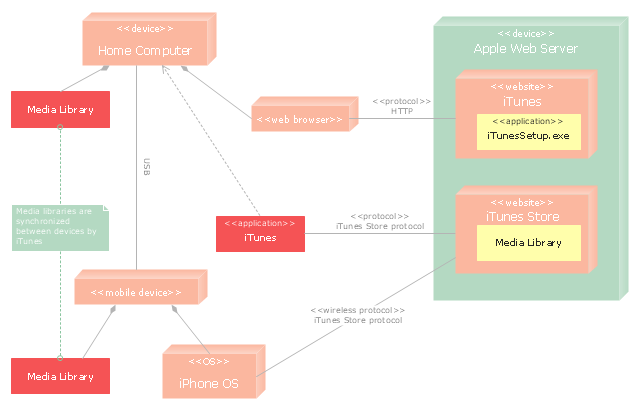
"iTunes is a media player, media library, and mobile device management application developed by Apple Inc. It is used to play, download, and organize digital audio and video on personal computers running the OS X and Microsoft Windows operating systems. The iTunes Store is also available on the iPod Touch, iPhone, and iPad.
Through the iTunes Store, users can purchase and download music, music videos, television shows, audiobooks, podcasts, movies, and movie rentals in some countries, and ringtones, available on the iPhone and iPod Touch (fourth generation onward). Application software for the iPhone, iPad and iPod Touch can be downloaded from the App Store." [iTunes. Wikipedia]
The UML deployment diagram example "Apple iTunes" was created using the ConceptDraw PRO diagramming and vector drawing software extended with the Rapid UML solution from the Software Development area of ConceptDraw Solution Park.
Through the iTunes Store, users can purchase and download music, music videos, television shows, audiobooks, podcasts, movies, and movie rentals in some countries, and ringtones, available on the iPhone and iPod Touch (fourth generation onward). Application software for the iPhone, iPad and iPod Touch can be downloaded from the App Store." [iTunes. Wikipedia]
The UML deployment diagram example "Apple iTunes" was created using the ConceptDraw PRO diagramming and vector drawing software extended with the Rapid UML solution from the Software Development area of ConceptDraw Solution Park.
UML deployment diagram
The vector stencils library "App icons" contains 24 icons of iOS 8 / iPhone 6 software applications.
Use it to design iOS 8 apps GUI prototypes and iPhone 6 software applications user interface sketches and mockups.
The icons example "App icons - Vector stencils library" was created using the ConceptDraw PRO diagramming and vector drawing software extended with the iPhone User Interface solution from the Software Development area of ConceptDraw Solution Park.
Use it to design iOS 8 apps GUI prototypes and iPhone 6 software applications user interface sketches and mockups.
The icons example "App icons - Vector stencils library" was created using the ConceptDraw PRO diagramming and vector drawing software extended with the iPhone User Interface solution from the Software Development area of ConceptDraw Solution Park.
Messages
Calendar
Photos
Camera
Weather
Clock
Maps
Videos
Notes
Reminders
Stocks
Game Center
Newsstand
iTunes Store
App Store
iBooks
Health
Passbook
Passbook (iOS 7)
Settings
Phone
Mail
Music
Safari
The vector stencils library "App icons" contains 24 icons of iOS 8 / iPhone 6 software applications.
Use it to design iOS 8 apps GUI prototypes and iPhone 6 software applications user interface sketches and mockups.
The icons example "App icons - Vector stencils library" was created using the ConceptDraw PRO diagramming and vector drawing software extended with the iPhone User Interface solution from the Software Development area of ConceptDraw Solution Park.
Use it to design iOS 8 apps GUI prototypes and iPhone 6 software applications user interface sketches and mockups.
The icons example "App icons - Vector stencils library" was created using the ConceptDraw PRO diagramming and vector drawing software extended with the iPhone User Interface solution from the Software Development area of ConceptDraw Solution Park.
Messages
Calendar
Photos
Camera
Weather
Clock
Maps
Videos
Notes
Reminders
Stocks
Game Center
Newsstand
iTunes Store
App Store
iBooks
Health
Passbook
Passbook (iOS 7)
Settings
Phone
Mail
Music
Safari
The vector stencils library "App icons" contains 24 icons of iOS 8 / iPhone 6 software applications.
Use it to design iOS 8 apps GUI prototypes and iPhone 6 software applications user interface sketches and mockups.
The icons example "App icons - Vector stencils library" was created using the ConceptDraw PRO diagramming and vector drawing software extended with the iPhone User Interface solution from the Software Development area of ConceptDraw Solution Park.
Use it to design iOS 8 apps GUI prototypes and iPhone 6 software applications user interface sketches and mockups.
The icons example "App icons - Vector stencils library" was created using the ConceptDraw PRO diagramming and vector drawing software extended with the iPhone User Interface solution from the Software Development area of ConceptDraw Solution Park.
Messages
Calendar
Photos
Camera
Weather
Clock
Maps
Videos
Notes
Reminders
Stocks
Game Center
Newsstand
iTunes Store
App Store
iBooks
Health
Passbook
Passbook (iOS 7)
Settings
Phone
Mail
Music
Safari
The vector stencils library "App icons" contains 24 icons of iOS 8 / iPhone 6 software applications.
Use it to design iOS 8 apps GUI prototypes and iPhone 6 software applications user interface sketches and mockups.
The icons example "App icons - Vector stencils library" was created using the ConceptDraw PRO diagramming and vector drawing software extended with the iPhone User Interface solution from the Software Development area of ConceptDraw Solution Park.
Use it to design iOS 8 apps GUI prototypes and iPhone 6 software applications user interface sketches and mockups.
The icons example "App icons - Vector stencils library" was created using the ConceptDraw PRO diagramming and vector drawing software extended with the iPhone User Interface solution from the Software Development area of ConceptDraw Solution Park.
Messages
Calendar
Photos
Camera
Weather
Clock
Maps
Videos
Notes
Reminders
Stocks
Game Center
Newsstand
iTunes Store
App Store
iBooks
Health
Passbook
Passbook (iOS 7)
Settings
Phone
Mail
Music
Safari
- Reminders - Template | iPhone Programming | App icons - Vector ...
- App icons - Vector stencils library | Iphone Nots Icon Png
- App icons - Vector stencils library | Ios 9 Camera Icon Png
- Ios 8 Itunes Png Icon
- Ios7 Icon Png
- Icon Videos Iphone 6 Png
- Iphone App Icons Png
- App icons - Vector stencils library | Ios9 Icon Png
- App icons - Vector stencils library | iPhone OS ( iOS ) graphic user ...
- App icons - Vector stencils library | Reminders - Template | iPhone ...
- Iphone 6 Safari Icon Png
- Ios 8 Camera Icon Png
- Music Png Icon For Ios9
- App icons - Vector stencils library | iPhone OS ( iOS ) graphic user ...
- iPhone OS ( iOS ) graphic user interface (GUI) - Alarm setting | App ...
- App icons - Vector stencils library | Iphone Ihealth Icon Png
- iOS 8 / iPhone 6 home screen | App icons - Vector stencils library ...
- Clock Ios 9 Icon Png
- App icons - Vector stencils library | Ios 10 Clock Icon Png
- Icon App Ios Png


