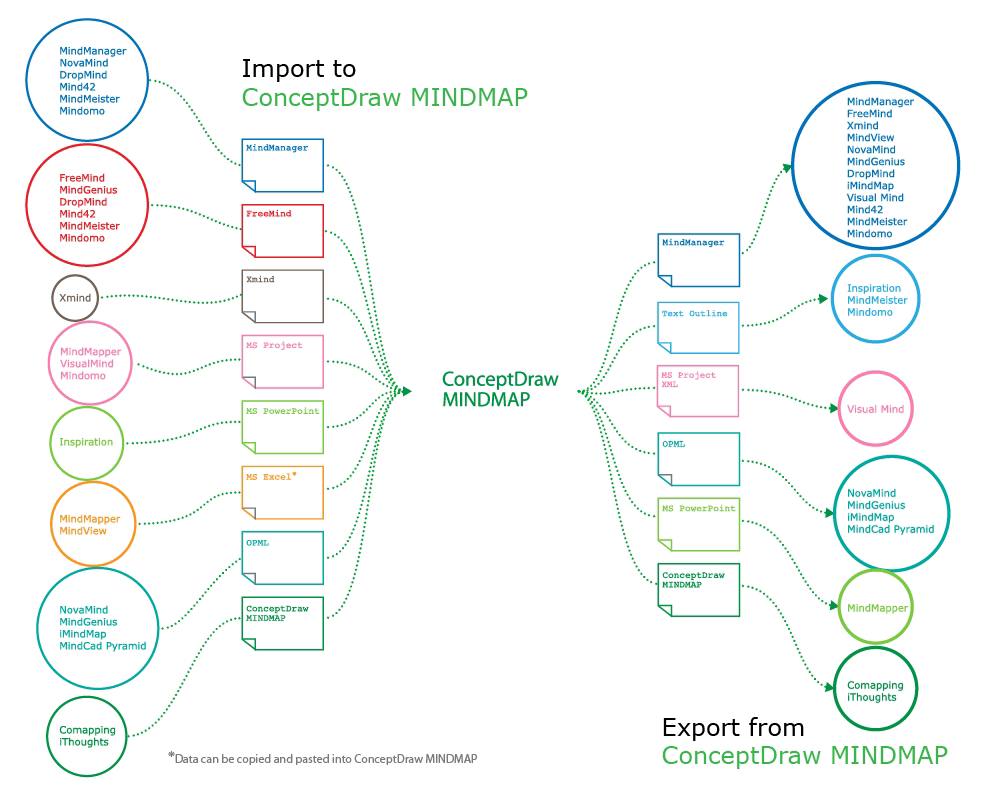
Now ConceptDraw MINDMAP users and XMind users can freely exchange their mind maps using the Mind Map Exchange solution available in Solution Park.
ConceptDraw MINDMAP is great for breaking through barriers in your workflow. Its intuitive thought organization abilities jumpstart stagnant processes and provide a platform for bursts of creativity that launch stalled projects to new heights. In the continued spirit of breaking down barriers, CS Odessa brings you Mind Map Exchange Phase.
ConceptDraw MINDMAP has impressive import and export capabilities includes following formats:
OPML
Mindjet™ MindManager™
Microsoft™ Office products:
PowerPoint™Project™Word™
FreeMind (import only)
XMind Import features:
Structure
Floating topics
Hyperlinks (all types of hyperlinks)
Notes
Pictures
Relations (relation styles)
Markers
Task info
Attachments (including audio files)
If your mind mapping product is not listed, check and see what its import and export capabilities are. There is a good chance it shares a common format(s) with ConceptDraw MINDMAP
Pic. 1. Mind Map Exchange
Future phases of Mind Map Exchange will continue to expand ConceptDraw MINDMAP ’s capabilities. Let us know what your requirements are! Our customers’ feedback is vital to our success.
VSM symbols are the best for a production process designing. The entire Value Stream Mapping method uses a graphical representation of the manufacturing process, factors' pros and cons, that all stakeholders can easily understand. Value Stream Mapping is a graphical technique that provides possibilities to improve analysis of a manufacturing process, at the stage of the transferring information or materials that required to deliver a product or service to the customer.
Sometimes it’s quite useful to look on a problem from another view. To gain insight into an obstacle you should use SWOT analysis, and this will help you to see the whole situation. When composing a SWOT matrix, you divide your problem onto four elements - strengths, weaknesses, opportunities and threats and place them into matrix.
This sample SWOT analysis matrix of the athletic shoes producing company was designed on the base of template provided by ConceptDraw SWOT and TOWS Matrix Diagrams solution. It delivers number of easy-to-use templates and samples of SWOT and TOWS matrices for ConceptDraw DIAGRAM. Applying one of these templates, enables to quickly find out Strengths, Weaknesses, Opportunities, and Threats. After creating a list managers can consider methods the business can use to amplify strengths and to decrease weaknesses; realize opportunities; and avoid threats.
Unfortunately, a man can’t predict the future and no one is safe from natural disasters, such as floods, earthquakes, hurricanes or fires. Nonetheless, what you can do to ensure safety for you and your relatives is to create an emergency plan, so everyone will know what to do if emergency happens. Keep that plan simple and train it several times a year so that no one could forget any details of it.
Fire and emergency plans are important to supply people with a visual safety solution. This diagram presents a set of standard symbols used to depict fire safety, emergency, and associated information. Using clear and standard symbols on fire emergency plans provides the coherence of collective actions , helps to avoid embarrassment, and improves communications in an emergent situation. The fire emergency symbols are intended for the general emergency and fire service, as well as for building plans ,engineering drawings and insurance diagrams. They can be used during fire extinguishing and evacuation operations, as well as trainings. It includes vector symbols for emergency management mapping, emergency evacuation diagrams and plans.
Madagascar, officially the Republic of Madagascar, is an island country in the Indian Ocean, off the coast of Southeast Africa.
The vector stencils library Madagascar contains contours for ConceptDraw DIAGRAM diagramming and vector drawing software. This library is contained in the Continent Maps solution from Maps area of ConceptDraw Solution Park.