Made with
ConceptDraw
DIAGRAM 18

Overlay network.
Computer and Network Examples

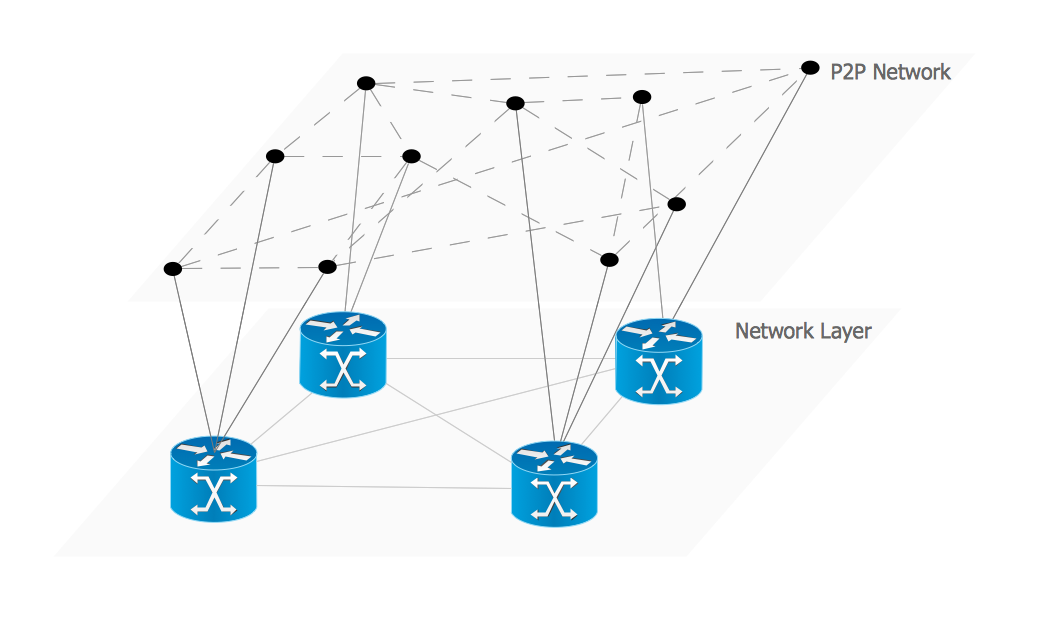
An Overlay network is a computer network that is built on the top of another network. The nodes of the overlay network are connected by virtual or logical links.

This example was created in ConceptDraw DIAGRAM using the Computer and Networks Area of ConceptDraw Solution Park and shows the Overlay network diagram for the P2P network.

Overlay network. Computer and Network Examples

Example 1. Computer and Network Area.

Peer-to-peer (P2P) network is a virtual overlay network on top of the physical network topology. In the overlay its nodes form the subset of the nodes in the physical network. The nodes are equal peer nodes. At the application layers the peers exchange data via the logical overlay links. Overlays are used for indexing and peer discovery. They also make the P2P system independent from the physical network topology. The networks can be structured and unstructured in depending on how the nodes are linked each other.
Overlay network. <br>Computer and Network Examples *

Example 2. Overlay network.

This example was redesigned from the file [https://commons.wikimedia.org]

Using the solutions of the Computer and Networks Area for ConceptDraw DIAGRAM you can design anyone overlay networks quick and easy.

The diagrams created with ConceptDraw DIAGRAM are vector graphic documents and are available for reviewing, modifying, and converting to a variety of formats (image, HTML, PDF file, MS PowerPoint Presentation, Adobe Flash or MS Visio).


See also Samples:



THREE RELATED HOW TO's:
Creating a detailed network plan can cause a lot of headache to an unexperienced user. And it is worth mentioning that ConceptDraw DIAGRAM is a decent tool for creating a network diagram, a tool that is easy-to-use. To get an accurate diagram use the vector shapes from the special libraries that represent workstations, network appliances, wiring systems and connect them with smart-connectors, just as simple as that. This communication network diagram displays the way different components of a computer network communicate with each other. When representing network information, such as depicting all the equipment in a large network, it is helpful to make visual representation. Network diagram provides an easy way to show the way the connections between an equipment in a large network. This diagram of a communication network depicts a network composed of three sub-networks. It uses a network equipment symbols to represent the different devices that make up a network communication including routers, Ethernet devices and end-point equipment.ConceptDraw DIAGRAM <br> Network Diagram Tool *
Picture: ConceptDraw DIAGRAM Network Diagram Tool
Related Solution:
The network architecture and design specialization will help you gain the technical leadership skills you need to design and implement high-quality networks that support business needs.Computer Network Architecture. <br>Computer and Network Examples *
Picture: Computer Network Architecture. Computer and Network Examples
OSPF is an interior gateway protocol (IGP), it is widely used in large enterprise networks. OSPF routes the IP packets within a single routing domain. It gathers the information about the link state from the routers and makes the network topology map. This example was created in ConceptDraw DIAGRAM using the Computer and Networks Area of ConceptDraw Solution Park and shows the OSPF diagram.OSPF Network. Computer and Network Examples *
Picture: OSPF Network. Computer and Network Examples
Related Solution:
ConceptDraw
DIAGRAM 18
