Made with
ConceptDraw
DIAGRAM 18

Marketing Infographics

Marketing Infographics is a very popular tool that allows to represent the complex data, knowledge, and other marketing information in a simple, visual and attractive graphical form.

But how to draw Marketing Infographics simply and quickly? ConceptDraw DIAGRAM diagramming and vector drawing software extended with unique Marketing Infographics Solution from the Business Infographics Area will help you design marketing infographics without efforts.
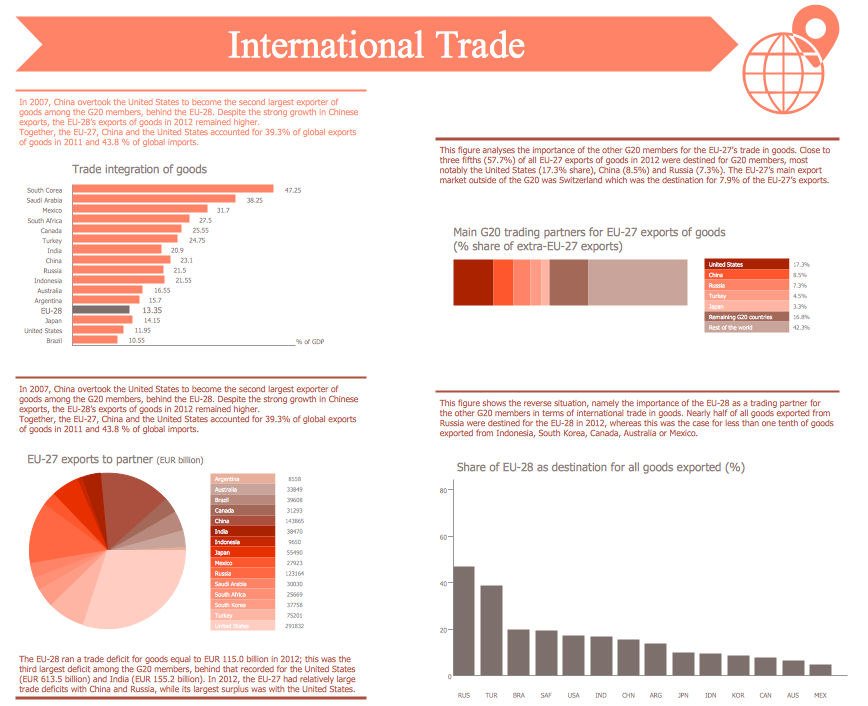
Marketing Infographics *

Example 1. Marketing Infographics - International trade statistics EU in comparison with the Group of Twenty

Marketing Infographics Solution provides easy-to-use infographics drawing tools, large collection of different marketing infographics, content marketing infographics and many other types of samples and templates to be filled in.
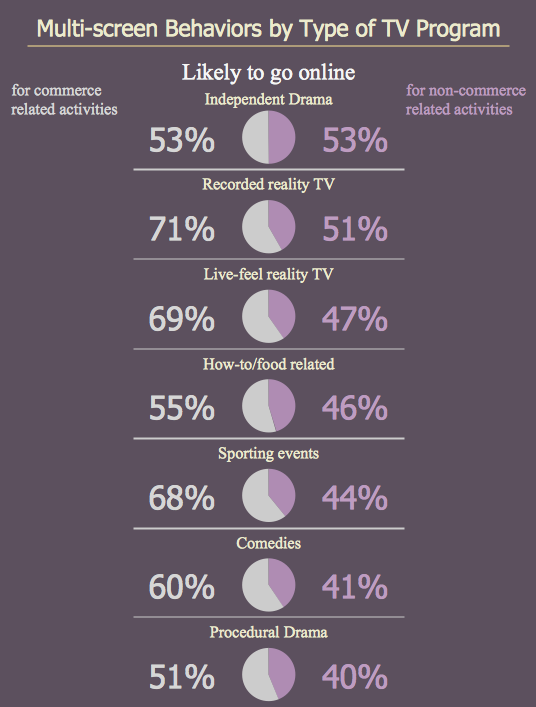
Marketing Infographics - Multi-screen behaviors by type of TV program

Example 2. Marketing Infographics - Multi-screen behaviors by type of TV program

Marketing Infographics Solution offers also 11 libraries with great quantity of predesigned marketing-related vector stencils. Use these objects for effectively and quickly drawing professional looking, interesting and attractive marketing infographics.
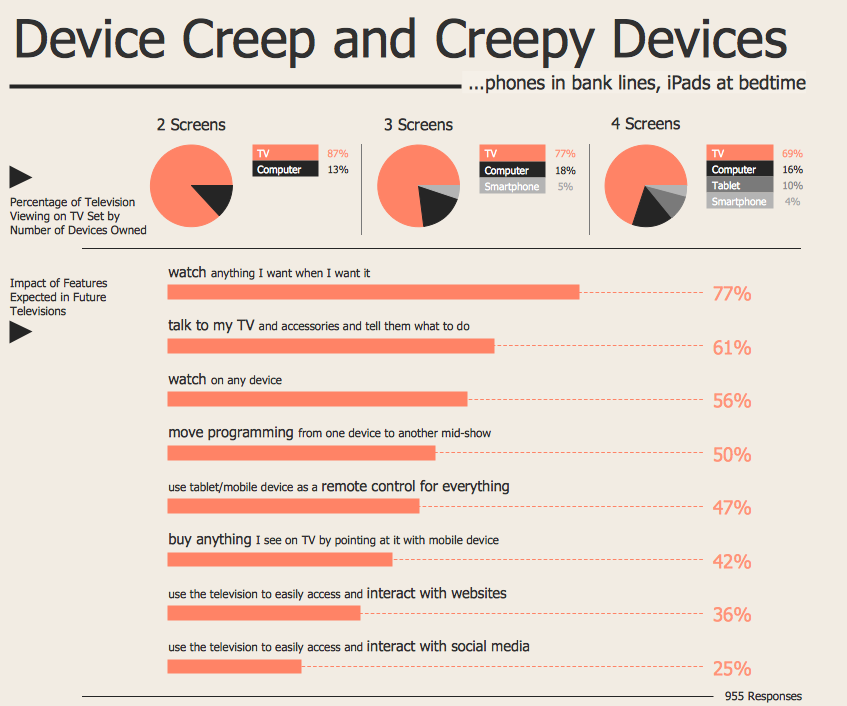
Marketing Infographics - Device Creep and Creepy Devices

Example 3. Marketing Infographics - Device Creep and Creepy Devices

The Marketing Infographics samples you see on this page were created in ConceptDraw DIAGRAM using the vector objects from the Marketing Infographics Solution libraries. These examples successfully demonstrate solution's capabilities and the professional results you can achieve using it. An experienced user spent 10 minutes creating every of these samples.

Use Marketing Infographics solution to design your own Marketing Infographics simply and fast.

All source documents are vector graphic documents. They are available for reviewing, modifying, or converting to a variety of formats (PDF file, MS PowerPoint, MS Visio, and many other graphic formats) from the ConceptDraw STORE. The Marketing Infographics Solution is available for ConceptDraw DIAGRAM users.

THREE RELATED HOW TO's:
ConceptDraw DIAGRAM is a powerful software that helps you create professional looking cross-functional flowcharts with the well-designed objects. ConceptDraw DIAGRAM allows you to focus on work, not the drawing process. ConceptDraw Arrows10 Technology allows to draw connectors with smart behavior that gives flexibility to you during work process.Horizontal Cross Functional Flowchart *
Picture: Horizontal Cross Functional Flowchart
Related Solution:
You need design the Marketing Organization Chart and look for effective software? Now it's incredibly easy to do this in ConceptDraw DIAGRAM which was supplied with Marketing Diagrams Solution from the Marketing Area of ConceptDraw Solution Park.Marketing Organization Chart *
Picture: Marketing Organization Chart
Related Solution:
When thinking about the process of decision making, it's easy to imagine it as a pyramid. We will look at a three level pyramid model as an example. Operational decisions are first that come to mind, and it's the first level. Tactical and strategic decisions are the second and the third levels. Pyramid (triangle) diagrams are used to show some hierarchical data. Because to the pyramid form of diagram, each diagram slice has a different width. The width of each segment depends on its hierarchical level. The current image illustrates the model of information system types. Most graphically the model can be represented as a three level pyramid. The first level shows a system of transaction processing It is concentrated on operational tasks. The second level is devoted to tactical solutions of the information system management. And at least, the third level addresses strategy and represents the executive information system. This three level pyramid sample is supplied with the ConceptDraw Pyramid Diagrams solution from Marketing area of ConceptDraw Solution Park.Pyramid Diagram *
Picture: Pyramid Diagram
Related Solutions:
ConceptDraw
DIAGRAM 18