Made with
ConceptDraw
DIAGRAM 18

Business Graphics and Diagramming Package

Flowcharts with Connectors

The innovative ConceptDraw Arrows10 Technology included in ConceptDraw DIAGRAM Package is a powerful drawing software that changes the way diagrams are produced. While making the drawing process easier and faster.

ConceptDraw DIAGRAM is a powerful tool that helps you create professional looking diagrams. Fine-tuning the objects in ConceptDraw DIAGRAM allows you to focus on your job, not the drawing. ConceptDraw Arrows10 Technology gives you freedom and flexibility to drawing your business graphics.

Business Graphics and Diagramming Package *

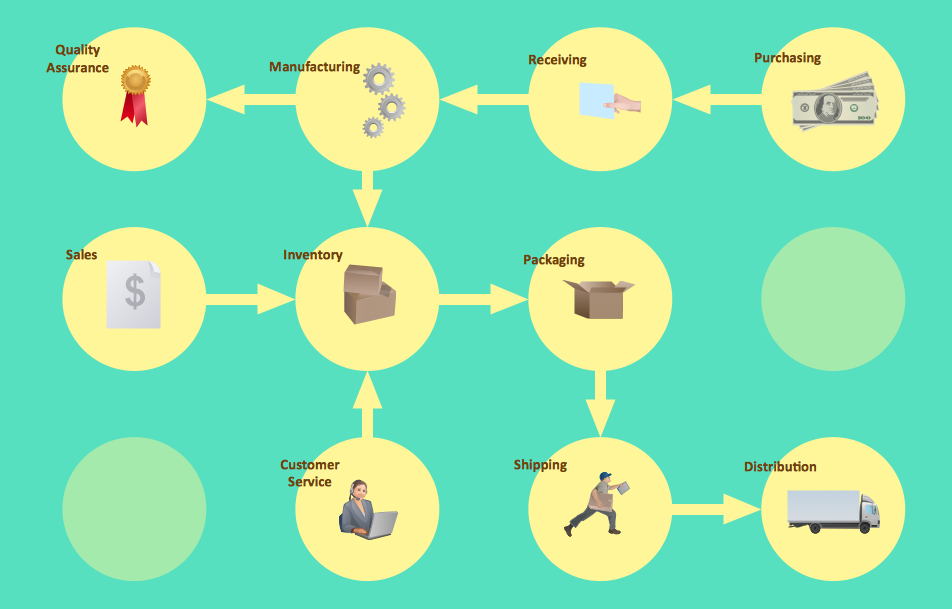
Sample 1. Workflow diagram - Business process flowchart.

ConceptDraw DIAGRAM diagramming software provides vector shapes and connector tools for quick and easy drawing diagrams for business, technology, science and education.

Use ConceptDraw DIAGRAM enhanced with solutions from ConceptDraw Solution Park to create diagrams to present and explain structures, process flows, logical relationships, networks, and other visually organized information and knowledge.
THREE RELATED HOW TO's:
While developing software, it is very important to have a visual model, because it helps to represent the logic and the architecture of an application. Experienced engineers use UML diagrams to denote relationships between classes and their instances. UML is a general language for a set of diagrams like deployment diagrams, object diagrams or use case diagrams. This diagram represents UML class diagram used for a software system development using an object-oriented method. Class diagrams are categorized as static structure diagrams that depict the physical structure of a system. Class diagram divides a software system's structure into "classes". Classes are defined by the methods and variables of objects. UML Class diagram is used to depict relationships and source code dependencies between objects.UML Diagram *
Picture: UML Diagram
Related Solution:
Use ConceptDraw DIAGRAM diagramming and business graphics software for drawing your own PM life cycle flow charts.Program to Make Flow Chart *
Picture: Program to Make Flow Chart
Related Solution:
Database model is a graphic representation need at the beginning of project development. You won't have any problems with drawing ER diagrams on a Mac anymore with ConceptDraw DIAGRAM application. Special libraries that contain all the symbols of both Chen's and Crow’s foot notation allow you to start database modeling within a few minutes. Creating entity-relationship diagrams on Mac is fun and effortless when you use a software designed for professional ERD drawing tailored to specific characteristics of Apple OS X. ConceptDraw DIAGRAM is a business diagramming software for those using OS X. The Entity-Relationship Diagrams solution for ConceptDraw has 2 libraries containing about 50 vector icons, depicting ERD symbols of the most popular Chen's and Crow’s Foot Notations. The other valuable component of the solution is a collection of ERDs samples and templates that can be opened on Macs and PCs.Drawing ER diagrams on a Mac *
Picture: Drawing ER diagrams on a Mac
Related Solution:
ConceptDraw
DIAGRAM 18