Made with
ConceptDraw
DIAGRAM 18

Data Flow Diagram Free

A Data Flow Diagram (DFD) is a type of flowchart, which shows graphically the flow of data through a business process or information system. It is a convenient way to document the process or system, design its architecture, and realize an initial top-down analysis of a system. Because DFD gives a clear understanding of process and system operations, the interactions and data exchanges between the processes, shows how data is transferred from the inputs to the file storage with generating the reports.

Data Flow Diagram focuses on data and information and helps discover potential problems and improve efficiency when developing systems. It shows the boundaries of a system, the sequence of processes that are done in a particular order to achieve a particular goal, how data enter a system, how are processed, and where they go. The arrows describe the flow of data and information.

Data Flow Diagrams are equally beneficial for simple and complex processes or systems and are designed both as simple overviews and detailed ones. One differs two types of DFDs: logical and physical, which provide different perspectives of the same data flow and give together a complete understanding of an entire process. Logical DFD describes the system focusing on the information required for its operation. Physical DFD gives information about the involved entities and how the system is or will be implemented.

Logical DFD is useful to show business information, the flow of business actions. It clarifies business activities, types of functionalities in a particular business and is a powerful tool for business analysis and improvement of business processes. Physical DFD shows how the system is organized and operates, and how data move through it. It includes hardware, software, files, and ensures that the processes described in the logical DFD will be implemented correctly. Usually, a logical DFD is less complex than a physical DFD, but the physical is created on its basis and is more detailed.

Data Flow Diagrams are used for analysis and modeling of systems in different areas. These include technical areas, software engineering, business management, database development, business analysis, system structure analysis, business process re-engineering, agile development, and others. Visualization using DFD is useful to explain processes and make them memorable. DFDs are used to analyze the systems and improve them, troubleshoot, find and eliminate inefficiencies, steps that might be missed or not fully understood. They are also a powerful tool for communication and collaboration.

A clear understanding of processes in a company helps to streamline them, improve the company's operation, and make your business successful. DFDs help to improve customer service, design more agile processes, increase competitiveness in the market, cut operational costs, measure progress, encourage system improvement and development. Being used in software development, Data flow diagrams help to design the application and show its architecture before its coding. They help engineers and developers understand the needs and wants of customers. DFDs easier the work with complex databases by clarifying the movement and storing of data, support ensuring cyber security and data protection.
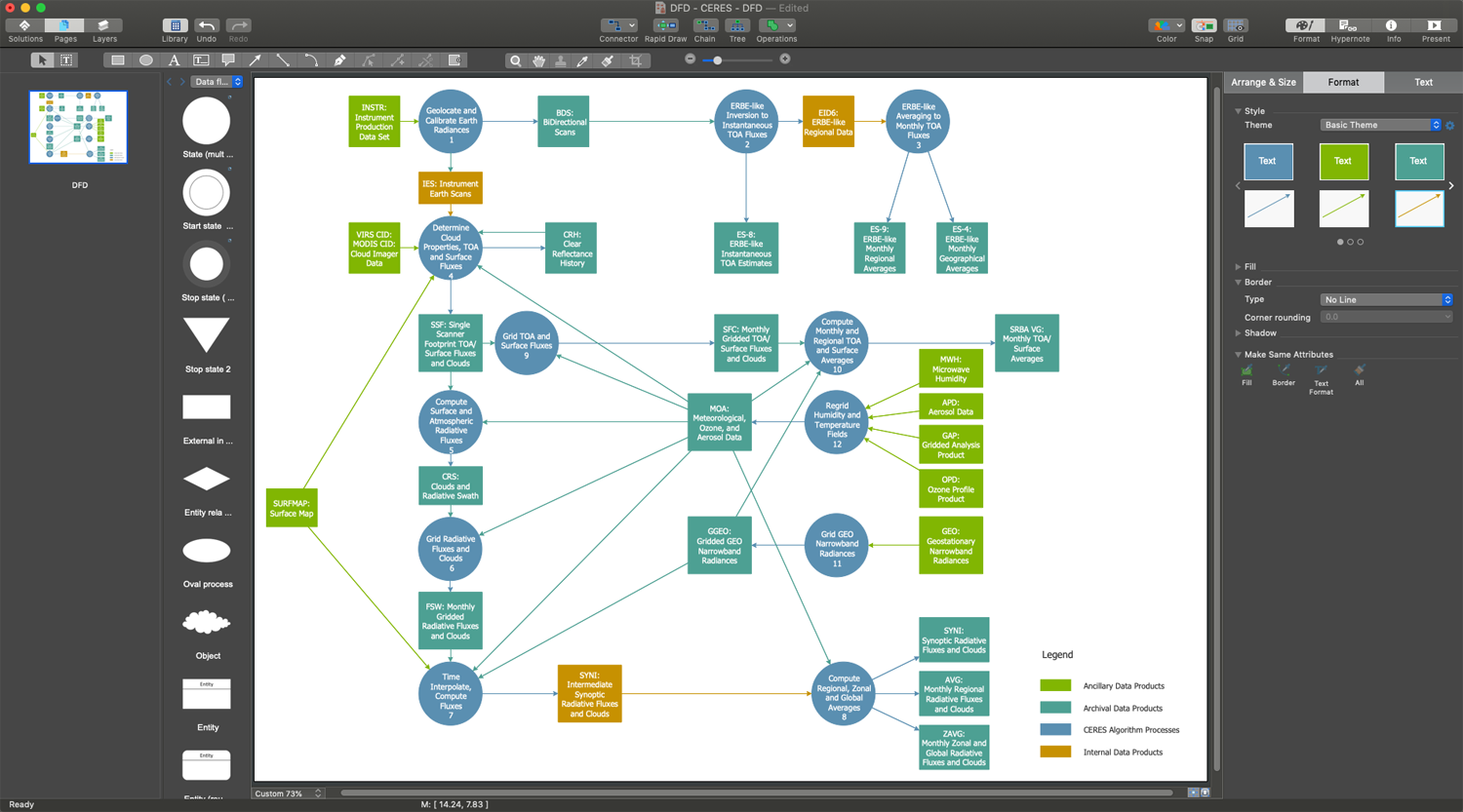
Data Flow Diagram Free in ConceptDraw DIAGRAM

Example 1. Data Flow Diagram Free in ConceptDraw DIAGRAM

Data Flow Diagrams can range from simple, which give a process overview to complex multi-layered diagrams including a lot of details about the system. The complexity of DFD also depends on the complexity of the system it represents. As a rule, Data Flow Diagram includes 3-4 levels numbered as 0, 1, 2, 3, and rarely beyond. The level of detail determines how deep the diagram shows a system, its processes and subprocesses.

DFD Level 0 is a basic level called a Context diagram, it shows the overall system or high-level process overview and its relationships to external entities. DFD Level 1 is a more detailed breakout of the processes of Level 0 and shows the main functions and subprocesses within the system. DFD Level 2 provides more deeper description than shown at Level 1. More levels are also added if needed.

The basic symbols used to create a Data Flow Diagram are standardized by Yourdon & Coad and Gane & Sarson notations and include rectangles, circles, triangles, cylinders, arrows, text labels, and other symbols to show entities, data stores, and other components. Being standardized, these symbols make your diagram comprehensive for all team members and easy to implement. The main difference in these notations is that Yourdon-Coad notation uses circles to show processes, while Gane-Sarson notation uses rectangles with rounded corners.
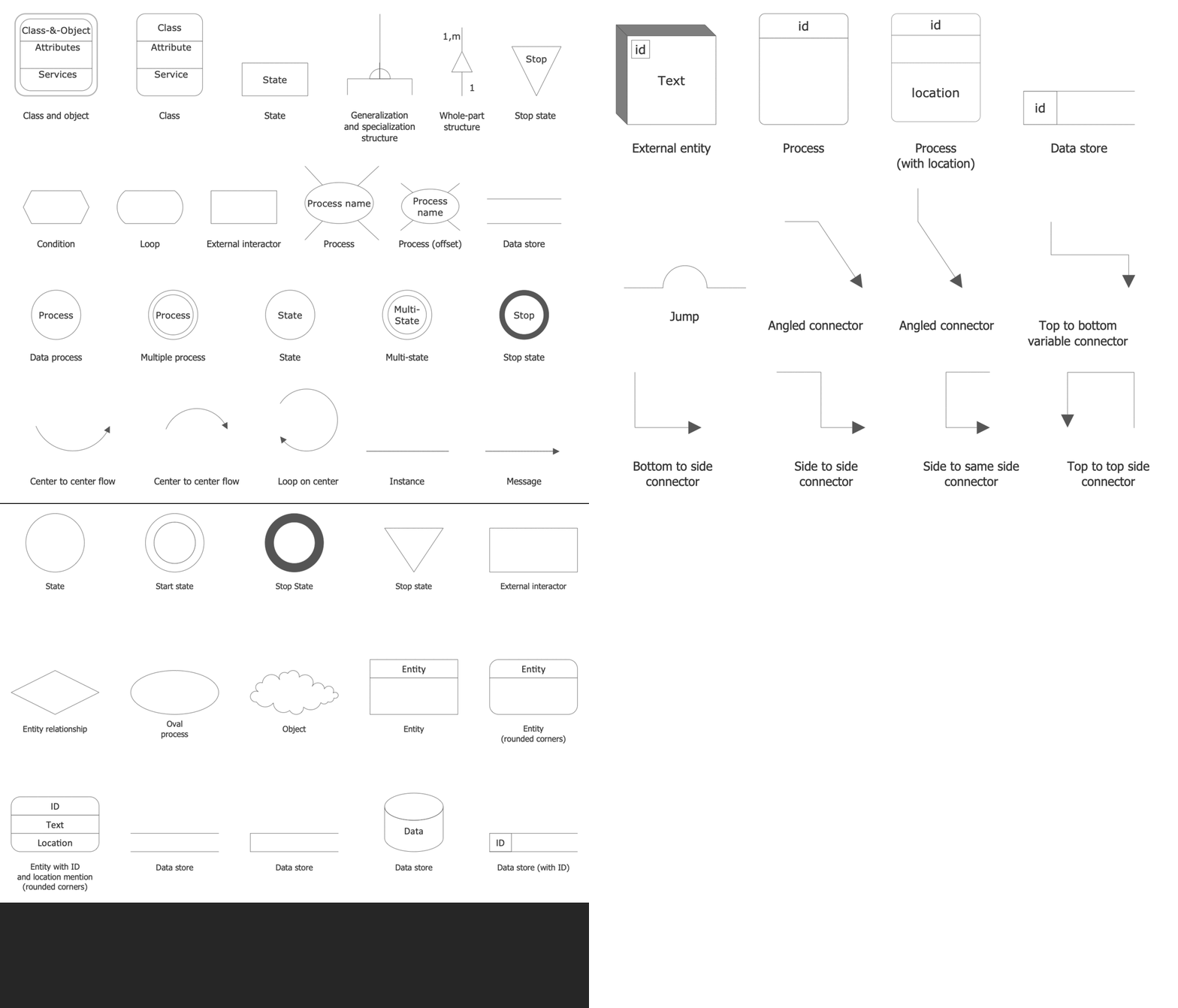
Data Flow Diagrams Solution- Libraries Design Elements

Example 2. Data Flow Diagrams Solution- Libraries Design Elements

ConceptDraw DIAGRAM extended with Data Flow Diagrams (DFD) solution is a powerful software for designing a Data Flow Diagram free and easily. Use the specialized design elements — Yourdon and Coad notation and Gane-Sarson notation, and pre-made templates to show the flow of data through your system as a Data Flow Diagram in minutes. The included DFD examples are also helpful for designing your own diagrams. You can customize any of them relative to your needs, your processes, external entities, data stores, data flow, etc.
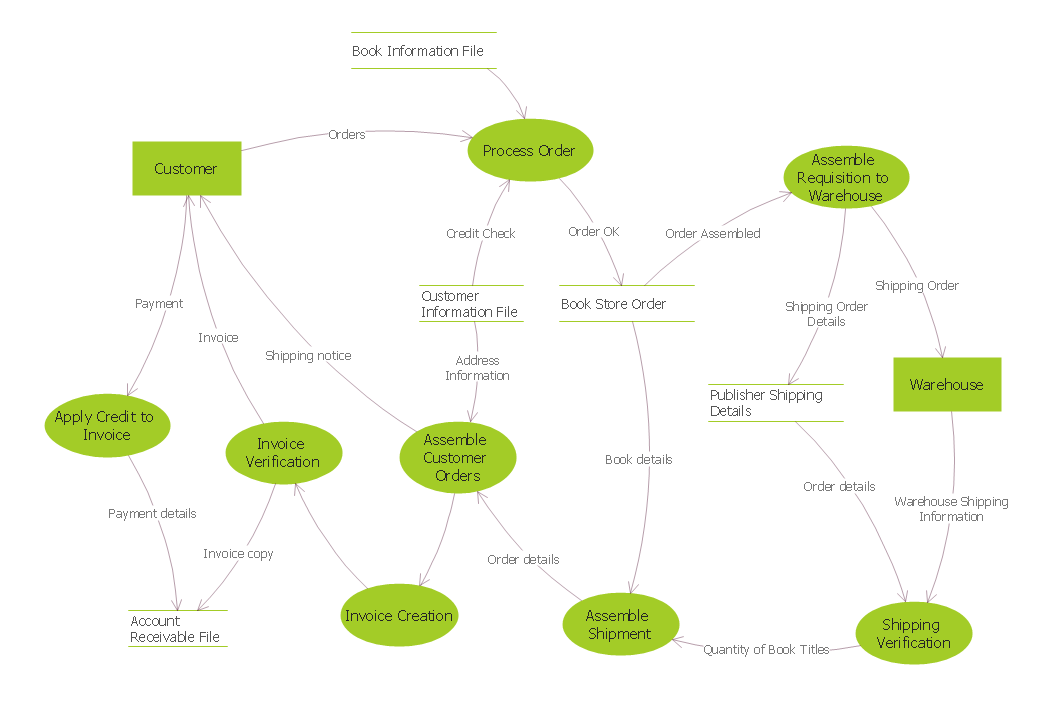
DFD — Process of Account Receivable

Example 3. DFD — Process of Account Receivable

The Data Flow Diagram examples you see on this page were created in ConceptDraw DIAGRAM using the objects from the libraries of Data Flow Diagrams solution. These samples demonstrate the solution's capabilities and the professional results you can achieve. An experienced user spent 15 minutes creating each of these samples.

Use the Data Flow Diagrams solution for designing your own Data Flow Diagrams quick, simply, and effectively.

All source documents are vector graphic documents. They are available for reviewing, modifying, or converting to a variety of formats (PDF file, MS PowerPoint, MS Visio, and many graphic formats) from the ConceptDraw STORE. The Data Flow Diagrams Solution is available for all ConceptDraw DIAGRAM users.

TEN RELATED HOW TO's:
Accounting is a cornerstone of any business, it’s basement. If you want to have a visual representation of your finance management, use audit flowchart symbols to document the money flow. Although some would say that accounting is boring, it is very a responsible duty. The audit flowchart symbols is supplied with ConceptDraw Audit Flowcharts solution as a vector objects library. Together with Conceptdraw Drawing capabilities it forms the helpful tool for audit process planning and setting the steps of audit by designing audit flow charts. Audit Flow charts are used to organize fiscal information tracking process as well as in accounting, finance and investment management.Audit Flowchart Symbols
Picture: Audit Flowchart Symbols
Related Solution:
Data structure diagram (DSD) is intended for description of conceptual models of data (concepts and connections between them) in the graphic format for more obviousness. Data structure diagram includes entities description, connections between them and obligatory conditions and requirements which connect them. Create Data structure diagram with ConceptDraw DIAGRAM.Data structure diagram with ConceptDraw DIAGRAM
Picture: Data structure diagram with ConceptDraw DIAGRAM
Diagramming is an astonishing way to visualize business processes. The list of the most common business process flowchart symbols is quite long starting from basic flowcharts, continuing with SIPOC diagrams. Business process modeling was never easier than now, with special ConceptDraw Business Process Mapping solution. To carry out all professional standard requirements for business processes mapping, it is necessarily to follow the special graphical notations. ConceptDraw Business Process Mapping solution offers an exhaustive suite of tools to aid business process mapping. There are three vector libraries SIPOC Diagrams, Business Process Flowcharts, and Swim Lanes that contains totally more than 50 symbols of standard BPM notations. This is all that professionals need to effectively evaluate and manage quality in business processes.Business Process Flowchart Symbols *
Picture: Business Process Flowchart Symbols
Related Solution:
If you need to describe some process, diagramming is a perfect tool for almost any imaginable purpose. The set of the most commonly used flow charts symbols is quite wide and includes symbols for operations, processes, data inputs and outputs. You can see the full list of all the symbols used for flowcharting in Flowcharts solution from Diagrams area in ConceptDraw Solution Park. A flow chart is often used for visual representation of a sequential process flow. The flowchart approach to any process is to divide it into some sequential actions. What makes a flow chart so popular and clear to make out is the set of standard flowchart symbols that has the same reading independently from processes described with their applying. The current drawing represents the vector library containing the pack of standard flowchart symbols. This library is supplied with ConceptDraw Flowcharts solution.Flow Chart Symbols
Picture: Flow Chart Symbols
Related Solution:
A flowchart is a simple but very functional tool when it comes to understanding a workflow or to removing unnecessary stages from a process. When drawing flowcharts, keep in mind that there are four common types of flowcharts, like document flowcharts and data flowcharts that show control over a data or document flow over a system. To show controls on a physical level, use system flowcharts. In addition, to show controls in a program, you can draw a program flowchart. This flowchart diagram represents the piece of an article editing process, that involves the author and editor. It was created using the Basic Flowchart notation that consists from the basic flowchart symbols. The start and the end of the process are indicated with "Terminator" symbols. The "Process" symbols show the action steps consisting from making edits and searching for a compromise, when the author does not agree with the suggestions of the editor. The "Process" symbol is the general symbol in process flowcharts. The "Decision" symbol indicates a branching in the process flow. There are two branches indicated by a Decision shape in the current flowchart (Yes/No, Disagree/Agree). This basic flowchart can be used as a repeating unit in the workflow diagram describing the working process of some editorial office.Types of Flowcharts *
Picture: Types of Flowcharts
Related Solution:
Use ConceptDraw DIAGRAM diagramming and business graphics software to draw your own flowcharts of computer algorithms.Process Flow app for macOS *
Picture: Process Flow app for macOS
Related Solution:
The ConceptDraw Flowchart component includes a set of samples and templates. This geathered as flowchart maker toolbox which focused on drawing flowcharts of any industry standards.Flowchart Components
Picture: Flowchart Components
Related Solution:
Data flow diagrams are the graphical tool, used in the visualization of data flow of some data processing systems. It is the valuable process modeling tool. Also designing DFD is the important component of the initial part of any information system development project. The standard symbols are used to represent the interaction of a system components and how various kinds of components influence on data flow. The ConceptDraw Data Flow Diagrams solution is design to assist professional software engineers in making DFDs according to Gane and Sarson, and Yourdon and Coad notations. Do you imagine yourself as a successful IT specialist? To your mind, they all use data flow diagram examples to learn and to get inspired. Aren’t you still with us?Data Flow Diagram Examples *
Picture: Data Flow Diagram Examples
Related Solution:
ConceptDraw DIAGRAM is a world-class diagramming platform that lets you display, communicate, and present dynamically. It′s powerful enough to draw everything from basic flowcharts to complex engineering schematics. Video tutorials on ConceptDraw products. Try it today!Business  Process Mapping — How to Map a Work Process *
Picture: Business Process Mapping — How to Map a Work Process
Related Solutions:
Event-Driven Process Chain Diagrams for improvement throughout an organisation. ConceptDraw DIAGRAM - software that reduces the time needed to create a business process model.Graphical Symbols to use in EPC diagrams *
Picture: Graphical Symbols to use in EPC diagrams
Related Solution:
ConceptDraw
DIAGRAM 18